PDi PERSONA 10 User manual

Communication
Systems Inc. PDI-P10LCDD TV Service Manual Page 1 of 32
Better Solutions Are Within Reach™
Service
Manual
Communication
Systems, Inc.
40 Greenwood Lane
Springboro, Ohio 45066
PH: 937-743-6010
FX: 937-743-5664
http://www.pdiarm.com
PERSONA10
Hospital-Grade LCD
Television Receiver
MODEL PDI-P10 LCDD
Better Solutions Are Within Reach®
Document Number: PD196-068R5

Communication
Systems Inc. PDI-P10LCDD TV Service Manual Page 2 of 32
Better Solutions Are Within Reach™
Copyright, Disclaimer, and Trademarks
Copyright
PDI Communication Systems, Inc. claims proprietary rights to the material disclosed in this service manual. This
manual is issued in confidence for servicing information only and may not be used to manufacture anything shown
herein. Copyright 2009 by PDI Communication Systems, Inc. All rights reserved.
Disclaimer
The author and publisher have used their best efforts in preparing this manual. PDI Communication Systems, Inc.
makes no representation or warranties with respect to the accuracy or completeness of the contents of this manual
and specifically disclaim any implied warranties of merchantability or fitness for any particular purpose and shall in
no event be liable for any loss of profit or any other damages, including but not limited to special, incidental,
consequential or other damages. The information contained herein is believed to be accurate, but is not warranted,
and is subject to change without notice or obligation.
Trademarks
All brand names and product names used in this manual are trademarks, registered trademarks,
or trade names of their respective holders.
PDI and Better Solutions Are Within Reach are registered trademarks of PDI Communication
Systems, Inc., Springboro, Ohio.
Regulatory Information
FCC
This equipment has been tested and found to comply with the limits for a Class B digital device, pursuant to part
15 of the FCC Rules. These limits are designed to provide reasonable protection against harmful interference
when the equipment is operated in a residential or commercial installation. If this equipment does cause harmful
interference to radio or television reception, which can be determined by turning the equipment off and on, the
user is encouraged to try to correct the interference by one of more of the following measures:
•Reorient or relocate the receiving antenna.
•Increase the separation between the equipment and receiver.
•Connect the equipment to an outlet on a circuit different from that to which the receiver is connected.
•Consult the dealer or an experienced radio/TV technician for help.
Underwriters Laboratories
The model PDI-P10LCDD Hospital Grade LCD TV is a specialized LCD television and
should be installed to National Electrical Code specifications. This device is safety tested
and listed by the Underwriters Laboratories as a product suitable for use in healthcare
facilities in both the United States and Canada.
Document Number: PD196-068R5

Communication
Systems Inc. PDI-P10LCDD TV Service Manual Page 3 of 32
Better Solutions Are Within Reach™
Product Identification
Product Label
The P10LCDD is easily identified using the product label located in the center of the back housing.
Serial Number
The serial number is located at the lower right corner of the product label.
Serial Number Format Explanation
a. The first two digits compose the year of manufacture. 2009 would be 09.
b. The second two digits compose the week of manufacture. 22 would be week 22.
c. The single alphabetic character represents the place of manufacturing.
d. The next three alphanumeric characters compose the unique model ID.
e. The next six digits compose the serial number starting with the first unit produced in the current year.
f. The last character is the Revision Level.
Document Number: PD196-068R5

Communication
Systems Inc. PDI-P10LCDD TV Service Manual Page 4 of 32
Better Solutions Are Within Reach™
Warnings
Graphical Symbols
This lightning flash with arrow symbol, within an equilateral is intended to alert the user of the presence of un-
insulated “dangerous voltage” within the product’s enclosure that may be of sufficient magnitude to constitute a risk
of electric shock to persons.
The exclamation point within an equilateral triangle is intended to alert the user of the presence of
important operating and maintenance (servicing) instructions in the literature accompanying the
appliance.
This service manual contains various CAUTIONS and WARNINGS indicated by triangular warning
symbols, which should be read and understood in order to minimize the risk of personal injury to
service personnel and customers. The possibility exists that improper service methods may damage
the equipment or result in property damage or user injury. It is also important to understand that
these CAUTIONS and WARNINGS are not exhaustive.
PDI could not possibly know, evaluate, and advise the service industry of all conceivable methods in which
service might be done or of the possible hazardous consequences of each method. Accordingly, a
technician who uses a service procedure or tool which is not recommended by PDI must first satisfy
themselves thoroughly that neither their safety nor the safe operation of the equipment will be compromised
by the service method selected.
Product Safety Servicing Precautions
1 MODIFICATIONS Do not attempt to modify this product in any way
without written authorization from PDI. Unauthorized modifications
will not only void the warranty, but may lead to you being liable for
any resulting property damage or user injury.
2 POWER SOURCE Use only a power source from a CSA Certified /
UL Approved Class 2 Power Supply suitable for use in a healthcare
facility. This TV will operate on either DC or AC voltage.
Voltage Range
AC 18-32
volts
DC 18-32
volts
3 X-RAYS X-Ray radiation is not a concern since this TV does not
incorporate a CRT.
4 REPLACEMENT PARTS. Parts critical to the safe operation of this
TV are pictured in this manual.
Replace only with the part number specified.
5 SAFETY CHECKS This hospital grade TV requires special
safety checks before returning to service. Observe and follow the
“Safety Check” section (page 31) in this service manual.
Document Number: PD196-068R5

Communication
Systems Inc. PDI-P10LCDD TV Service Manual Page 5 of 32
Better Solutions Are Within Reach™
Table of Contents
Copyright, Disclaimer, and Trademarks.................................................................................. 2
Regulatory Information............................................................................................................ 2
Product Identification.............................................................................................................. 3
Warnings................................................................................................................................. 4
Product Safety Servicing Precautions..................................................................................... 4
Picture Adjustments ................................................................................................................ 5
Disinfecting and Cleaning ....................................................................................................... 6
Exploded diagram.................................................................................................................... 7
Replaceable Parts............................................................................................................. 8 -12
List of tools............................................................................................................................ 12
Main circuit board layout and interconnects.......................................................................... 13
Disassembling..................................................................................................................14-20
Reassembling ..................................................................................................................21-30
Safety checks........................................................................................................................ 31
Troubleshooting ...............................................................................................................31-32
Picture Adjustments
The LCD display does not use magnetic deflection (like a CRT tube display) and does not require any internal
adjustments. Dynamic picture adjustments to Brightness, Contrast, Color, and Tint are available using the IR
Remote Control, part number PD108-420, using the SETUP / Picture menu.
Document Number: PD196-068R5

Communication
Systems Inc. PDI-P10LCDD TV Service Manual Page 6 of 32
Better Solutions Are Within Reach™
Disinfecting and Cleaning
The P10LCDD should be disinfected before performing any service. The following procedure is only a
recommendation. Your hospital or company may have a different procedure to follow.
CAUTION – Before using any cleaning or disinfecting
agent on the P10LCDD, perform a spot check by wetting
a small area of the cabinet. Verify the agent does not
discolor or deteriorate the cabinet.
Disinfecting
1. The P10LCDD has been designed to withstand up to a 25% chlorine based disinfectant.
Many alcohol and ammonia based disinfectants have also been tested with success.
However, before using any cleaner or disinfectant, spot check a small area on the
cabinet.
2. Apply the cleaner or disinfectant per its recommended instructions.
NOTE: Most disinfectants require a waiting time following application and prior to wipe-down.
Cleaning
Stubborn ink and other scratch type marks may prove difficult to remove. A dilute solution of Isopropyl
alcohol will generally work when all else fails. However, full strength Isopropyl will remove the cabinet’s
paint. Use with caution!
Document Number: PD196-068R5

Communication
Systems Inc. PDI-P10LCDD TV Service Manual Page 7 of 32
Better Solutions Are Within Reach™
Replaceable Parts - Exploded diagram
This diagram shows the order that the different parts of the P10LCDD fit together.
List of tools
1 Phillips screwdriver
2 3/8-inch socket wrench for four 10-32 nuts
3 7/16-inch wrench
4 Flathead screwdriver
Document Number: PD196-068R5

Communication
Systems Inc. PDI-P10LCDD TV Service Manual Page 8 of 32
Better Solutions Are Within Reach™
EMI Shield
The EMI Shield mounts over the TV’s main board and provides protection from electromagnetic interference.
EMI Shield
Part #: PD130-001
Housing
Components include the front with crystal clear window and foam seals, rear housing, and swivel assembly.
NOTE: The keypad shown with the front housing is sold separately. (See page 8 for more information)
INOVA-10 Front Housing INOVA-10 Rear Housing
Part #: PD133-586 Part #: PD133-587
Document Number: PD196-068R5

Communication
Systems Inc. PDI-P10LCDD TV Service Manual Page 9 of 32
Better Solutions Are Within Reach™
INOVA-10 Swivel Assembly
Part #: PD290-100
Keypad
The keypad fits into the cavity below the speaker vents on the front housing.
Keypad
Part #: PD134-237
LCD Panel
The LCD panel is what displays the images the TV receives. The panel is mounted to the chassis by 2 brackets
and 4 screws. The brackets come attached to the panel.
LCD panel Part #: PD289-110
Document Number: PD196-068R5
Communication
Systems Inc. PDI-P10LCDD TV Service Manual Page 10 of 32
Better Solutions Are Within Reach™
Replaceable Parts
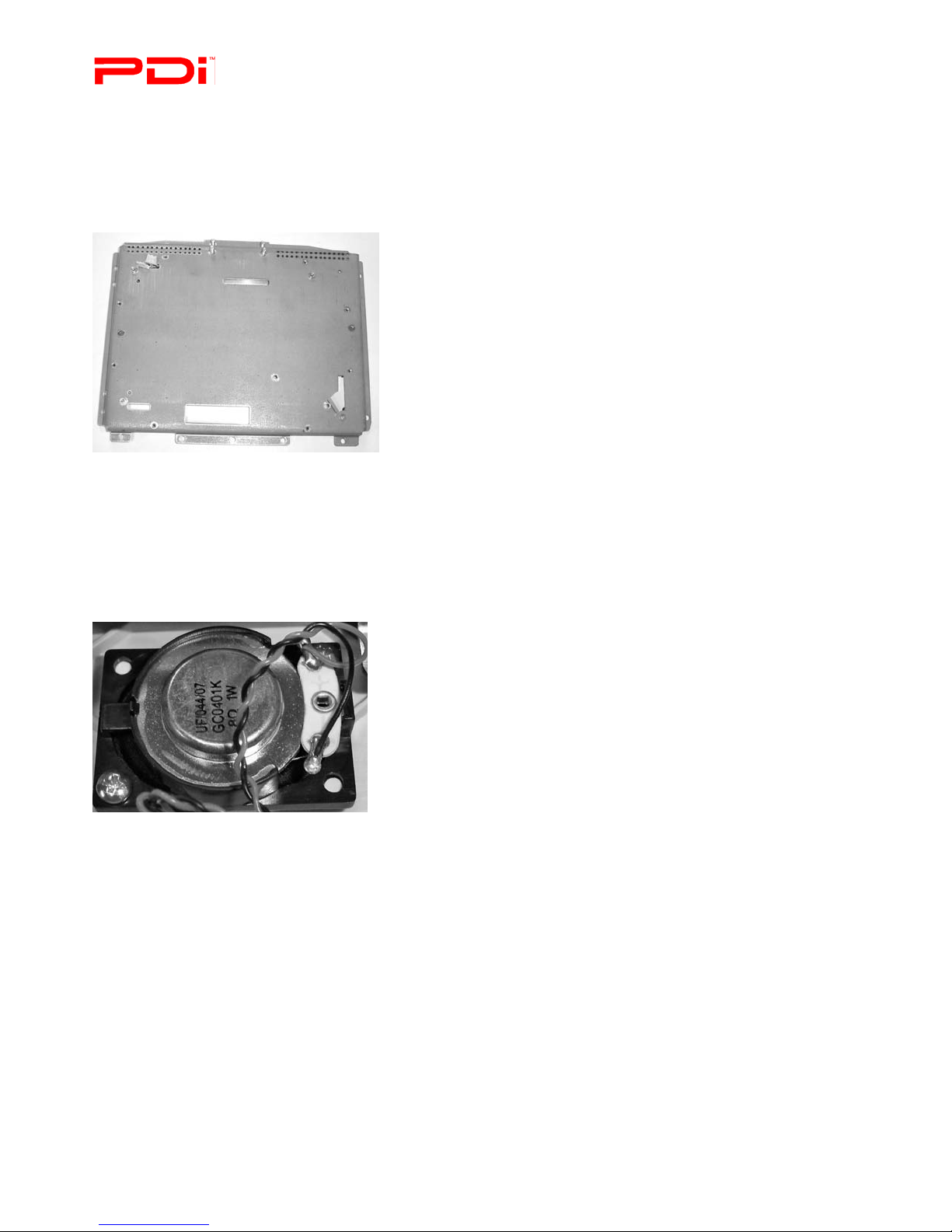
Chassis
The circuit board and the LCD panel are attached to the chassis. It also helps give the unit rigidity.
Chassis
Part #: PD186-001
Speaker Assembly
The speaker assembly attaches to the front cabinet and is replaceable.
Speaker Assembly
Part #: PD106-431
Document Number: PD196-068R5
Other manuals for PERSONA 10
2
Table of contents
Other PDi LCD TV manuals