
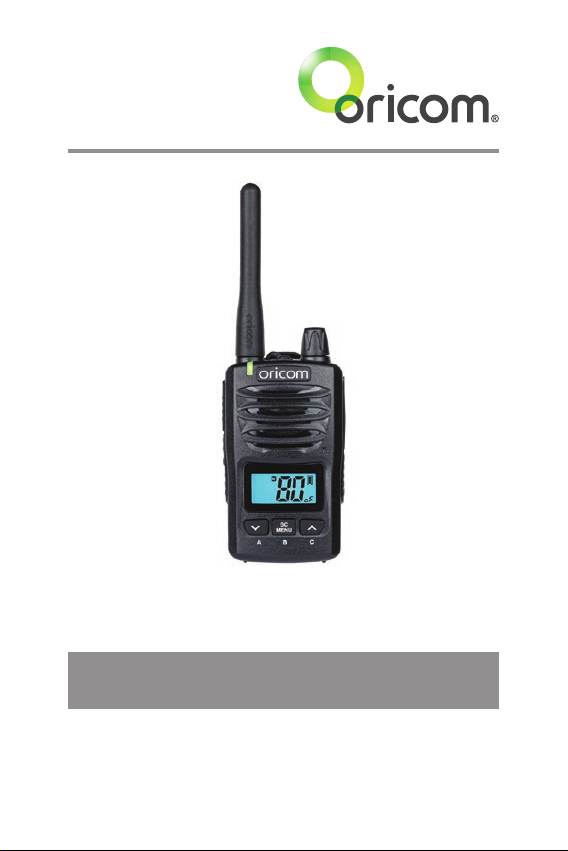
Oricom DTX600 User manual
Keep this user guide for future reference.
Always retain your proof of purchase in case of
warranty service.
www.oricom.com.au
Operating Instructions
DTX600 Waterproof 80 Channel UHF
Citizen Band Radio

This unit complies with all relevant Australian and
New Zealand approval requirements
AS/NZS 4365: 2011 including radio communications
(NZS2772.1 for human exposure) standard 2003.
R-NZ
When a narrowband radio receives a transmission from an older wideband radio the
speech may sound loud and distorted – simply adjust your radio volume for the best
listening performance. When an older wideband radio receives a signal from a new
narrowband radio the speech may sound quieter - simply adjust your radio volume for
best listening performance. When operating a narrowband radio or Channel 41 - 80
interference is possible from wideband radios transmitting on high power or on
adjacent frequency.
The issues described above are not a fault of the radio but a consequence of mixed
use of wideband and narrowband radios.

3
Safety Information and Warnings .....................4
Introduction .....................................................8
Pack Contents................................................10
Installation.....................................................11
Controls and Indicators ..................................13
Operations.....................................................15
UHF CB Channels and Frequencies ................26
Express Warranty...........................................31
Table of Contents
Need Help?
If you need assistance setting up or using your Oricom
product now or in the future, call Oricom Support.
Australia (02) 4574 8888
www.oricom.com.au
Mon-Fri 8am – 6pm AEST
New Zealand 0800 674 266
www.oricom.co.nz
Mon-Fri 10am – 8pm NZST

4
Safety Information and Warnings
Lithium-ion Battery Pack Warning
• This equipment contains a Lithium-ion Battery pack.
• Do not short circuit the Battery pack.
• Do not charge the Lithium-ion Battery pack used in this equipment in
any other charger.
• Lithium-ion Batteries must be disposed of properly.
• The Lithium-ion Battery pack contained in this equipment may
explode if disposed of in a re.
• Lithium-ion Batteries should not be exposed to high temperature
environments as they may not operate correctly in these conditions.
• Always keep out of direct sunlight in conned environments.
Information on Safe Operation
WARNING
Read This Information Before Using Your Oricom Radio.
The operation of your UHF radio in Australia and New
Zealand is subject to conditions in the following licenses:
In Australia, the ACMA Radio communications (Citizen
Band Radio Stations) and in New Zealand by MED the
General User Radio License for Citizen Band Radio.
Radio Antenna
Do not use any radio that has a damaged antenna. If a
damaged antenna comes in contact with the skin, a minor
burn may result.
Unauthorized antennas, modications, or attachments
could damage the radio and violate compliance. Do Not
change or modify the antenna.
Do not hold the antenna when the radio is "in use". Holding
the antenna reduces range and may cause bodily harm.
Safety and general use whilst in a vehicle
Check the State and Federal laws and regulations
regarding the use of two way radios in the area where you
drive, and always obey them.

5
Safety Information and Warnings
WARNING
For Vehicles tted with Air Bags
Do not place your radio in the area over an air bag or in
the air bag deployment area.
Air bags inate with great force. If a radio is placed in
the air bag deployment area and the air bag inates, the
radio may be propelled with great force and cause serious
injury to the occupants of the vehicle.
Potentially Explosive Atmospheres
Turn your radio OFF when in any area with a potentially
explosive atmosphere.
Sparks in such areas could cause an explosion or re
resulting in injury or even death.
NOTE:
Areas with potentially explosive atmospheres are often,
but not always, clearly marked. They include fuelling areas such
as below deck on boats, fuel or chemical transfer or storage
facilities, areas where the air contains chemicals or particles;
such as grain, dust or metal powder and any other area where
you would normally be advised to turn off your vehicle engine.
Blasting Caps and Areas
To avoid possible interference with blasting operations,
turn your radio Off near electrical blasting caps in a
"blasting area" or in areas posted: "Turn off two way
radios".
Obey all signs and instructions.
Exposure to Radio Frequency Energy
Your Oricom two-way radio complies with Australian
Communication Authority Radio communications
(Electromagnetic Radiation-Human Exposure)
Standard,2003.

6
WARNING
To ensure optimal radio performance and to make sure
human exposure to radio frequency electromagnetic
energy is within the guidelines set out in the above
standards, always adhere to the following procedures:
Transmit and Receive Procedure
Your two-way radio contains a transmitter and a receiver.
To control your exposure and ensure compliance with the
general population/uncontrolled environment exposure
limits, always adhere to the following procedures:
• Transmit no more than 50% of the time.
• To receive calls, release the PTT button.
• To transmit (talk), press the Push to Talk (PTT) button.
Transmitting 50% of the time, or less, is important
because the radio generates measurable RF energy
exposure only when transmitting (in terms of measuring
standards compliance).
Always hold the radio approximately 5cm in front of your
mouth with the antenna pointing away from your head.
Radio Operation and EME Exposure
Unauthorized antennas, modications, or attachments
could damage the radio and violate compliance. Do NOT
hold the antenna when the radio is "IN USE."
Holding the antenna reduces the effective range.
Do not use the radio if the antenna is damaged. If a
damaged antenna makes contact with your skin, a minor
burn can result.
If you wear a radio on your body when transmitting,
always t the radio on the belt clip (supplied). Always
ensure the radio and its antenna is at least 5cm from your
body when transmitting.
Electromagnetic Interference/Compatibility
Nearly every electronic device is susceptible to
electromagnetic interference (EMI).
Safety Information and Warnings

7
Safety Information and Warnings
WARNING
To avoid the possibility of electromagnetic interference and/
or compatibility conicts, turn off your radio in any location
where posted notices instruct you to do so such as health care
facilities.
Aircraft
When instructed to do so, turn off your radio when
onboard an aircraft. Any use of a radio must be in
accordance with applicable regulations per airline crew
instructions.
Medical Devices - Pacemakers
The Advanced Medical Technology Association
recommends that a minimum separation of 6 inches
(15cm) be maintained between a handheld wireless radio
and pacemaker.
These recommendations are consistent with the
independent research by and recommendations of the
U.S. Food and Drug Administration.
People with pacemakers should:
• Always keep the radio more than 15cm from their
pacemaker when the radio is turned ON.
• Not carry the radio in the breast pocket.
• Use the ear opposite the pacemaker to minimize the
potential for interference.
• Turn the radio OFF immediately if there is any reason to
suspect that interference is taking place.
Medical Devices - Hearing Aids
Some radios may interfere with some hearing aids.
In the event of such interference, you may want to consult
your hearing aid manufacturer to discuss alternatives.
General warnings
Never use your radio outdoors during a thunderstorm.
Keep the radio out of reach of babies and your children.

8
Introduction
Introduction
Thank you for choosing the Oricom DTX600 5 Watt Handheld Radio.
Water & Dust Proof IP67:
The DTX600 meets IP67 standard. This provides protection against
dust and is capable of withstanding water immersion of up to 1m for
30 minutes. (To meet the IP67 waterproof rating, the accessory socket
cover must be in place and the antenna and battery must be tted
correctly).
NOTE: DO NOT submerge the transceiver in water if there is any
reason to suspect the waterproof protection may not be effective. For
example, in cases where the battery cover or external jack cap rubber
seal is detached from the transceiver or damaged, the transceiver/
battery cover/jack cap is cracked or broken, or the transceiver has
been dropped.
Key Features
• 5/1 watt switchable TX power
• Waterproof (meets IP67 dust/waterproof specications)
• Long life batteries : Lithum-Ion rechargeable 2600mAh
• Fast charger POD supplied with 230V and 12V adaptors
• 3 Programmable instant channel buttons
• Die cast metal chassis
• 80 Narrowband channels
• Channel scan (Open/Priority)
• Duplex
• Backlit LCD display
• Signal monitoring
• 38 CTCSS & 104 DCS Privacy codes
• Keypad lock
• 5 Calling Tones
• Roger Beep
• Priority channel

9
Introduction
• 5 different Scrambler functions
• Triple watch
• VOX function
• Squelch tail on/off
• Busy channel lockout function
• Key beep
• Memory channel On/Off
• Auto power save mode
• Battery indicator
• Low battery alert function
• Removable exible antenna
• 2.5mm jack for optional headset or speaker mic
Customized multi menu function
1. TX power HI(5W)/LO(1W)
2. Digital Squelch setting (Auto, 1 to 5 levels)
3. User selectable 38 CTCSS and 104 DCS codes
4. Scrambler setting (Off, 1 to 5 different frequencies)
5. Duplex On/Off
6. VOX sensitivity (Off, 1 to 3 levels)
7. Priority channel memory
8. Scan mode (Open or Group scan)
9. Busy channel lockout (On or Off)
10. 5 Selectable call tones (Off, 1 to 5 melody)
11. Key beep tone (On or Off)
12. Roger beep tone (On or Off)
13. Triple watch sub channel 1 setting
14. Triple watch sub channel 2 setting
15. Memory channel (On or Off)
16. Squelch tail (On or Off)
10
Pack Contents
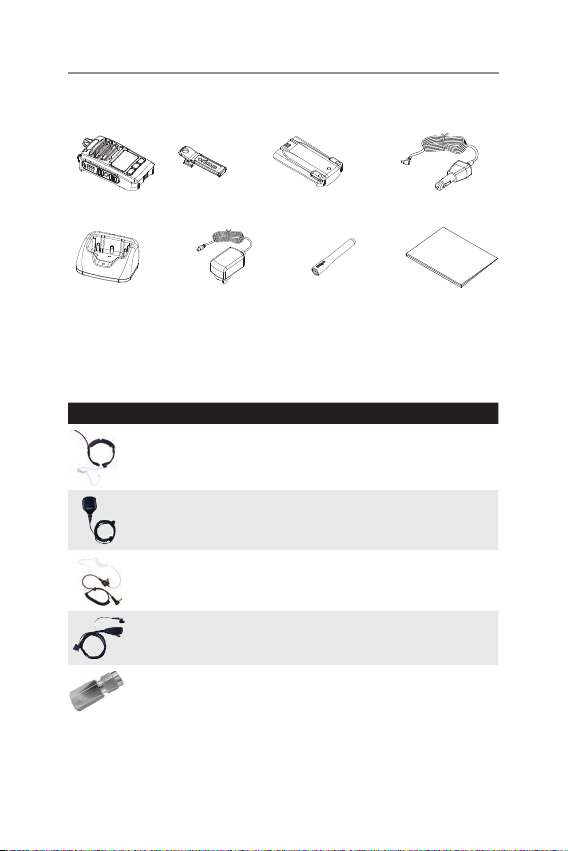
Oricom DTX600 Accessories
The following Oricom DTX600 accessories can be purchased directly from
Oricom. Visit www.oricom.com.au or call or (02) 4574 8888.
Model No. Description
THMIC5000 Throat microphone with voice tube for noisy
environments.
SPKMIC5000 Heavy duty IP54 speaker microphone
EARSET5000 Earbud with 3.5mm jack suits SPKMIC5000 or
any radio with 3.5mm jack
EBVOX5000 Small compact speaker with in-line mic
2U0003 SMA to FME Adaptor to connect DTX600 to an
external antenna via an FME connector.
FOR A FULL LIST OF CURRENT PARTS AND ACCESSORIES VISIT
www.oricom.com.au
The following items are included in your DTX600 single pack. If you have
purchased a twin pack, you will have two items of each.
DTX600 Radio
Lithium-ion Battery pack
Belt Clip
AC Adaptor
Charger Pod User Guide
Antenna
12V Charging Plug
Table of contents
Other Oricom Two-way Radio manuals

Oricom
Oricom PMR1000R User manual

Oricom
Oricom UHF380 User manual

Oricom
Oricom PMR1280 User manual

Oricom
Oricom UHF2190K User manual

Oricom
Oricom UHF2180 User manual

Oricom
Oricom PMR1200 User manual

Oricom
Oricom UHF768 User manual

Oricom
Oricom UHF180 User manual

Oricom
Oricom PMR1250 80 User manual

Oricom
Oricom UHF2200 User manual

Oricom
Oricom UHF2390 User manual

Oricom
Oricom UHF2190 User manual

Oricom
Oricom COM-PMR780 User manual

Oricom
Oricom PMR780 User manual

Oricom
Oricom UHF2100 User manual

Oricom
Oricom UHF100 User manual

Oricom
Oricom DTXTP600 User manual

Oricom
Oricom PMR3000R User manual

Oricom
Oricom PMR1290 User manual

Oricom
Oricom PMR1290-1 User manual


