
Onlogic ML350G-10 User manual

vv
ML350 Manual
The not so quick, quick start guide.
Version 2, Published 3/7/2018
ML350G-10 Manual
US Oce
Phone: +1 802 861 2300
Email: [email protected]
www.onlogic.com
EU Oce
Phone: +31 85 2733760
Email: [email protected]
www.onlogic.com

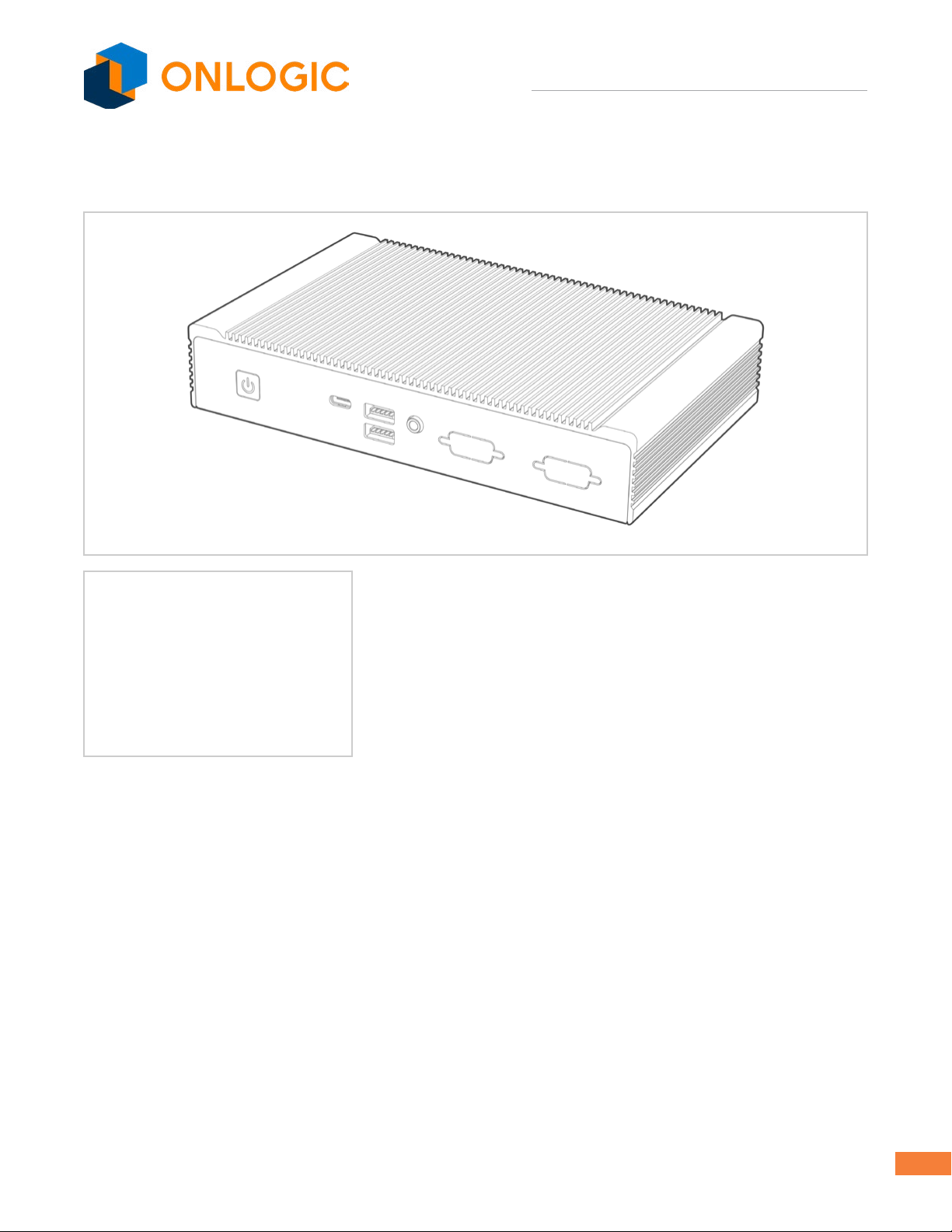
ML350G-10 Industrial Computer
2
ML350 Quick Start Guide
1 - About OnLogic. . . . . . . . . . . . . . . . . . . . . . . . . . . . . . . . . . . . . . . . . . . . . . . . . . . . . . . . . . . . . . . . . . . . . 3
Contact Information. . . . . . . . . . . . . . . . . . . . . . . . . . . . . . . . . . . . . . . . . . . . . . . . . . . . . . . . . . . . . . . . . 3
2 - Legal Disclaimer ...................................................................4
3 - Safe Use and Installation Instructions................................................5
4 - What’s In The Box..................................................................6
5 - System Overview ..................................................................7
5.1 - System Diagram................................................................7
5.2-SystemSpecications ...........................................................8
5.3 - Mounting Hole Pattern ..........................................................9
5.4 - Mounting Guide ...............................................................10
6 - Motherboard Overview............................................................11
6.1 - Jumpers and Headers Guide ....................................................12
6.2-ConguringJumpers ...........................................................13
6.3 - Onboard Headers .............................................................14
7 - UEFI .............................................................................15
7.1 - UEFI Interface and Driver Downloads.............................................15

ML350G-10 Industrial Computer
3
1 - About OnLogic
OnLogicispoweringinnovationwithhighlycongurableembeddedandIoTcomputersengineeredforreliabil-
ity. Businesses worldwide depend on our solutions to operate in the toughest environments while tapping into
theevolvingIndustrialInternetofThings.
ThisguidewillintroduceyoutotheML350G-10industrialfanlesscomputerandthesystemspecications.For
technical questions or support, please reach out via our contact information below.
Youhavealotofchoiceswhenchoosingcomputerhardware.TheOnLogicTeamwantstothankyoufortrust-
ingourcomponentstomeetyourapplicationneeds.TheML350G-10istheresultofinputfrompartnerslike
you.We’veworkedhardtocreateasystemthatmeetsthevariedneedsofindustrialandIoTcomputingand
we’ve manufactured this system under our strict quality assurance and immunity standards to serve you best.
If you have any concerns about the quality or performance of this product, please contact us directly or visit our
support page.
Contact Information
OnLogic Global
35ThompsonStreet,
SouthBurlington,VT05403
USA
+1 802 861 2300
OnLogic Europe
De Boedingen 39
4906 BA Oosterhout
TheNetherlands
+31 88 5200 700

ML350G-10 Industrial Computer
4
2 - Legal Disclaimer
Intellectual Property Notice:Allmaterialincludingbutnotlimitedto,text,designspecications,graphics,
logos, reference, images, drawings, and software including this document and the product itself (together and
separately) is owned, controlled by, licensed to, or used with permission by OnLogic, Inc., OnLogic BV, Interlogic,
Inc. or the authorized agents and representatives (Collectively “OnLogic”) and is protected by copyright, trade-
mark,andotherintellectualpropertyrights.Nopartofthismanualmaybereproduced,transcribed,transmit-
ted, or translated in any language, in any form or by any means, except duplication of documentation by the
purchaserforbackuppurpose,withoutthewrittenconsentofOnLogic.Productsandcorporatenamesappear-
inginthismanualmayormaynotberegisteredtrademarksorcopyrightsoftheirrespectivecompanies,and
areusedonlyforidenticationorexplanationandtotheowners’benet,withoutintenttoinfringe.Information
in this document is subject to change without notice.
Legal Disclaimer: Specicationsandinformationcontainedinthismanualarefurnishedforinformational
use only and subject to change without notice, and should not be constructed as a commitment by OnLogic.
OnLogic assumes no responsibility for any errors or omissions that may appear in this manual. With respect
tothecontentsofthismanual,allisprovided“asis”andOnLogicdoesnotprovidewarrantyofanykind,either
expressed or implied, statutory or otherwise and expressly disclaims all implied warranties of noninfringement,
merchantability,andtnessforaparticularpurpose.INNOEVENTSHALLONLOGIC,ITSDIRECTORS,OFFICERS,
EMPLOYEES,ORAGENTSBELIABLEFORDIRECT,INDIRECT,SPECIAL,INCIDENTAL,SPECULATIVEORCONSE-
QUENTIALDAMAGESARISINGFROMTHEUSEORINABILITYTOUSETHISPRODUCTORDOCUMENTATION,
EVENIFADVISEDOFTHEPOSSIBILITYOFSUCHDAMAGES.INPARTICULAR,OnLogicSHALLNOTHAVELIABILITY
FORANYHARDWARE,SOFTWARE,ORDATASTOREDORUSEDWITHTHEPRODUCT,INCLUDINGTHECOSTSOF
REPAIRING,REPLACING,INTEGRATING,INSTALLINGORRECOVERINGSUCHHARDWARE,SOFTWARE,ORDATA.
Unlessotherwiseexpresslyagreedtoinwriting,thesale,use,etc.ofanyandallONLOGICproductsisgoverned
exclusively by the terms and conditions of purchase (www.onlogic.com/company/support/terms-conditions)
and/or other written agreements executed by OnLogic. Unless otherwise expressly agreed to in writing, any and
all disputes arising between OnLogic and the customer shall be governed by the laws of the State of Vermont,
USA and the State of Vermont shall be the exclusive venue for the resolution of any such disputes.
Regulatory Compliance: ThisdigitaldeviceisdesignedtocomplywithallapplicableFCCRulesPart15and
CE compliance requirements for electronic equipment. For more detailed or additional regulatory compliance
information, please see the relevant product page at www.onlogic.com or contact OnLogic directly at info@
onlogic.com.
Copyright © 2018 by OnLogic, Inc. All rights reserved.

ML350G-10 Industrial Computer
5
3 - Safe Use and Installation Instructions
WARNING:ThereisdangerofexplosioniftheCMOSbatteryisreplacedincorrectly.
Wireless
Ifthisproductwasconguredwithawirelessdevice,theFCCandICIDswillbedetailedonalabelonthechassis.
1.Donotopenormodifythedevice.ThedevicehasbeentestedandcomplieswithFCCandCEregulations.Modicationofthe
devicewillvoidthesecertications.
2. Install the device securely. Be careful handling the device to prevent injury and do not drop.
3. Wallorceilingmountingdevicerequiresuseofamountingplateorpairofmountingbrackets.Plateorbracketsmustbeof
metalconstructionandhaveaminimumthicknessof1mm.
4. UseM3x0.5mmFlatHeadscrewstoattachmountingplateormountingbracketstothreadedholesonbottomofchassis.
Screwsshouldbeminimumlengthof4mm.Add1mmofscrewlengthforeverymmofadditionalthicknessofplateorbracket
beyond 1.5mm.
5.Operationaltemperaturemustbebetween0-50°C,or0-40°CwhenusingtheULlistedconguration,withanoncondensing
relative humidity of 10-90%.
6.Thedevicecanbestoredattemperaturesbetween0-60°C.
7.Keepthedeviceawayfromliquidsandammablematerials.
8.Donotcleanthedevicewithliquids.Thechassiscanbecleanedwithacloth.
9. Allow at least 2 inches of space around all sides of the device for proper cooling. If device is mounted to vertical surface then
recommendeddeviceorientationissothatheatsinknsallowairtoriseunobstructed.Alternativeorientationsmayresultin
reduced operational temperature range.
10.Thisdeviceisintendedforindooroperationonly.
11. UseULlistedexternalpowersupplywithratedoutput9Vdc,4.0Amin.to24Vdc,1.5Amin.,NECClass2,orLPSoutputor
equivalent.
12.Installthedeviceonlywithshieldednetworkcables.
13. Serviceandrepairofthedevicemustbedonebyqualiedservicepersonnel.Thisincludesbutisnotlimtedtoreplacementof
CMOSbattery.ReplacementCMOSbetterymustbeofsametypeasoriginal.
14. Proper disposal of CMOS battery must comply with local governance.
ML350G-10 Industrial Computer
6
4 - What’s In The Box
ML350 Built & Tested System
Any Selected Accessories
Ifyoupurchasedadditionalitemssuchasspecicmountingbrackets,
power supplies or antennas, they will be located in the system box or
within the outer shipping carton.
All drivers and product guides can be found on the corresponding
product page at www.onlogic.com.
+
ML350G-10 Industrial Computer
7
5 - System Overview
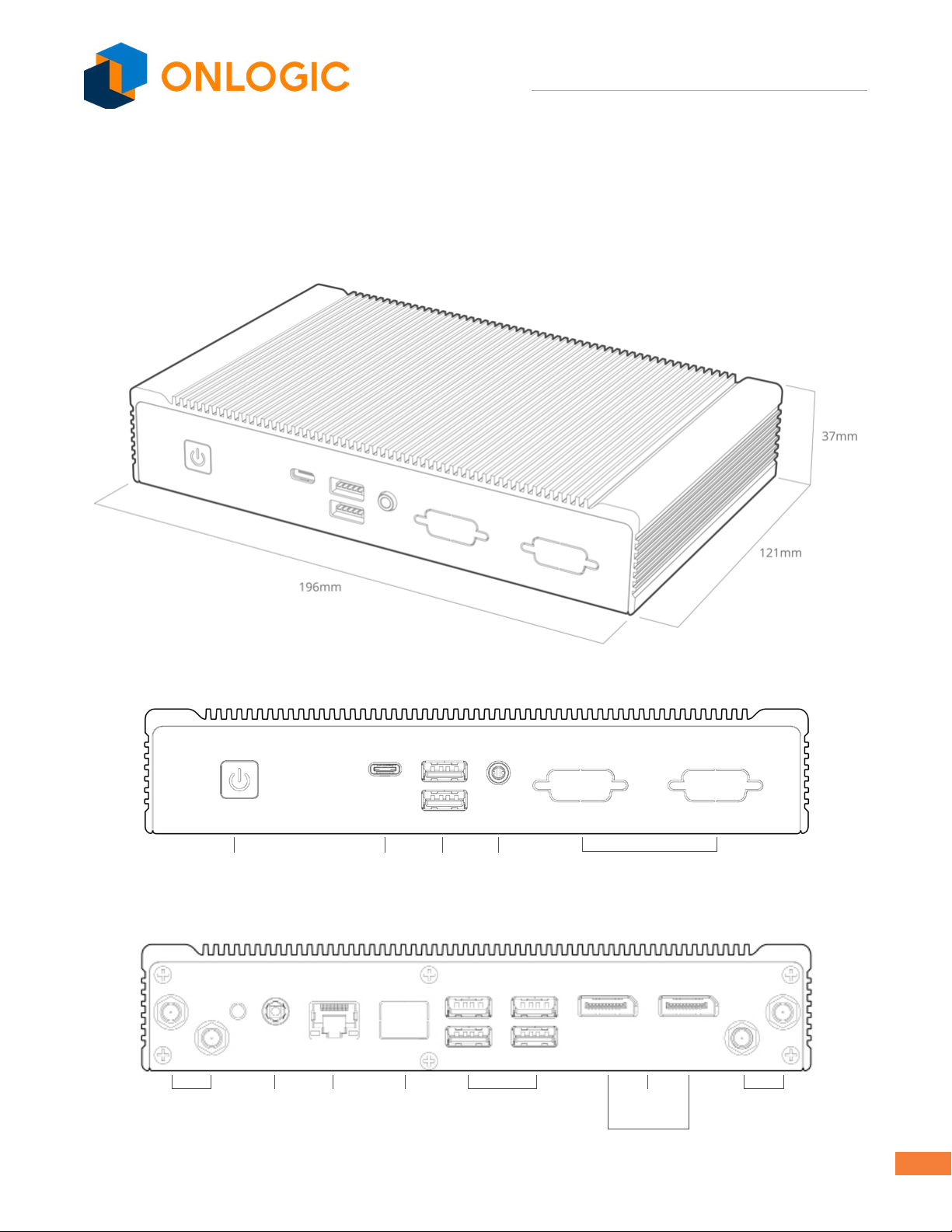
5.1 - System Diagram
Power Button
Antenna
(Optional)
Antenna
(Optional)
GbLAN GbLAN
(Optional)
USB 2.0
DisplayPort
CEC
Power In
USB C USB 3.0 Audio
In/Out
COM
(Optional)

ML350G-10 Industrial Computer
8
5.2 - System Specications
N3350 N4200
Processor and Chipset IntelApolloLakewithintegratedgraphics
Memory 1x204-pinDDR3LSO-DIMMupto8GB
Audio Controller RealtekALC283audiocodec
Expansion
Full-size/half-sizemPCIewithPCIe,SATA,andUSBsignal 1
Full-size mPCIe with PCIe and USB signal 1
Full-sizemPCIewithSATAandUSBsignal 1
Rear I/O
DisplayPort,Version1.2(HDMICECoption,supportsdualmodeandMST) 2
GbELAN 1 2
USB2.0 4
Front I/O
USB3.0 2
USB type C 3.1 1
Audiojack;line-in/out 1
Power button 1
Onboard I/O
USB2.0 pin header (2 USB supported) 1
RS-232/422/485pinheader 2
SATApower 1
CEC header 1
ATmodejumperheader 1
RTCbatteryheader 2
Ambient temperature header 1
Super I/O Controller NCT6793D
LAN Controller RTL8111G
UEFI UniedExtensibleFirmwareInterface(UEFI)residentinaSerialPeripheralInterface(SPI)Flashdevice
SupportforAdvancedCongurationandPowerInterface(ACPI)andSystemManagementBIOS(SMBIOS)
Environment
Operating temperature: 0°C ~ 50°C
OperatingtemperatureforULlistedcongurations:0°C ~40°C
Operation humidity: 10% ~ 90%
Storage temperature: 0°C ~ 60°C
Storage humidity: 5% ~ 95%
Dimensions 196 x 121 x 37mm
Mounting Wall,DIN,VESA-75/100.(Additionalmountinghardwarerequired)
Certications
CE(EN55022,EN55032,EN55024,EN60950-1)
FCC part 15b, Class A
RoHS,WEEE
UL/IEC 62368-1, UL/IEC 60950-1

ML350G-10 Industrial Computer
9
5.3 - Mounting Hole Pattern
210.6 mm
223.4 mm
76.2 mm
40.5 mm
12.7 mm
3.7 mm
Ø4.5mm
Ø4.6 mm
Ø8 mm
ML350G-10 Industrial Computer
10
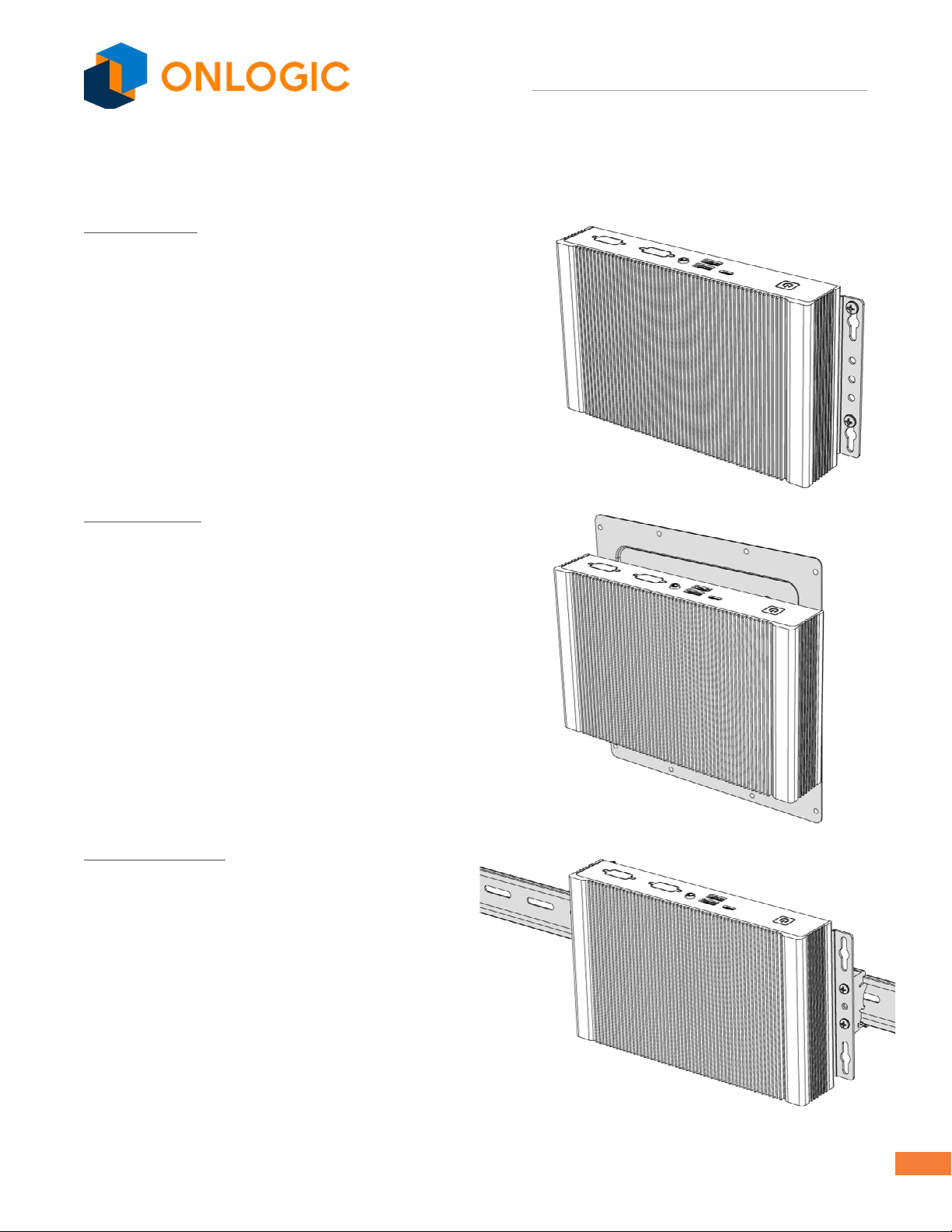
5.4 - Mounting Guide
Wall Mounting
Step 1:Attachwallmountbracketstochassis
Step 2:Markandprepholesinsurfaceformounting
Step 3: Fasten system to surface
VESA Mounting
Step 1: Install 4 VESA Screws into your display/surface
Step 2:AttachVESAbrackettothechassis
Step 3: Hangcombinedsystemandbrackettodisplay/surface
DIN Rail Mounting
Step 1:Attachwallmountingbracketstothechassis
Step 2:AttachDINRailClipstothemountingbrackets
Step 3:ClipsystemtotheDINRail
Other manuals for ML350G-10
1
Table of contents
Other Onlogic Industrial PC manuals

Onlogic
Onlogic IGN100 User manual
Onlogic
Onlogic HX511 User manual

Onlogic
Onlogic ML100G-51 User manual

Onlogic
Onlogic ML510G-50 User manual

Onlogic
Onlogic IGN500 User manual

Onlogic
Onlogic HX310 User manual

Onlogic
Onlogic K410 User manual

Onlogic
Onlogic HX401 User manual

Onlogic
Onlogic Karbon 800 Series User manual

Onlogic
Onlogic ML350G-10 User manual


Popular Industrial PC manuals by other brands






Dell
Dell Embedded Box PC 5000 Installation and operation manual

IBASE Technology
IBASE Technology ASB200-918 Series user manual

Lenovo
Lenovo ThinkCentre M90q Hardware Maintenance Manual

IXXAT
IXXAT Econ 100 Hardware manual

Kontron
Kontron KBox A-151-TGL user guide

AXIOMTEK
AXIOMTEK ICO500-518 Series user manual