
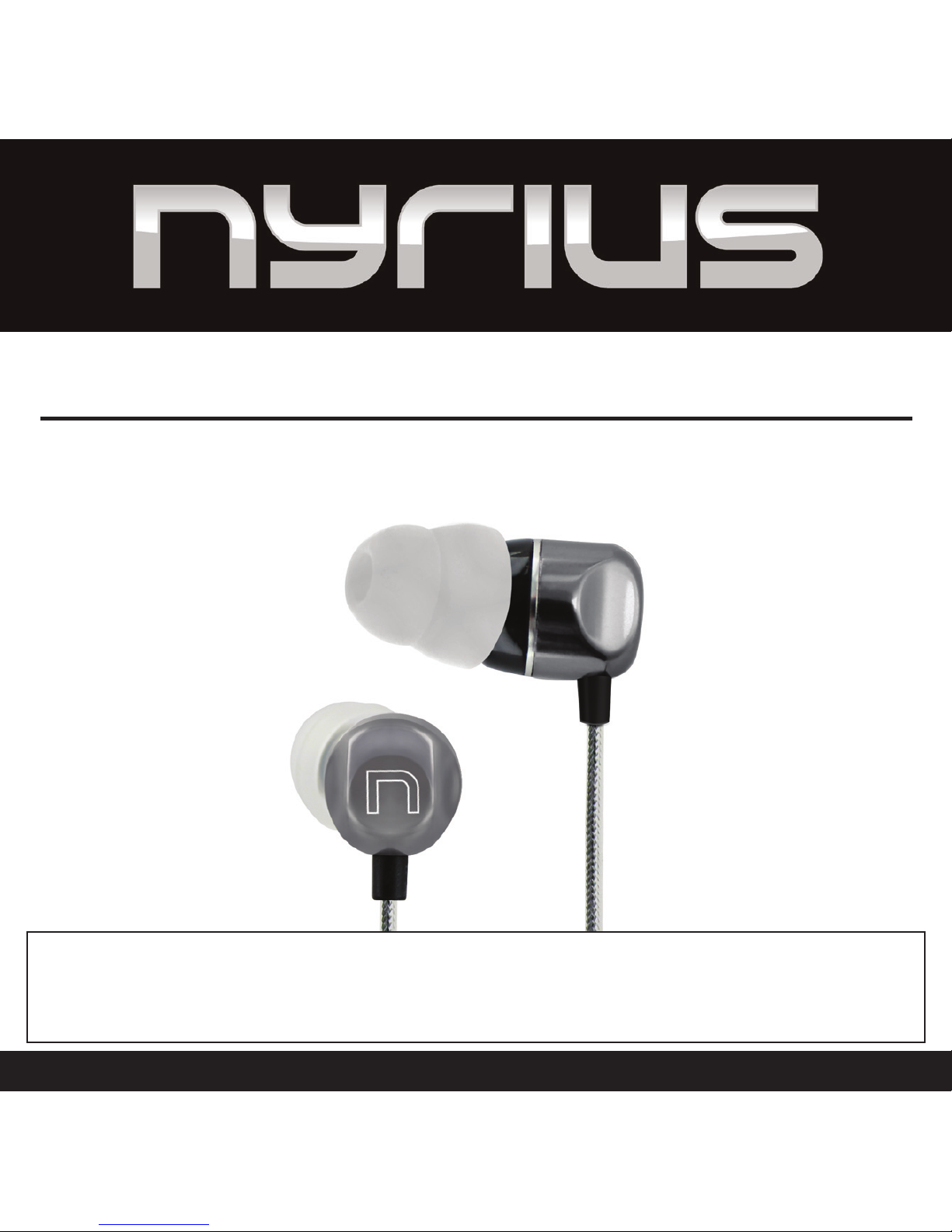
Nyrius NAEB500 User manual
USER MANUAL
GUIDE DE L’UTILISATEUR
OracleTM High Performance Noise Isolating Earphones
Écouteurs à isolation contre le bruit OracleTM de haute performance
NAEB500
Thank you for your purchase of this Nyrius product. Please read this instruction manual carefully before using product to ensure proper
use. Keep this manual in a safe place for future reference.
Merci d’avoir fait l’achat de cet appareil Nyrius. Veuillez lire ce guide attentivement avant de faire fonctionner l’appareil pour vous
assurer de l’utiliser correctement. Conservez ce guide dans un endroit sûr an de pouvoir vous y référer au besoin.
www.NYRIUS.com

- 2 -
NYRIUS [neer - ee - uhs]
noun
• Innovator of consumer electronics
• Used to describe high performance products with great value
• Distinguished; famous: a great inventor
–Related forms
greatness, noun
A revolution in design and performance. The OracleTM Nyrius High Performance
Noise Isolating Earphones reproduces clean, undistorted bass, a warm midrange,
and transparent natural highs at any volume level. Experience the dierence of high
performance.
INTRODUCTION

- 3 -
Table of Contents ................................................................................................................................................................. 3
Features .............................................................................................................................................................................. 3
What’s Included .................................................................................................................................................................. 3
Safety Information ...............................................................................................................................................................4
Product Preview .................................................................................................................................................................5
Earphones Use......................................................................................................................................................................6
Care and Storage ..................................................................................................................................................................7
Troubleshooting ...................................................................................................................................................................8
Specications .......................................................................................................................................................................8
NYRIUS Warranty................................................................................................................................................................. 9
FEATURES
WHAT’S INCLUDED
• High Fidelity speaker design reproduces clean, undistorted bass, a warm midrange, and transparent natural highs at
any volume level
• Directly angled earpiece focuses the pure sound image to the eardrum
• Ergonomically angled earpiece design for a secure in-ear t and increased sound isolation
• Double coned ear gels provide enhanced noise isolation to reduce ambient sounds that aect listening experience
• Anti-tangle cord is constructed of aluminum foil and a clear plastic cover which surrounds the copper cores ensuring
best tensile strength
• Enhanced strain relief at all stress points to prevent damaged wires from use over time
• Noise Isolating Earphones
• Protective Carrying Case
• 8 Eartip Sets
• Shirt Clip
• Instruction Manual
• 1 Year Warranty
TABLE OF CONTENTS

- 4 -
1. If you hear ringing or experience pain or discomfort in your ears during or after using any in-ear audio product, that is
a sign you are listening too loud. When your ears are exposed to high volumes (in excess of 85dB) for over an hour, you
may be permanently damaging your hearing.
2. Turn down your listening device’s volume to zero before you insert the NYRIUS earphones and turn on your media
device. Once you have the earphones in, gradually increase the volume to a comfortable, moderate volume.
3. Clean your earphones with an antiseptic wipe frequently to avoid wax buildup. This will improve the acoustic quality
of your earphones.
4. NEVER operate a motor vehicle while listening to or wearing your earphones. It is not only dangerous, but also illegal
in many places.
5. NEVER operate heavy machinery while listening to or wearing your earphones.
6. We don’t recommend you use the earphones while riding a bicycle, running, or walking in heavy trac areas. If you
do, do not fully insert the earphones into your ear and listen at a lower volume so you can hear ambient noise.
OSHA Guidelines for Noise Exposure Limits:
Sound Pressure Level Recommended Maximum Exposure per Day
90dB 8 Hours
95dB 4 Hours
100dB 2 Hours
105dB 1 Hour
110dB 30 Minutes
115dB 15 Minutes
120dB Avoid as hearing damage may occur
To learn how to establish a safe listening level and review other important safety guidelines, visit the Consumer
Electronics Association at www.ce.org or the Deafness Research Foundation at www.drf.org.
SAFETY INFORMATION
- 5 -
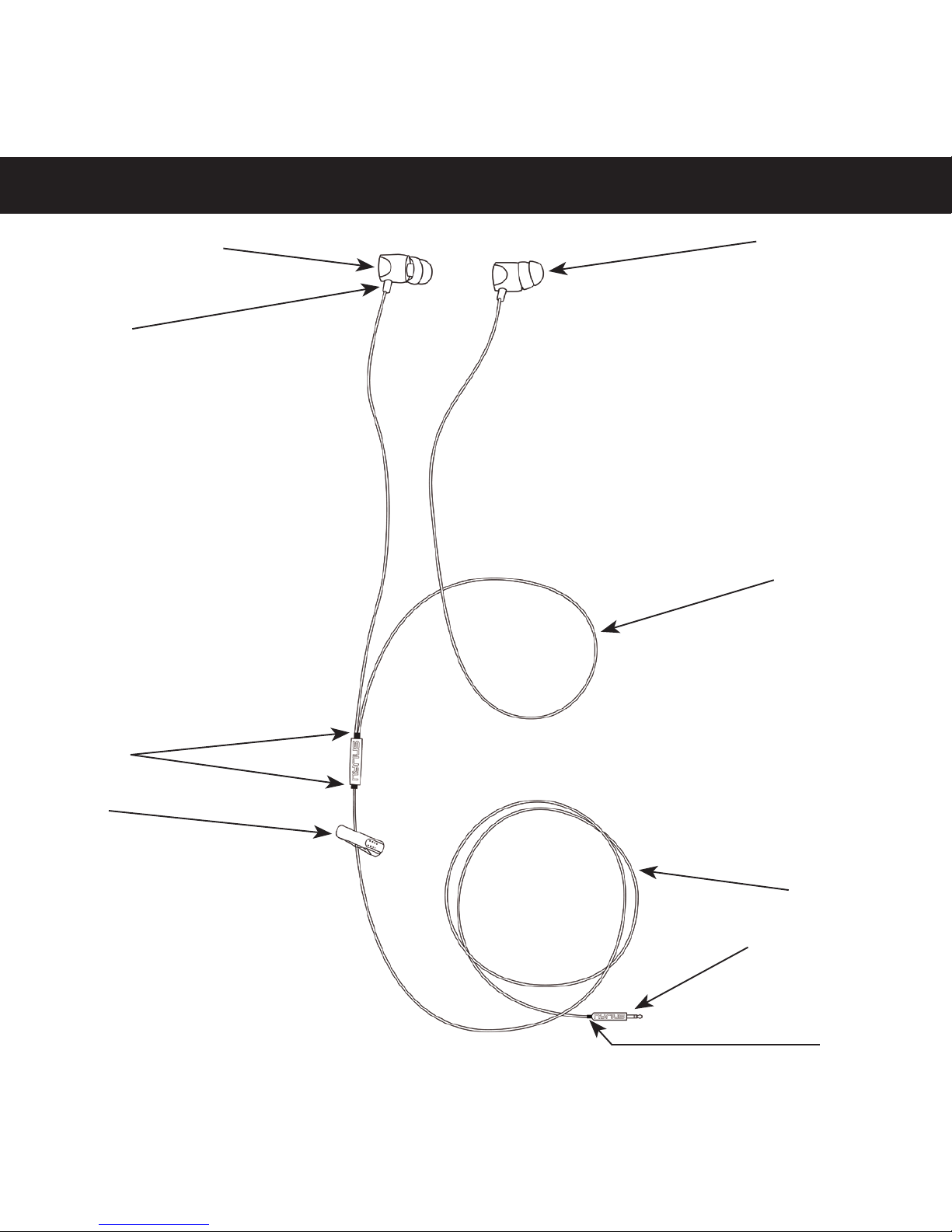
Directly Angled Earpiece
Strain Relief
Strain Relief
Shirt Clip
Double Coned Ear Tip
Asymmetrical Cord
Anti-tangle Cord
Gold Plated Connector
Strain Relief
PRODUCT PREVIEW

- 6 -
Left and Right Speakers
There are "L" and "R" markings on each earpiece. "L" is for the left ear and "R" is for the right ear.
Attaching Eartips to the Speakers
Choose an eartip of your size and liking, it may be necessary to test several eartips to decide which size ts your ear the
best. All included eartips easily clip onto the end of each speaker. You will feel them gently snap into place on the speaker
when they are secure.
Proper Insertion and Removal of Earphones
1. Use your right hand to hold the earphone marked with an "R".
2. Use your left hand to pull up and back on your right ear to straighten the ear canal. This will allow for a better fit of
the earpiece.
3. Insert the right earphone into your ear so that it seals completely and comfortably in your ear.
4. Repeat with the left earpiece. Using your right hand to pull back on your ear while you insert the left earpiece with
your left hand.
5. To remove the earphones, slowly pull them out with a twisting motion to gently break the seal.
Note: It is important that you do not insert the earphones so deep that your ears feel completely plugged!
Using the Shirt Clip
A shirt clip comes attached to the wire to secure your earphones from easily falling out of your ear. It absorbs the tension
that may occur during movement while wearing your earphones.
1. Squeeze the end of the clip to open the fastening end, and slip it over part of your shirt or collar.
2. Release the end of the clip to secure.
Asymmetrical Cord Design
The right earphone cord is longer than the left. The asymmetrical cord is designed to be draped behind the neck before
the earphone is placed in the ear. This design offers several advantages:
1. Reduces strain on the wires from the cords dangling.
2. Conventiently rests on your neck when the earphones are not in use.
3. Helps with optimal fit in your ear.
EARPHONE USE

- 7 -
Earphone “Break-In” Time
Your Nyrius earphones are a performance mechanical device that will settle in after use. Although they will sound
amazing right out of the box, they will mellow after use and sound even better. After 20 hours of use the earphones
should be fully broken in for you to enjoy!
Using the Earphones at High Altitudes
Changes in altitude can change the air pressure within your ear canal, which may alter the sound that you
hear from your Nyrius earphones. This will be most apparent during takeoff or landing of an airplane. To help with this,
simply break the seal made by the earphones on a regular interval while changing altitudes.
Cleaning the Eartips
It is essential that the eartips be kept clean for hygenic reasons. DO NOT attempt to clean the eartips while they are
still attached to the speaker. Getting the delicate speaker circuitry wet could damage the earphones permanently.
1. Carefully remove the eartip from the earpiece.
2. Using warm water and mild soap on a cloth, gently rinse the eartip of any dirt or earwax. Do not use harsh
cleaning solvents.
3. Rinse and allow the eartips to completely dry before attempting to reattach them to the earpieces.
Care and Storage
• When not in use, always store your Nyrius earphones in the protective case provided. Keep the case closed and in a
clean, dry environment
• Do not store other objects in the earphone case as they may damage the earphones
• Avoid storage in extreme heat or cold
• Avoid any exposure of the earphones to liquids or high humidity
• Never pull on the cable to disconnect the earphones from your media device, always grasp the plug at the end of the
cable and gently pull to remove
EARPHONE USE
CARE AND STORAGE
- 8 -
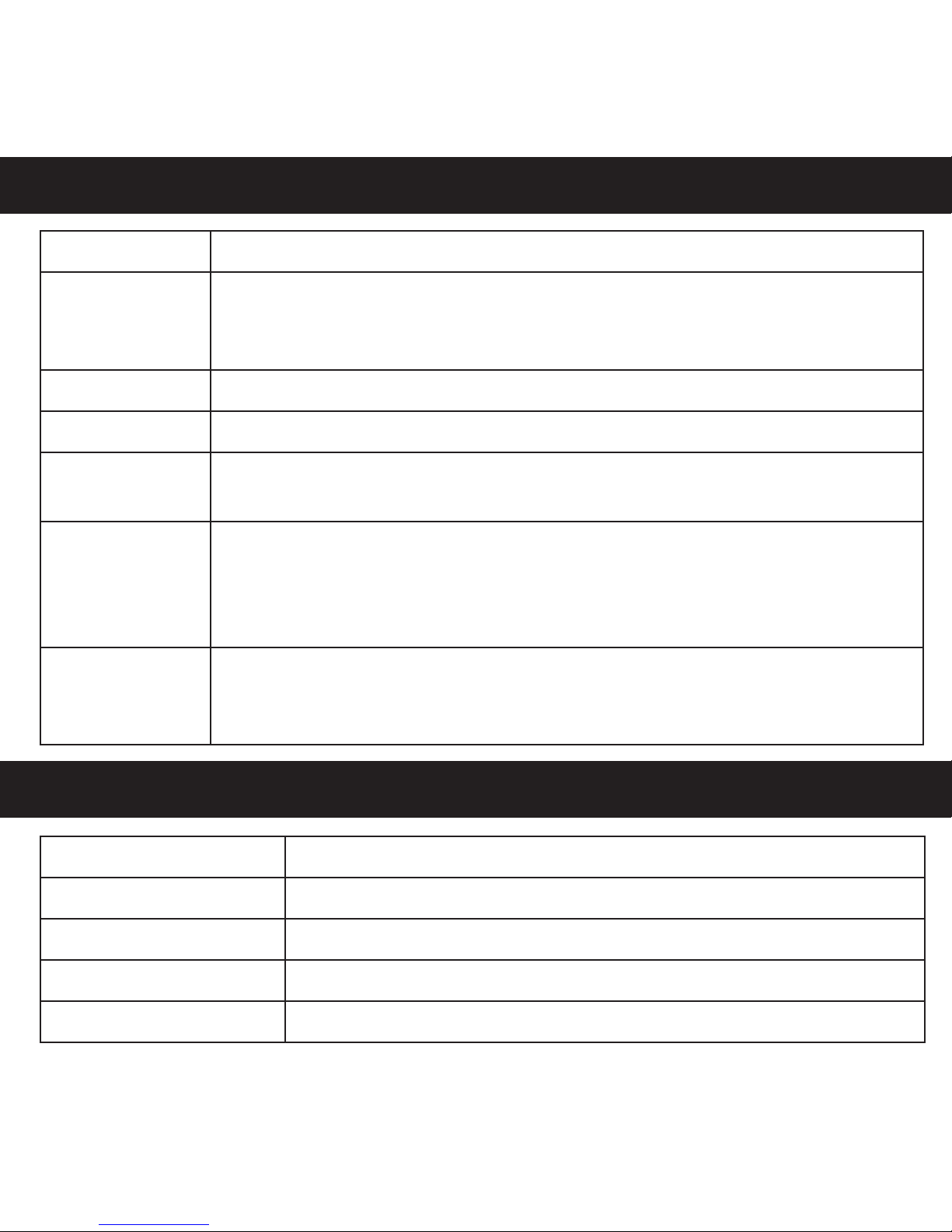
Problem What To Do
No/Intermittent
audio
• Make sure that the earphone plug is securely connected to the earphone jack of your media
device (not the line out jack)
• Try another audio device
Excessive bass • Turn o any audio enhancement features on the audio source
Earpieces falling out • Try using another size of eartip, the size you are using may not be sized properly to your ear
Low volume/Poor
audio
• Make sure ear tips and earphone nozzles are clear of any debris or wax build-up
• Make sure the volume level of the audio source is turned up
Sound is mued
from earpiece
• Make sure ear tips and earphone nozzles are clear of any debris or wax build-up
• Unplug the earphones from the audio source, then plug back in making sure they are
securely connected
• Try another audio device
Sound is only
coming from one
earpiece
• Unplug the earphones from the audio source, then plug back in making sure they are
securely connected
• Try another audio device
SPECIFICATIONS
Driver High Performance 9.2mm
Impedance 16 Ohm
Max Output Power 5 mW
Frequency 12Hz - 22kHz
Sensitivity 91+/-3db at 1kHz
TROUBLESHOOTING

Thank you for choosing NYRIUS® Consumer Electronics Products!
BlueTronics Group gives the following express warranty to the original consumer purchaser or gift recipient
for this NYRIUS product, when shipped in its original container and sold or distributed by BlueTronics Group or
by an Authorized NYRIUS Dealer: BlueTronics Group warrants that this product is free, under normal use and
maintenance, from any defects in material and workmanship. If any such defects should be found in this product
within the applicable warranty period, BlueTronics Group shall, at its option, repair or replace the product as
specied herein. Replacement parts furnished in connection with this warranty shall be warranted for a period
equal to the unexpired portion of the original equipment warranty.
This warranty shall not apply to:
A. Any defects caused or repairs required as a result of abusive operation, negligence, accident, improper
installation or inappropriate use as outlined in the owner’s manual.
B. Any NYRIUS product tampered with, modied, adjusted or repaired by any party other than BlueTronics
Group or NYRIUS’s Authorized Service Centres.
C. Damage caused or repairs required as a result of the use with items not specied or approved by
BlueTronics Group, including but not limited to head cleaning tapes and chemical cleaning agents.
D. Any replacement of accessories, glassware, consumable or peripheral items required through normal
use of the product including but not limited to earphones, remote controls, AC adapters, batteries,
stylus, trays, lters, cables, paper, cabinet, cabinet parts, knobs, buttons, baskets, stands and shelves.
E. Any cosmetic damage to the surface or exterior that has been defaced or caused by normal wear and
tear.
F. Any damage caused by external or environmental conditions, including but not limited to transmission
line/power line voltage or liquid spillage.
G. Any product received without appropriate model, serial number and CSA /cUL /cULus /cETL /cETLus
markings.
H. Any products used for rental or commercial purposes.
I. Any installation, setup and/or programming charges.
NYRIUS® WARRANTY
- 9 -

Should this NYRIUS product fail to operate during the warranty period, warranty service may be obtained
upon delivery of the NYRIUS product together with proof of purchase and a copy of this LIMITED WARRANTY
statement to an Authorized NYRIUS Service Centre. In-home warranty service may be provided at BlueTronics
Group’s discretion on any NYRIUS television with the screen size of 40” or larger. This warranty constitutes
the entire express warranty granted by BlueTronics Group and no other dealer, service centre or their agent
or employee is authorized to extend, enlarge or transfer this warranty on behalf of BlueTronics Group. To the
extent the law permits, BlueTronics Group disclaims any and all liability for direct or indirect damages or losses
or for any incidental, special or consequential damages or loss of prots resulting from a defect in material or
workmanship relating to the product, including damages for the loss of time or use of this NYRIUS product or
the loss of information. The purchaser will be responsible for any removal, reinstallation, transportation and
insurance costs incurred. Correction of defects, in the manner and period of time described herein, constitute
complete fulllment of all obligations and responsibilities of NYRIUS Electronics to the purchaser with respect
to the product and shall constitute full satisfaction of all claims, whether based on contract, negligence, strict
liability or otherwise.
1 YEAR PARTS & LABOUR WARRANTY PERIOD.
TO OBTAIN THE NAME AND ADDRESS OF THE NEAREST AUTHORIZED NYRIUS SERVICE CENTRE OR FOR MORE
INFORMATION ON THIS WARRANTY:
• Contact NYRIUS Support by Email: support@bluetronicsgroup.com
• Visit www.NYRIUS.com
• Mail your inquiry to:
BlueTronics Group
NYRIUS Customer Service. 4080 Montrose Road. Niagara Falls, ON L2H 1J9
• Call toll free 1-800-663-5954
Nyrius is a registered trade-mark of Circus World Displays Limited
04.2011
NYRIUS® WARRANTY
- 10 -
Table of contents
Languages:


