Novation Launchkey 25 User manual

1
Version 6
User Guide

2
Contents
Introduction ..............................................................................................................................5
Key Features...................................................................................................................................5
Box Contents..................................................................................................................................6
Getting Started ..............................................................................................................................6
Troubleshooting and Support ........................................................................................................7
Model Specific Features.................................................................................................................7
Semi-Weighted Keybed (Launchkey 88 only)..............................................................................7
Hardware Overview........................................................................................................................8
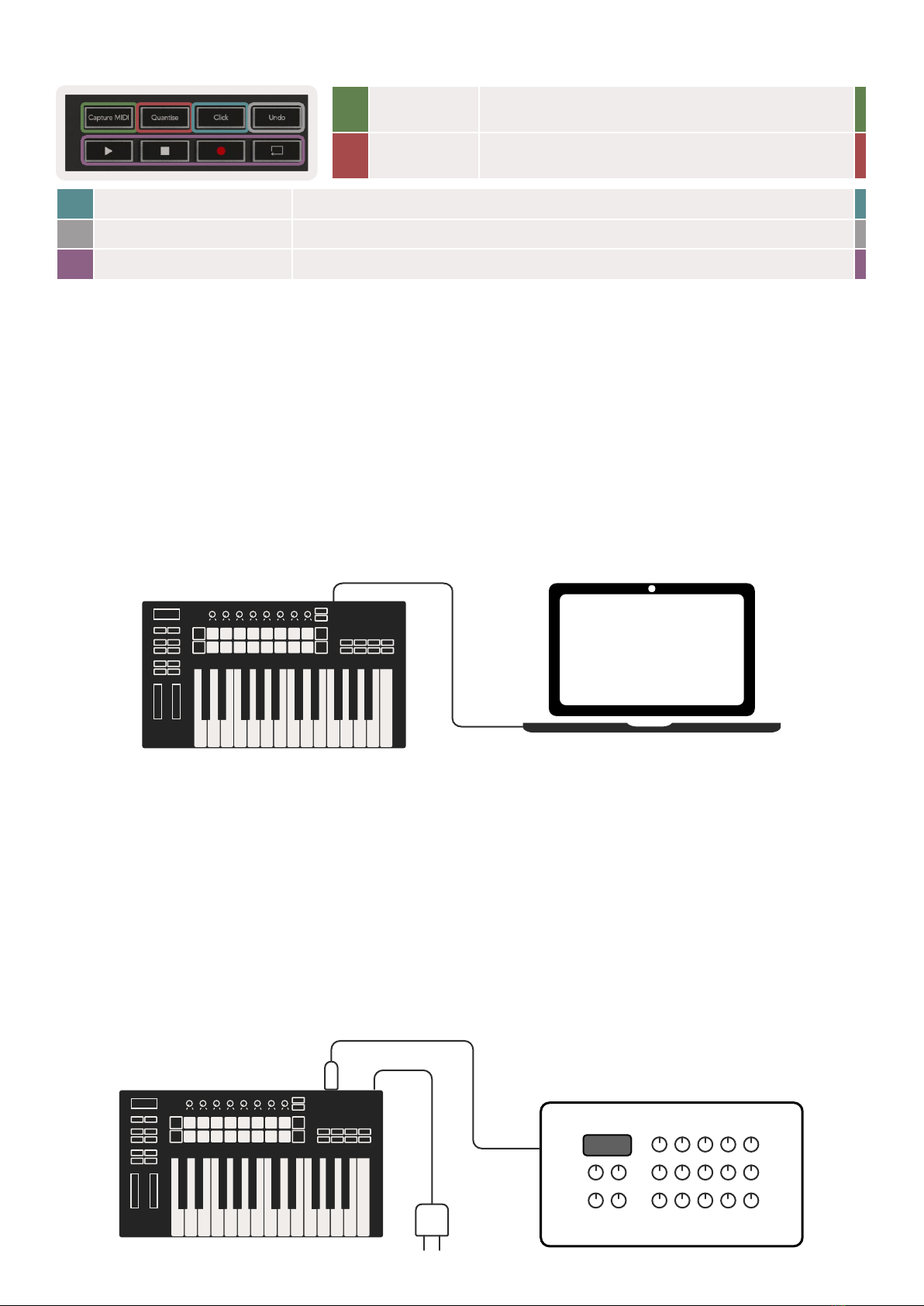
Getting Connected ......................................................................................................................10
Connecting Launchkey with a Computer..................................................................................10
Connecting Launchkey with External MIDI Enabled Instruments .............................................10
Working with Ableton Live.....................................................................................................11
Installation ....................................................................................................................................11
Setup............................................................................................................................................11
Session Mode...............................................................................................................................13
Launching Clips ........................................................................................................................15
Launching Scenes .....................................................................................................................16
Stop, Solo, Mute ......................................................................................................................16
Record.......................................................................................................................................17
Capture MIDI.............................................................................................................................17
Quantise....................................................................................................................................17
Click...........................................................................................................................................17
Undo..........................................................................................................................................17
Arm/Select (Launchkey 49, 61 and 88 only).....................................................................................18
Drum Mode - Playing and Recording Drums.....................................................................................18
Using Ableton Live’s Mixer ..........................................................................................................19
Pots ...........................................................................................................................................19
Faders (Launchkey 49, 61 and 88 only) ............................................................................................20
Device Mode - Navigating and Controlling Devices......................................................................... 21
Device Select.............................................................................................................................22
Device Lock...............................................................................................................................22
Transport Functions......................................................................................................................23

3
Working with Cubase.............................................................................................................24
Setup............................................................................................................................................24
Pot Modes and Fader Modes (49, 61, 88 key) .............................................................................25
Device mode.............................................................................................................................25
Volume mode............................................................................................................................25
Pans Mode ................................................................................................................................25
Sends (Sends A and B) ..............................................................................................................25
Pad Mode.....................................................................................................................................26
Session Mode............................................................................................................................26
Fader Buttons (Launchkey 49, 61 and 88 only) ............................................................................26
Select Mode..............................................................................................................................26
Arm Mode .................................................................................................................................26
Transport Controls........................................................................................................................27
Track ◄ ► Buttons ..................................................................................................................27
> Pad (Scene Launch)................................................................................................................27
Standalone Features ...............................................................................................................28
Grid ..............................................................................................................................................28
Drum Mode...............................................................................................................................28
Scale Chord Mode ....................................................................................................................28
User Chord Mode......................................................................................................................30
Fixed Chord...............................................................................................................................31
Scale Mode ..................................................................................................................................33
Custom Modes.............................................................................................................................34
Pads...........................................................................................................................................34
Pots ...........................................................................................................................................35
Faders (Launchkey 49, 61 and 88 only) ............................................................................................35
Arpeggiator..................................................................................................................................35
Arpeggiator Pot Controls..........................................................................................................36
Arp Modes ................................................................................................................................37
Arp Rates ..................................................................................................................................38
Arp Rhythms .............................................................................................................................39
Latch .........................................................................................................................................39
Arp Control Lock ......................................................................................................................40
Octave Buttons.............................................................................................................................40
Settings ........................................................................................................................................41
Pot Pickup ....................................................................................................................................41
Navigation Mode - ([...] Button) .......................................................................................................... 42
Strum Mode .................................................................................................................................42
Arp Controls in Strum Mode.....................................................................................................43

4
Working with Other DAWs ....................................................................................................44
Logic.............................................................................................................................................44
Setup.........................................................................................................................................44
Session Mode............................................................................................................................45
Pots ...........................................................................................................................................47
Faders (Launchkey 49, 61 and 88 only) ............................................................................................48
Arm/Select (Launchkey 49, 61 and 88 only).....................................................................................48
Transport Functions...................................................................................................................49
Navigation.................................................................................................................................49
Reason..........................................................................................................................................50
Setup.........................................................................................................................................50
Transport Control ......................................................................................................................50
Pots ...........................................................................................................................................51
Pads Session Mode ...................................................................................................................51
Navigation.................................................................................................................................51
Preset Browsing.........................................................................................................................51
Working with HUI (Pro Tools, Studio One etc.) ..................................................................................52
Setup ........................................................................................................................................52
Pro Tools....................................................................................................................................52
Studio One............................................................................................................................... 52
Pad Session Mode.....................................................................................................................52
Navigation ................................................................................................................................52
Controlling the Mixer ................................................................................................................52
Faders and Fader Buttons (Launchkey 49, 61 and 88 only)............................................................53
The faders always control track volumes for the selected bank of tracks. ................................53
Transport Buttons......................................................................................................................53
The transport buttons listed below will function as described when used with HUI.................53
Physical Characteristics...........................................................................................................54
Weight and Dimensions...............................................................................................................54
Custom Modes and Components ...........................................................................................54

5
Introduction
Launchkey [MK3] is Novation’s intuitive and fully integrated MIDI keyboard controller for making tracks
in Ableton Live and Steinberg’s Cubase. Designed to give you everything you need to create and play
your music. Made for creators of all abilities, Launchkey gives you inspirational tools to expand your
musical vocabulary.
Launchkey gives you unrivalled access to Ableton Live’s functions, including Capture MIDI, track
arm, quantise, click and loop controls. Not using Ableton Live? No problem, Launchkey also has
full integration with Cubase, Logic and Reason, plus out of the box functionality with other DAWs
including Studio One and Pro Tools, via HUI.
Inspirational features include Scale, Chord and Strum modes and a powerful arpeggiator, which
together extend your musical capabilities and let you create in new ways. Scale Mode transposes keys
and pads played to notes in the scale selected; chord modes let you trigger complex chords with one
finger, while the arpeggiator gives your melodies movement.
Launchkey also works in standalone; the full-size five-pin MIDI output works with any MIDI-compatible
device. Use Novation Components to update firmware and configure Custom Modes. We recommend
updating the firmware right away so your Launchkey is up to date and fully featured.
Key Features
• Designed for Ableton Live: immediate
access to all the controls you need.
• Additional DAW support: Full integration
with Cubase, Logic and Reason, out of
the box functionality with Studio One,
Pro Tools and more via HUI.
• Produce and perform: 25, 37, 49, 61 or
88-note velocity sensitive keyboard and
16 velocity sensitive RGB backlit pads
• Shape your sound: tweak instruments and
effects to perfection using eight rotary
encoders - and 9 faders (Launchkey 49,
61 and 88 only)
• Automatically map scales to the keys:
never hit a wrong note
• Get creative: three chord modes allow
you to trigger chords with one finger,
the powerful arpeggiator gets melodies
moving
• Transport and mixer control: directly
operate playback, recording, pans, mutes
and sends
• Connect to your hardware: 5-pin MIDI Out
works with any MIDI-compatible device
• Control anything MIDI: create custom
mappings for any performance or studio
rig using Novation Components
• Make music immediately: Ableton Live
Lite, virtual instruments and effects
plugins and sample packs included

6
Box Contents
• Launchkey 25, 37, 49, 61 or 88
• USB Type-A to B cable (1.5 meters)
• Safety Instructions
Getting Started
The ‘Easy Start Tool’ provides a step-by-step guide to setting up your Launchkey. This online tool
guides you through the process of registering your Launchkey and accessing the software bundle.
When connecting Launchkey to your computer, it will appear as a Mass Storage Device (MSD), like a
USB drive. Open the drive and open ‘Click Here to Get Started.url’. This will open the Easy Start tool
in your web browser.
Alternatively, visit our website to register your Launchkey and access the software bundle.

7
Troubleshooting and Support
For help getting started with your Launchkey, please visit:
novationmusic.com/get-started
If you have any questions or need any help at any time with your Launchkey, please visit our Help
Centre.
Here you can also contact our support team:
support.novationmusic.com
Model Specific Features
There are 25, 37, 49, 61 and 88 key versions of Launchkey. The differences between the devices are
outlined below and model specific features are noted throughout this guide.
Model Launchkey 25 Launchkey 37 Launchkey 49 Launchkey 61 Launchkey 88
Velocity Sensitive keys 25 37 49 61 88
Faders - - 9 9 9
Fader/Track Buttons - - 9 9 9
Arm/Select Button - -
Semi-Weighted
Keybed
- - - -
Semi-Weighted Keybed (Launchkey 88 only)
The Launchkey 88 model features a semi-weighted keyboard for a piano-like feel. All 88 keys are
velocity sensitive with four velocity curves to suit your playing– See “Settings” on page 41.

8
Hardware Overview
1LCD Display Shows the device status, parameter values,
and lets you navigate through menus.
2Shift Button Enables access to secondary Shift functions
which are shown in grey text on the hardware.
3Settings Button Opens the settings menu on the screen. See
“Settings” on page 41 for a reference table
4▲▼ Buttons Navigates up and down through rows of pads.
Used for clips and drum racks in Live, chords,
and more.
5Track ◄ ►Buttons Navigates through tracks in your DAW.
6… Button
(Navigation Mode)
Pressing the ‘...’ button will put the Launchkey
into Navigation Mode useful for browsing
samples and presets. See “Navigation Mode -
([...] Button)” on page 42.
7Fixed Chord
Button
Stores a chord that can be played with oe
finger anywhere on the keyboard. See “Fixed
Chord” on page 31.
8Arp Button Turns on and off Launchkey’s inbuilt
arpeggiator. Long press also locks the pot and
pad Arp controls to on.
9Scale Button Turns on and off Launchkey’s Scale Mode. See
“Scale Mode” on page 33.
10 Octave - +
Buttons
Transposes the keyboard up or down eight
octaves (C-2 to C5). Pressing both buttons sets
the transposition amount back to 0.
11 Pitch Wheel Bends the pitch of the note being played.
12 Modulation Wheel Modulates software/hardware parameters.
1
2 3 4
5
6
8
11
10
7
9
12

9
19 Faders (Launchkey 49,
61 and 88 only)
Control various parameters using eight available modes: Device, Volume, Send
A, Send B and four Custom Modes. The 9th fader controls Master volume in your
DAW (excluding HUI).
20 Fader Buttons (49,
61 and 88 key models
only)
Control various parameters using eight available modes: Device, Volume, Send A,
Send B and four Custom Modes.
21 Arm/Select Button (49,
61 and 88 Key Models
Only)
Changes the functionality of the Fader Buttons in your DAW to let you select and
record arm tracks.
13 Pots Controls various parameters using eight available modes: Device, Volume, Pan, Sends
and four Custom Modes. The first five pots also control Arp parameters as secondary
functions.
14 Pads Trigger clips and play drum racks in Ableton Live using Session and Drum Modes. Send
custom MIDI messages using four available Custom Modes. Trigger chords in Scale Chord
and User Chord Modes.
15 Device Select Selects the device you want to control in Ableton Live using the pads.
16 Device Lock Locks the currently selected device controls to the pots in Ableton Live, even when you
navigate to a different track.
17 > Button
(Scene Launch)
Launches full rows of clips in Ableton Live.
18 Stop/Solo/
Mute Button
Turns the bottom row of pads into track stop, solo or mute buttons.
13
14
15
16
17
18
19
20 21

10
22 Capture
MIDI
Capture any recently played MIDI notes in your
DAW (supported by Live, Cubase and Logic).
23 Quantise Triggers the quantise function in Live, Cubase and
Logic, to snap notes to the grid.
24 Click Toggles Logic, Cubase and Live’s metronome on and off.
25 Undo Triggers Logic, Cubase and Live’s undo function.
26 Play, Record, Stop, Loop Controls the transport in your DAW.
22
26
23 24 25
Getting Connected
Connecting Launchkey with a Computer
Your Launchkey is USB bus-powered, it’s powered when you connect it to your computer with a USB
cable. When connecting Launchkey for the first time, visit Components to make sure you have the
latest firmware. This will make sure you have all the latest features enabled.
Power and MIDI via USB
USB Cable
Note: When connecting Launchkey to a Mac you may see the Keyboard Setup Assistant. This is
because Launchkey functions as a computer keyboard device in Navigate Mode. Please close the
Keyboard Setup Assistant.
Connecting Launchkey with External MIDI Enabled Instruments
If you want to use the 5-pin DIN socket for MIDI output on your Launchkey without a computer, you
can power the unit with a standard USB power supply (5V DC, minimum 500mA).
MIDI Device/Sound
Module
USB
Power
MIDI Cable
This manual suits for next models
4
Table of contents
Other Novation Recording Equipment manuals

Novation
Novation LaunchPad S User manual
![Novation Launchpad Mini [MK3] User manual Novation Launchpad Mini [MK3] User manual](/data/manuals/1k/r/1krbl/sources/novation-launchpad-mini-mk3--manual.jpg)
Novation
Novation Launchpad Mini [MK3] User manual
![Novation Launchpad Mini [MK3] User manual Novation Launchpad Mini [MK3] User manual](/data/manuals/13/8/138eh/sources/novation-launchkey-mini-mk3-manual.jpg)
Novation
Novation Launchpad Mini [MK3] User manual

Novation
Novation SL MkIII User manual

Novation
Novation Launchkey MK3 User manual

Novation
Novation Launchkey User manual
![Novation Launchpad Mini [MK3] User manual Novation Launchpad Mini [MK3] User manual](/data/manuals/1h/6/1h6un/sources/novation-launchkey-mini-mk3-manual.jpg)
Novation
Novation Launchpad Mini [MK3] User manual

Novation
Novation ZeRO SL MkII User manual

Novation
Novation Launchpad Pro User manual

Novation
Novation Nocturn 49 User manual