Nedap VP5001 User manual

Instruction Manual
InTouch, model
VP5001
User Manual
Version 03.000 / July 2022 / EN
Original instructions
Dairy Farming

Copyright
Copyright © Nedap N.V. All rights reserved. The information in this document is subject to change without
notice, it is not to be reproduced in any way, in whole or in part, without the written consent of Nedap N.V. All
trademarks referenced belong to their respective owners.
Disclaimer
Nedap N.V. has made every effort to ensure the accuracy of the information contained in this document.
However, Nedap N.V. makes no representations or warranties whatsoever whether express or implied as
to the accuracy, correctness, completeness or fit-for-purpose or suitability for the purpose of this product.
You use the products at your own risk. Nedap N.V. excludes any liability to the maximum extent permitted by
applicable law for the damages caused by errors or failures made during the installation or improper use of
this product or by not applying the instructions stated in this document. Nedap N.V. reserves the right to make
improvements or amendments to this document and/or the products described therein at any time without any
notification. The latest version of this document can be found on the Nedap Livestock Management business
portal (www.nedap.com/livestockmanagement-portal). Please download the latest version of this document (by
yourself or reseller) and keep a copy for your own records. This document can be published in various languages
but only the English language version will prevail. Nedap N.V. assumes no responsibility for any errors caused for
the translations into another language.
Warranty and spare parts
Please consult the Nedap products dealer from whom you purchased this product, in regards to the applicable
warranty conditions. This product cannot be used for any other purpose as described in this document. If
the product is not installed according to this document; the warranty provided is not applicable. At the sole
discretion of Nedap N.V., Nedap N.V. may decide to change the conditions of the warranty policy. You agree
that Nedap N.V. is able to compensate you the pro-rata value of the warranty involved rather than replacing
or repairing the product depending on the technical or economical value of the product. Prior to applying the
warranty, please verify if you comply with the warranty conditions of the warranty policy, whether you can
successfully apply for the replacement or repair of a defective part. Parts can only be replaced with original
Nedap parts, otherwise the warranty policy will not be applicable on the product. If the warranty is applicable,
please contact the dealer or send the defective parts to the dealer.
Additional information
For any information or questions regarding the product, please contact your own dealer.

InTouch, model VP5001 / User Manual
Version 03.000 / July 2022 / EN
1
Dairy Farming
InTouch, model VP5001

InTouch, model VP5001 / User Manual
Version 03.000 / July 2022 / EN
2
Dairy Farming
Content
1 Safety .................................................................................................. 3
2 InTouch overview ................................................................................. 5
2.1 InTouch introduction ...................................................................................................... 5
2.2 SmartFlow and InTouch in the milking parlor ............................................................... 5
3 First use ............................................................................................... 7
4 Operation ............................................................................................. 8
4.1 Use of the InTouch ......................................................................................................... 8
4.2 Using the system .......................................................................................................... 10
4.2.1 Milking procedure .......................................................................................................... 10
5 Maintenance ....................................................................................... 13
5.1 Maintenance scheme ................................................................................................... 13
6 Troubleshooting .................................................................................. 14
7 Handling Instructions ......................................................................... 15
8 Glossary ............................................................................................. 16
9 Appendix ............................................................................................ 17
9.1 InTouch menu overview ............................................................................................... 17

InTouch, model VP5001 / User Manual
Version 03.000 / July 2022 / EN
3
Dairy Farming
1 Safety
Read this manual before using this product. Failure to follow the instructions and safety precautions in this
manual may result in serious injury or death. Keep this manual in a safe location for future reference.
Symbols used in the manual
Danger
Indicates a hazardous situation that, if not avoided, will result in death or serious
injury.
Warning
Indicates a hazardous situation that, if not avoided, could result in death or serious
injury.
Caution
Indicates a hazardous situation that, if not avoided, could result in minor or moderate
injury.
Indicates important information but not hazard related.
Suggestions and advice to perform certain tasks more easily.
General safety instructions
Warning
Always turn off the mains power supply when working on the electrical installation.
Warning
Always wear proper protection when installing and maintaining the Nedap VP5001.
Caution
Installation and service should only be done by locally qualified personnel.
Caution
Install the system according to the local rules and regulations.
Working environment
Caution
The installation area must be free from any obstacles, including animals.
Caution
Make sure all components are installed out of reach of animals.

InTouch, model VP5001 / User Manual
Version 03.000 / July 2022 / EN
4
Dairy Farming
Caution
Make sure all cables are properly concealed, and form no danger for stumbling.
Animal welfare and safety
The automated actions of the Nedap Livestock Management systems do never discharge the installer and the
user of the system from his/her responsibility to assure and to take care of the well-being of the animals.
InTouch, model VP5001 / User Manual
Version 03.000 / July 2022 / EN
5
Dairy Farming
2 InTouch overview
2.1 InTouch introduction
The Nedap InTouch is used to control the milking process at each individual milking point of the whole parlor.
The InTouch control unit is able to show real time milk yields for specific cows, measured by the SmartFlow milk
meter.
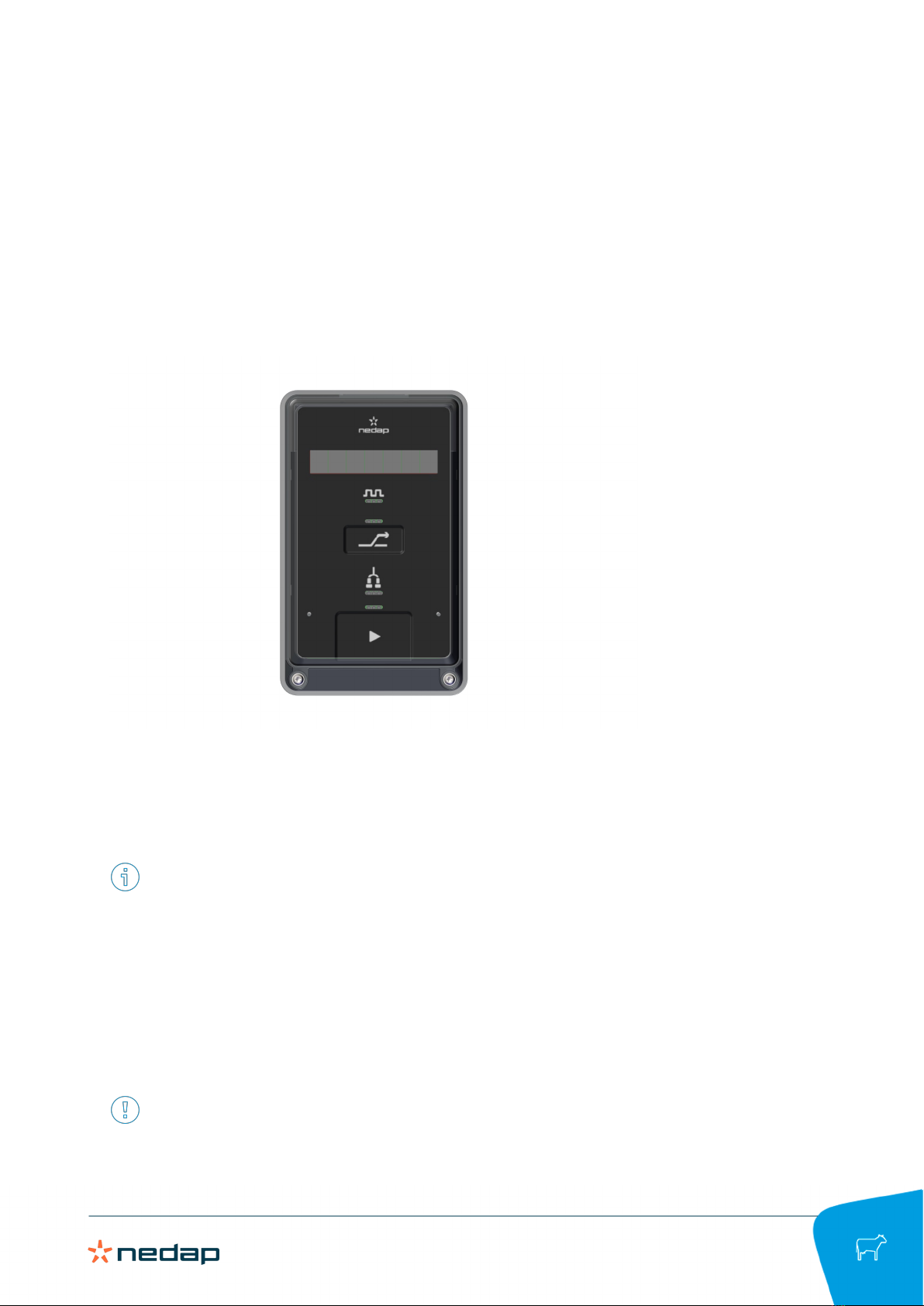
The InTouch has a user-friendly control panel that shows the cow number and milk delivery. The buttons on the
InTouch are used to control the milking process, prepare the parlor for cleaning and add cow-specific separation
rules.
The InTouch is controlled by a Nedap VP8002 Velos Processing Unit (VPU) which is accessible with a PC, tablet
or smart phone. The InTouch is powered and connected with the VP8002 VPU through a CAN cable.
The installation of the SmartFlow milk meter is described in the SmartFlow Installation Manual.
2.2 SmartFlow and InTouch in the milking
parlor
The Nedap SmartFlow milkmeters and Nedap InTouch control units are mounted in milking parlors to measure
the milk flow and control the milking process. The location of the SmartFlow milk meters and InTouch units in
the milking parlor are indicated in the following illustration. The other parts indicated in the illustration are not
delivered by Nedap.
The illustration is a simplified example of a milking parlor.

InTouch, model VP5001 / User Manual
Version 03.000 / July 2022 / EN
6
Dairy Farming
1. Nedap SmartFlow 7. Take off cylinder
2. Nedap InTouch 8. Pulsator
3. Milk cluster 9. Take off/Vacuum valve
4. Milk hose 10. Vacuum line for cleaning
5. Milk hose bracket 11. Vacuum valve
6. Milk line

InTouch, model VP5001 / User Manual
Version 03.000 / July 2022 / EN
7
Dairy Farming
3 First use
The first time the Nedap InTouch units are used after installation, the following tasks must be completed by the
installer (in cooperation with the farmer):
1. Add animals to Velos using the Add animal option on the Farm or Quick entry window:
a. Couple a responder number to each animal for animal identification.
b. Fill in the right calendar data for each animal.
c. Add milk separation rules (if applicable).
d. Add cow separation rules (if applicable).
2. Go to Settings > Milking > Attentions to select the requirements for a milking attention. Click Submit to
save the settings.
3. Go to Settings > Milking > Milking times to select for each production group the start and end times of each
milking session. Click Submit to save the settings.
For detailed installation instructions see the InTouch Installation Manual, which can be obtained from your
dealer or on our Business portal: https://www.portal.nedap-livestockmanagement.com.

InTouch, model VP5001 / User Manual
Version 03.000 / July 2022 / EN
8
Dairy Farming
4 Operation
4.1 Use of the InTouch
InTouch control panel
1. Attention LED 5. Cow separation button
2. Display 6. Cluster LED
3. Pulsation LED 7. Start/Stop LED
4. Cow separation LED 8. Main button
Guard key
Around the Main button (8) and Cow separation button (5), a hidden guard key is positioned. The function of the
guard key is to prevent false detects due to the presence of moisture.
The guard key aims to improve the user experience when the InTouch control panel is operated with wet fingers.
It also tries to avoid any accidental false detects when wiping water from the control panel or spraying the
control panel with water while cleaning the parlor equipment.
If the guard key is active the Start/Stop LED (7) or Cow Separation LED (4) light up red. When the red LEDs turn
off, the buttons of the control panel can be used again.
It is advised to keep the InTouch control panel as clean as possible to improve the usability of the control
panel.
Table of contents
Other Nedap Farm Equipment manuals