neabot NoMo N1 Plus User manual


Neabot NoMo N1 Plus Robot Vacuum
User Guide
Guide de l'utilisateur
Gebrauchsanweisung
取扱説明書
用户指南


取扱説明書
用户指南
Gebrauchsanweisung
•Safety Information
•Package Includes
•About Your Robot Vacuum
•About Your Self-Emptying Dustbin
•Get Started
•Trouble Shooting
•Customer Support
•Care and Maintenance
•Warranty
1-2
3
4-8
9-10
11-16
17
17
18-26
27-28
User Guide
Guide de l'utilisateur
• Informations sur la sécurité
• Le forfait comprend
• À propos de votre robot aspirateur
• À propos de votre poubelle à vidange automatique
• Démarrez
• Dépannage
• Service clientèle
• Entretien et maintenance
• Garantie
29-30
31
32-36
37-38
39-44
45
45
46-54
55-56
• Sicherheitsinformationen
• Das Paket enthält
• Über Ihr Roboterstaubsauger
• Über Ihren selbstentleerenden Staubbehälter
• Beginnen
• Fehlerbehebung
• Kunden-Support
• Pflege und Wartung
• Garantie
57-58
59
60-64
65-66
67-72
73
73
74-82
83-84
• 安全情報
• パッケージに含まれるもの
• ロボット掃除機について
• 自動ゴミ収集ボックスについて
• 掃除開始
• トラブルシューティング
• カスタマーサポート
• ケアとメンテナンス
• 保証
85-86
87
88-92
93-94
95-100
101
101
102-110
111-112
• 安全信息
• 包装清单
• 关于您的扫地机器人
• 关于您的集尘宝
• 使用说明
• 故障排除
• 客户支援
• 保养与维护
• 保修
113-114
115
116-120
121-122
123-128
129
129
130-138
139-140

Safety Information
General Warning
• Your robot is not a toy. Small children and pets should be supervised when your robot is operating.
• Do not sit or stand on your robot or charging station.
• Do not use unauthorized chargers. Use of an unauthorized charger could cause the battery to
generate heat, smoke, catch fire, or explode.
• Your robot comes with a region approved power supply cord and is designed to be plugged into a
standard household AC power outlet only. Do not use any other power supply cord. For replacement
cords, please contact Customer Support to ensure proper selection of country specific power supply cord.
• Do not open your robot or charging station. There are no user serviceable parts inside.Refer servicing to
qualified service personnel.
• Risk of electric shock, use indoors in dry location only.
• Do not handle your robot or charging station with wet hands.
• Store and operate your robot in room temperature environments only.
• If the room to be cleaned contains a balcony, a physical barrier should be used to prevent access
to the balcony and ensure safe operation.
1

Safety Information
Battery & Charging Warnings
• Do not use a charging station with a damaged cord or plug. If the cord or plug is damaged,
it must be replaced.
• Always disconnect your robot from the charging station before maintenance.
• Charge your robot only with the power supply provided. The provided power supply delivers
safety extra low voltage corresponding to the input marking on the robot which is required to
maintain safe operation.
• Do not open, crush, heat above 176°F/80°C, or incinerate. Follow manufacturer’s instructions.
• Do not short-circuit the battery by allowing metal objects to contact battery terminals or immerse
in liquid.
• Do not subject batteries to mechanical shock.
Cautions
• Do not operate the robot in areas with exposed electrical outlets in the floor.
• If the device passes over a power cord and drags it, there is a chance an object could be pulled off
a table or shelf. Before using this device, pick up objects like clothing, loose papers, pull cords for
blinds or curtains, power cords, and any fragile objects.
• Be aware that the robot moves on its own. Take care when walking in the area that the robot is
operating in to avoid stepping on it.
• Do not use this device to pick up sharp objects, glass, or anything that is burning or smoking.
2

Package Includes
Robot Vacuum*1
Side Brush*2 Cleaning Brush*1
(next to the dust box on the robot)HEPA Filter*1 Water Tank*1
Mop Cloth*2Remote Control*1 Dust Bag*2 Battery AAA*2
(for remote control)
Self-Emptying Dustbin*1 User Guide*1
Accessories:
• Do not operate the robot in areas with exposed electrical outlets in the floor.
• If the device passes over a power cord and drags it, there is a chance an object could be pulled off
a table or shelf. Before using this device, pick up objects like clothing, loose papers, pull cords for
blinds or curtains, power cords, and any fragile objects.
• Be aware that the robot moves on its own. Take care when walking in the area that the robot is
operating in to avoid stepping on it.
• Do not use this device to pick up sharp objects, glass, or anything that is burning or smoking.
Note: If you find something missing in your package,
3
About Your Robot Vacuum
Front View
4
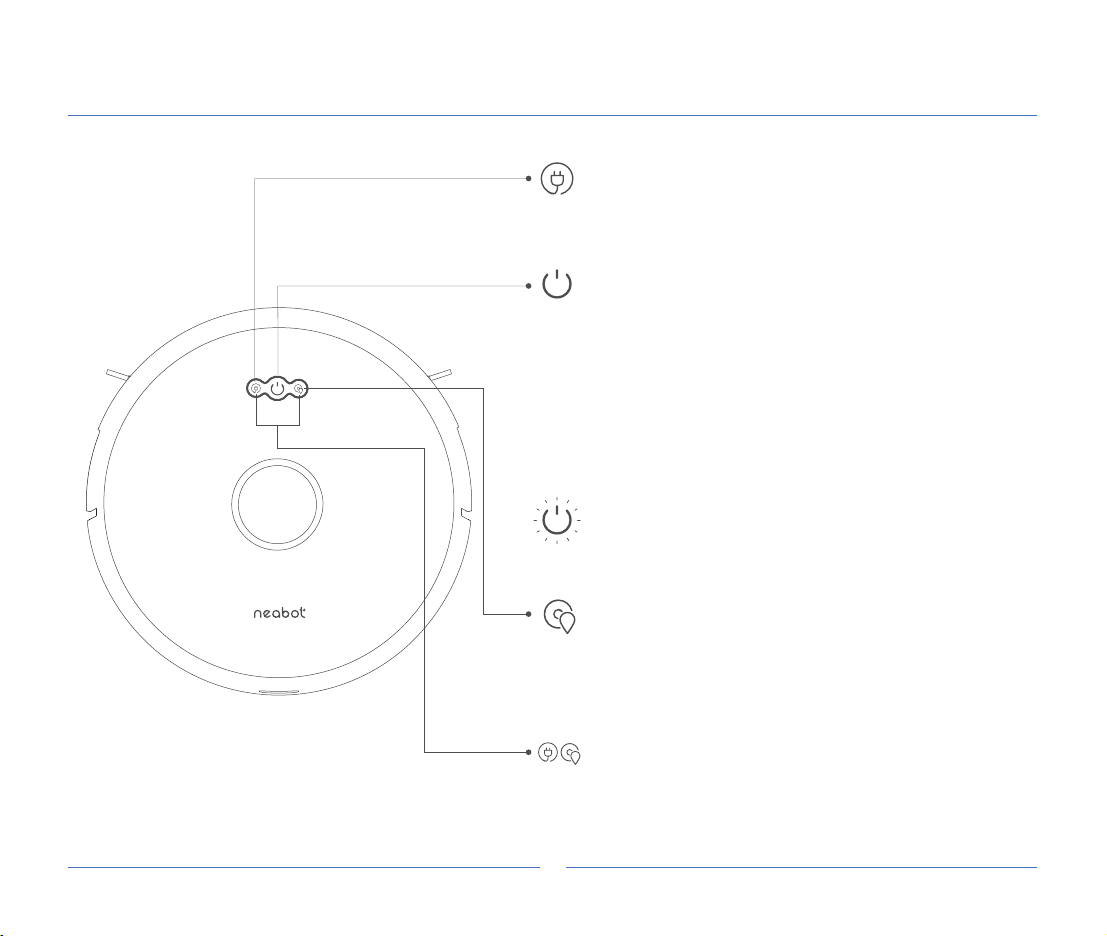
Recharge
Short press to recharge.
During the recharging process, short press to pause,
press again to continue recharging.
Start/Pause
Short press to clean all, and automatically recharge
after cleaning.
During cleaning, short press to pause, press again to
continue cleaning.
In shutdown mode, long press for 5s to turn on.
In standby mode, long press for 5s to shut down.
Note: when the neabot is charging on the
charging station, it will automatically turn on, and it
cannot be turned off during charging.
Spot Cleaning
Short press the spot cleaning button to start. This
mode is used to clean a square area of
1.6*1.6m/5.2*5.2ft centered on the robot. After the
cleaning is finished, the robot will automatically
return to the starting position and stop working.
Network Configuration
Long press the spot cleaning button and the recharge
button for 5 seconds to reset the WiFi.
Light Indication
The robot is cleaning: White light flashes.
The robot is charging: Orange light is on.
The robot is fully charged: White light is on.

About Your Robot Vacuum
Top View
Laser ranging sensor
Speaker
Dust box release button
Dust box
Wall-mounted
TOF sensor
Laser head cover
pressure sensor
Infrared auxiliary
recharge sensor
Air outlet
5

About Your Robot Vacuum
Side View
Bottom View
Reset hole
(short press to turn off)
Charging contacts
Front caster wheel
Left brush
Cliff sensor
Left drive wheel
Right brush
Right drive wheel
Main brush
6
Table of contents
Other neabot Vacuum Cleaner manuals