
MYCRONOZ ZeBuds Pro User manual

ZeBuds Pro
- FULL USER GUIDE -

ENGLISH
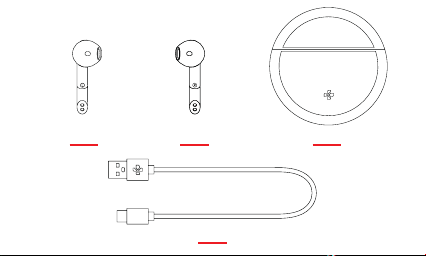
LEFT EARBUD WIRELESS CHARGING CASE
USB-C CHARGING CABLE
RIGHT EARBUD
OVERVIEW
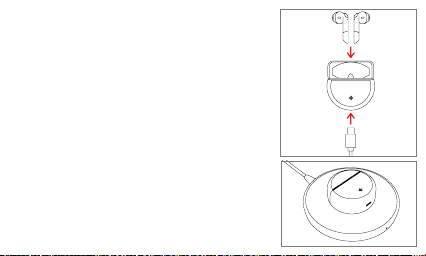
CHARGING
Before the first time use, make sure to fully charge your
ZeBuds Pro inside their charging case with the USB-C
cable for about 2 hours.
You can also charge your ZeBuds wirelessly into their
charging case with a Qi-certified charging pad.
Make sure to place the center of the charging case on
the center of the wireless charger.
ZeBuds Pro and its charging case will reach maximum
battery capacity in order to provide you with up to 20
hours playtime.
ZeBuds Pro can deliver about 4 hours of battery life.
When reaching low battery level, you will hear an audio
indication in your earbuds inviting you to put them back
in the charging case to recharge them.
It will take about 90 minutes to fully charge your earbuds
in the charging case. Once the charging case is fully
charged, you can recharge your earbuds up to 4 times
until it reaches low battery.
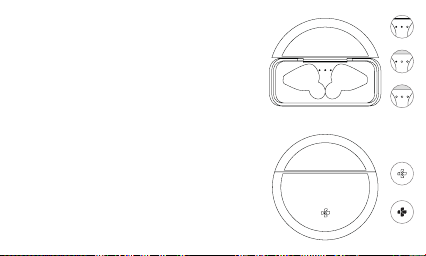
LED INFORMATION
Battery status
There are 3 LED indicators in the charging case
to indicate its built-in battery level.
I
3 LEDs ON = between 75% and 100%
I
2 LEDs ON = between 25% and 75%
I
1 LED ON = below 25% and requires your attention
I
LED OFF = 0% battery
Charging status
There is 1 LED indicator in front of the charging case
to indicate the charging status of the case itself.
I
Start charging The LED indicator will start flashing
slowly for 15 seconds before it turns o.
Note: Each time you open or close the charging case,
the indicator light stays on for 3 seconds before
going o.
or
or
or

PAIRING
HOW TO PAIR WITH ANOTHER SMARTPHONE
In order to pair your ZeBuds Pro with your smartphone, please follow the below instructions:
• Search for the MyKronoz App in the App store or Google Play store, download and install the
App on your mobile device.
• Open the MyKronoz App on your mobile device. Sign up if you are a new member or login with
your existing account.
• Ensure the Bluetooth®is enabled on your mobile smartphone.
• Then follow the on-screen instructions.
• When your ZeBuds Pro are successfully paired, you will be notified on your mobile device’s
screen and white LED on either earbud will stay solid state for one second then turn o.
• You’re now ready to enjoy your new ZeBuds Pro.
Note: Thanks to the MyKronoz mobile app you’ll also enjoy new features and performance
improvements.
Android user: To pair your ZeBuds Pro with another phone, please unpair ZeBuds Pro from
MyKronoz mobile app first, then perform a new pairing procedure with another smartphone
as mentioned above.
iOS user: To pair your ZeBuds Pro with another phone, please forget ZeBuds Pro from your
iOS device’s Bluetooth list, then perform a new pairing procedure with another smartphone
as mentioned above.
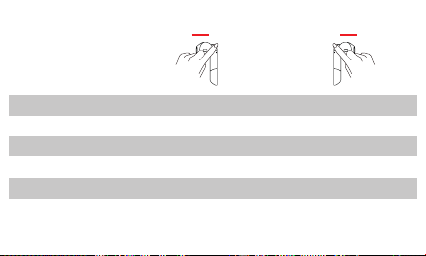
OPERATIONS
Play / Pause
Next track
Voice control
Answer call
Reject call
End call
x2
x3
x2
Press & hold
for 3 seconds
x2
x2
x3
x2
Press & hold
for 3 seconds
x2
or*
or*
or*
or*
*use either earbud to conduct these operations
LEFT RIGHT

TROUBLESHOOTING
I
Bluetooth®disconnection issues
ZeBuds Pro are Bluetooth®5.0 earphones, which provide a more stable connection with
compatible mobile devices and less interference.
•
Make sure that both devices are within Bluetooth®range.
•
Ensure both earphones have enough battery power.
•
Make sure to install all available updates to the MyKronoz app.
•
Put the earbuds back to the charging case. Then take the earbuds out of the case. Reboot
your Bluetooth®device and pair the earbuds once again after restarting.
I
Bluetooth®connection issues
•
Insert the both ZeBuds back into the case and open the case to enter pairing mode again.
•
Make sure the mobile device is within 10m of ZeBuds when trying to pair initially.
•
Double tap on the top section (touch area) of 2 earbuds at the same time to reconnect both
earbuds together. If it works, the 2 earbuds will start blinking very quickly, then the light stays
on for 2 seconds. After that, the lights blink in normal speed.
I
Can’t hear other end on phone calls / Poor Audio Quality
•
Adjust the volume on the connected mobile device.
•
Move to another area with better quality signal.
•
Make sure your ZeBuds are fully and properlyinserted into your ears.
•
Ensure the mobile device is within 10m of ZeBuds while on a call.

TECH SPECS
WHAT’S IN THE BOX
I
EARBUDS:
Bluetooth®5.0 - Dimensions: 17.8*43*19mm - Weight: 4 g each - Battery capacity: 40 mAh
Battery life: up to 4h of playtime - Charging time: 20 min for 1h listening / 1h30 full charge
Dual microphone - Speaker impedance: 32 - Frequency: 20Hz/20KHz - IPX4 water
resistant - Operating temperature: -10°C to +60°C
I
WIRELESS CHARGING CASE:
Dimensions: Ø 55,5 x 22mm - Weight: 48 g - Battery capacity: 380 mAh - Battery life: 16h
of extra playtime - Charging time: 1h30 for full charge - Wireless charging (Qi compatible
or via USB-C cable
Compatible with iOS and Android devices.
1 year international warranty.
I
ZeBuds Pro with wireless charging case
I
1x USB-C charging cable
I
1x Quick start guide

FRANÇAIS
Table of contents
Languages:


