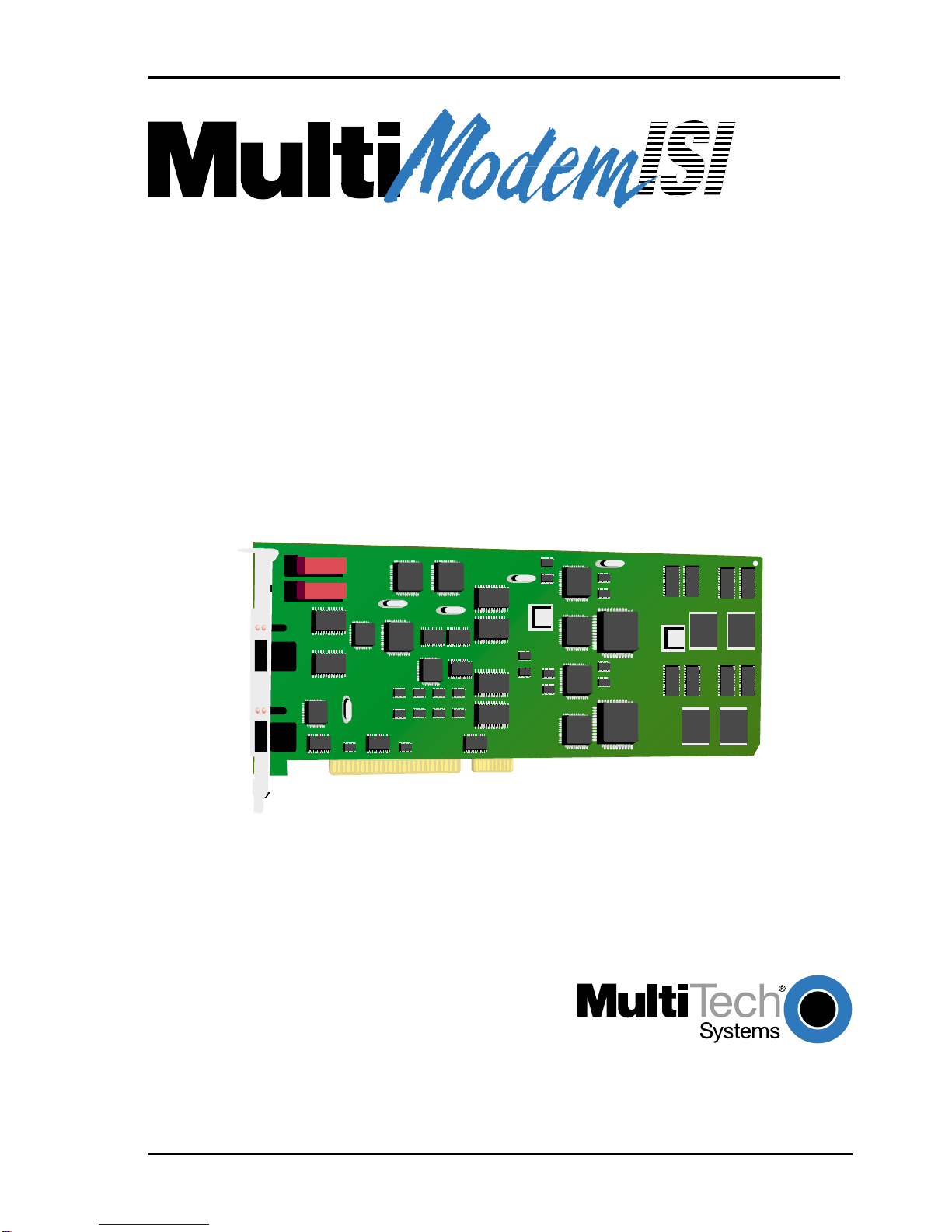
Multitech ISIHI-2S User manual

MultiModemISI Hybrid Series
Models ISIHP- 1S/2S/2U,
ISIHP- 4S/4U/4SD,
and ISIHI-2S/2U
Quick Start Guide

MultiModemISI Hybrid Server Cards
Models ISIHP-1S/2S/2U/4S/4U/4SD & ISIHI-2S/2U
Quick Start Guide
82093804 Revision E
All rights reserved. This publication may not be reproduced, in whole or in part,
without prior expressed written permission from Multi-Tech Systems, Inc. All rights
reserved.
opyright © 2004 by Multi-Tech Systems, Inc.
Multi-Tech Systems, Inc. makes no representation or warranties with respect to the
contents hereof and specifically disclaims any implied warranties of merchantability
or fitness for any particular purpose. Furthermore, Multi-Tech Systems, Inc.
reserves the right to revise this publication and to make changes from time to time
in the content hereof without obligation of Multi-Tech Systems, Inc., to notify any
person or organization of such revisions or changes.
Record of Revisions
Revision Description
D Updated info on Win2000 , Windows Me, Linux-RPM, Novell,
regulatory, & safety (5/8/01).
E Revised to remove V100 capability.
Patents
This product is covered by one or more of the following U.S. Patent Numbers:
5.301.274, 5.309.562, 5.355.365, 5.355.653, 5.452.289, 5.453.986. Other patents
Pending.
Trademarks
The Multi-Tech logo is a registered trademark of Multi-Tech Systems, Inc.
NetWare is a registered trademark of Novell, Inc.
Pentium is a registered trademark of Intel orporation.
S O is a registered trademark of Santa ruz Operation, Inc.
UNIX is a registered trademark of X/Open ompany, Ltd.
Windows 95 and Windows NT are registered trademarks of Microsoft.
Multi-Tech Systems, Inc.
2205 Woodale Drive
Mounds View, Minnesota 55112
(763) 785-3500 or (800) 328-9717
Fax (763) 785-9874
Tech Support (800) 972-2439
Internet Address: http://www.multitech.com

Contents
Chapter 1: Introduction
About This Manual..........................................................................12
Peripiheral Component Interconnect (PCI) for ISIHP Cards ...........12
Communication Protocols for ISIHP Ports ......................................13
Chapter 2: Hardware Installation
Introduction.....................................................................................16
ComputerRequirements.................................................................16
Shipping Contents ..........................................................................16
Safety Warnings Telecom ...............................................................17
Hardware Installation Procedure ....................................................17
LED Indicators................................................................................20
Chapter 3: Software Installation
Introduction.....................................................................................26
Install ISIHI Software for Windows 2000.........................................26
Recommended Base I/O Address and IRQ Values .......................... 26
Install ISIHP Software for Win 2000................................................28
ISIHx for Win 2000: Install ISI Management Software ....................29
ISIHx for Win 2000: Install TAs & Modems to COM Ports..............30
Install Terminal Ada ters to COM Ports ......................................... 31
Install modems to COM Ports.......................................................... 33
Remove ISIHx Driver (Win 2000) ...................................................37
ISIHx Software Install for Windows NT 3.51/4.0 .............................37
Recommended Base I/O Address and IRQ Values .......................... 38
Install ISIHx TAs & Modems to COM Ports in Windows NT............40
To install terminal ada ters: ............................................................. 40
To install modems ............................................................................ 42
Remove ISIHx Card and Driver in Windows NT 3.51/4.0................46
I/O Addresses and IRQ Codes............................................................... 46
Configuring the TerminalAdapter....................................................47
Introduction ...........................................................................................47
North American Users ...................................................................... 47
International Users ........................................................................... 48
O tional Settings ................................................................................... 48
ISDN TA Configuration Utility ............................................................. 50
ConfigMenu Configuration Utility ........................................................ 52
Terminal Ada ter AT Commands .......................................................... 53

Chapter 3: Software Installation (continued)
NetWare Driver Installation .............................................................54
Configuring Ports for NetWare Connect .......................................... 55
Removing the Driver (Novell) ......................................................... 55
SCO Open Server 5 Driver Installation ...........................................56
To install from CD-ROM: ..................................................................... 56
To format a flo y disk for SCO5: ........................................................ 56
To untar the driver file and co y files onto flo y disk: ....................... 56
To install driver from flo y disk.......................................................... 58
MultiTech Installation Scri t ................................................................. 59
Activating Ports in SCO O en Server 5........................................... 62
Removing the Driver (SCO O en Server 5) .................................... 63
Linux Driver for ISI Server Cards (for PCI and ISA busses)...........64
LINUX: Pre-Installation Issues ............................................................. 64
LINUX: Co ying the driver from the media ......................................... 64
LINUX: Co ying & untarring the driver from CD-ROM .....................64
LINUX: Co ying & untarring the driver from a flo y ........................65
LINUX: Driver installation and loading ............................................... 65
LINUX: Setting the baud rate ............................................................... 66
LINUX: Verifying the orts...................................................................67
LINUX: TTY Devices Created by the Drivers: .................................... 67
LINUX -- Dial-in configuration: ........................................................... 69
LINUX -- PPP setu :............................................................................. 69
Removing the ISI Driver (Linux) .......................................................... 70
RedHat Linux 6.2/7.0 RPM Drivers for
ISI Server Cards (PCI bus only) .....................................................72
LINUX-RPM: Pre-Installation Issues ................................................... 72
LINUX-RPM: Co ying the driver from the media ............................... 72
LINUX-RPM: Co ying the driver from CD-ROM ...............................72
LINUX-RPM: Co ying the driver from a flo y ..................................73
LINUX-RPM: Verifying the orts ......................................................... 75
LINUX-RPM: TTY Devices Created by the Drivers ............................ 75
LINUX-RPM -- Dial-in configuration: ................................................. 77
LINUX-RPM -- PPP setu : ................................................................... 77
Removing the ISI Driver (Linux-RPM) ................................................78
Warning About the Flashing of Terminal Ada ter Ports ....................... 78
Firmware U date for ISIHx Terminal Ada ters ....................................78

Chapter 4: Warranty, Service, and Tech Support
Limited Warranty ............................................................................81
Upgrades and Support ...................................................................81
Service ...........................................................................................82
Index ..............................................................................................83


Introduction
MultiModemISI Hybrid Server Cards, ISIHP & ISIHI Series 7
Welcome to Multi-Techs MultiModemISI Hybrid Series of
ISDN BRI server cards. The series consists of eight models:
The 2S/2U and 4S/4U models are all multi ort hybrid ISDN cards that
can be lugged into a server ex ansion slot (PCI or ISA, as listed) for
a lications that involve ISDN or modem calls over ISDN BRI lines.
When the ISI card is used with Remote Access Servers (RAS), remote
users can call in using either modems or ISDN terminal ada ters
(TAs). For V.90 modem calls, a 56kb s download s eed can be
achieved without the ex ense of T1, E1, or ISDN PRI lines. S-models
use the ISDN S interface; U-models use the ISDN U interface.
This manual also describes the ISIHP-1S and the ISIHP-4SD cards.
The ISIHP-1S is a revised version of the ISIHP-2S card that has been
altered to acce t one ISDN Basic Rate Interface line rather than two.
ledoM suB
epyT
NDSIfo#
seniLIRB
detpeccA
NDSI
-retnI
ecaf
fo#
medoM
stroP
.mreT#
.padA
stroP
.xaM
tnerrucno
snoisseS
S2-PHISIICP2S44 4
U2-PHISIICP2U44 4
S4-PHISIICP4S88 8
U4-PHISIICP4U88 8
S2-IHISIASI2S444
U2-IHISIASI2U444
S1-PHISIICP1S222
DS4-PHISIICP4Senon8 8

Introduction
8 MultiModemISI Hybrid Server Cards, ISIHP & ISIHI Series
The ISIHP-4SD is a serial interface card equi ed with four terminal
ada ters only (no analog modems are resent). The ISIHP-4SD is
otherwise like the ISIHP-4S/4U models.
The ISIHP-2S/2U contains two terminal ada ters and four V.90/
K56flex modems. The ISIHP-2S/2U uses two ISDN BRI lines (each
offering two B-channels) to connect to the telco and these connect to
its two built-in terminal ada ters. In addition to handling ISDN calls,
each terminal ada ter can detect analog modem and fax calls. When
analog calls are detected, they are automatically connected to one of
the four V.90 modems on the ISIHP board. In this way, these hybrid
cards can handle either ISDN calls or analog modem calls. Although
the ISIHP-2S/2U contains four ISDN TA orts and four analog
modem orts, only four orts can be active at any one time (because
only four B-channels are resent). See Figure 1-1. The ISIHI-2S/2U
function like the ISIHP-2S/2U units but have an ISA-ty e bus which
requires manual setting of the I/O address and the interru t request
(IRQ).
The ISIHP-4S/4U works like the ISIHP-2S/2U but contains four
terminal ada ters and eight V.90/K56flex modems. The 4S and 4U
models each accommodate four ISDN BRI lines. The configuration of
modem and TA orts for the 4S and 4U models is shown in Figure 1-
2.

Introduction
MultiModemISI Hybrid Server Cards, ISIHP & ISIHI Series 9
The ISIHP-4SD contains four terminal ada ters only (the daughter
card containing the eight modems is absent). Since it accommodates
four ISDN BRI lines (each offering two B-channels), it su orts eight
inde endent digital data connections.
Each terminal ada ter a ears as two orts to the server PC using the
ISI card.
ISIHx cards also su ort dial-out a lications via their modems or
terminal ada ters.
MultiTechs ISI Management Software is designed to monitor data
traffic and control the modems/TAs of ISIHx server cards o erating
in the Windows 2000 Server and Advanced Server OSs. (See the ISI
Management Software User Guide, doc #88301450.)
The ISIHP-2S/2U and ISIHI-2S/2U cards each offers eight RAS orts
using two Basic Rate Interface (BRI) ISDN lines; the ISIHP-4S/4U
has 16 orts using four BRI ISDN lines. The eight orts of the 2S/2U
models allow a server to acce t any combination of analog modem
and digital ISDN calls, making a maximum of four simultaneous
inde endent data connections (sessions). For the ISIHP-4S/4U, its
sixteen orts allow a server to acce t any combination of analog
modem and digital ISDN calls, making a maximum of eight
simultaneous inde endent data connections. This arrangement gives
the user the flexibility to customize the settings of the terminal
ada ters and modems. The terminal ada ters on the ISIHP-4SD can
make eight simultaneous inde endent connections.

Introduction
10 MultiModemISI Hybrid Server Cards, ISIHP & ISIHI Series
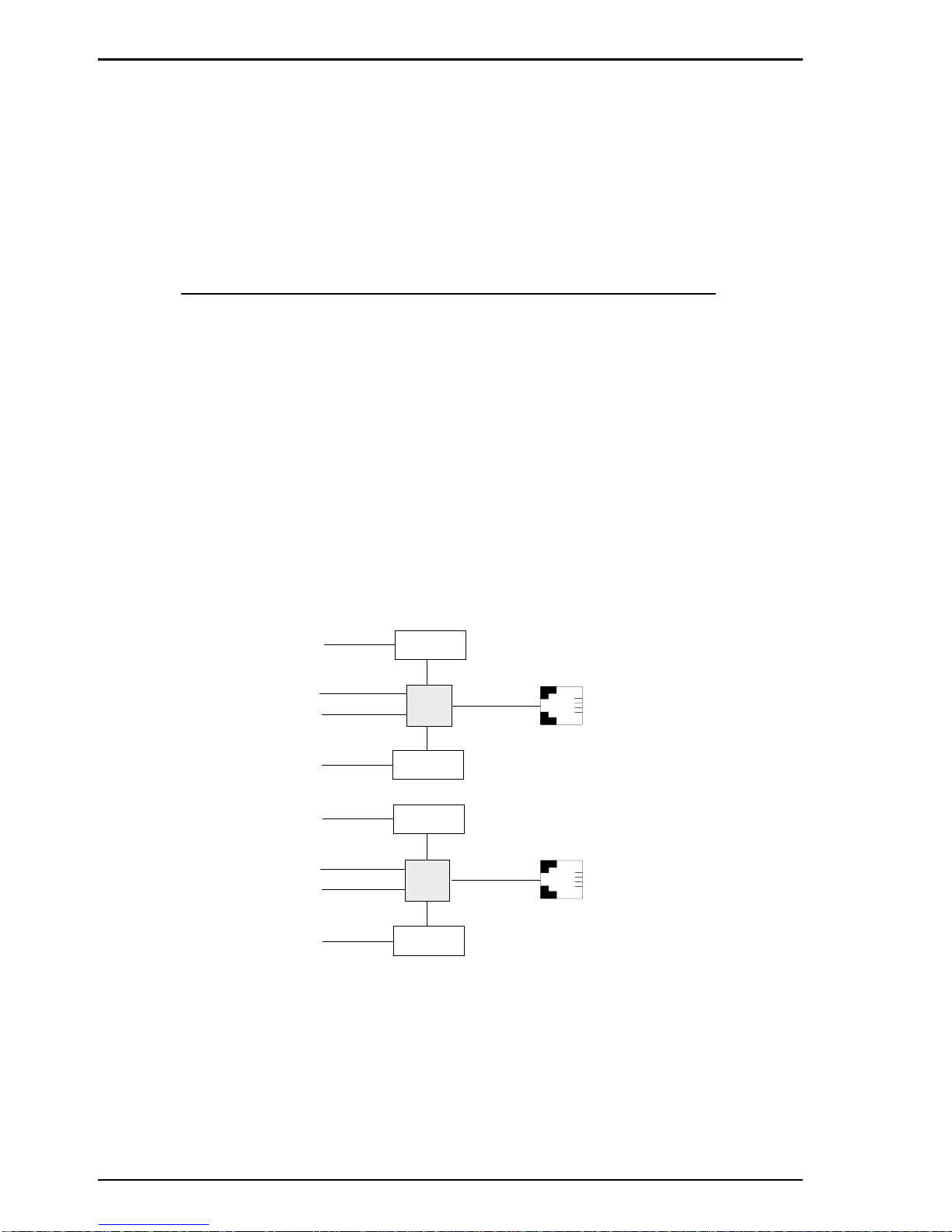
From the ers ective of the server PC, the ISIHP-2S/2U (or ISIHI-2S/
2U) is an eight- ort serial card with eight devices ermanently
attached to the serial orts (Figure 1-1). The first four orts are the
two terminal ada ters, each of which a ear as two orts. The
remaining four orts are the four central site modems. The following
chart summarizes the correlation of orts and devices.
2S/2U Port # Device ISDN Line Number
1TA 1
2TA 1
3TA 2
4TA 2
5 Modem 1
6 Modem 1
7 Modem 2
8 Modem 2
RJ-45 jack
Com Ports
Line 1
Line 2
Modem
Modem
Modem
Modem
TA
TA
7
8
3456
3
4
3456
6
2
1
5ISDN
RJ-45 jack
Figure 1-1: Modems and Terminal Adapters of ISIHP-2S/2U and ISIHI-2S/2U.
Other manuals for ISIHI-2S
1
This manual suits for next models
7
Table of contents
Other Multitech PCI Card manuals
Multitech
Multitech MultiConnect MTPCIE-H5 Instruction Manual

Multitech
Multitech ISI9234PCIE User manual

Multitech
Multitech ISIHI-2S User manual
Multitech
Multitech MultiConnect MTPCIE-EV3 Instruction Manual

Multitech
Multitech ISI4604-PCI Technical manual

Multitech
Multitech MultiModem ISI5634UPCI-8 User manual
Popular PCI Card manuals by other brands

Conrad Electronic
Conrad Electronic 97 46 71 operating instructions

Micro Innovations
Micro Innovations USB650A Quick installation guide

KTI Networks
KTI Networks KF-310 user guide

Asus
Asus SpaceLink WL230 user manual

SIIG
SIIG SC2475 Quick installation guide

TRENDnet
TRENDnet TEW-703PI Quick installation guide