Mova L600 User manual

MOVA L600 Robot Vacuum and Mop Cleaner
User Manual
Read this manual carefully before use and retain it for future reference.

EN
DE
FR
IT
ES
User Manual
Benutzerhandbuch
Manuel d’utilisation
Manuale utente
Manual de usuario
1
21
42
63
84

1
Usage Restrictions
Safety Information
This product can be used by children aged 8 years and above and persons with
physical, sensory, intellectual deciencies, or limited experience or knowledge
under the supervision of a parent or guardian to ensure safe operation and to
avoid any risks. Cleaning and maintenance shall not be done by children without
supervision.
Children shall not play with this product. Ensure children and pets are kept at a
safe distance from the robot while it is operating.
This product is for oor cleaning in a home environment only. Do not use it
outdoors, on non-oor surfaces, or in a commercial or industrial setting.
Do not use the robot in an area suspended above ground level without a
protective barrier.
Do not use the robot at an ambient temperature above 40° C or below 0° C or on a
oor with liquids or sticky substances.
Pick up any cables from the oor before using the robot to prevent it from
dragging them while cleaning.
Remove fragile or small items from the oor to prevent the robot from bumping
into and damaging them.
EN

2
Usage Restrictions
Safety Information
Batteries and Charging
Do not use any third-party battery, charger, or charging dock. Use only with RCS0
supply unit.
EN
Keep hair, ngers, and other body parts away from the suction opening of the robots.
Keep the brush cleaning tool out of reach of children.
Do not place children, pets, or any item on top of the robot regardless of whether
it is stationary or moving.
Do not use the robot to clean any burning objects.
Do not vacuum hard or sharp objects.
Make sure the robot is turned o and the charging dock is unplugged before
cleaning or performing maintenance.
Do not wipe any part of the product using a wet cloth or liquids
Please use this product in accordance with the instructions in the User Manual.
Users are responsible for any loss or damage that arise from improper use of this
product.

3
Safety Information
Hereby, Dreame Trading (Tianjin) Co., Ltd. declares that the radio equipment type RLS4 is in compliance with Directive
2014/53/EU. The full text of the EU declaration of conformity is available at the following internet address:
www.movaglobal.com
Do not attempt to disassemble, repair, or modify the battery or charging dock on
your own.
Do not place the charging dock near a heat source.
Do not use a wet cloth or wet hands to wipe or clean the dock's charging
contacts.
Do not improperly dispose of old batteries. Unneeded batteries should be
discarded at an appropriate recycling facility.
If the power cord becomes damaged or broken, stop using it immediately and
contact after-sales service.
Make sure the robot is turned o when being transported and kept in its original
packaging if possible.
If the robot will not be used for an extended period, fully charge it, then turn it o
and store in a cool, dry place. Recharge the robot at least once every 3 months to
avoid over-discharging the battery.
This product contains batteries that can only be replaced by qualied technicians
or after-sales service.
EN

4
Accessories
Note: The illustrations in this manual are for reference only. Please refer to the actual product.
Charging Dock
Water Tank Side Brush
Cleaning Tool Power Cord
Mop Pad
Product Overview
EN

5
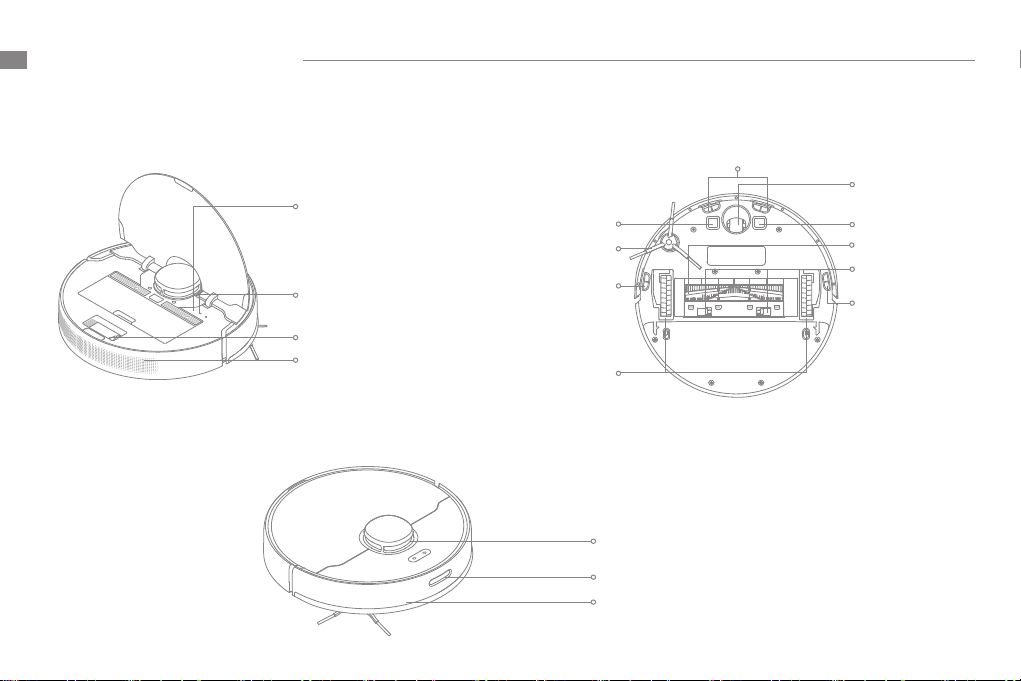
Robot
Power/Clean Button
• Press and hold for 3 seconds
• Press to begin cleaning after the robot is powered on
Dock Button/Spot Clean Button
• Press to send robot back to the charging dock
• Press and hold for 3 seconds to start Spot Clean Mode
Status Indicator
• White: Cleaning/ Cleanup is completed/ Charging is
completed
• Blinking White: Return to dock to charge when the
battery power is not low
• Breathing White: Vacuum is charging when the battery
power is not low
• Blinking Orange: Return to dock to charge when the
battey power is low/Error
• Breathing Orange: Vacuum is charging when the battey
power is low
Product Overview EN
6
Robot
Robot Sensors
Reset Button
• Press and hold for 3
seconds to restore the
robot to factory settings
Wi-Fi Indicator
Cleaning Tool
Air Outlet/Speaker
Returning-to-dock Sensor
Collision Buer
LDS Laser Sensor
Cli Sensor
Cli Sensor
Cli Sensor
Main Wheels
Main Brush
Charging ContactsCharging Contacts
Brush Guard Clips
Omnidirectional
Wheel
Side Brush
Product Overview
EN

7
Dust Bin Mopping Module
Charging Dock
Water Inlet
Water Tank
Mop Pad
Attaching Area
Filter
Bin Cover
Bin Clip
Signaling Area
Power Port
Charging Contacts
Water Tank Release Clip
Product Overview EN

8
> 0,5 m
> 0,5 m> 1,5 m
6.5h
Note:
• Fully charge your robot before rst-time use.
• Don't install the mopping module while charging. Be extra careful with
wet mop as it can damage the oor.
1. Remove the protective lm 3. Place the charging dock on the level ground
against the wall and connect it to a power outlet
2. Install the side brush
Click
4.Place the robot onto the charging dock to
recharge. The robot will turn on automatically and
begin recharging
Note:
• Keep the immediate area 1.5m in front of the charger and 0.5m to both
sides of the charging dock clear of objects.
• To ensure you can connect to the robot with your phone well, make sure
the robot and charging dock are within the range of Wi-Fi.
• Do not place the charging dock in an area with direct sunlight or where
other objects might block the signal, as this may hinder the robot from
returning to the charging dock.
Note: Install the side brush until it clicks into place.
Preparation Before Use
Remove the protective lms on the robot and charging dock.
Tidy up Any
Loose Cord
Battery Level Indicator
• White: Battery level
is more than 15%
• Orange: Battery
level is less than 15%
EN
Table of contents
Languages:
Other Mova Vacuum Cleaner manuals