Mohu channels User manual

PERSONAL TV GUIDE QUICK START GUIDE
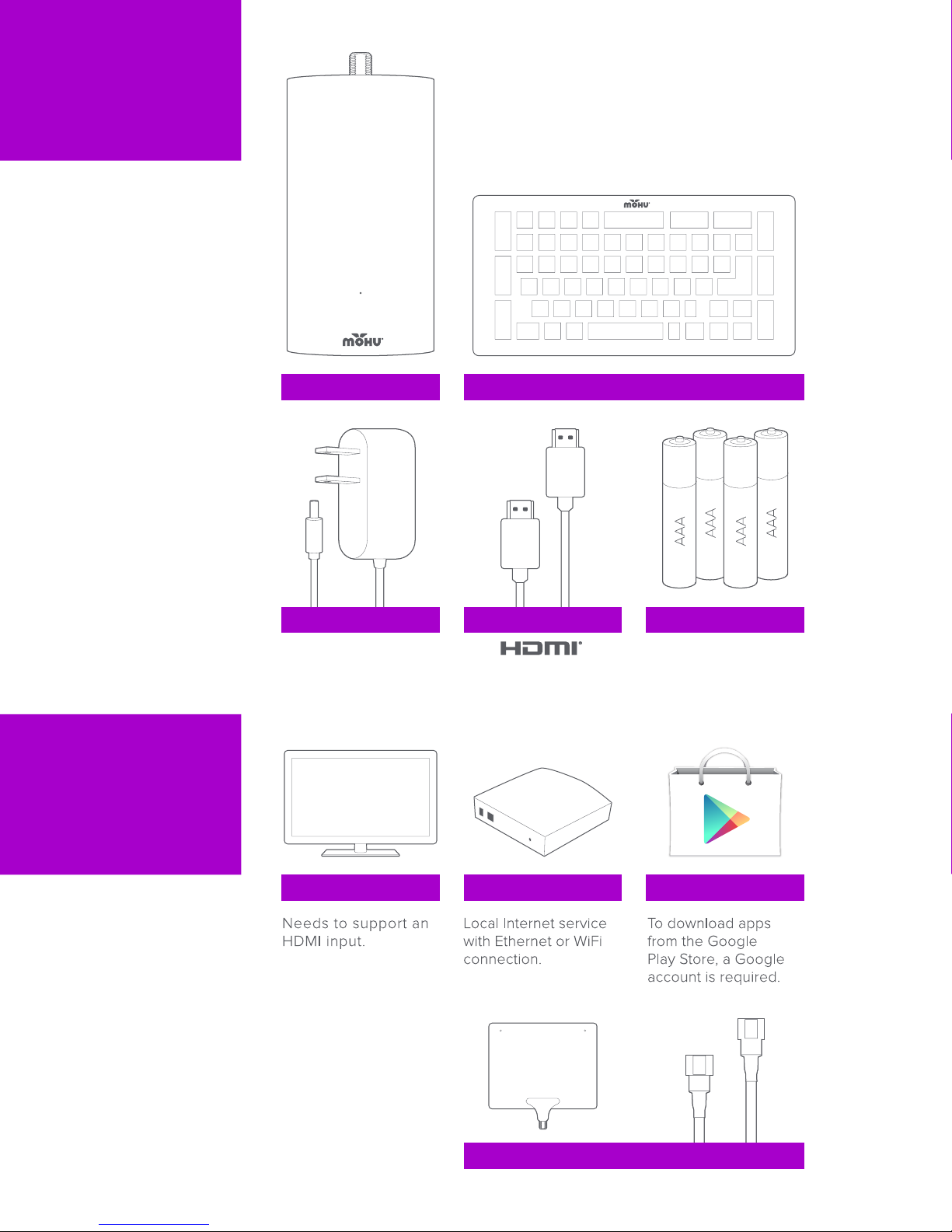
CHANNELS DEVICE
4 AAA BATTERIES
CHANNELS REMOTE
HDMI® CABLEPOWER ADAPTER
TV ANTENNA & COAXIAL CABLE
GOOGLE ACCOUNTINTERNETTV / MONITOR
WHAT’S IN
THE BOX?
WHAT
ELSE DO
YOU
NEED?

Mohu Channels
Serial No.: MC011311-00001
FCC ID: 2ABUT-MHCHBOX01 IC: 11925A-MHCHBOX01
MAC: D0:76:50:90:00:01
Model No.: MH-CHBOX01
HDMI® PORT
USB PORT* POWER PORTETHERNET PORT
COAXIAL CABLE
CONNECTOR
VENTS
STATUS
LIGHT
MOHU®
CHANNELS
LABEL
ABOUT
DEVICE
BOTTOM / PORTS
FRONT / BACK

YOUR
REMOTE
PRIMARY FUNCTIONS PROGRAMMABLE KEYS
QWERTY KEYBOARD CONTROLS
The Channels remote can control your TV (or
other IR device). Setup with the
function.
L
M
N
O
Volume UP | MUTE | DOWN.
Turn TV ON | OFF.
J
K
OM NL KJ
YOUR
REMOTE
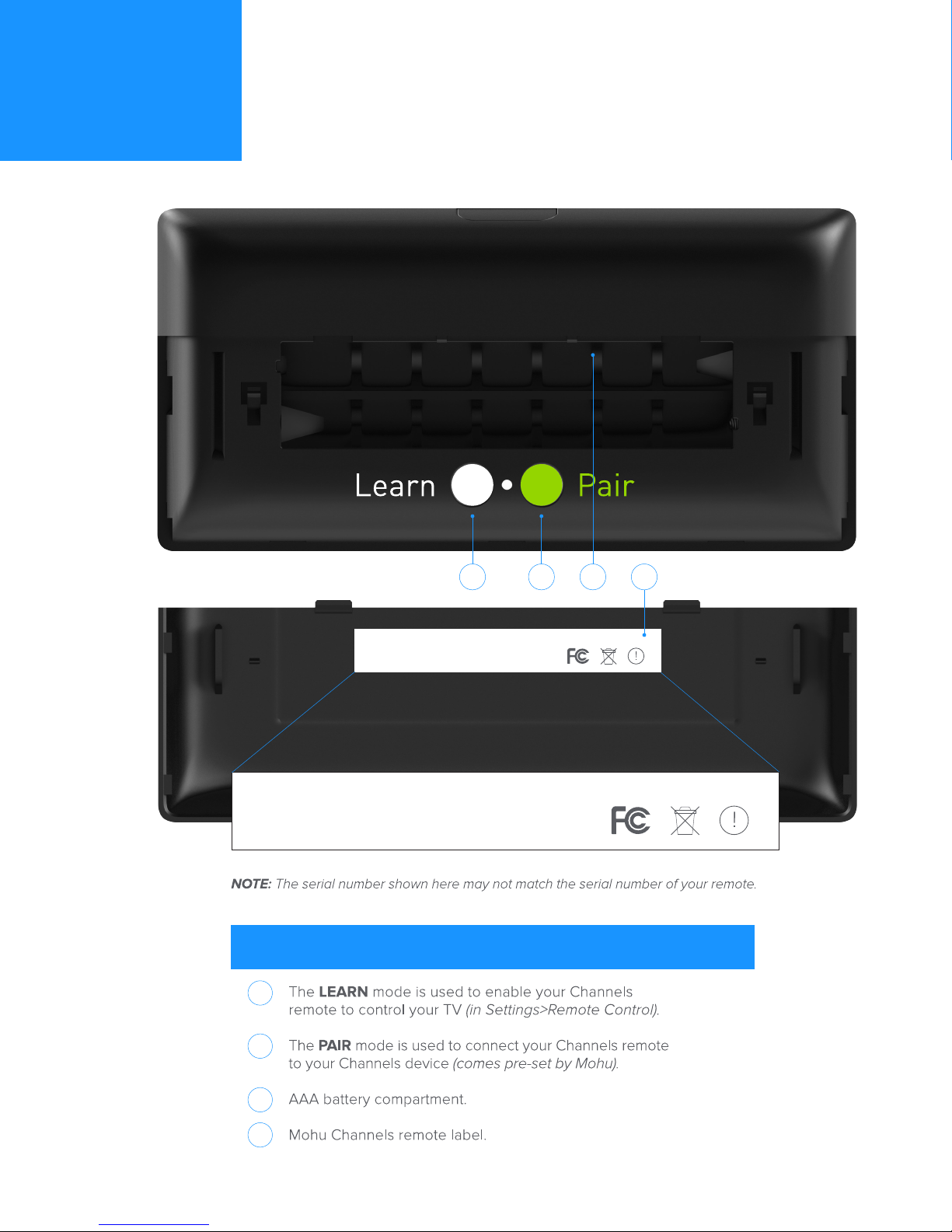
BACK OF REMOTE FUNCTIONS
1
2
3
4
Mohu Remote
Serial No.: MR-RF125-011311-00001
FCC ID: 2ABUT-MHCHRMT01 IC: 11925A-MHCHRMT01
Model No.: MH-CHRMT01
Mohu Remote
Serial No.: MR-RF125-011311-00001
FCC ID: 2ABUT-MHCHRMT01 IC: 11925A-MHCHRMT01
Model No.: MH-CHRMT01
31 2 4
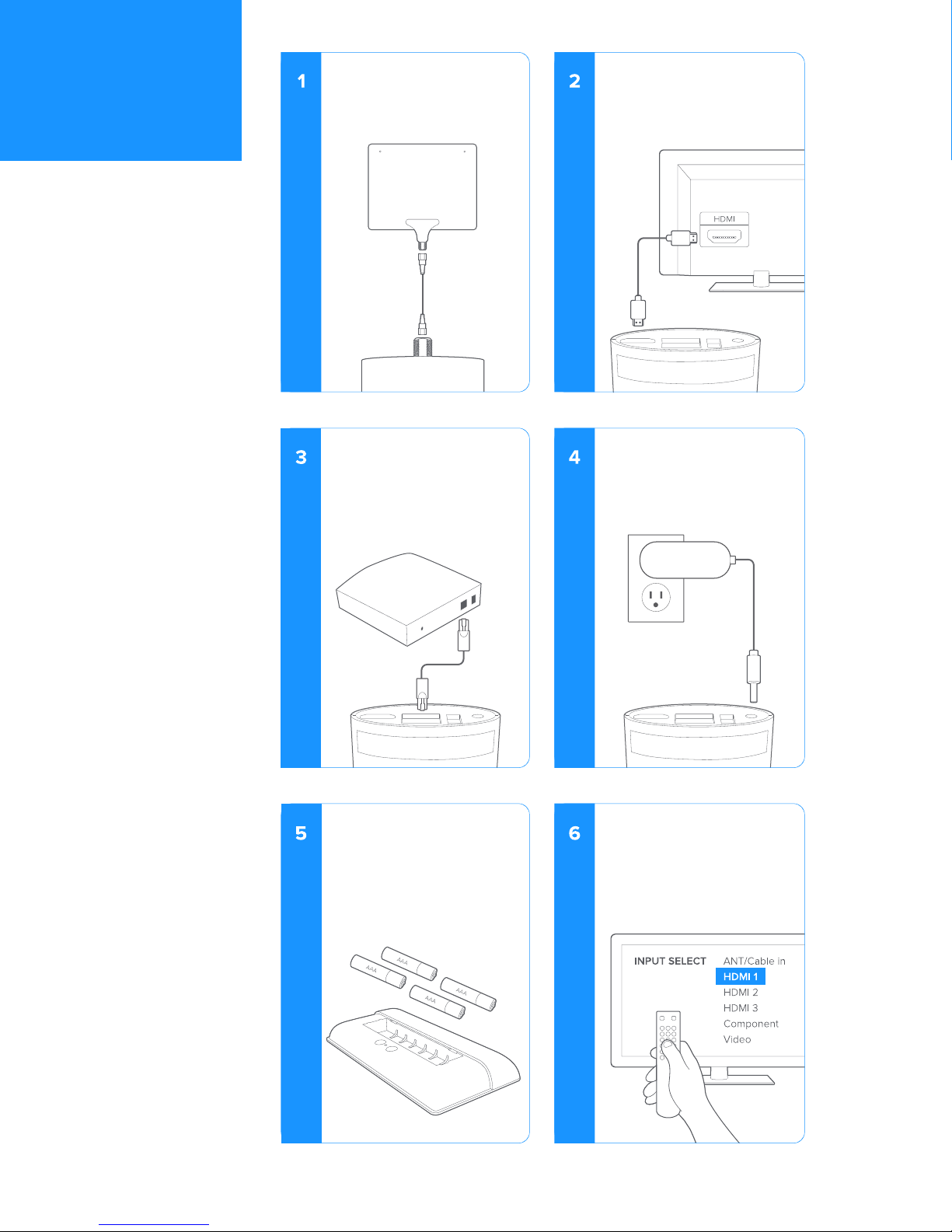
You can access the
Internet two ways:
Plug Ethernet in directly.
OR
Through WiFi.
(Discussed later in Setup.)
Plug in power adapter.
Slide o back cover of
your Channels remote
and insert four AAA
batteries into the remote
in the orientation labeled
in the battery compart-
ment.
Turn on your TV/monitor
and go to the INPUT menu
on your TV. Select the
corresponding HDMI input
of your Channels device.
Connect your antenna
via coaxial cable to the
top of your Channels
device.
Plug your HDMI cable
from the Channels device
to the HDMI input on
your TV/monitor.
CONNECT
DEVICE

Remote Control
System Preferences
Internet Connection
Antenna Scan
DEVICE SETUP
After powering up your Channels device, a slideshow of quick
tips will cycle through before the startup screen appears. The
screen will automatically appear after 10 seconds
and take you into Step 1. The instructional video will then walk
you through the rest of .
REMOTE CONTROL
Enables you to control
your TV with your new
Channels remote.
INTERNET
CONNECTION
Choose Ethernet
or WiFi.
Skipping this step will
disable all web access
and streaming apps.
To change in the future,
click on the gear icon in the top right of your .
SYSTEM PREFERENCES
Set your time zone, display
clock and language.
ANTENNA SCAN
Checks with a built-in
channel listings in your
area.
Skipping this step will
disable OTA features.
SET UP
DEVICE

APP
APP
5.1
17.1
WEB
CHANNEL GUIDE 10:00 AM
10:00 10:30 11:00
CHANNEL #/TYPE
CHANNEL NAME
SCROLL ▲ / ▼
PROGRAM NAME
TIME LINE
SCHEDULED PROGRAM
CURRENT TIME
SCROLL /
GUIDE
This icon directs
you to your Channel
Guide where all of
your channels live.
ADD CHANNELS
Add your favorite
apps, websites and
OTA as channels to
your Channel Guide.
EDIT GUIDE
Easily edit the order
of your channels or
delete any channels
you don't want from
your Channel
Guide.
SETTINGS
Antenna Scan
Internet Connection
Remote Control
Language
Info/Updates
Audio/Video
Date & Time
Register
Reset
The is your home screen for all your OTA broadcast TV, applications
and web content. It enables you to create your own personal TV guide.
CHANNEL GUIDE
WEB
OTA
APP
ADD CHANNELS
OTA
Enter your zip code (USA or Canada) to
begin the channel scan process.
WEB
Learn how to add your favorite web-
sites as channels to your .
APP
Add apps as channels to your
using the Google Play Store or
through an external USB device using
the USB port on the Channels device.
Mohu Channels combines three types of video content – live
broadcast TV, web content and apps – into a single channel guide.
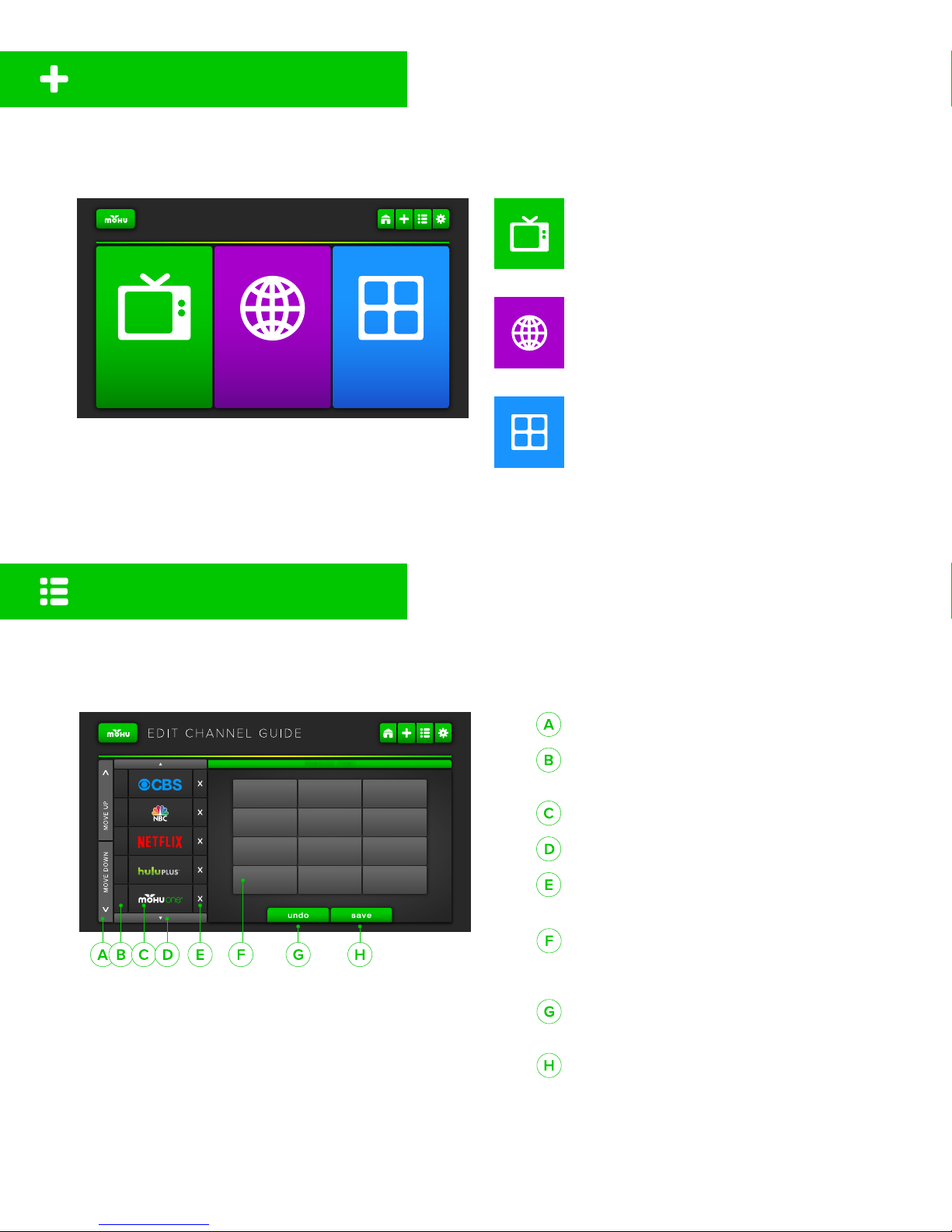
ADD CHANNELS
REMOVED CHANNELS
Channels that can be added back to
your .
UNDO CHANGES
Cancel unsaved changes.
SAVE CHANGES
You must save to have your changes
accepted.
REORDER CHANNEL ▲ / ▼ IN LIST
CHANNEL
OTA [CH #]| APP | WEB
CHANNEL NAME
SCROLL ▲ / ▼ IN GUIDE
REMOVE CHANNEL FROM GUIDE
Moves channel to
REMOVED ITEMS
APP
APP
5.1
17.1
WEB
EDIT CHANNELS
is the personalization center of Mohu Channels. Reorder
your favorite channels and delete the ones you don’t want.

INTERNET
CONNECTION
REMOTE
CONTROL
ANTENNA
SCAN
LANGUAGE REGISTER RESET
DATE & TIME
INFO AUDIO/VIDEO
SETTINGS 10:00 AM
PERFORM ANTENNA SCAN
Enter your Zip Code to
find built-in channel
listings in your area.
TOGGLE
CONNECTION TYPE
WiFi
Ethernet
REMOTE CONTROL
Cursor Speed
Feature Descriptions
Pair Remote
Learn Remote
REGISTER DEVICE
Directs you to register your
product at GoMohu.com
DEVICE INFO
IP Address, MAC
Address, Serial
Number, FCC ID, IC
ID, Model Number,
Kernal Number, Build
Number
UPDATE DEVICE
Click the ‘up to date’
button to find out if an
update is available for
your device.
ADJUST DATE
Month/Day/Year
ADJUST TIME ZONE
Central
Eastern
Alaska
Hawaii-Aleutian
Pacific
Mountain
CLOCK DISPLAY
12-Hour/24-Hour Clock
ADJUST AUDIO
Dolby 2.1 Decode
Dolby 5.1 Pass-Through
ADJUST VIDEO
Brightness
Contrast
Color
SCREEN SCALE
Adjust to fit screen
CHANGE LANGUAGE
English
Spanish
RESET DEVICE
Restore to factory default
SYSTEM SETTINGS
Other manuals for channels
1
Table of contents