
MIXVIBES U46MK2 User manual
ENGLISH
FRANCAIS
DEUTSCH

U46MK2 MIXVIBES
2
ENGLISH
INDEX
1. Introduction..................................................................................................................3
1.1. What’s in the box........................................................................................................3
1.2. Key Features ..............................................................................................................4
2. Description of the U46MK2 .........................................................................................5
2.1. Front Panel.................................................................................................................5
2.2. Rear Panel..................................................................................................................6
2.3. Connection with external devices ...............................................................................7
3. Hardware Installation...................................................................................................8
3.1. Minimum system requirements...................................................................................8
3.2. Installation...................................................................................................................8
4. Driver Installation.........................................................................................................9
5. The U46MK2 panel.....................................................................................................13
5.1. Menu bar...................................................................................................................13
5.2. Input Section.............................................................................................................16
5.3. Output Section..........................................................................................................17
6. Application Setup ......................................................................................................18
6.1. Windows® Multimedia setup.....................................................................................18
6.2. Latency setting on ASIO applications .......................................................................19
6.3. MixVibes CROSS LE................................................................................................20
7. Technical Specifications...........................................................................................21
V2.0 - June 2008

U46MK2 MIXVIBES
3
1. Introduction
Thank you for choosing the MIXVIBES U46MK2.
The U46MK2 is an ideal mobile recording interface for both laptops and desktop computers. It
offers a 4-in 6-out multi-channel audio interface with a separate Mix output. Two Phono inputs
make the unit a perfect portable solution for digital DJs compatible with all current major DJ
software applications.
The U46MK2’s flexible 4 inputs enable you to record from a variety of sources. There are 2
Phono inputs 2 stereo Line inputs and a MIC input with +48V phantom power and Hi-Z
(E.Guitar) input.
Six line level analog outputs allow you to connect the U46MK2 to various external devices or to
a 5.1 surround system. A separate Mix output and headphone output allow you to monitor
your inputs and outputs directly. The U46MK2 offers all these features in metal casing that can
travel with you anywhere.
Even if you are an experienced professional please take some time to read through this user
manual and familiarize yourself with the U46MK2’s features and operation. You may also want
to refer to your audio software’s documentation to better understand how the U46MK2’s
features are integrated with your program. A good knowledge of your audio software will help
you to get the best out of your U46MK2.
1.1. What’s in the box
U46MK2 USB audio interface
CD including drivers CROSS LE DJ Software
User manual
USB cable
RCA mini jack cable

U46MK2 MIXVIBES
4
1.2. Key Features
-4-in 6-out multi purpose USB audio interface
-2 Phono inputs and 4 Line inputs
-MIC inputs with gain control
-+48V phantom power for condenser microphone
-Direct instrument input for electrical guitars (Hi-Z) with gain control
-6 line level analog outputs with separate Mix outputs
-Headphone out with level control
-4 channel recording and 6 channel playback at the same time – Full Duplex
-4-in 6-out at 44.1 kHz 4-in 4-out at 48 kHz.
-Compatible with Microsoft® Windows XP (Service pack 2 strongly recommended)
Windows Vista and Mac OSX.
-WDM MME ASIO and DirectSound support.
U46MK2 MIXVIBES
5
2. Description of the U46MK2
2.1. Front Panel
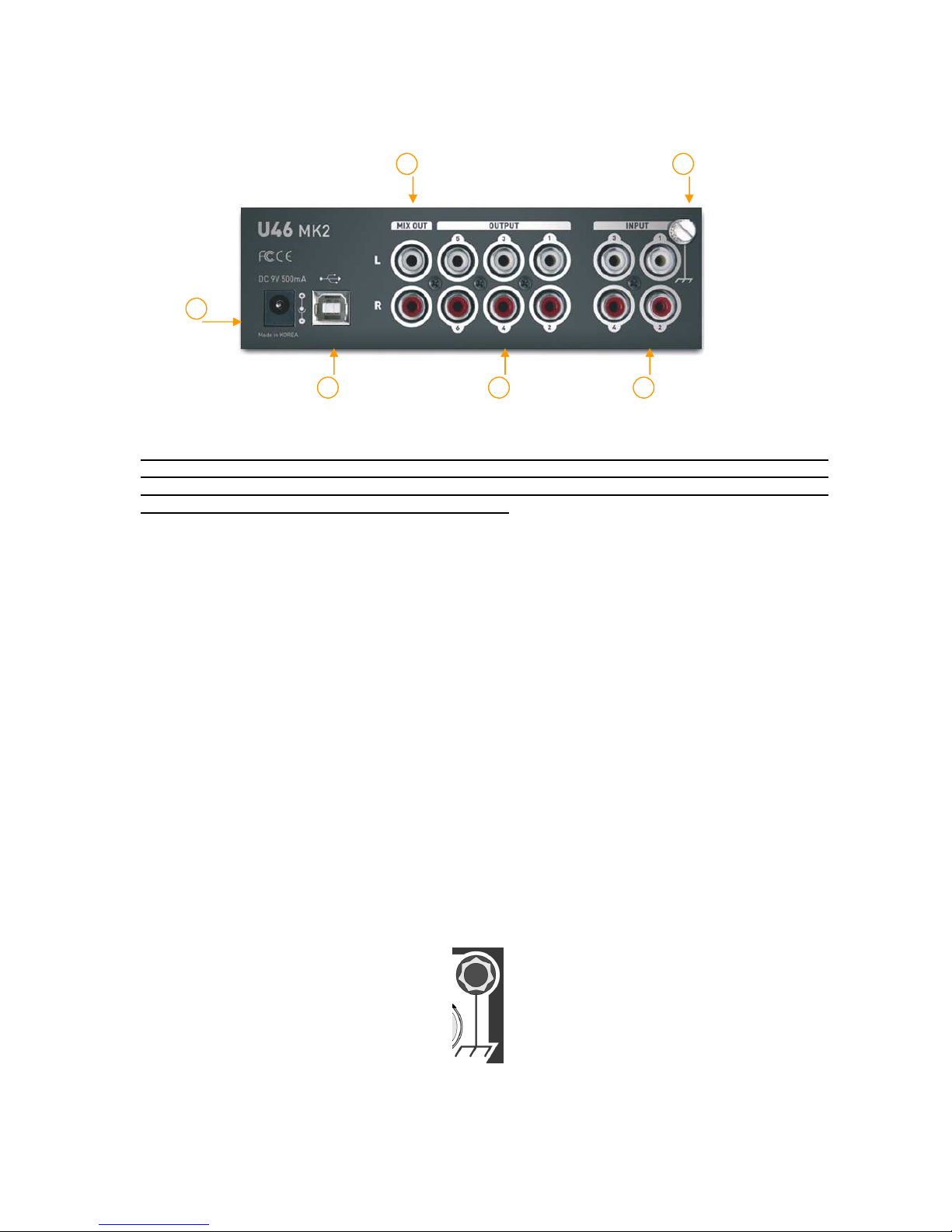
1) Channel 1/2 input connector
- Input source MIC/LINE/PHONO) selector: This is where you select input sources of
channel 1/2.
- MIC input connector: Connect your Microphone to this Balanced 1/4” connector.
- +48V Phantom power switch: Supply +48V DC phantom power to input channels 1/2
simultaneously by pressing the button
- Gain control for MIC input: Control input level of microphone
2) Channel 3/4 input connector
- Input source Hi-Z/LINE/PHONO) selector: This is where you select input sources of
channel 3/4.
- Hi-Z input connector: Connect an electric guitar or bass guitar to this unbalanced 1/4”
connector. Only unbalanced 1/4” phone jack connection is available for this setting.
- Gain control for Hi-Z input: Control the input level of the E.guitar input
3) Headphone output with Headphone volume control: Monitor all input sources and
output sources through the headphone output. Output level can be adjusted with the
control knob.
4) Power Switch
1
2
3
4
U46MK2 MIXVIBES
6
2.2. Rear Panel
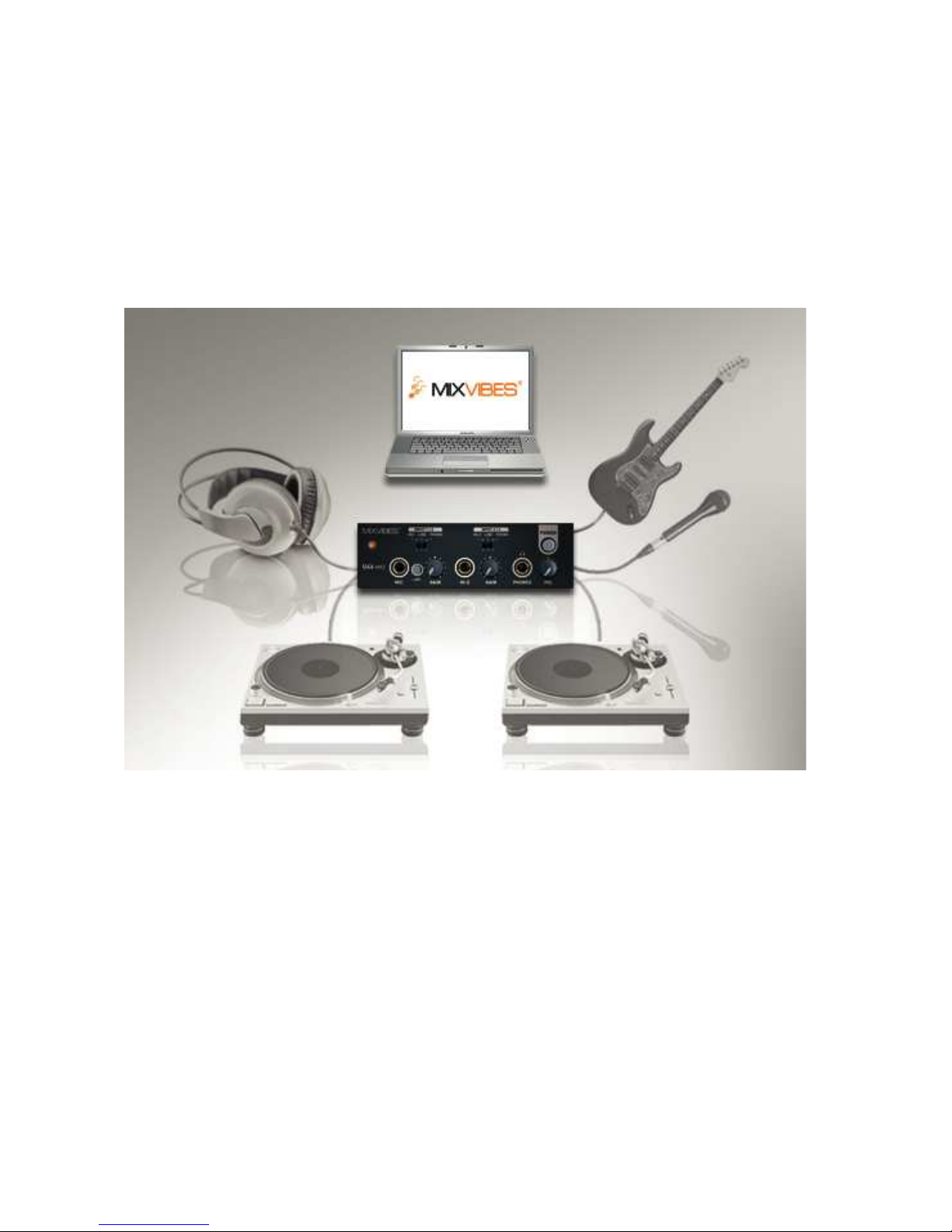
1) External Power supply connector:
If you use a microphone that requires phantom power, especially with a laptop
computer, it’s strongly recommended to use a DC +9V/500mA adapter not
included). When you turn on the U46MK2 or when you turn on/off phantom power,
the current peak level might go over 500mA.
2) USB connector: Connects the USB cable to the computer.
3) Input 1~4: The turntable inputs and line level inputs share the same connectors. The
RCA turntable inputs feed an RIAA equalized preamp designed to accept moving magnet
type phono cartridges.
4) Output 1~6: You can use these outputs to connect to various external devices or to a 5.1
surround system.
5) Mix output: You can monitor all input sources and output sources through the Mix output.
Usually you can use Mix out to connect to powered monitor speakers.
6) Ground plug: When you use a turntable connect the ground lead from your turntable to
the ground plug to help preventing hum.
1
2
3
4
5
6
U46MK2 MIXVIBES
7
2.3. Connection with external devices
The U46MK2 allows various multimedia uses. This means that there are many different ways to
connect other devices to the U46MK2. The below figure describes which devices can be
connected to the U46MK2.
U46MK2 MIXVIBES
8
3. Hardware Installation
3.1. Minimum system requirements
Intel Pentium III 600MHz CPU or equivalent AMD CPU
256MB of RAM
Direct X 8.1 or higher
Microsoft Windows® XP or Windows® Vista Mac OSX.
One available USB port
3.2. Installation
Before proceeding to driver installation please locate your original Windows CD as you may
need it during installation. If you have a motherboard with a new chipset please install the
most recent patches provided by your motherboard or chipset manufacturers.
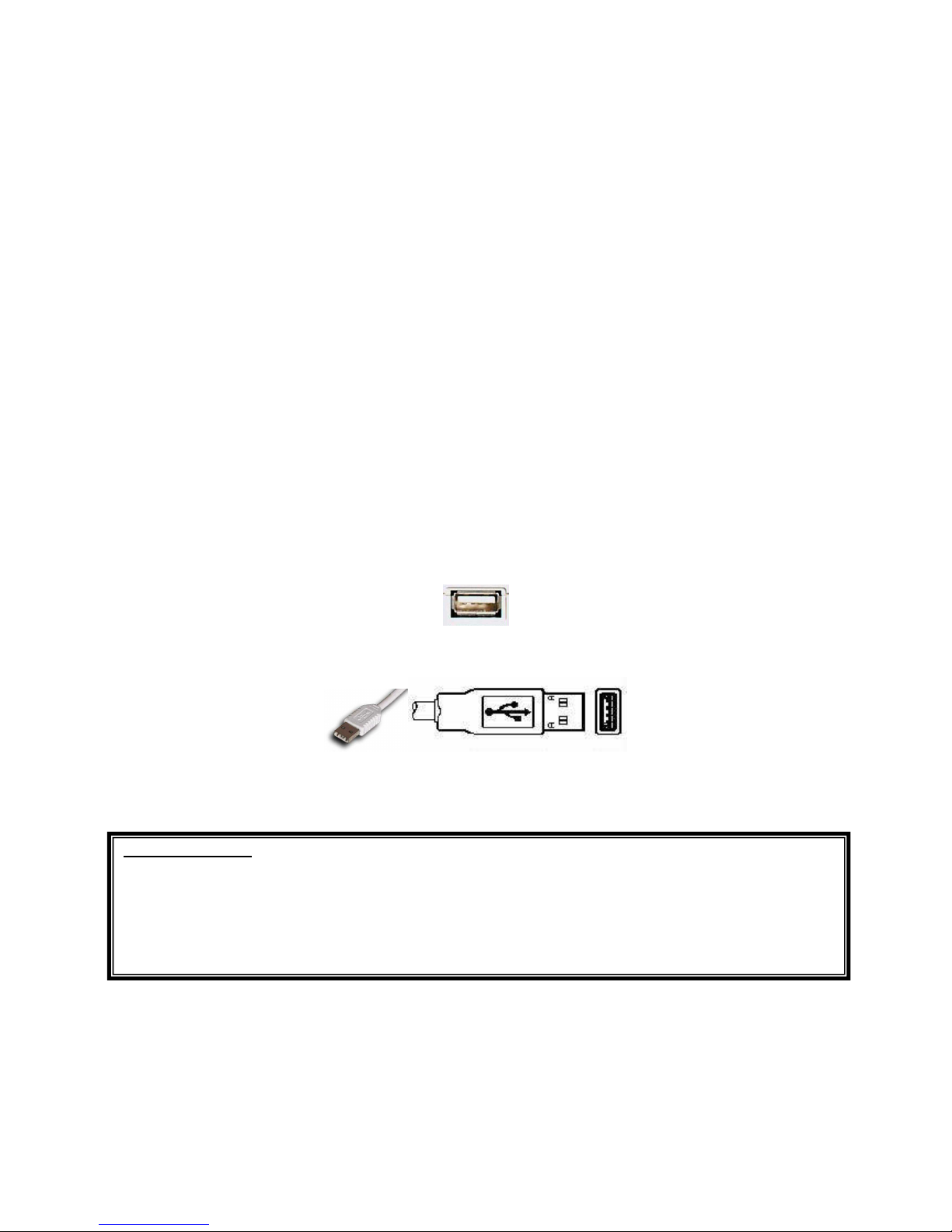
Locate an available USB port on your computer. A sample USB port is pictured below. It is
typically located next to the PS/2 or serial ports on the back of your computer.
Plug the U46MK2’s USB cable (Series A plug type) into the USB port of your computer.
Turn on the U46MK2’s power button. After that you will see a power led switch on on the
U46MK2’s front panel. The U46MK2 gets the power from the computer via a USB cable. You
can also use an external Power supply if you have one.
Important Note
Some of your computer USB ports may not recognize the U46 mk2. In this case,
simply try to connect the device to another USB port.
U46MK2 MIXVIBES
9
4. Driver Installation
After connecting and powering the U46MK2 your computer will automatically detect the
U46MK2 as a USB Composite Device and will proceed with the installation.
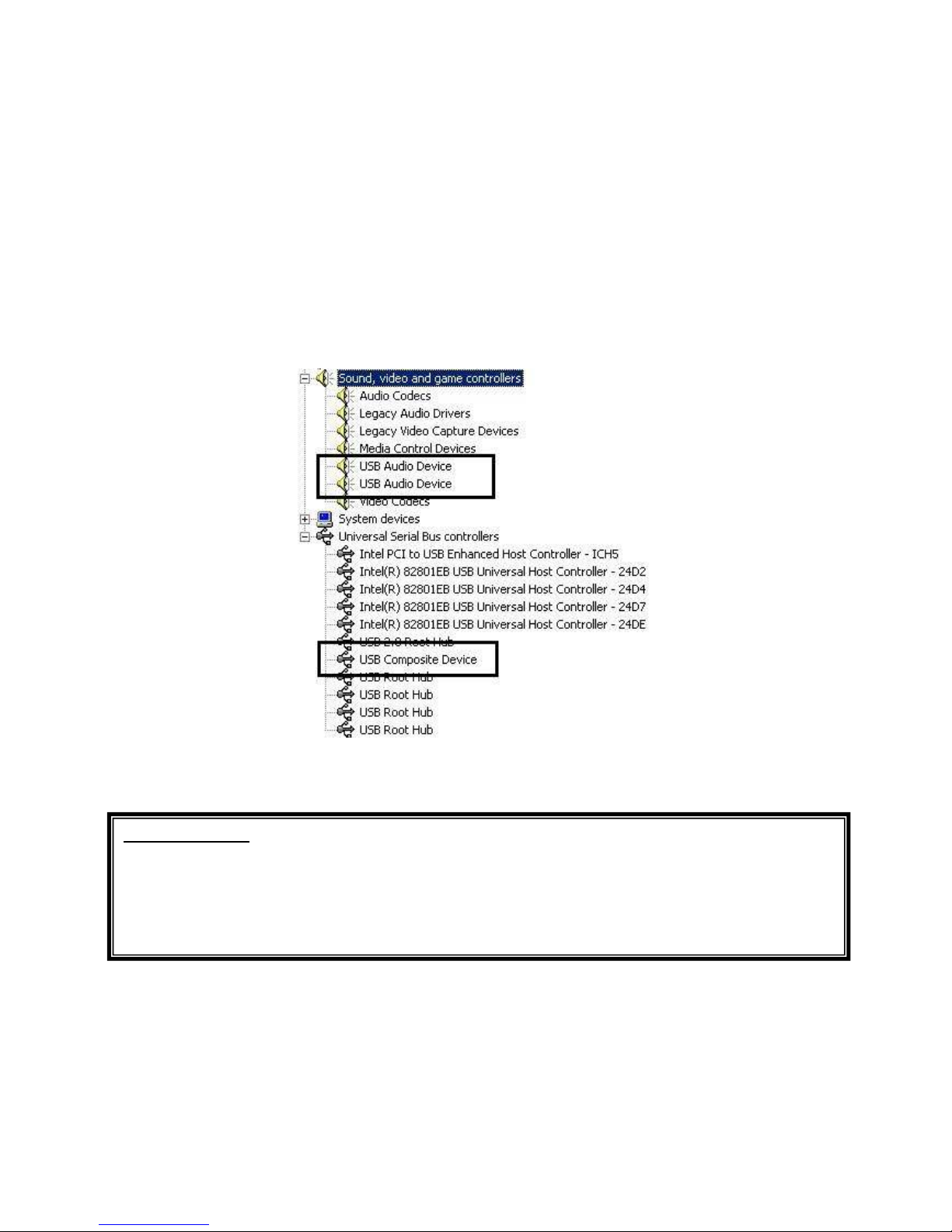
1. To confirm the installation of the U46MK2 go to “Start-> Settings-> Control Panel ->
System -> Device Manager”. Confirm that two (2) instances of “USB Audio Device” are listed
under ‘Sound video and game controllers’ and that one (1) “USB Composite Device” is listed
under “Universal Serial Bus controllers”.
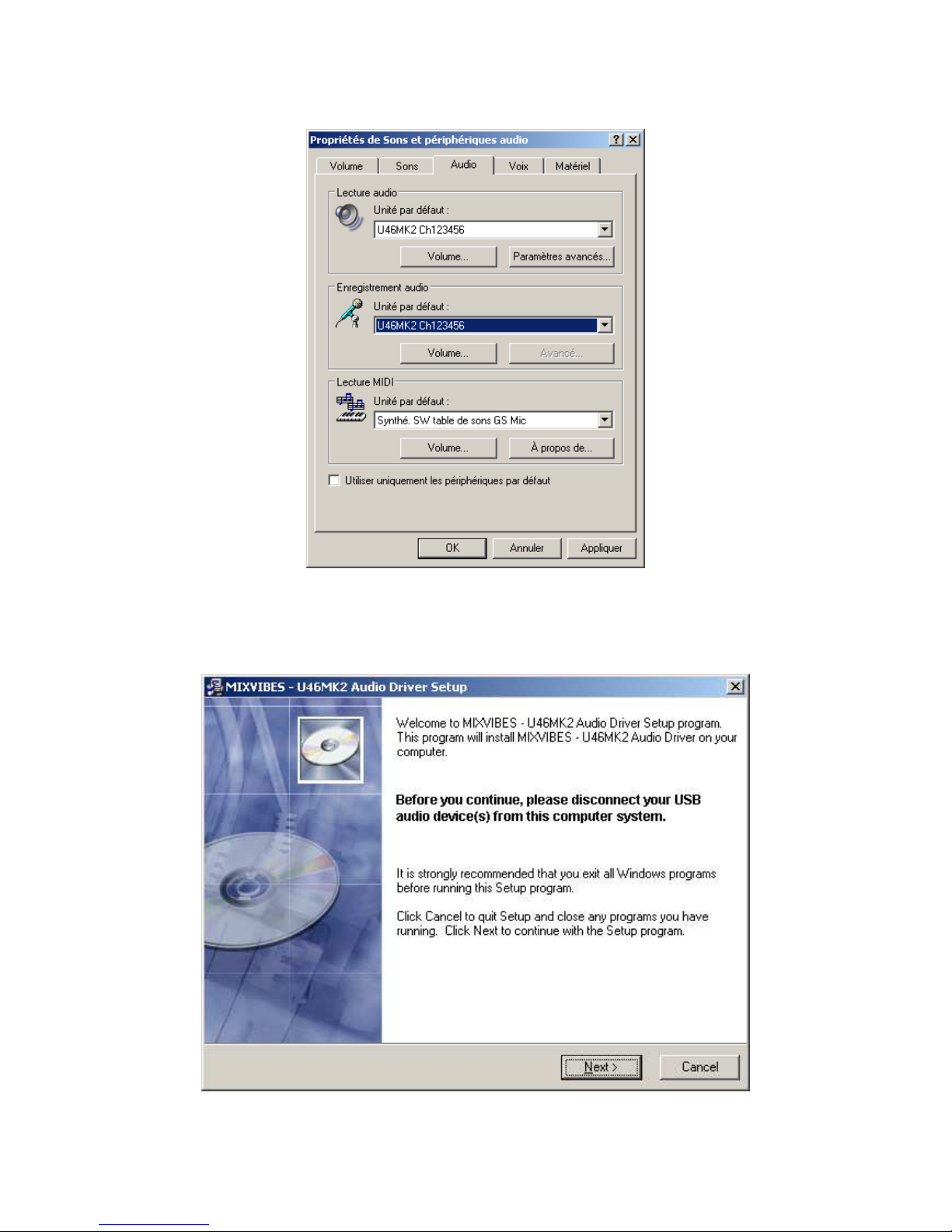
2. Check your system.
Go to: Control Panel -> Sounds and Audio Devices -> Audio
Please check that your audio devices are installed properly.
Important note
Due to the limitations of the USB 1.1 driver, audio output at 48 kHz sample rate is
limited to 4 channels. If you need better audio quality and don’t need all 6 outputs,
you can choose the 48 kHz sample rate. If your setup requires all 6 outputs, you
must choose the 44.1 kHz sample rate.
U46MK2 MIXVIBES
10
3. Install the U46MK2 driver. Insert the MIXVIBES driver CD in your CD Rom drive. Just
click the “setup” icon. After that if you see the message below simply click “Yes.”
Table of contents
Languages:
Other MIXVIBES Recording Equipment manuals



