
mininavident DENACAM User manual

USER MANUAL
VERSION 2.5

CONTACT INFORMATION
DENACAM System | User Manual | REF M1000-1001 I Version 2.52
CONTACT INFORMATION
Manufacturer’s address
mininavident AG
Gerberstrasse 5
4410 Liestal
Switzerland
www.mininavident.com
EC representative
Axxos GmbH
Im Sägenloh 3
78333 Stockach
Germany
Authorized service partners
mininavident’s authorized service partners cover all
service needs for the entire system life cycle.
To find your local authorized service partner visit our
website:
www.mininavident.com/servicepartner
Ordering components
Only use original accessories and spare parts. Order
DENACAM components from an authorized mininavident
service partner.
For order information, see "Reference numbers" on page 106
FAQ
www.mininavident.com/faq
INTENDED USE OF THE DENACAM
SYSTEM
The DENACAM navigation system is a real-time
computerized navigational system intended to provide
assistance in the intra-operative surgical phases of dental
implantation surgery.
The system provides precise navigational guidance of
surgical instruments according to the preoperative
planning in the dental implantation procedure.
Patient population
Partially edentulous patients who require dental implants
as part of their treatment plan.
Intended user
Oral surgeons, cranio maxillofacial surgeons, and general
practitioners with knowledge of dental implant surgery
and preoperative planning software, who understand
written and spoken English, and who have successfully
completed training on the DENACAM System.
Anatomical location
Complete upper and lower jaw, depending on the
individual mouth opening and the placement and line of
sight of the marker.
Intended medical indication
All dental implantations are indications for using this
navigation system.

INTENDED USE OF THE DENACAM SYSTEM
DENACAM System | User Manual | REF M1000-1001 I Version 2.5 3
Intended medical contraindication
All contraindications for dental implants apply as well as
a contraindication for this navigation system.
Dental implants contraindications
General:
Serious internal medical problems, bone metabolism
disturbances, uncontrolled bleeding disorders,
inadequate wound healing capacity, poor oral hygiene,
maxillary and mandibular growth not completed, poor
general state of health, uncooperative, unmotivated
patient, drug or alcohol abuse, psychoses, prolonged
therapy-resistant functional disorders, xerostomia,
weakened immune system, illness requiring periodic use
of steroids, titanium allergy, uncontrollable endocrine
disorders.
Relative contraindications:
Previously irritated bone, diabetes mellitus,
anticoagulation drugs/hemorrhagic diatheses, bruxism,
parafunctional habits, unfavorable anatomic bone
conditions, tobacco abuse, uncontrolled periodontitis,
temporomandibular joint disorders, treatable pathologic
diseases of the jaw and changes in the oral mucosa,
pregnancy, inadequate oral hygiene.
Local contraindications:
Inadequate bone volume or quality, local root remnants.
Navigation system contraindications
Heavy artefacts in region of marker, preventing
unambiguous detection.
Electromagnetic compatibility (EMC)
The DENACAM System is a medical device that requires
special safety precautions and must be installed and
placed in operation in accordance with the attached EMC
information.
mininavident only guarantees compliance of the
DENACAM System with the EMC directives when it is
used with original spare parts, consumables, and
accessories. The use of spare parts, consumables, and
accessories that have not been approved by mininavident
may lead to increased emission of electromagnetic
interference or to reduced resistance to electromagnetic
interference.
For more information about the EMC manufacturer’s declaration,
see "EMC manufacturer’s declaration for the DENACAM System" on
page 114

NOTES ON THE USER MANUAL
DENACAM System | User Manual | REF M1000-1001 I Version 2.54
NOTES ON THE USER MANUAL
General information on the User Manual
Table 1 Revision history
Publication version Software version Revision date Change description
1.0 1.0.0 August 2017 First version
1.1 1.0.0 January 2018 Additional information about the
precision of the optical system
1.2 1.1.0 July 2018 Software update. Minor content
changes. New address
1.3 1.1.1 February 2020 Software update. Screenshots
updated. The "To export log
files" task moved to System
overview. Minor content
changes.
2.0 1.2.0 July 2020 Additional content: Setting up
the database, workflows for
marker setup, registering
different instruments, customize
the screens. Changed
procedure about take a dental
impression. Minor content
changes.
2.1 1.2.0 May 2021 Address of EC representative
added. EC representative
symbol added in table “Symbols
used on the components”.
Open-source licenses
information added in appendix.

NOTES ON THE USER MANUAL
DENACAM System | User Manual | REF M1000-1001 I Version 2.5 5
2.2 1.2.0 June 2022 Adjustment of "Intended use of
the DENACAM system" section
"Patient population".
2.3 1.3.0 September 2022 Software update. Screenshots
updated. Changed procedure
about take a dental impression.
Renamed Drilling screen to
Navigation screen. Minor
content changes.
2.4 1.4.0 March 2023 Software update. Additional
information added in appendix.
Updated EMC Manufacturer`s
Declaration based on updated
norm IEC 60601-1-2:2014/
AMD1:2020. Added FCC Notice.
Minor content changes.
2.5 1.4.0 October 2023 Address of EC representative
changed. Additional marker
(M1501), registration tool
(M1801), and adapter (M1204)
mentioned. New touchscreen
(M1401) integrated. Changed
the term “teaching” to
“calibration” throughout the
manual. System cart replaced
with new version. Care and
cleaning procedures added and
updated. Adjustments to the
cleaning agents used.
Illustrations updated. Applicable
standards updated. Minor
content changes and additions.
Table 1 Revision history
Publication version Software version Revision date Change description

NOTES ON THE USER MANUAL
DENACAM System | User Manual | REF M1000-1001 I Version 2.56
Edition notice
This User Manual is intended for operators of the
DENACAM System.
Every effort has been made to ensure that all the
information contained in this User Manual is correct at the
time of publishing. However, mininavident may need to
update the User Manual information as a result of product
surveillance.
Observe the User Manual information
Please familiarize yourself with the unit by reading
through this User Manual before putting it into operation.
It is essential that you comply with the specified warning
and safety information.
For more information about safety, see "Safety information" on
page 11
Keep the User Manual safe
Always keep the User Manual handy in case you or
another user requires information later. Save the User
Manual on the computer or print it out. If you sell the unit,
make sure that the User Manual is included with it either
as a hard copy or on an electronic storage device so that
the new owner can familiarize himself with its functions
and the specified warning and safety information.
Online portal for technical documents
mininavident has set up an online portal for the technical
documents at http://www.mininavident.com/manuals.
From there, you can download this User Manual along
with other documents.
Help
If you continue to have difficulties despite having
thoroughly studied the User Manual, please contact an
authorized service partner.
For information about your local authorized service partner, see
"Authorized service partners" on page 2
Other valid documents
Equipment options
This document describes the full version of the DENACAM
System. It may therefore cover components that are not
included in the package you purchased.
Documents Supplement of
Quick Start Guide DENACAM®System
NOTES ON THE USER MANUAL
DENACAM System | User Manual | REF M1000-1001 I Version 2.5 7
Names, symbols, and abbreviations
Component names
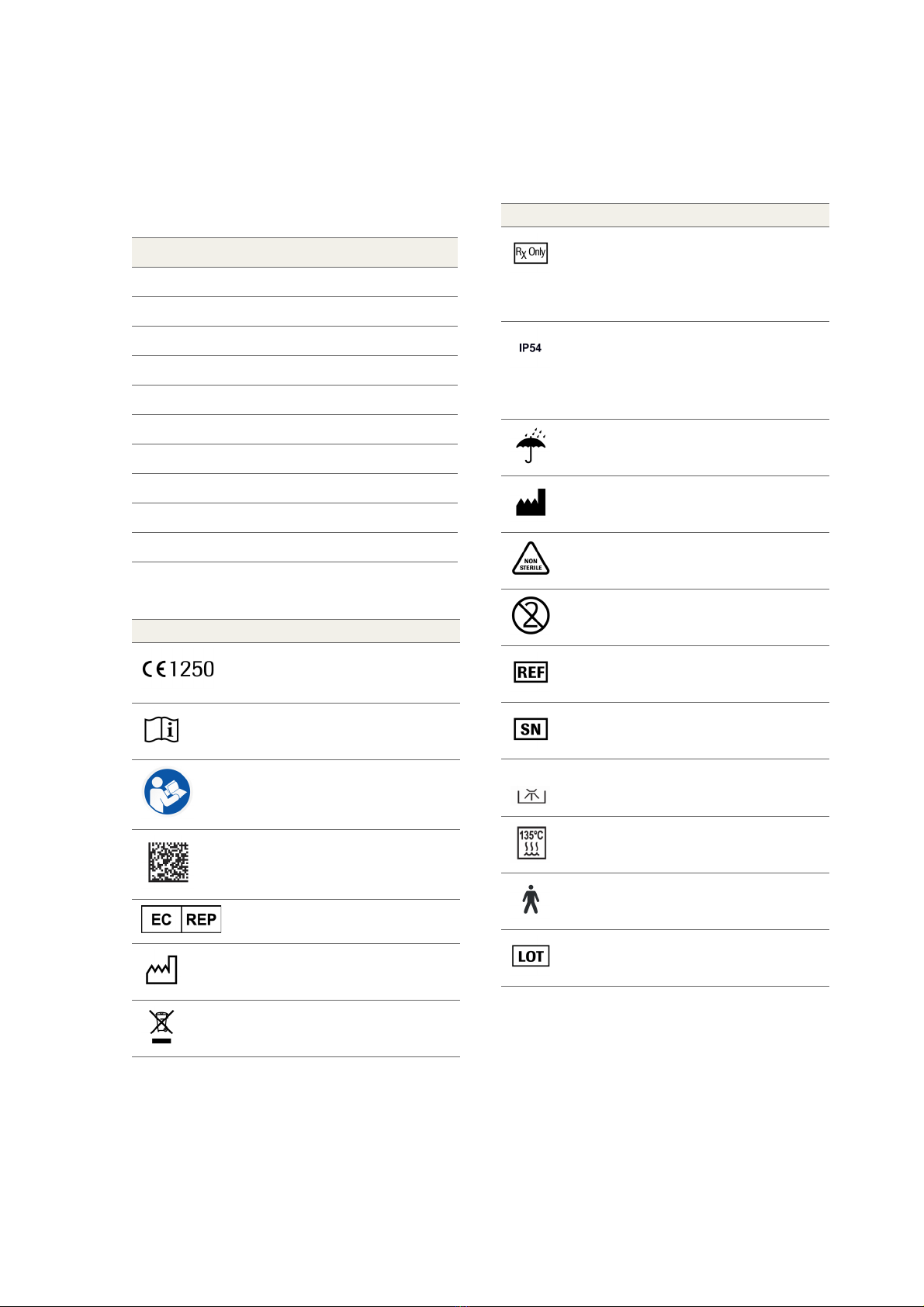
Symbols used on components
Component name Descriptor
DENACAM®System System
DENAOPT®Camera
DENACOMP®Computer
DENASOFT®Software
DENASCREEN®Touchscreen
DENADAPT®Adapter
DENAREG®Registration tool
DENACART®System cart
DENAMARK®Marker
DENATRAY®Tray
Symbol Explanation
CE mark
with identification number of the notified
body
Consult instructions for use
Consult User Manual
Data matrix code for product information
including UDI
EC representative
Date of manufacture
Do not dispose of with domestic waste
Federal law restricts this system to sale by
or on the order of a dentist, physician or
any other practitioner licensed by the law
of the state in which he or she practices to
use or order the use of the system.
Limited protection against dust ingress
(no harmful deposit).
Protected against low pressure water jets
from any direction. Limited ingress
permitted.
Keep dry
Manufacturer
Non sterile
Not for re-use
Reference number
Serial number
Thermo washer disinfectable
Sterilizable in a steam sterilizer (autoclave)
at the specified temperature
Electrical security. Applied part type B
Batch code or Lot number
Symbol Explanation

NOTES ON THE USER MANUAL
DENACAM System | User Manual | REF M1000-1001 I Version 2.58
Abbreviations
Abbreviation Definition
3D Three-dimensional
AC Alternating current
ANSI American National Standards Institute
CBCT Cone beam computed tomography
DC Direct current
DIN Deutsches Institut für Normung
EMC Electromagnetic compatibility
EN European standard
ESD Electrostatic discharge
FAQ Frequently asked questions
HDMI High-definition multimedia interface
HF High frequency
IEC International Electrotechnical Commission
IFU Instructions for use
ISO International Organization for
Standardization
LED Light emitting diode
RF Radio frequency
UDI Unique device identification
USB Universal serial bus

WARRANTY AND LIABILITY
DENACAM System | User Manual | REF M1000-1001 I Version 2.5 9
WARRANTY AND LIABILITY
Care and cleaning
The owner is responsible for making sure that all care and
cleaning activities are performed.
Repair
As manufacturers of medical electrical equipment,
mininavident can assume responsibility for the safety
properties of the system only if repairs on the system are
performed by authorized service partners, and if
components of the system are replaced only by original
spare parts in case of failure.
Exclusion of liability
Any customer modification of the system renders the
warranty or service agreement null and void.
In the event that the system owner fails to fulfill its
obligation to perform care and cleaning activities or
ignores error messages, mininavident and its authorized
dealers cannot assume liability for any damage thus
incurred.
Duration
mininavident grants a product warranty of 24 months
from the date of purchase.
ACCEPTANCE PROTOCOL / TRAINING
DENACAM System | User Manual | REF M1000-1001 I Version 2.510
ACCEPTANCE PROTOCOL / TRAINING
Training intended for users - Training about the
DENACAM System is provided by mininavident in English
or local language.
The following are the training materials in English or in
local language:
•Scope of training
•User Manual
•Basic user training presentation
•Quick Start Guide (if planned and available)
•Workflow steps
•User feedback about the training provided - Training
questionnaire
Only qualified trainer are allowed to train users. Qualified
means they passed successful an advanced training.
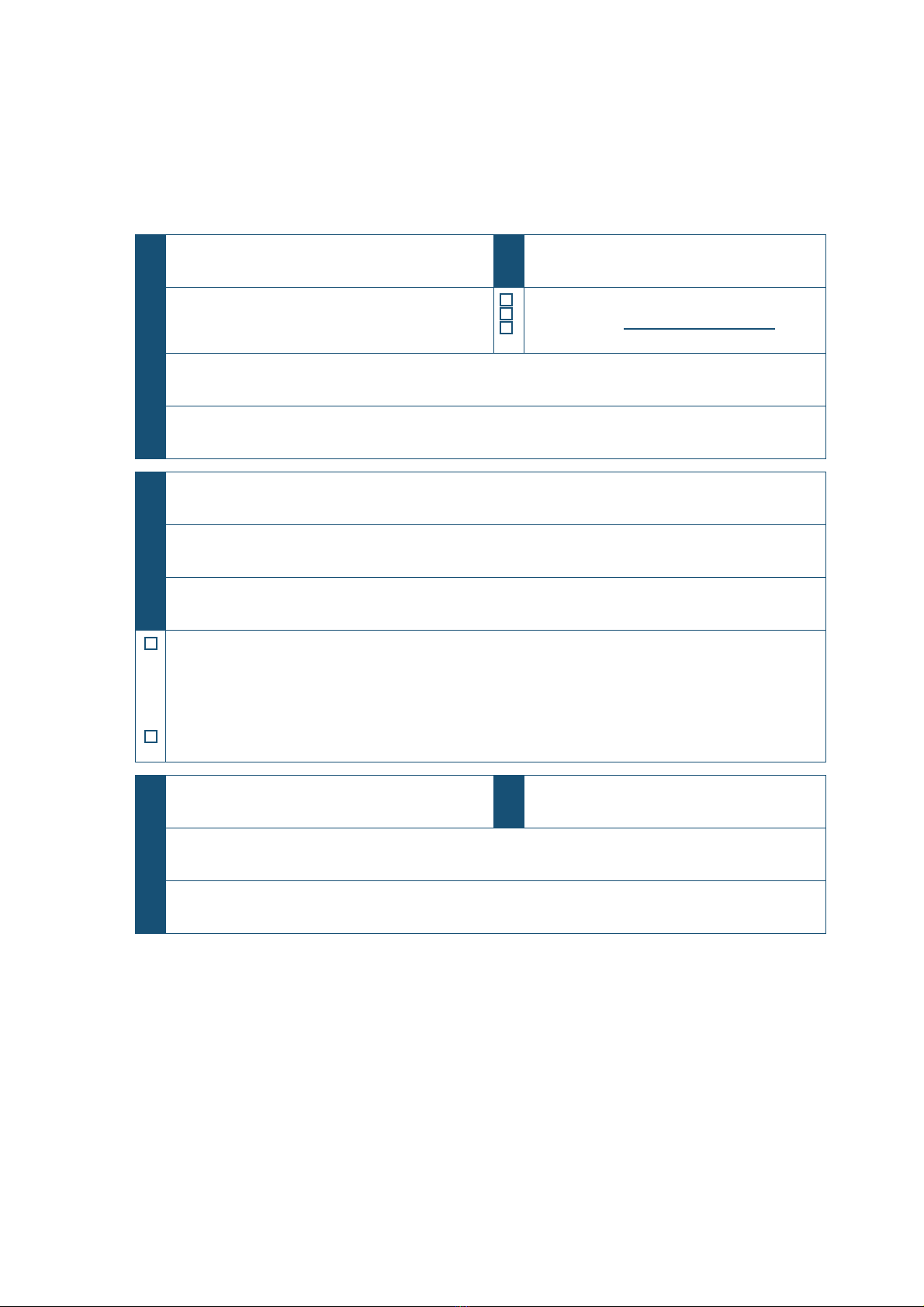
Product name:
DENACAM®System
Serial number (SN):
The product is: Purchased
Rented
Loaned until:
Manufacturer (incl. address):
mininavident, Gerberstrasse 5, 4410 Liestal, Switzerland
Distributor (incl. address):
Name of user:
Hospital / practice / departement (incl. address):
Signature of user:
The signature confirms that the user has been successfully trained on the DENACAM system, in
accordance with the legal regulations (medical devices marketing regulation, medical devices act) and has
understood the content of this manual. Particular attention has been paid to the chapter of safety notes,
operation, care, and cleaning.
The signature confirms the hand over of the the fully functional DENACAM system.
Name of instructor / authorized service partner Date of instruction / handover
Address of instructor / authorized service partner
Signature of instructor / authorized service partner
Other manuals for DENACAM
1
Table of contents
Other mininavident Dental Equipment manuals

Popular Dental Equipment manuals by other brands

Vatech
Vatech EzRay Air VEX-P300 user manual

KaVo
KaVo GENTLEpower LUX Contra-angle 25 LP Technician's Instructions

DENTSPLY
DENTSPLY SmartLite Focus Instructions for use

LM
LM ProPower CombiLED quick guide

Owandy Radiology
Owandy Radiology RX-AC user manual

mectron
mectron Piezosurgery Cleaning and sterilization manual


