
Milestone pro MP-DA4UHD-H2 User manual
User Manual
MP-DA4UHD-H2
HDMI V2.0 1x4 Splitter with Down-scaling and
AOC Supported
All Rights Reserved
Version: MP-DA4UHD-H2_2020V1.8

2
Statement
Thanks for purchasing this product, please read this user manual carefully before
using this product. The functions described in this version are updated till July, 2020. In
the constant effort to improve our product, we reserve the right to make functions or
parameters changes without notice or obligation.
Safety Precaution
Do not dismantle the housing or modify the module to avoid electrical shock or burn.
Using supplies not meeting the products' specifications may cause damage,
deterioration or malfunction.
Do not expose the unit to rain, moisture or install this product near water.
Install the device in a place with fine ventilation.
Do not twist or pull by force ends of the optical cable. It can cause malfunction.
Do not use liquid or aerosol cleaners to clean this unit.
Always unplug the power to the device before cleaning.
Unplug the power when not used for a long period of time.
Refer all servicing to qualified service personnel.
After-sales Service
We provide limited warranty for the product within three years.
Packing List
1x HDMI V2.0 1x4 Splitter
4x Plastic Cushions
1x Power Adapter (5V DC 1A)
1x User Manual
Note: Please contact your distributor immediately if any damage or defect in the
components is found.

3
Product Introduction
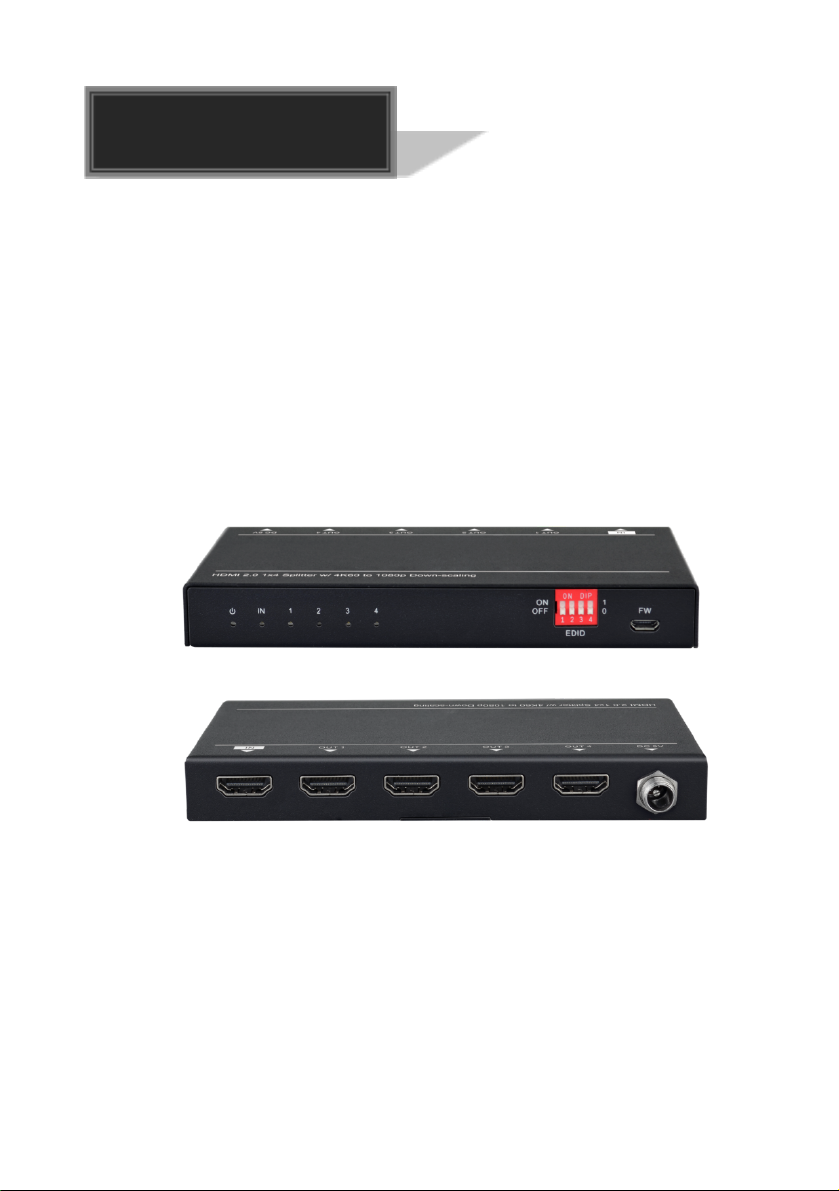
Thanks for choosing the HDMI V2.0 1x4 Splitter, which can distribute one HDMI input
to four outputs. The splitter supports HDMI video resolution up to 4K@60Hz 4:4:4,
1080p 3D, and multichannel audio formats. Besides passing EDID information from the
display, there are multiple built-in EDID settings can be selected by the 4-pin DIP
switch on the front panel. Moreover, the splitter supports convenient firmware upgrade
through Micro-USB port.
Features
Supports HDMI V2.0 and the video resolution up to 4K@60Hz 4:4:4.
HDMI input supports HDCP 2.3 and the outputs support HDCP Active or HDCP
Passive mode.
Compatible with HDMI AOC cable, provides up to 5V 200mA power on each output.
Supports video resolution down-scaling, the 4K input can be automatically degraded
to 1080p output for compatibility with 1080p display.
18Gbps high bandwidth.
Advanced EDID management: multiple built-in EDID settings can be selected.
Built-in equalizer for signal enhancement to avoid signal attenuation in transmission.
Supports CEC pass-through.
Provides LEDs to indicate the current operating status.
Firmware upgrade by Micro-USB port.
Panel Description
Front Panel
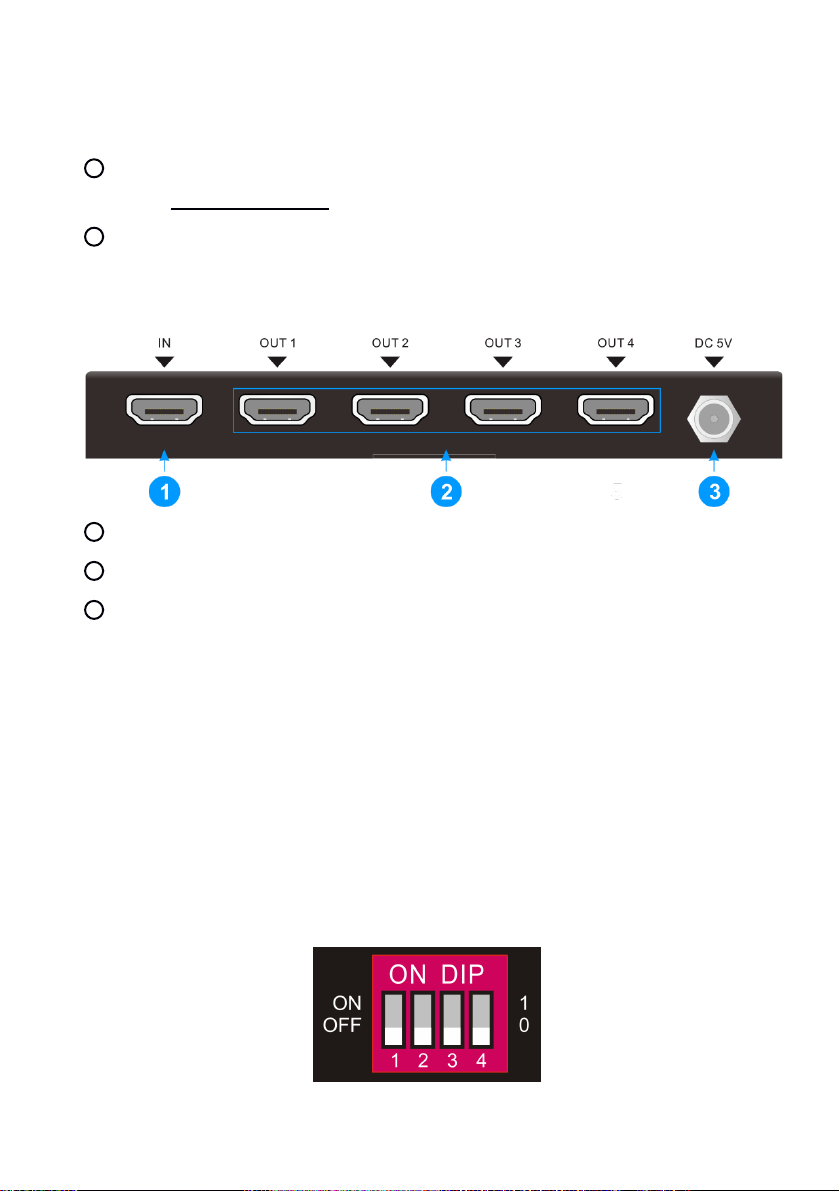
1POWER LED: The LED illuminates red when power is applied.
2INPUT LED: The LED illuminates blue when there is HDMI input.
3OUTPUT LEDs: The LED illuminates blue when there is HDMI output on the
4
corresponding channel.
4EDID: 4-pin DIP switch for EDID setting and HDCP mode selection. Please refer
to the EDID Management for more details.
5FW: Micro-USB port for firmware upgrade.
Rear Panel
1INPUT: Type-A female HDMI input port to connect a HDMI source.
2OUTPUTS: Four type-A female HDMI output ports to connect HDMI displays.
3DC 5V: DC barrel port to connect an AC power adapter.
DIP Switch Operation
EDID Management
The Extended Display Identification Data (EDID) is used by the source device to
match its video resolution with the connected display. By default, the source device
obtains its EDID from the first connected display. Meanwhile, since the displays with
different capabilities are connected to the splitter, the DIP switch on the front panel can
be used to set the EDID to a fixed value to ensure the compatibility in video resolution.
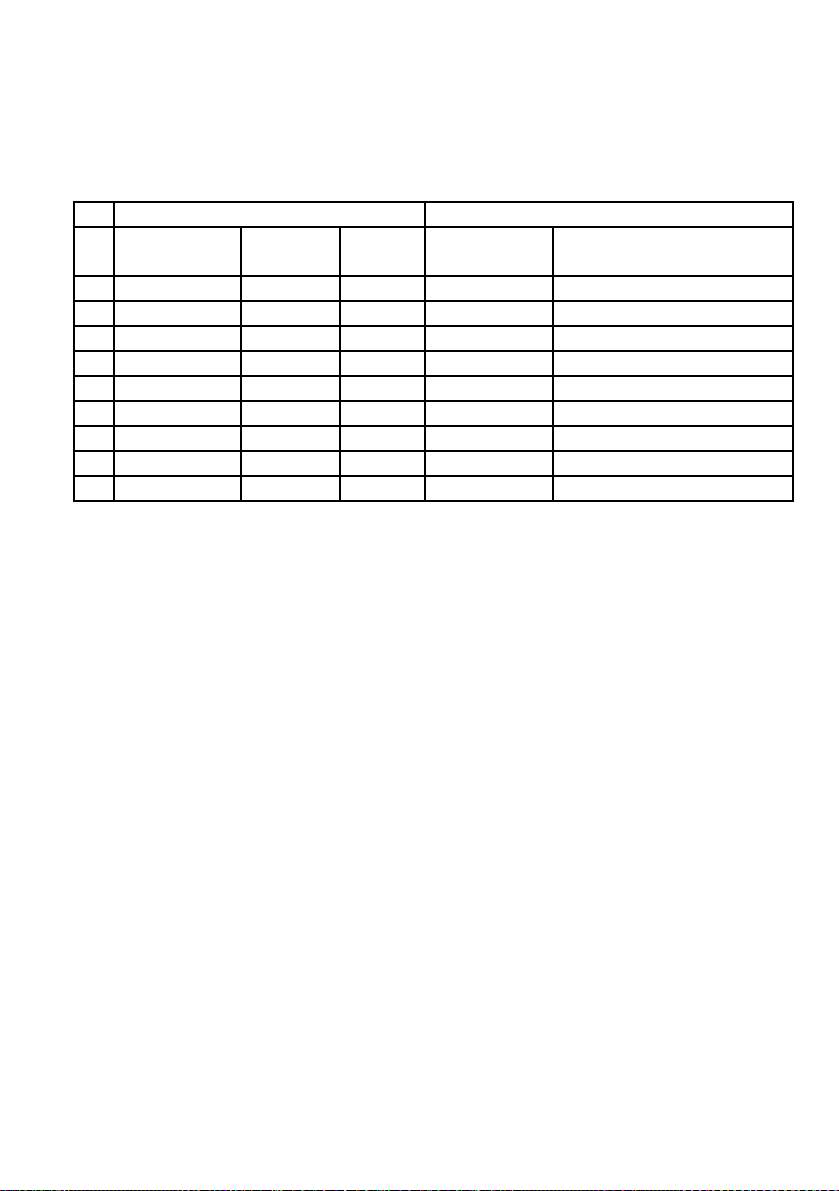
The switch represents “0” when in the lower (OFF) position, and it represents “1” while
putting the switch in the upper (ON) position.

5
Switch 1~3 are used for EDID setting. The DIP switch status and its corresponding
setting are shown at the back of the product.
Switch Status Video Resolution Audio Format
000
Obtains EDID from the first detected display starting at HDMI output
1>2>3>4.
001
Obtains EDID from the first detected display starting at HDMI output
4>3>2>1.
010 1080p LPCM
011 1080p DTS/Dolby
100 3840x2160@30Hz HDR LPCM
101 3840x2160@30Hz HDR DTS/Dolby
110 3840x2160@60Hz HDR LPCM
111 3840x2160@60Hz HDR DTS/Dolby
HDCP Mode
Put switch 4 on “ON” position to select HDCP Active mode, or to “OFF” for HDCP
Passive mode.
Switch Status Mode HDCP
OFF (0)
Passive
(Default)
Automatically follows the display’s HDCP version.
ON (1) Active
Automatically removes the HDCP content of HDMI
output for broader video solution.
6
Video Resolution Down-scaling
The product supports video resolution down-scaling, the 4K input can be automatically
degraded to 1080p output for compatibility with 1080p display, shown in the below chart.
Input
Output
# Resolution
Refresh Color
Space
Downscale 1080p Specs
1 3840x2160
60 4:4:4
Support 1080p@60Hz 4:4:4
2 3840x2160
30 4:4:4
Support 1080p@30Hz 4:4:4
3 3840x2160
24 4:4:4
Support 1080p@24Hz 4:4:4
4 3840x2160
60 4:2:0
Support 1080p@60Hz 4:4:4
5 3840x2160
30 4:2:0
Support 1080p@30Hz 4:4:4
6 3840x2160
24 4:2:0
Support 1080p@24Hz 4:4:4
7 3840x2160
60 4:2:2
Not Support N/A
8 3840x2160
30 4:2:2
Not Support N/A
9 3840x2160
24 4:2:2
Not Support N/A
Firmware Upgrade
Please follow the below steps to upgrade firmware by the Micro-USB port:
1) Connect the splitter to the PC with USB cable.
2) Power on the splitter, and then the PC will automatically detect a U-disk named of
“BOOTDISK”.
3) Double-click to open the U-disk, a file named of “READY.TXT” will be showed.
4) Copy the latest upgrade file (.bin) to the “BOOTDISK” U-disk directly.
5) If the filename “READY.TXT” automatically turns to “SUCCESS.TXT”, the firmware
was upgraded successfully. If the firmware upgrade failed, please check the file
(.bin) and then follow the above procedure to operate again.
6) Remove the USB cable after firmware upgrade.
7
Technical Specification
Video Input
Input (1) HDMI
Input Connector (1) Type-A female HDMI
HDMI Input Resolution Up to 4K@60Hz 4:4:4 8bit
HDMI Standard 2.0
HDCP Version 2.3, 1.4 compliant
CEC Supported
Video Output
Output (4) HDMI
Output Connector (4) Type-A female HDMI
HDMI Output Resolution Up to 4K@60Hz 4:4:4 8bit
HDMI Output Supports up to 5V 200mA power for AOC cable.
HDMI Standard 2.0
HDCP Version 2.3, 1.4 compliant
CEC Supported
Control
Control Part (1) EDID 4-pin DIP switch, (1) Micro-USB port
General
Bandwidth 18Gbps
HDMI V2.0 Cable Length 4K@60Hz 4:4:4 ≤5m, 4K@ 60Hz 4:2:0 ≤15m,
1080p ≤20m
Operation Temperature -5 to +55℃(+23° to +131°F)
Storage Temperature -25 to +70℃(-13° to +158°F)
Relative Humidity 10% to 90%, Non-condensing
Power Supply Input:100V~240V AC, Output: 5V DC 1A
Power Consumption 2.5W (Max)
Dimension (W*H*D) 142.0mm x 17.6mm x 70.4mm
Net Weight 260g
Note: Please adopt high-qualified HDMI cable fully compliant with HDMI V2.0 for
reliable transmission and connection.
8
System Connection
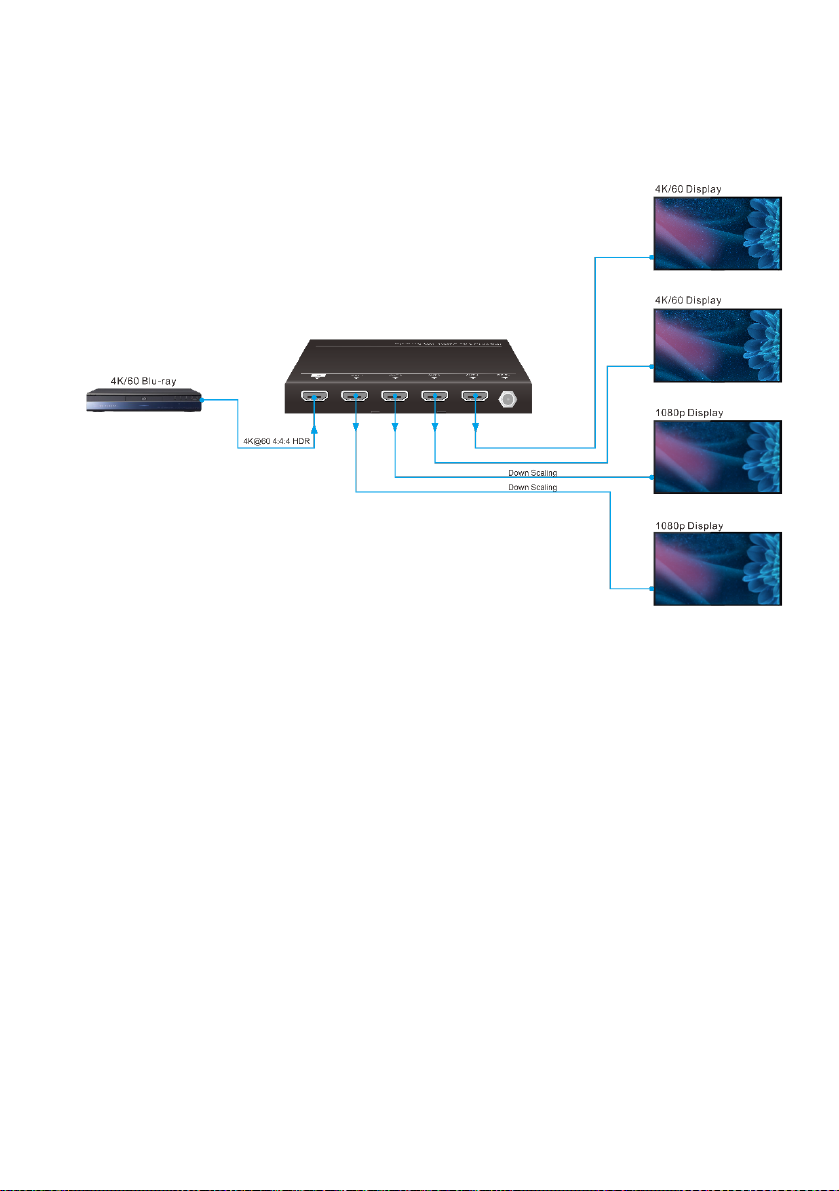
The following diagram illustrates the typical input and output connection of the splitter:
Table of contents
Other Milestone pro Media Converter manuals


