
MicroNet SP906GK User manual

User’s Manual
Wireless LAN PCI Adapter
Model No.: SP906GK
http://www.micronet.info

CONTENTS
1INTRODUCTION.............................................................................1
1.1 Features.........................................................................................................................2
1.2 Specifications................................................................................................................2
1.3 Package Contents..........................................................................................................3
2INSTALLATION PROCEDURE .....................................................4
I. Install the Hardware............................................................................................................4
II. Install the Driver and Utility..............................................................................................4
3CONFIGURATION UTILITY .........................................................7
3.1 Site Survey....................................................................................................................9
3.2 Profile..........................................................................................................................10
3.2.1Configure the Profile.....................................................................................11
3.2.1.1 Configuration ............................................................................................... 11
3.2.1.2 Authentication and Security......................................................................... 13
3.2.1.3 802.1x Setting-Certification.........................................................................17
3.2.1.4 802.1x Setting-CA Server ............................................................................19
3.3 Link Status ..................................................................................................................19
3.4 Statistics......................................................................................................................21
3.5 Advance ......................................................................................................................21
3.6 About...........................................................................................................................24
3.7 Turbo Mode.................................................................................................................25
3.8 WMM Function ..........................................................................................................25
4TROUBLESHOOTING..................................................................28

1 Introduction
Thank you for purchasing SP906GK Wireless LAN PCI Adapter. This adapter complies with IEEE
802.11g standard, which supports up to 54Mbps high-speed wireless network connections. It can also
work with IEEE 802.11b devices. When the adapter connects to 11b devices, the link speed will be up
to 11Mbps.
This adapter enables higher data throughput than the IEEE 802.11g standard (up to 54Mbps). It
supports specific ways to increase the data transfer rate at a time; compress the data and decrease the
waiting time to send the next data to the Routers or APs. This feature is called Turbo Mode. When the
adapter is connecting to the Routers or APs with the proprietary Turbo Mode feature, the wireless
network will be more effective.
For WLAN security issues, this adapter supports 64/128-bit WEP data encryption that protects your
wireless network from eavesdropping. It also supports WPA (Wi-Fi Protected Access) feature that
combines IEEE 802.1x and TKIP (Temporal Key Integrity Protocol) technologies. Client users are
required to authorize before accessing to APs or AP Routers, and the data transmitted in the network is
encrypted/decrypted by a dynamically changed secret key. Furthermore, this adapter supports WPA2
function, WPA2 provides a stronger encryption mechanism through AES (Advanced Encryption
Standard), which is a requirement for some corporate and government users.
When you use the devices such as Voice over Internet Protocol (VoIP) phones, televisions, VCRs and
MP3 players, how can you speed up the audio, video and voice data to pass through the wireless
network? IEEE 802.11e Quality of Service (QoS) (The Wi-Fi Alliance defined WMM as a profile of the
IEEE 802.11e) extensions for 802.11 networks will help to define the priorities of the data traffics by the
data categories to provide enhanced multimedia support. This adapter supports the advanced
technology for sure.
The power consumption of the adapter is also very low. This adapter provides several levels of power
saving modes allowing user customizes the way of saving the power from his/her portable or handheld
devices.
This adapter is cost-effective, together with the versatile features; it is the best solution for you to build
your wireless network.
1

1.1 Features
•Works with both IEEE 802.11b and IEEE 802.11g products.
•High-speed transfer data rate - up to 54Mbps.
•Supports Turbo Mode to enhance the data transfer speed within the specific wireless
network.
•Supports WMM function to meet the multi-media data bandwidth requirement.
•Supports 64/128-bit WEP, WPA (TKIP with IEEE 802.1x), WPA2 (AES with IEEE 802.1x)
functions for high level of security.
•Automatic fallback increases data security and reliability.
•Supports the most popular operating system: Windows 98SE/Me/2000/XP.
•Supports 32-bit PCI interface.
1.2 Specifications
•Standard: IEEE 802.11b/g
•Interface: 32-bit PCI
•Frequency Band: 2.4000 ~ 2.4835GHz (Industrial Scientific Medical Band)
•Modulation: OFDM with BPSK, QPSK, 16QAM, 64QAM (11g)
BPSK, QPSK, CCK (11b)
•Data Rate: 54/48/36/24/18/12/11/9/6/5.5/2/1Mbps auto fallback
•Security: 64/128-bit WEP Data Encryption, WPA (TKIP with IEEE 802.1x), WPA2 (AES with
IEEE 802.1x) Note: WPA2 is enabled in Windows 2000/XP.
•Antenna: External detachable dipole antenna (Connector: RP-SMA connector,)
•Drivers: Windows 98SE/Me/2000/XP
•LEDs: Link, TX/RX
•Transmit Power: 16dBm~18dBm
•Dimension: 19(H) x 130(W) x 121(D) mm
•Weight: 46g
•Temperature: 32~131°F (0 ~ 55°C)
•Humidity: Max. 95% (NonCondensing)
•Certification: FCC, CE
2

1.3 Package Contents
Before you begin the installation, please check the items of your package. The package should include
the following items:
•Wireless LAN PCI Adapter
•Quick installation guide
•Driver and Manual CD
•Detachable Antenna
If any of the above items is missing, contact your supplier as soon as possible.
3
2 Installation Procedure
Before you proceed with the installation, please notice following descriptions.
Note1: The following installation was operated under Windows XP. (Procedures are similar for
Windows 98SE/Me/2000.)
Note2: If you have installed the Wireless PCI Adapter driver & utility before, please uninstall the
old version completely first.
I. Install the Hardware
A. Turn off your computer and remove its cover.
B. Insert the PCI adapter to an available PCI slot firmly.
C. Secure this adapter to the rear of the computer chassis and put back the cover.
D. Secure the antenna to the antenna connector of the adapter.
E. Turn on the computer.
II. Install the Driver and Utility
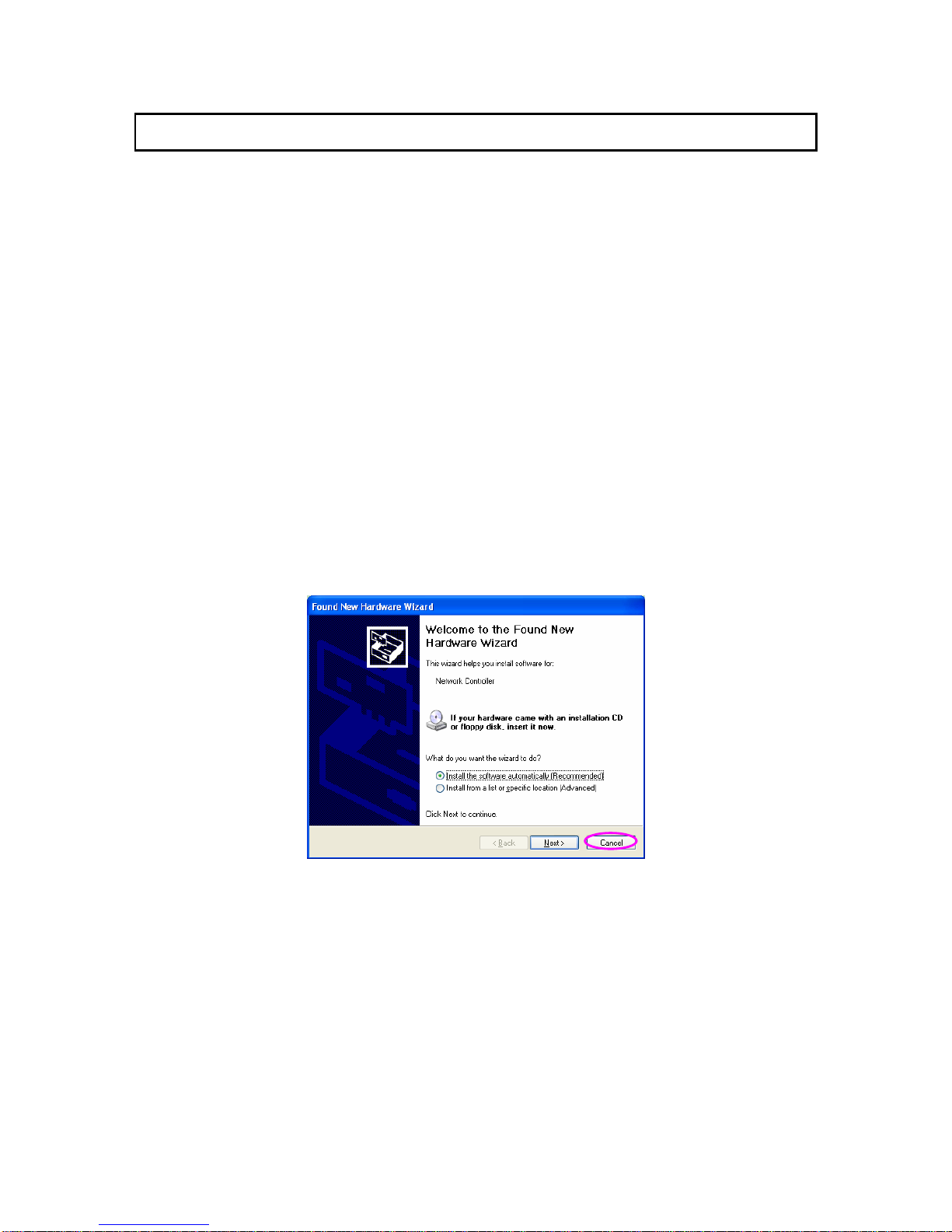
A. “Found New Hardware Wizard” is displayed after the adapter is installed and the computer is
restarted. Click “Cancel”.
4
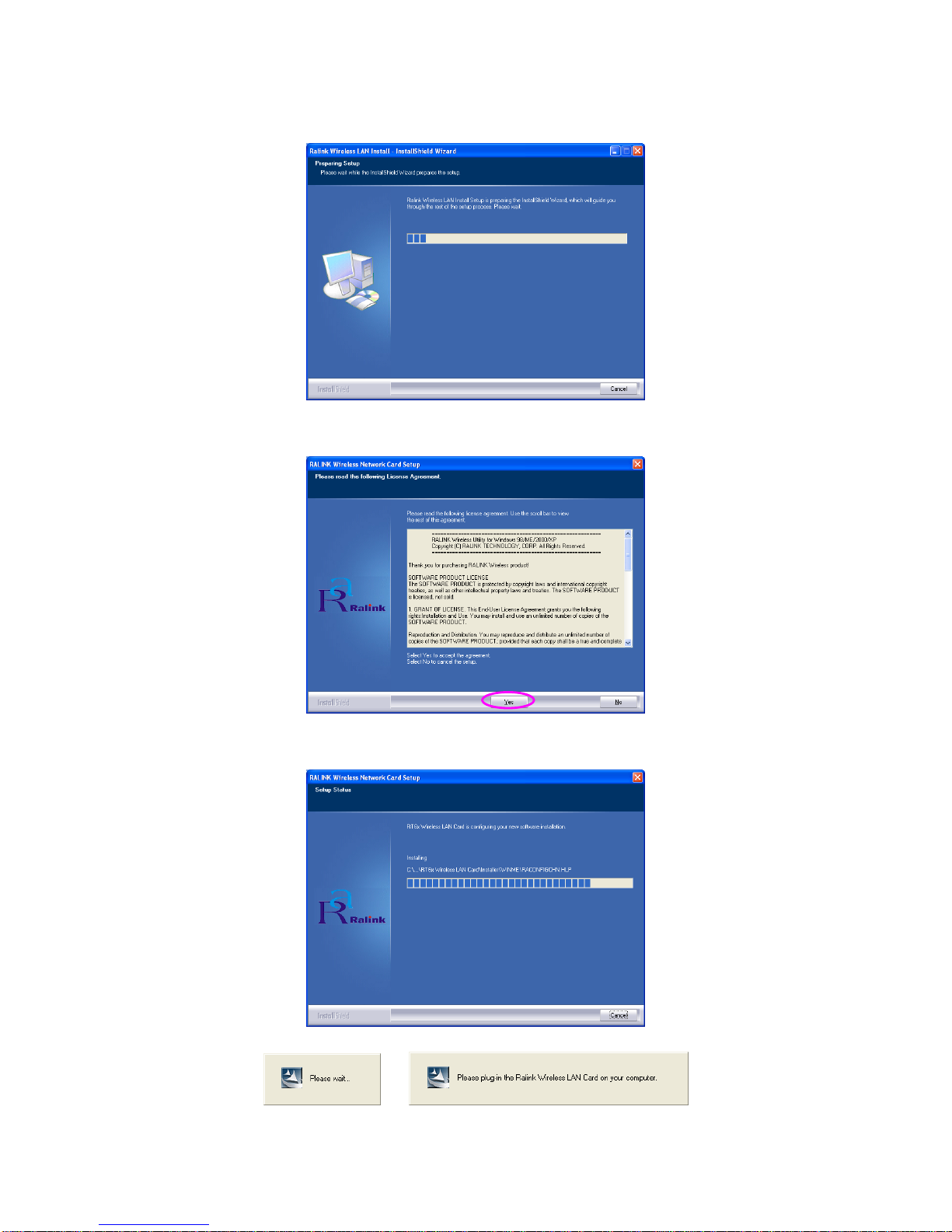
B. Insert the supplied CD to your CD-ROM Drive. Execute the “Setup.exe” program.
C. Click “Yes” to process the installation if you accept the license agreement.
D. The system starts to install the software of the adapter.
5
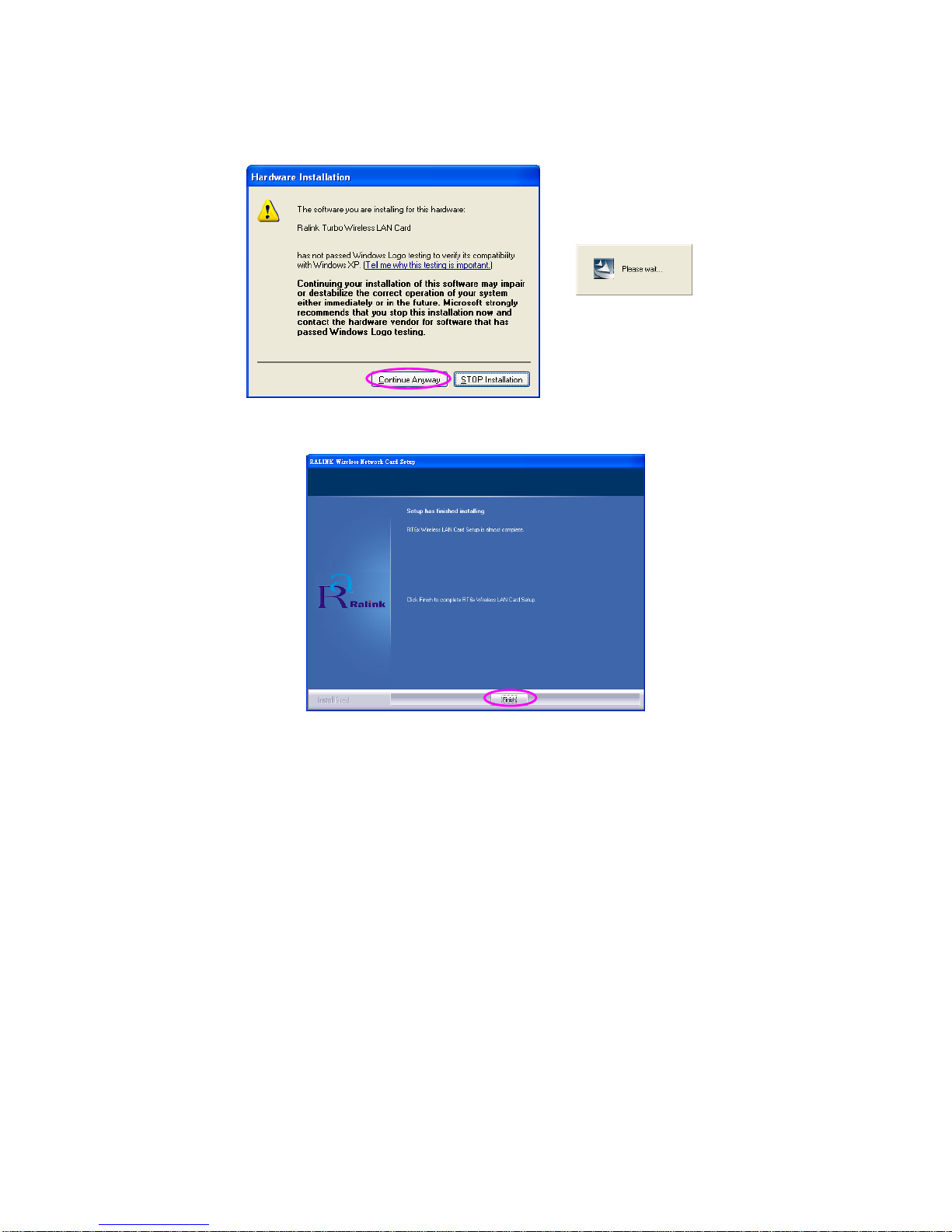
E. The system will automatically detect the adapter and display “Hardware Installation” screen. Click
“Continue Anyway” to continue.
F. Please click “Finish” to complete the installation.
6
3 Configuration Utility
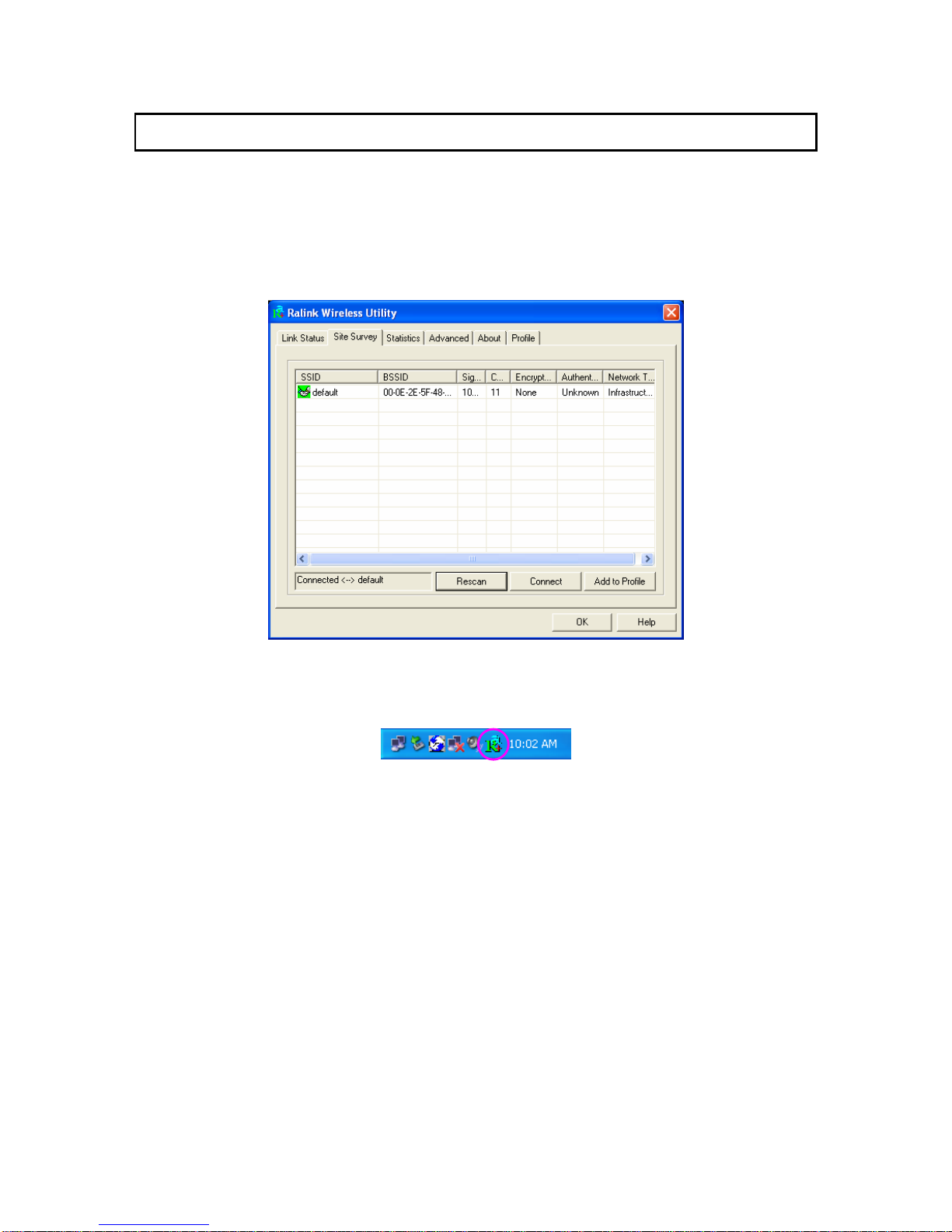
The Configuration Utility is a powerful application that helps you configure the adapter and monitor the
link status and the statistics during the communication process.
When the adapter is installed, the configuration utility will be displayed automatically. This adapter will
auto connect to wireless device which has better signal strength and no wireless security setting.
The Configuration Utility appears as an icon on the system tray of Windows while the adapter is running.
You can open the utility by double-click on the icon.
Right click the icon; there are some items for you to operate the configuration utility.
zLauch Config Utilities:
Select “Lauch Config Utilities” to open the Configuration Utility tool.
zUse Windows Zero Configuration as Configuration Utility:
Select “Use Zero Configuration as Configuration Utility” to use Windows XP built-in wireless
configuration utility (Windows Zero Configuration) to configure the adapter.
zExit:
Select “Exit” to close the Configuration Utility tool.
7
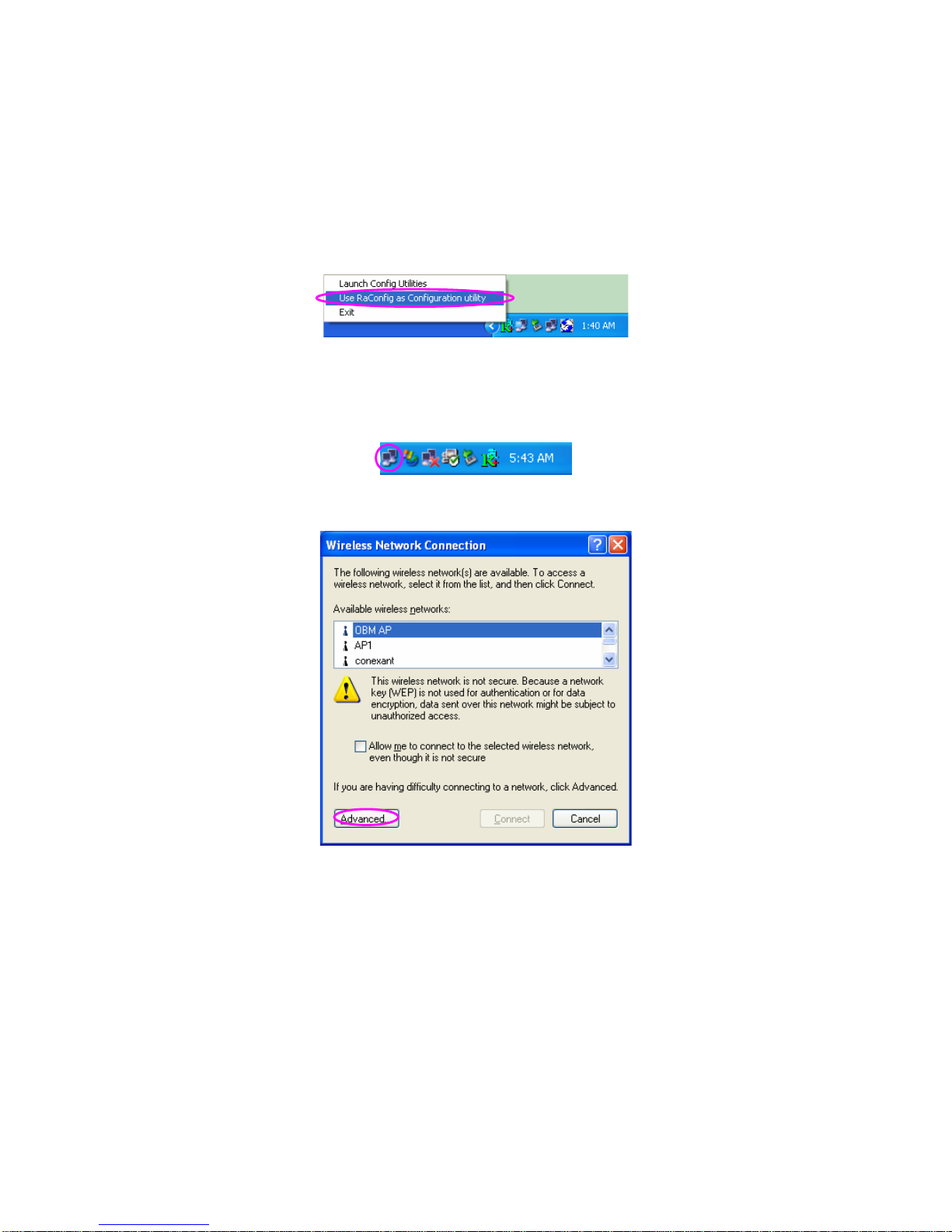
In Windows XP, there is a “Windows Zero Configuration Tool” for you to setup wireless clients. By
default, this “Windows Zero Configuration Tool” is enabled. If you want to use the Utility for the
adapter, please follow one of the ways as below.
First Way
Right click the icon in the system tray and select “Use RaConfig as Configuration Utility”.
Second Way
A. Right-click the icon and select “View Available Wireless Networks”.
B. Click “Advanced”.
C. Uncheck “Use Windows to configure my wireless network settings” to enable the utility for the
adapter.
8
Other manuals for SP906GK
1
Table of contents
Other MicroNet PCI Card manuals

Popular PCI Card manuals by other brands


Conrad Electronic
Conrad Electronic 97 46 71 operating instructions

Micro Innovations
Micro Innovations USB650A Quick installation guide

KTI Networks
KTI Networks KF-310 user guide

Asus
Asus SpaceLink WL230 user manual

SIIG
SIIG SC2475 Quick installation guide

TRENDnet
TRENDnet TEW-703PI Quick installation guide


