megabyte Logistic Tray L2-U User manual

Logistic Tray L2U User Manual Rev. 3.0 Updated on 7NOV 2016
Technical Contacts and Enquiry: jimmywong@myndar.com Website: www.myndar.com
(This user manual / product specification is subjected to be changed without prior notice) P.1
Logistic Tray L2-U User Manual Rev. 3.0
Model: Logistic Tray L2-U

Logistic Tray L2U User Manual Rev. 3.0 Updated on 7NOV 2016
Technical Contacts and Enquiry: jimmywong@myndar.com Website: www.myndar.com
(This user manual / product specification is subjected to be changed without prior notice) P.2
Table of Content
FCC statement.....................................................................................................3
CE statement.......................................................................................................3
Chapter 1 Introduction of Logistic Tray L2-U .................................................4
1.1 Overview of Logistic Tray L2-U ....................................................... 4
1.2 Ports Description ................................................................................ 5
1.3 Indicators LEDs in Logistic Tray L2-U ............................................ 5
1.4 Antenna for Logistic Tray L2-U ....................................................... 7
1.5 Specification:....................................................................................... 8
Chapter 2 Installation of Logistic Tray L2-U ...................................................9
2.1 Start-up Procedures of Logistic Tray L2-U .....................................9
2.2 Environmental Requirements........................................................ 100
2.3 Caution .............................................................................................. 11
Chapter 3 Demonstration of RFID Applications ...........................................112
3.1 Creating RFID Application with Logistic Tray L2-U ................... 122
3.1.1 Delivering Application to Logistic Tray L2-U ........................ 122
3.1.2 Programming Language compatibility...................................... 12
Chapter 4 Regulatory Information ...................................................................13
4.1 Federal Communications Commission (FCC) Compliance.......... 13
4.1.1 Radio Frequency Radiation Exposure ....................................... 14
4.2 CE Com`pliance ............................................................................... 14
Chapter 5 Disclaimer Notice ........................................................................1615
Chapter 6 Warranty...........................................................................................16
Chapter 7 Support.............................................................................................17

Logistic Tray L2U User Manual Rev. 3.0 Updated on 7NOV 2016
Technical Contacts and Enquiry: jimmywong@myndar.com Website: www.myndar.com
(This user manual / product specification is subjected to be changed without prior notice) P.3
FCC statement
FCC NOTICE:
To comply with FCC part 15 rules in the United States, the system must be
professionally installed to ensure compliance with the Part 15 certification. It is
the responsibility of the operator and professional installer to ensure that only
certified systems are deployed in the United States.
The use of the system in any other combination (such as co-located antennas
transmitting the same information) is expressly forbidden.
CE statement
CE NOTICE:
The CE Mark applies to products regulated by certain European health, safety
and environmental protection legislation. The CE Mark is obligatory for
products it applies to: the manufacturer affixes the marking in order to be
allowed to sell his product in the European market.

Logistic Tray L2U User Manual Rev. 3.0 Updated on 7NOV 2016
Technical Contacts and Enquiry: jimmywong@myndar.com Website: www.myndar.com
(This user manual / product specification is subjected to be changed without prior notice) P.4
Chapter 1 Introduction of Logistic Tray L2-U
1.1 Overview of Logistic Tray L2-U:
Logistic Tray is an UHF EPC C1G2 RFID fixed reader, it is embedded with
strong near field antenna and only read tag on the tray, minimize the false
reading issue.
•The Logistic Tray L2-U Intelligent RFID Reader supports protocols, UHF
CLASS 1 GEN2 EPC C1G2/ISO 18000-6C, 902-928 MHz RFID
frequency band in United States.

Logistic Tray L2U User Manual Rev. 3.0 Updated on 7NOV 2016
Technical Contacts and Enquiry: jimmywong@myndar.com Website: www.myndar.com
(This user manual / product specification is subjected to be changed without prior notice) P.5
1.2 Ports Description
The Logistic Tray L2-U has several types of input/output port:
Items no. Name Description
1 DC jack 6.5V/3A dc power supply input
2 USB port One standard USB port
3 On_OFF switch One switch on and off button

Logistic Tray L2U User Manual Rev. 3.0 Updated on 7NOV 2016
Technical Contacts and Enquiry: jimmywong@myndar.com Website: www.myndar.com
(This user manual / product specification is subjected to be changed without prior notice) P.6
1.3 Indicators LEDs in Logistic Tray L2-U
The Logistic Tray L2-U has different LEDs to indicate the reader status.
Items no. Name Description
4 Red LED Powered On but USB not connect
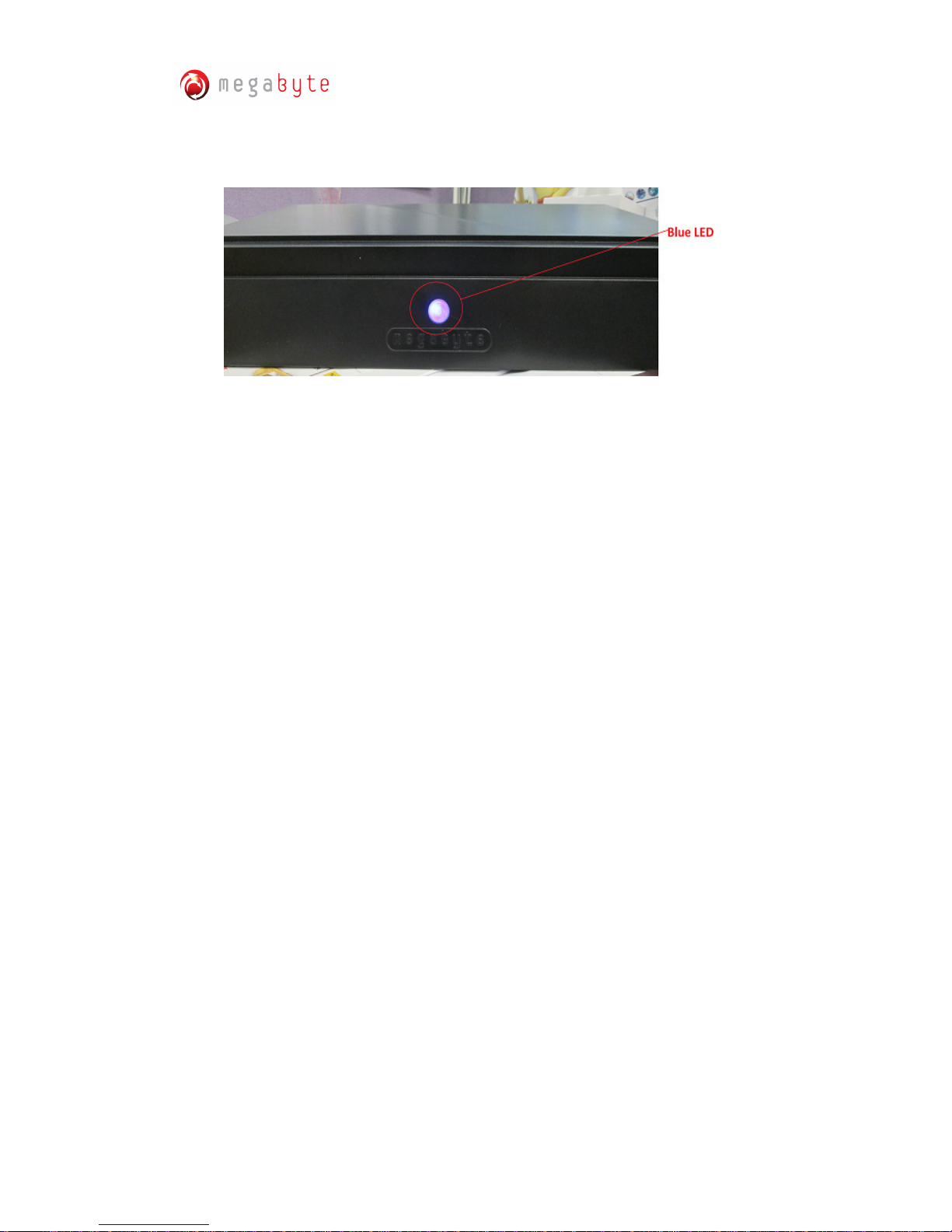
5 Blue LED Powered On and USB Connected

Logistic Tray L2U User Manual Rev. 3.0 Updated on 7NOV 2016
Technical Contacts and Enquiry: jimmywong@myndar.com Website: www.myndar.com
(This user manual / product specification is subjected to be changed without prior notice) P.7
1.4 Antenna for Logistic Tray L2-U
There are two identical antennas are used with Logistic Tray L2-U. The following
antennas are used for Logistic Tray L2-U:
RFID NEAR FIELD FLAT PANEL ANTENNA: antenna gain = 0dBi

Logistic Tray L2U User Manual Rev. 3.0 Updated on 7NOV 2016
Technical Contacts and Enquiry: jimmywong@myndar.com Website: www.myndar.com
(This user manual / product specification is subjected to be changed without prior notice) P.8
1.5 Specification:
Item Specification
Input 1 power key button
1 USB port
Indicator Red LED indicate for Powered On but USB not connected
Blue LED indicate for Powered On and USB Connected
Connectivity USB2.0
Charger 6.5V 3A ac to dc power adapter
DC jack with inner post of “+ve” and outer post of “-ve”
Operation
temp. 0 to +40 deg C
Storage temp. -20 to +60 deg C
Operating
Humidity 20% to 90%
Features
1 Watt (30dBm) Tx output levels
Adjustable output Tx power levels over +5 to 30dBm
range in 1dB steps,
High durability in harsh environments,
Easy installation and maintenance,
All-in-one compact design,
Fanless
Design for protection of dirt, dust, insects, liquids,
Supporting tag interface of EPC C1G2/ISO
18000-6C(UHF C1G2),
Dense Reader Mode Capability

Logistic Tray L2U User Manual Rev. 3.0 Updated on 7NOV 2016
Technical Contacts and Enquiry: jimmywong@myndar.com Website: www.myndar.com
(This user manual / product specification is subjected to be changed without prior notice) P.9
Chapter 2 Installation of Logistic Tray L2-U
2.1 Start-up Procedure of Logistic Tray L2-U
This section explains how to set-up Logistic Tray L2-U and connect the Logistic Tray L2-U
to your computer and antenna:
I. Plug in the power adapter.
II. Power on the L2-U by switching the Power on button. Then, the Red LED will be
turned on.

Logistic Tray L2U User Manual Rev. 3.0 Updated on 7NOV 2016
Technical Contacts and Enquiry: jimmywong@myndar.com Website: www.myndar.com
(This user manual / product specification is subjected to be changed without prior notice) P.10
III. Plug in the USB to the tray and connect the USB with the computer. Then, the
Blue LED will be turned on.
IV. Select the test tools or apps for application.
V. Logistic Tray L2-U operates at UHF frequency band, FCC 902-928 MHz, SRRC
920-925 MHz and NCC 922-928 MHz); the setting depends on countries’
regulations.
2.2 Environmental Requirements
The next table includes environmental requirements for the Logistic Tray L2-U. Choose a
location that meets these requirements.
Description Minimum Maximum
Operating temperature 0ºC 40ºC
Storage temperature -20ºC 60ºC
Humidity (non-condensing) 20% 90%
Table of contents
Other megabyte Other manuals