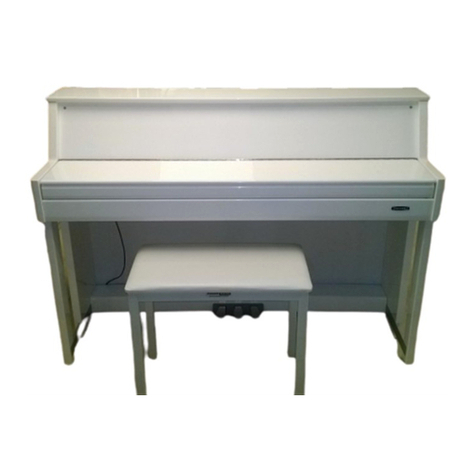
Medeli DP760K User manual

0
5
25
75
95
100
AW_DP760K_Quick Start Guide_G02_151027_pa
20151027 16:59:42

INFORMATION FOR YOUR SAFETY!
THE FCC REGULATION WARNING (for USA)
This equipment has been tested and found to comply with
the limits for a Class B digital device, pursuant to Part 15 of
the FCC Rules.
These limits are designed to provide reasonable protection
against harmful interference in a residential installation. This
equipment generates, uses, and can radiate radio frequency
energy and, if not installed and used in accordance with the
instructions, may cause harmful interference to radio
communications. However, there is no guarantee that
interference will not occur in a particular installation.
If this equipment does cause harmful interference to radio or
television reception, which can be determined by turning the
equipment off and on, the user is encouraged to try to
correct the interference by one or more of the following
measures:
Reorient or relocate the receiving antenna.
Increase the separation between the equipment and
receiver.
Connect the equipment into an outlet on a circuit
different from that to which the receiver is connected.
Consult the dealer or an experienced radio/TV technician
for help.
Unauthorized changes or modification to this system can
void the user's authority to operate this equipment.
CAUTION
The normal function of the product may be disturbed by
Strong Electro Magnetic Interference. If so, simply reset
the product to resume normal operation by following the
owner's manual. In case the function could not resume,
please use the product in other location.
PRECAUTIONS
PLEASE READ CAREFULLY BEFORE PROCEEDING
Please keep this manual in a safe place for future reference.
Power Supply
Please connect the designated Power Cord to an AC outlet
of the correct voltage.
Do not connect it to an AC outlet of voltage other than that
for which your instrument is intended.
Connections
Before connecting the instrument to other devices, turn off
the power to all units. This will help prevent malfunction and
/ or damage to other devices.
Location
Do not expose the instrument to the following conditions to
avoid deformation, discoloration, or more serious damage:
Direct sunlight
Extreme temperature or humidity
Excessive dusty or dirty location
Strong vibrations or shocks
Close to magnetic fields
Interference with other electrical devices
Radios and televisions placed nearby may experience
reception interference. Operate this unit at a suitable
distance from radios and televisions.
Cleaning
Clean only with a soft, dry cloth.
Do not use paint thinners, solvents, cleaning fluids, or
chemical-impregnated wiping cloths.
Handling
Do not apply excessive force to the switches or controls.
Do not let paper, metallic, or other objects into the
instrument. If this happens, unplug the Power Cord from the
wall outlet. Then have the instrument inspected by qualified
service personnel.
Disconnect all cables before moving the instrument.
Unplug the AC power adaptor when not using the
instrument, or during electrical storms.
2
Regarding the display
This display is a precision device created
using extremely high technology, and careful attention
has been paid to its product quality. Although you may
notice some of the issues listed below, please be aware
that these are due to the characteristics of LCD displays,
and are not malfunctions.
• There may be pixels in the display that are always dark
(unlit) or always bright (lit).
• Depending on the displayed content, the brightness of
the display may appear uneven.
• Depending on the displayed content, horizontal stripes
of shading may be visible.
• Depending on the displayed content, flickering or moire
patterns may be visible.
instrument
0
5
25
75
95
100
AW_DP760K_Quick Start Guide_G02_151027_pa
20151027 16:59:45

Contents
3
Introduction
Panel & Display Description
Front Panel............................ ......................4
Rear Panel..........................................................5
Main Display........................................................6
Setup
Part List...............................................................7
Setup Guide........................................................7
Connections
Power Supply....................................................10
Connecting a pair of Headphones.....................10
Connecting an Audio Equipment.......................10
Connecting an MP3/CD Player.........................10
Connecting a Microphone..................................11
Connecting a Computer.....................................11
Connecting External MIDI Devices....................11
Quick Start
Basic Operations
Selection Operation...........................................12
Soft Keyboard Operation...................................12
Setting Operation..............................................13
Playing the Demos.......................................14
Playing Voices..............................................15
Playing with a Style......................................16
Playing Songs...............................................17
Recording Your Performance to MIDI......18
Recording Your Performance as Audio...19
Using a USB Flash Drive............................20
........
Appendices
Troubleshooting
Specification..................................................22
Appendices
Voice List...........................................................23
Style List............................................................29
Song List...........................................................32
Demo List..........................................................32
Chord List..........................................................33
MIDI Implementation List..................................34
............................................21
0
5
25
75
95
100
AW_DP760K_Quick Start Guide_G02_151027_pa
20151027 16:59:45

Panel & Display Description
Front Panel
4
1. POWER ON/OFF BUTTON
Turn the power on or off.
2. MASTER VOLUME SLIDER
Adjust the master volume.
3. MUSIC VOLUME SLIDER
Adjust the volume of the playing style
or the playing song.
4. SELECT BUTTON
Select the three effect combinations of
GROUP KNOBS sequentially.
5. GROUP KNOBS
Effect1: Adjust reverb level, chorus
level, volume, pan of the
RIGHT 1 voice.
Effect2: Adjust attack time, release
time, the filter cut off
frequency, the amount of
resonance applied at the filter
cutoff frequency of the
RIGHT 1 voice.
Effect3: The knob effect can be
assigned separately. See
“Controller”.
6. EFFECT ON/OFF BUTTON
Turns the keyboard effect (arpeggio,
harmony, chopper) on or off.
7. SCORE BUTTON
Show the staff of the current song
(SMF).
8. SONG SELECT BUTTON
Enter the SONG SELECT interface.
9. STYLE SELECT BUTTON
Enter the STYLE SELECT interface.
10. TEMPO TAP BUTTON
Change the tempo by “tapping” out
the tempo with this button.
11. TEMPO+, TEMPO- BUTTONS
Adjust the current tempo.
12. METRO. BUTTON
Turn the Metronome on or off.
13. RECORD SONG BUTTON
Enter the RECORD SONG interface.
You’ll record your performance in
SMF format.
14. RECORD AUDIO BUTTON
Enter the audio recording is in ready
state. You’ll record your performance
in WAV format.
15. A.B.C. BUTTON
Turn the A.B.C. MODE on or off.
16. O.T.S. LINK BUTTON
Turn the O.T.S. LINK on or off.
If it is turned on, the One Touch
Settings can be changed when you
select different style.
17. AUTO FILL IN BUTTON
Turn the AUTO FILL IN on or off.
18. FADE IN/OUT BUTTON
Turn the FADE IN or OUT on or
off.
19. INTRO 1, 2 BUTTONS
Play the intro.
20. MAIN 1, 2, 3, 4 BUTTONS
Play the main part.
STYLE CONTROL
21. ENDING 1, 2 BUTTONS
Play the ending.
22. SYNC. STOP BUTTON
Turn the SYNC. STOP on or off.
23. SYNC. START BUTTON
Turn the SYNC. START on or off.
24. START/STOP BUTTON
Start or stop playing the style.
SONG
21. RW, FF BUTTONS
Rewind and fast forward the song.
23. PAUSE BUTTON
Pause the song playback.
24. PLAY/STOP BUTTON
Start playing the song or stop
the song playback.
25. MIXER BUTTON
Enter the MIXER interface.
CHORD
DICT.
PLAY/
STOP
RW FF PAUSE
O.T.S.
LINK
AUTO
FILL IN
FADE
IN / OUT
START/
STOP
SYNC
STOP
INTRO 1 INTRO 2 MAIN 1 MAIN 2 MAIN 3 MAIN 4 ENDING 1A.B.C.
SYNC
START
ENDING 2
MASTER
VOLUME
MUSIC
VOLUME
EFFECT ON / OFF
REVERB
ATTACK
ASSIGN 1
CHORUS
RELEASE
ASSIGN 2
VOLUME
CUTOFF
ASSIGN 3
PAN
RESONANCE
ASSIGN 4
SONG
SELECT
STYLE
SELECT
TEMPO
TAP
TEMPO
METRO.
MIXER
MAX
MIN
MAX
MIN
SCORE
NEW SONG
AUDIO
SONG
RECORD RECORD
SELECT
1
23
4
5
6
78 9
10 11
12 13 14
15 16 17 22 23 24
18 25
19 20 21
51. PEDALS
The function of pedal can be set.
The default settings are soft,
sostenuto, sustain from left to right.
51
0
5
25
75
95
100
AW_DP760K_Quick Start Guide_G02_151027_pa
20151027 16:59:45

Panel & Display Description
5
26. VOICE MODE BUTTON
Enter the VOICE mode.
27. PIANO MODE BUTTON
Enter the PIANO mode.
28. GLOBAL SETTING BUTTON
Enter the GLOBAL SETTING
interface.
29. USB DISK BUTTON
Enter the USB DISK interface.
30. PART ON/OFF BUTTONS
Turn LEFT, RIGHT1, RIGHT2,
RIGHT3 on and off individually.
31. DATA DIAL
Increase and decrease the
value.
32. VOICE BUTTONS
Enter the VOICE SELECT
interface. You'll select a voice
category.
33. MULTI PADS
Add spice to your performance
with special dynamic phrases
by pressing them.
34. EXIT BUTTON
Exit the current interface and
return to the previous display.
35. +, - BUTTONS
Increase and decrease the
value by 1.
36. BANK BUTTON
Enter the PERFORMANCE SELECT
interface.
37. FREEZE BUTTON
Turn the FREEZE function on or off.
38. STORE BUTTON
Save the panel setups to one of the
performance memorys.
39. M1-M6 BUTTONS
PERFORMANCE MEMROY:
Recall the panel setups from one of
the performance memorys.
O.T.S (M1-M4):
Call up all the settings (voice, effect,
etc) that match the current style.
40. O.T.S. BUTTON
Switch to the O.T.S. function.
41. TRANSPOSE+, TRANSPOSE-
BUTTONS
Adjust the TRANSPOSE value.
42. OCTAVE+, OCTAVE-
BUTTONS
Adjust the OCTAVE value.
43. USB PORT
Connect the USB storage device.
44. MIDI IN/OUT/THRU JACKS
Connect other products equipped
with a MIDI interface.
45. USB JACK
Connect to a computer.
46. MIC JACK
Connect a microphone.
47. MIC VOL KNOB
Adjust the input volume of the
microphone.
48. AUX IN JACKS
Connect any external audio source,
such as an MP3 or CD player.
Rear Panel
43
40
33
34
29
PART ON/OFF
VOICE
LEFT R 2
IGHT R3IGHT RIGHT 1
BANK FREEZE STORE O.T.S.
M1 M2 M3 M4 M5 M6
PERFORMANCE MEMORY
O.T.S.
EXIT TRANSPOSE OCTAVE
2 3 41
6 7 85
PIANO E.PIANO ORGAN
VOICE
MODE
PIANO
MODE
GLOBAL
SETTING
USB
DISK
DEMO
STRINGS &
ENSEMBLE
GUITAR &
BASS
ACCORDION &
HARMONICA
LEAD &
PAD
BRASS &
SAXOPHONE
FLUTE &
WOODWIND
FX &
EFFECTS
ETHNIC &
COMBINED
PERCUSSIVE &
DRUM
26 28
27
30
31
32
35 36 37 38
39
42
41
44 46 47 48 49 50
45
USB
IN OUT THRU MIC MIC VOL
MIDI AUX IN AUX OUT 15V
L
RRL/MONO
49. AUX OUT JACKS
Connect to your amp/audion system.
For monaural output, use the L/MONO
jack.
50. DC IN Jack
Connect the DC power adaptor.
0
5
25
75
95
100
AW_DP760K_Quick Start Guide_G02_151027_pa
20151027 16:59:45

1. Voice
Display voice name and octave data of each part.
(Right1, Right2, Right3, Left)
How to select the voice for each part?
For example:
1. Pressing anywhere in the R1 display area makes the
R1 part selected.
2. Pressing again will call up the Voice Selection display.
Now, you can select the voice for R1.
2. Style&Song
Display the currently selected style name, for example
“8Beat Ballad”. Pressing this name will call up the Style
Selection.
Pressing song tab will display the currently selected song
name, for example “Brahms Waltz”. Pressing this name
will call up the Song Selection display.
3. Performance
Display the currently selected performance name.
Pressing this name will call up the Performance
Selection display.
Main Display
12
3
4
5
6
CB
A
4. Chord
Display the chord name and related information.
A. Chord Name
B. Chord Mode
C. Split
5. Shortcut to setup pages
Pressing “Split Point” will call up the Split Setting quickly.
Pressing “Effect” will call up the Effect Setting quickly.
Pressing “Controllers” will call up the Controllers display
quickly.
6. Others
The amount of transposition in semitone units.
Current tempo.
Current playback position.
Current time signature.
Panel & Display Description
6
0
5
25
75
95
100
AW_DP760K_Quick Start Guide_G02_151027_pa
20151027 16:59:45

Setup
7
1Piano body
2Left leg component
3
4
5
6Screws M6X12(2PCS)
Screws M6X18(4PCS)
7
8
Screws M6X40(4PCS)
screwTapping 4X15(5PCS)
Screw caps(6PCS)
Hand screws(2PCS)
Foot pedal cable
9
10
11
12
Right leg component
Foot pedal
Rear board
0
5
25
75
95
100
AW_DP760K_Quick Start Guide_G02_151027_pa
20151027 16:59:50

Setup
8
and 2 pieces screw(6)
10
4
5
0
5
25
75
95
100
AW_DP760K_Quick Start Guide_G02_151027_pa
20151027 16:59:51

Setup
9
12
Power Cable
0
5
25
75
95
100
AW_DP760K_Quick Start Guide_G02_151027_pa
20151027 16:59:54

MIC MIC VOL
AUX IN AUX OUT 15V
L
RRL/MON O
Connections
10
Connecting a pair of Headphones
There are two headphones jacks on the left underneath the piano body.
1. When an optional pair of stereo headphones is connected with the
headphones jack, the sound from speakers will switch off
automatically resulting in only the sound from headphone to be
heard.
2. Connect two pairs of headphones to jack1 and jack 2, it helps the
user play with the teacher or friend in a quiet surrounding.
Note:
Do not listen with the headphones at high volume for long periods of
time. Doing so may cause hearing loss.
Connecting an Audio Equipment
Connect the rear-panel AUX.OUT jack to amplified speakers, amplifiers
or domestic hi-fi units for external amplification.
For monaural output, use the L/MONO jack.
Note:
To avoid damaging the speakers, please ensure that the volume has
been set to the minimum level before connecting the power and other
devices.
Connecting an MP3/CD Player
Connect the audio output of an MP3/CD player or other audio source to
the stereo AUX IN jacks on the rear panel.
The input signal is mixed with the instrument signal, allowing you to
play along.
Power Supply
1. Make sure that the piano is turned off. Before you switch your piano on or
off, turn down the volume of piano and any connected audio equipments
first.
2. Connect the AC adaptor to the DC power jack instrument.
3. Connect the power cable to the AC outlet.
4. Turn the power ON. The LCD on the panel will light up.
5. If you want to turn off the piano, just long press the [POWER] switch then
release.
Note:
When the keyboard is not in use or in the time of thunderstorm, please
disconnect the power for safety purpose.
Headphone Jack 1
Headphone Jack 2
MIC MIC VOL
AUX IN AUX OUT 15V
L
RRL/MON O
MIC MIC VOL
AUX IN AUX OUT 15V
L
RRL/MON O
0
5
25
75
95
100
AW_DP760K_Quick Start Guide_G02_151027_pa
20151027 16:59:54
Table of contents
Other Medeli Musical Instrument manuals

Medeli
Medeli DP660 User manual

Medeli
Medeli CDP5000 User manual

Medeli
Medeli GRAND1000 User manual

Medeli
Medeli SP4200 User manual

Medeli
Medeli DP460K User manual

Medeli
Medeli AW GRAND 300 User manual

Medeli
Medeli UP81 User manual

Medeli
Medeli CDP5200-BK User manual

Medeli
Medeli SP40A User manual

Medeli
Medeli SP5500 User manual

Medeli
Medeli CDP5200 User manual

Medeli
Medeli DP280K User manual

Medeli
Medeli CDP6200 User manual

Medeli
Medeli sp 5100 User manual

Medeli
Medeli SP3000 User manual

Medeli
Medeli SDP-4 User manual

Medeli
Medeli KURTZMAN K700 User manual

Medeli
Medeli Grand 1000 User manual

Medeli
Medeli DP263 Operating instructions

Medeli
Medeli Grand 1000 User manual