MedComp C3 WAVE User manual


Owner’s Manual
© 2011-2014 – Medical Components Inc. All Rights Reserved.
Manufactured by: Medical Components, Inc., 1499 Delp Drive, Harleysville, PA 19438 USA Phone: 215.256.4201
1. Symbol Table
2. ImportantNoces
3. Introducon
4. IndicaonForUse/IntendedUse
4.1 IndicaonForUse
4.2 Intended Use
5. FeaturesAndControls
5.1 iPad
5.2 Hub
5.3 Hub Power Sources
5.3.1 Power Supply
5.3.2 Charging Base
5.4 Remote
5.5 Ecg Clip Cable
5.6 Ecg Snap Lead Set
6. TechnicalSpecicaons
6.1 Ipad
6.2 Hub
6.3 Remote
7. ApplicaonAndIpadOperaon
7.1 PowerOnIpad
7.2 LaunchApplicaon
7.3 New Procedure
7.4 EnterPaentId/Notes
7.5 PowerOnHub
7.5.1 Wirelessly Connect Hub To Ipad
7.5.2 Internal Test
7.6 Connect3PaentSnapLeads
7.7 Apply The Ecg Adhesive Electrodes
ToPaentsChest
7.8 Verify Surface Ecg Signal
7.9 Collect Baseline Ecg Snapshot
During Surface Mode
7.9.1
7.9.2
7.9.3
7.10 Enter Surface Measurement
7.11 Enter Internal Mode
7.12 PrepSterileField
7.12.1 Remote
7.12.2 Hub
7.13 Connect Ecg Clip Cable To Hub
7.14 Connect Ecg Clip Cable To Picc
7.15 Verify Picc Ecg Signal
7.16 CollectEcgSnapshotOfDeecon
And Maximum P-Wave
7.16.1
7.16.2
7.16.3
7.17 Enter Impant Depth
7.18 FinishProcedure
7.19 Bundle Protocol Parameters

TABLE OF CONTENTS
Note: For use with soware 1.0.
7.20 Save,PrintOrReplayPaentFiles
7.20.1 Save
7.20.2 Print
7.20.3 Replay
7.21 PowerO
7.21.1 iPad
7.21.2 Hub
7.22 Clean Up
7.22.1 Disposables
7.22.2 Reusables
8. AddionalApplicaonControls
8.1 Ecg Wave Zoom
8.2 Scroll Through Snapshots
8.3 DeletePaentFiles
8.4 SengsAndSupport
8.4.1 AccountSengs/Registraon
8.4.2 Hub Serial #
8.4.3 Remote Serial #
8.4.4 Emr Url
8.4.5 Product Improvement Program
8.4.6 Set Passcode
8.4.7 FirmwareUpdate
9. Cleaning
10. Parts And Accessories
10.1 Parts
10.2 Accessories
11. TroubleShoongGuide
11.1 Alarms,AlertsAndInformaonalMessages
12. Standards,DeclaraonsandLicensing
12.1
12.2
12.3
12.4
13. Maintenace And Service Requirements
13.1 RouneMaintenance
13.1.1
13.1.2
13.1.3
13.1.4
13.2 Semi-Annual Maintenance
13.2.1
13.2.2
13.3 Annual Maintenance
13.3.1
13.3.2
13.3.3
13.4 Service Assistance
13.5 Training
13.6 ReturningUnitForRepair
13.7 DisposalOfUnit
14. Limited Warranty

2. IMPORTANT NOTICES
BeforeusingC3Wave,theusermustthoroughlyunderstandthecontentsofthismanual,inaddion
totheiPadmanual,includingallwarnings,cauons,contraindicaons,andintendeduse.
Warning Thisdeviceisonlyintendedforusebyqualiedandtrainedmedicalprofessionals.Beforeusingthis
device,theusermustbequaliedforplacementofPeripherallyInsertedCentralCatheters[PICC]and
trained in the proper use of this device.
Cauon Beforestarnganewprocedure,verifytheC3Waveapplicaondoesnotrequireupdang.Dothis
bylaunchingtheAppStoreandselecngtheUpdatestab.IfaC3Waveupdateisrequired,theuser
mustfullyunderstandtheupdatespriortostarnganewprocedure.TheWhat’sNewsecondetails
therevisionstotheapplicaon.Aerreviewingtheupdates,selectUpdate,andwaitforthenew
applicaontoload.
1. SYMBOL TABLE
On/O
ReadAccompanyingDocumentsforimportantsafety-relatedinformaon
RatedtypeCFpaentprotecon
Date of Manufacture
Device serial Number
SN
1
Owner’s Manual

3. INTRODUCTION
C3Waveisdesignedtoprovideaconnuousdisplayofelectrocardiograph[ECG]waveformtobeusedasaguidein
placementofperipherally-insertedcentralcatheters[PICC]inperipheralveinsleadingtotheheartofthepaent.The
principleforoperaonofthissystemusesthreeECGleadsplacedonthepaent’schestandgeneratesathirdECGlead
byswitchingfromRAtoPICCstylet.TheECGwaveformiswirelesslytransmiedtoatabletwhichallowstheoperator
toviewandrecordchangestotheECGwaveformasthepofthecatheterapproachestheheart.AsthePICCcatheter
approachestheatriumoftheheart,thePwaveintheECGwaveformshowssubstanalchanges.Thissystemisdesigned
toaidthevisualizaonofchangesinPwaveamplitude.
The C3 Wave system must only be operated by a skilled nurse, physician, or trained medical professional who has been
qualiedinplacementofPICC’sandtrainedintheproperuseofthisdevice.
ECG-Based PICC Tip Confirmation System
2
Warning Never use C3 Wave if dropped or visibly damaged. Remove damaged device from service and return
to Medcomp for service.
Warning DonotimmerseC3Waveinwaterorotheruids.Seriousdamagemayoccur,possiblyresulngin
injurytotheuserorpaent.
4. INDICATION FOR USE/INTENDED USE
4.1 Indicaons for Use
C3WAVEisindicatedforuseasasupplementalaidinposioningforPeripherallyInsertedCentralCatheters(PICC)in
adultpaents.Itprovidesreal-mecatheterplocaoninformaonbyusingthepaent’scardiacelectricalacvity.
Conrmaonofpplacementshouldbeveriedaccordingtoclinicaljudgmentandestablishedhospitalprotocol,
(e.g.,ChestX-ray,Flouroscopy).
Note:Liming,butnotcontraindicated,situaonsforthistechniquearepaentswherecardiacrhythmsmaychange
presentaonoftheP-wave:
-Atrialbrillaon
-Atrialuer

3
Warning C3WAVEworkswiththenormalsinusrhythmoftheheart.DonotrelyonECGsignaldeteconfor
catheterpposioningwheninterpretaonoftheexternalorintravascularECGP-waveisdicult.
Forexample,when:
-P-Wave is not present
-P-Waveisnotidenable
-P-Waveisintermient
Warning ThisdeviceisnotintendedforuseasadiagnoscECGdeviceasthesystemisdesignedtoaidthe
visualizaonofchangesinPwaveamplitude.
Warning DoNOTusethisdeviceinthepresenceofammableanesthecs,oxygen-enrichedatmospheres,or
explosive gases.
Warning This device has not been tested for use near electrosurgical devices. It is not recommended for use
inoperangrooms.
Owner’s Manual
-Severe tachycardia
-Pacemaker-driven rhythm
-Chronicobstrucvepulmonarydisease(COPD)
SuchpaentsareeasilyidenedpriortoPICCinseron.Useofanaddionalconrmaonmethodisnecessaryto
conrmcatheterplocaon.
4.2 Intended Use
C3WAVEisintendedtoproviderealmeplocaoninformaonofacentralvenouscatheterbyulizaonofECGto
observeP-wavechangesasthepapproachestherightatriumoftheheartviathesuperiorvenacava.
5. FEATURES and CONTROLS
TheC3WavesystemiscomposedofaniPad,Hub,PowerSupply,ChargingBase,Remote,adisposableECGClipCable
andECGSnapLeadSet.

ECG-Based PICC Tip Confirmation System
4
5.1 iPad
TheiPadreceivesthepaentinformaonwirelesslytransmiedfromtheHub.Theinteracveapplicaondisplays
theinformaonguidingtheuserduringPICCplacement.Theapplicaonalsoallowstheusertosaveinformaonper-
tainingtotheproceduretothepaent’sle.TheiPadcanbeoperatedinanon-sterileenvironmentusingthetouch
screen or during a sterile procedure by placing the remote inside the sterile bag.
Note: It is recommended that the iPad be mounted with the included VESA mount to prevent drops or other damage.
Sleep/Wake
Buon
Rear iPad
VESA Mount
Home
Buon
C3 App Icon
Mul-TouchDisplay Colorgraphicdisplaywithcapacivetouchscreen.
Sleep/WakeBuon Pressing once will put the iPad in Sleep or Wake mode. Pressing and holding for a few
secondswillturntheiPadOnorO.
VESA Mount FourmounngpointsinVESAstandard75mmsquarepaern.

5
5.2. Hub
TheHuballowstheusertosetupastandardthree-leadECGconnecontothepaentpriortothestartofthePICC
locaonprocedure.DuringthePICClocaonproceduretwoleads[RedandBlack]fromthisHubareusedtogether
withtheECGclip[White]leadonthestyletwiretocreatetheguidanceECGwaveform.TheHubisnon-sterileand
requirestheuseoftheprovideddrapetocreatethesterileeld.
PowerBuon PressandholdfortwosecondstoturnHubON.PowerBuonwillashbluewhile
connecngwithiPad.OnceconnectedthePowerBuonwillilluminatesolidblue.Press
andholdforvesecondstoturnHubOFF.PowerBuonwillnotilluminatewhenHub
isOFF.Pressingandholdingfortensecondswillbreakthewirelessconneconwiththe
Hub.
Stereo Jack ConneconpointforECGClipcable.
PowerBuon BaeryAccessDoor
Stereo Jack
Threeconnecon
pointsforECG
Charging Base
connecon
External Power
Supply
Baery
Indicator Light
Owner’s Manual

ECG-Based PICC Tip Confirmation System
6
BaeryIndicatorLED Baerytest:PressandreleasethePowerBuontoilluminateHubbaeryindicator
LED.Redashindicateschargingisrequired.Yellowashindicatesparallydischarged.
Greenashindicatesfullycharged.
Charging:WhenhubischargingtheBaeryIndicatorLEDwillconnuouslyash.Red
ashindicateschargingisrequired.Yellowashindicatesparallydischarged.Green
ashindicatesfullycharged.
DINconnecons ConneconpointsforECGsnapleads.
BaeryDoor Baeryaccessdoor.Removingthescrewallowstheusertochangebaery.
5.3. Hub Power Sources
5.3.1 Power Supply
Themedicalgradepowersupply[5VDC,10W]isusedtochargeoroperatethehubduringuseifthebaeryislowor
discharged.
7
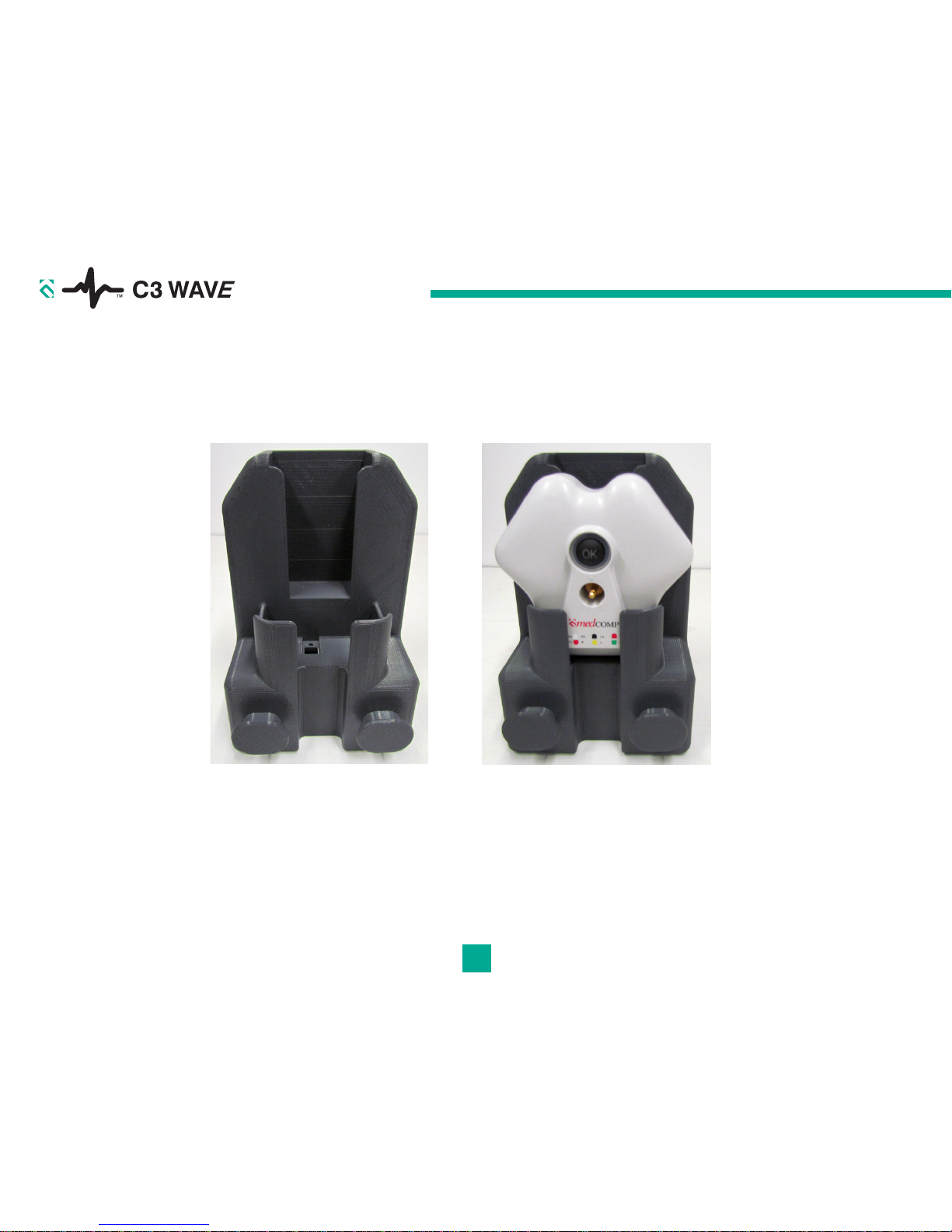
5.3.2 Charging Base
WhennotinusetheHubcanbechargedwhileresngintheChargingBase.Plugthemedicalgradepowersupply
[5VDC,10W]intotheChargingBaseandverifytheHubBaeryIndicatorLEDisashing.
Owner’s Manual
Table of contents
Other MedComp Medical Equipment manuals