MC Electronics AREA CONTROL MCK 3000 User manual

AREA CONTROL MCK 3000
UNIVERSAL HECTARE COUNTER
FOR AGRICULTURAL MACHINERY
USE AND ASSEMBLY
INSTRUCTIONS
NO.201211MI
REV. 2
EN

MCK 3000
Installation and use
MCK 3000
This product complies with the EMC requirements as defined by Directives
2004/108/EC and subsequent amendments
and refers to the applied Standard EN ISO 14982
Manufacture
r
: MC elettronica S.r.l.
Address
: Via E. Fermi, 450/486
Fiesso Umbertiano (ROVIGO) - ITALY
Tel. +39 0425 754713 Fax +39 0425 741130
E-mail: [email protected]
Internet: www.mcelettronica.it
Manual code
: 201211MI
Issued
: July 2012
Edition
: November 2020
MC elettronica S.r.l. is not obliged to give notice of any further modifications of the product.
The information given in this manual does not allow unauthorized personnel to tamper with the
product in any way.
The warranty on the equipment will no longer be valid if tampering should be detected.
© Copyright MC elettronica 2020

Installation and use 3
MCK 3000
Contents
1. Rules and general warnings ................................................................................ 4
1.1 Introduction....................................................................................................... 4
1.2 Terms of the warranty....................................................................................... 5
1.3 Service.............................................................................................................. 5
2. General description .............................................................................................. 6
3. System installation............................................................................................... 7
3.1 Mounting the Monitor ........................................................................................ 8
3.2 Sensor installation............................................................................................. 9
3.2.1 Speed sensor installation........................................................................... 9
3.2.1.1 Automatic calibration of the “C” parameter ......................................... 10
3.2.2 Installing the mechanical counting sensor (if present) ............................. 11
3.2.3 Installing the reflection seed sensor (if present)....................................... 12
3.2.3.1 Adjusting the sensitivity of the seed sensor ........................................ 13
3.3 Front view ....................................................................................................... 14
3.3.1 Keyboard.................................................................................................. 15
3.3.2 LCD Display............................................................................................. 16
4. Accessories......................................................................................................... 16
4.1 Standard accessories...................................................................................... 16
5. Setting the work parameters.............................................................................. 17
5.1 Setting the working width................................................................................ 17
5.2 Setting the calibration of the feed-rate ............................................................ 17
5.3 Setting the number of divisions of the total width............................................ 18
5.4 Setting the hectare count mode ...................................................................... 18
5.5 Programming the date/clock (if present) ......................................................... 19
5.6 Check the speed sensor operating ................................................................. 20
5.7 Check that the mechanical counting sensor functions .................................... 20
5.8 Check that the seed sensor functions (if present)........................................... 20
6. Operation............................................................................................................. 21
7. Maintenance........................................................................................................ 23
7.1 Routine maintenance...................................................................................... 23
7.1.1 How to protect the main connector .......................................................... 23
7.2 Extraordinary maintenance............................................................................. 23
8. Troubleshooting.................................................................................................. 24
9. Technical data..................................................................................................... 25
9.1 MCK 3000 Area Control Technical data.......................................................... 25
9.2 Accessory technical data ................................................................................ 25
9.2.1 MC speed inductive sensor –code 481................................................... 25

MCK 3000
Installation and use
MCK 3000
1. Rules and general warnings
1.1 Introduction
This instruction manual provides all specific information needed to know and correctly
use the equipment.
After buying the Monitor, read the manual carefully and refer to it any time you have
doubts on how to use the equipment or when you have to carry out maintenance
operations.
The manual must be kept on the machine or at least, when this is not possible, it
must be kept in a known place that is accessible for easy reference.
ALL RIGHTS RESERVED. THIS MANUAL IS INTENDED FOR CUSTOMERS ONLY. ANY
OTHER USE ISFORBIDDEN.

Installation and use 5
MCK 3000
1.2 Terms of the warranty
•SUBJECT OF THE WARRANTY: the warranty is applied to the product and to
those parts which are marked with the serial number or any other identification
number used by MC elettronica;
•DURATION OF THE WARRANTY: MC elettronica S.r.l. guarantees the MCK
3000 Monitor for a period of 1 year from the date of manufacture (printed on the
identification label on the rear of the monitor) and the accessories for a period of
1 year.
The warranty covers the product and any repairs carried out within the agreed
terms.
This warranty does not apply in the event of:
•accidental damage;
•improper use;
•changes which have not been agreed upon, improper installation (or set-up);
•damage caused when equipment not manufactured by MC elettronica,
which is mechanically or electrically connected to our instruments, breaks or
does not function properly;
•force majeure events (lightning, floods, fire or other causes which do not
depend on MC elettronica).
Repairs under warranty, which must be carried out in the laboratories of our
authorised centres, are entirely free of charge provided the equipment is directly
transported to said laboratories or sent carriage free. Transport costs and
ensuing risks are entirely borne by the Customer.
The above-mentioned warranty is valid unless otherwise agreed between MC
elettronica and the Customer.
!
Warning
MC elettronica declines any liability for damage or direct or indirect costs
caused by improper use or inability of the Customer to use the
equipment separately and/or together with other equipment.
1.3 Service
Service is available in all the countries where the Computer is officially supplied by
MC elettronica (during and after the warranty period).
Any kind of operation that is to be carried out on the MCK 3000 Monitor must be
done in accordance with the instructions stated in this manual or as agreed with MC
elettronica.
If not, the relative terms of the warranty might become null and void.
MCK 3000
Installation and use
MCK 3000
2. General description
The MCK 3000 Control Area is a universal hectare counter that can be installed on
any type of agricultural machine. With this instrument the following parameters can
be monitored:
•partial worked area;
•total worked area;
•distance travelled;
•speed (Km/h);
•forecast of the hectares that will be worked in an hour (only visible while you are
working).
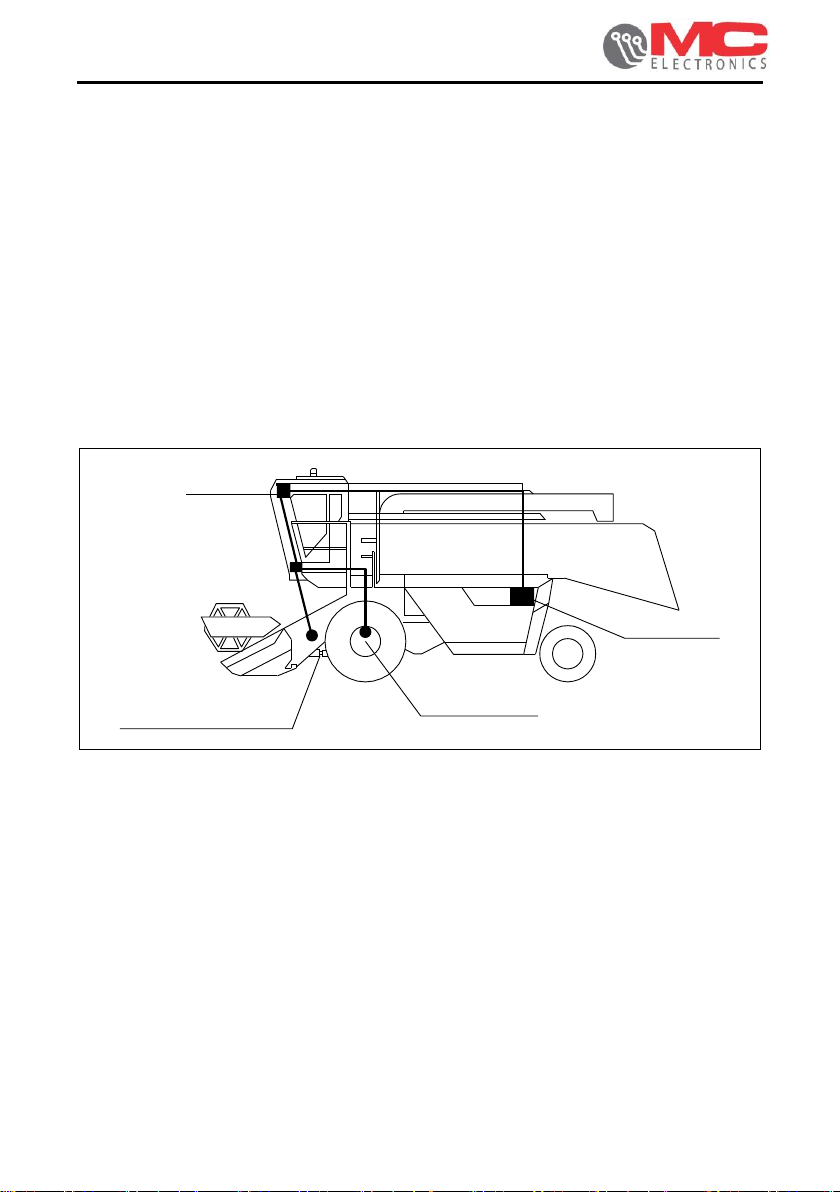
The Monitor uses a speed sensor to carry out the functions described above, which is
to be installed on the machine wheel, and a mechanical counting sensor or a seed
sensor.
Figure 1. Example of application on standard combine harvester.
Mechanical
counting
sensor
Battery
Speed
sensor
Monitor

Installation and use 7
MCK 3000
3. System installation
Figure 2. Overall dimensions

MCK 3000
Installation and use
MCK 3000
3.1 Mounting the Monitor
To assemble the instrument operate as follows:
•on a flat surface inside the cabin of the vehicle, drill 2 holes (D. 9 mm)
aligned with those on the bracket (Figure 33 - ref. <A>) and, by means of
two screws (not supplied), securely fasten the bracket to the structure;
•fasten the Monitor to the bracket by screwing the supplied knobs (Figure 33
- ref. <B>) in the holes on the sides of the Monitor (Figure 33 - ref. <B1>).
N.B.:
we recommend installing the Monitor in front of the operator to make it
easier to use during the working cycle.
Figure 3. How to assemble the Computer.

Installation and use 9
MCK 3000
3.2 Sensor installation
The MCK 3000 Area Control can be equipped with 3 types of sensors:
•speed sensor (always present);
•mechanical counting sensor (for NON self-levelling combine harvesters, tractors,
etc.);
•reflection seed sensor (for self-levelling combine harvesters).
3.2.1 Speed sensor installation
You can install the speed sensor anywhere there is mechanical movement, on the
wheel (front or rear) of the agricultural machine/vehicle or by creating a metal
reference protruding by at least 7 mm ( Figure 4 ref. B2). We recommend installing
the speed sensor inside the wheel and placing the sensor head opposite the rim bolts
(Figure 4 –ref. A and B).
Set the gap between the sensor and the bolts at about 2/3 mm (Figure 4 –ref. B1).
Firmly fix the sensor bracket (supplied) to a secure part of the machine. Fix the
sensor to the bracket with the nut and the lock nut.
!
Warning
The sensor cable should be covered with a rubber sheath.
Figure 4. How to install the speed sensor.
Inner side of wheel
Speed sensor
Metal reference
B2
B1

MCK 3000
Installation and use
MCK 3000
3.2.1.1 Automatic calibration of the “C” parameter
Parameter “C” is automatically set by covering a fixed distance of 100 metres,
according to the following procedure:
▪With the Monitor on, press the key several times until the arrow on the
display lights up as shown in the figure: ;
▪press keys and simultaneously: 0 0 will appear on the Monitor;
•cover 100 metres and the display will show the pulse count (1..2..3, etc.); once
the 100 metres are covered, confirm with the key.
N.B.: it is recommended to perform the operation at least 2 times in a row, checking
that the detected value is always the same 1 pulse. If the difference is
greater, it means that the speed sensor is NOT positioned correctly.
Therefore, the assembly must be checked (see Figure 4)
Table of contents
Other MC Electronics Cash Counter manuals