MAXIGLOBAL MODSECUR MT10 User manual

MODSECUR MT 10


1. Safety rules.........................................................................................................................................................1
2. Transport, unpacking the UPS.....................................................................................................................3
3. Appearance and connection.......................................................................................................................3
3.1. UPS rear panel..............................................................................................................................................3
3.2. Connection of the remote REPO switch...............................................................................................4
3.3. Connecting communication to the External Service Bypass EMBS...........................................4
3.4. Connection of communication options..............................................................................................4
3.5. Power connection - conguration 3:3..................................................................................................4
3.6. Power connection - conguration 3:1..................................................................................................5
4. LCD display operation...................................................................................................................................5
4.1. Main display window..................................................................................................................................6
4.2. UPS control window...................................................................................................................................6
4.3. Measure window.........................................................................................................................................9
4.4. UPS conguration window (Setting)..................................................................................................10
4.5. Information window.................................................................................................................................13
4.6. Alarm window.............................................................................................................................................14
5. Audible alarms and event codes.............................................................................................................14
5.1. Audible alarms............................................................................................................................................14
5.2. Warning codes............................................................................................................................................15
6. UPS operations...............................................................................................................................................16
6.1. Turn on the UPS from the mains...........................................................................................................16
6.2. UPS shutdown.............................................................................................................................................16
6.3. Turn on the UPS from the battery........................................................................................................17
6.4. Switching UPS to the Maintenance Bypass mode.........................................................................17
6.5. Switching the UPS from Maintenance Bypass mode....................................................................17
6.6. Installing the software.............................................................................................................................18
6.7. Working conditions...................................................................................................................................18
6.8. The storage conditions............................................................................................................................18
6.9. Battery change...........................................................................................................................................18
Table of contents


1
1. Safety rules
This manual contains information on the safe use of the UPS. Before unpacking and installing
the power supply, please read it carefully and follow its recommendations.
FULFILLED STANDARDS - EXECUTION
FULFILLED STANDARDS - ELECTROMAGNETIC COMPATIBILITY
FULFILLED STANDARDS - SAFETY
EN 62040-3: Uninterruptible Power Systems (UPS): Methods for determining the properties
and test requirements.
EN 62040-2 :2006 C3 Guaranteed Power Systems (UPS): Electromagnetic Compatibility.
EN 61000-2-2 :2002 Electromagnetic Compatibility (EMC): Environment. Compatibility levels
for conducted low-frequency disorders and signaling in public low-voltage power systems.
EN 61000-4-2 :2009 Electromagnetic Compatibility (EMC): Testing and measurement
methods - electrostatic discharge immunity test.
EN 61000-4-3 :2006 +A1 :2008 +A2 :2010 Electromagnetic Compatibility (EMC): Testing and
measurement methods - Radio frequency electromagnetic eld immunity test.
EN 61000-4-4 :2004 +A1 :2010 Electromagnetic Compatibility (EMC): Testing and Measure-
ment Methods - Testing of immunity to a series of fast electrical transients.
EN 61000-4-5 :2006 Electromagnetic Compatibility (EMC): Testing and Measurement
Methods - Surge Immunity Test.
EN 61000-4-6 :2009 Electromagnetic Compatibility (EMC): Test and Measurement Methods -
Immunity to conducted disturbances, induced by radio frequency elds.
EN 61000-4-8 :2010 Electromagnetic Compatibility (EMC): Testing and measurement
methods - Testing of resistance to magnetic eld at the frequency of the power grid.
The device complies with the Directive 2004/108 / EC (EMC).
EN 62040-1:2008 Uninterruptible Power Systems (UPS): General requirements and require-
ments for UPS safety.
EN 60950-1:2006 Information technology devices. Security.
IEC 60417 Symbols used on devices
The device complies with the 2006/95 / EC (LVD) directive.

2
- Keep these operating instructions! The manual contains important instructions on the use of
the UPS that should be followed during installation and use of the UPS device and batteries.
- Condensation may occur if the power supply is cold and is brought into a warm place.
Therefore, you should wait at least 2 hours until it starts up.
- To reduce the risk of electric shock, the UPS should be installed in a pollution-free room with
adequate temperature and humidity. The ambient temperature must not exceed 40 ° C.
- Do not install the power supply in a place exposed to direct sunlight or other heat sources.
- Do not connect devices that can overload the UPS output, e.g. laser printers, electric heaters,
etc.
- Cables should be connected and arranged in such a way that no one can accidentally step
on or disconnect them.
- The UPS must be connected to a wall outlet with a working protective earth (GND).
- Do not block the ventilation openings on the UPS. Make sure the vents are exposed and
there is a minimum of 25cm free space for ventilation.
- The UPS power socket should be protected with an appropriate overcurrent switch.
- The UPS has its own battery power source, so there may be voltage at the output sockets
even though the UPS is not connected to the mains.
- Battery service should be performed by trained personnel who are knowledgeable about
battery operation and take appropriate precautions during its use.
-If it is necessary to replace the battery, use batteries with the same number and parameters,
i.e. rated voltage, capacity and dimensions.
ATTENTION! Do not throw batteries into re. The battery may explode.
ATTENTION! Do not open or mutilate the battery.
Released electrolyte is harmful to the skin and eyes. It can be toxic.
- The battery can present a risk of electric shock. The following precautions should be taken
when working with batteries:
Remove watches, wedding rings and other metal objects from your hand.
Use tools with insulated handles.
Wear rubber gloves and boots.
Do not lay tools or metal parts on top of the battery.
Disconnect the battery charging source before connecting or disconnecting the
battery terminals.
- Make sure the battery is not inadvertently grounded. If present, remove the source of ground
fault. Contact with any part of a grounded battery can result in electric shock.

3
2. Transport, unpacking the UPS
Check carefully that the carton and the contents are not damaged. If any damage is found,
immediately inform the shipping company and the power supply distributor.
Do not throw away the UPS packaging.
1. If no damage is found, carefully open the carton.
2. Unpack all protective elements (sponges, llers).
3. Gently remove the UPS from the protective lm and place it on a clean, at and stable surface.
To prevent mechanical damage, shock and impact, only ship the UPS in its original packaging.
3. Appearance and connection
3.1 UPS rear panel
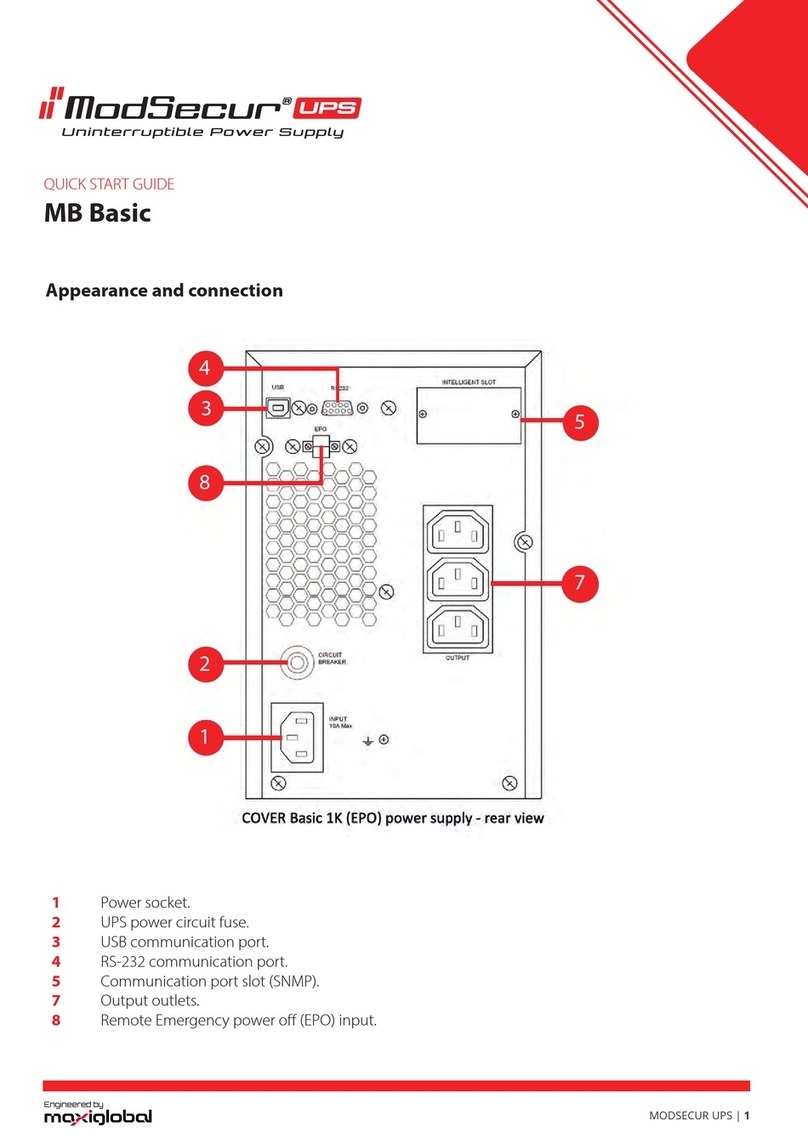
1. RS 232 Port
2. USB Port
3. EPO port (re protection switch connector)
4. Parallel port (optional)
5. Parallel port (optional)
6. Communication card slot (SNMP)
7. External battery socket
8. Rectier power disconnect switch for UPS
9. Mechanical and service bypass
10. Power cable connection strip
11. Terminals for powering the UPS rectier
12. Terminals for connecting load power
13. Ground terminal
14. Ground terminal
15. Internal bypass feeder disconnector of UPS
16. Bypass power supply terminals
17. Output disconnector
18. Bypass communication connector ext. EMBS

4
3.2. Connection of the remote REPO switch
The UPS is equipped with an EPO port for connecting the Remote Emergency Power O
(REPO) switch. The EPO port is congured as NC (normally closed), the activation of EPO occurs
by breaking the connection between Pin 1 and Pin 2 (removal of the jumper).
3.3. Connecting communication to the External Service
The UPS is equipped with an EMBS connector, enabling communication to be connected to
the External Service Bypass, in order to enable the inverter to be turned o while operating on
the External Bypass. It is an NC (normally closed) port that is activated by breaking the connec-
tion between Pin 1 and Pin 2 (removing the jumper). Activating the port turns o the inverter
and blocks the possibility of its activation.
3.4. Connection of communication options
The UPS has two communication ports:
USB Intelligent Slot (SNMP)
To enable automatic management and monitoring of the UPS, connect the USB cable
supplied with the UPS, on one side to the USB socket on the UPS and on the other side to the
USB socket on the computer. The software provided with the UPS allows you to automate the
processes of turning on / o the receivers connected to the UPS depending on the events that
occur on the UPS (e.g. power failure, low battery level, overload, etc.). The software also allows
for ongoing monitoring and logging of UPS event history.
The UPS also has a slot for additional cards, which enables retrotting with an SNMP network
card for remote communication via the network.
3.5. Power connection - conguration 3:3
NOTE: UPS operation conguration may only be changed by an authorized service!
OUTPUT INPUT INPUT BYPASS
Terminal for connecting the power supply conguration 3: 3 phase

5
3.6. Power connection - conguration 3:1
NOTE: UPS operation conguration may only be changed by an authorized service!
OUTPUT INPUT INPUT BYPASS
Power supply terminal for conguration 3: 1 phase
4. LCD display operation
The UPS is equipped with a color LCD touch panel. Below is a diagram showing the possibilities
and the location of the various information available in the display menu.
For 3: 3 and 3: 1 UPS congurations there are dierences in the number of displayed output
phases and bypass phases.
The screens below show a 3: 3 conguration. For a 3: 1 conguration, only 1 Output Phase and
Bypass are displayed.

6
4.1. Main display window
The main menu of the display shows the current operating mode of the UPS (energy ow
through individual functional blocks) and the parameters of power supply, batteries and UPS
outputs. To return to the main window from anywhere else, use the icon
4.2. UPS control window
Control menu allows you to turn the UPS inverter on or o, run a battery test and silence
the audible alarm.

7
Select the UPS ON / OFF command to enable or disable the UPS inverter. The display will
switch to the following view asking you to conrm or cancel your selection.
Click "YES" to turn on / o the UPS. The display will return to the main window view.
Click "BACK" or "No" to return to the control window.
The display in the main window will show messages related to turning the UPS on (Turning on)
or turning o the UPS (Turning o ).
To start the battery test, select the "BATT TEST" command and conrm your selection with the
"YES" key. To cancel the test, select the return to the "Back" menu or the "No" command.
The display in the main window will show messages related to Battery testing or Battery test
failed.
Turn on UPS Turn o UPS
Table of contents
Other MAXIGLOBAL UPS manuals