Matrox MXO2 Mini User manual

MATROX MXO2 FAMILY FOR PC Product Guide
June 2011

2
Matrox MXO2 Family for PC Product Guide
2
Matrox MXO2 Family for PC Product Guide
Table of Contents
Table of Contents Matrox MXO2 for PC
Overview.......................................................................................................................................... 3
Key features..................................................................................................................................... 3
Convenient form factors................................................................................................................... 4
Portable.................................................................................................................................. 4
Can run off standard field batteries ...................................................................................... 4
Rackmountable ...................................................................................................................... 4
Dimensions and weight .................................................................................................................. 5
Broadcast-quality HD/SD video and audio input/output .................................................................. 5
Video I/O ............................................................................................................................... 6
Audio I/O ............................................................................................................................... 6
Matrox MXO2 Mini Connections...................................................................................................... 7
Matrox MXO2 LE Connections........................................................................................................ 8
Matrox MXO2 Connections ............................................................................................................. 9
Matrox MXO2 Rack Connections .................................................................................................. 10
Flexible support for leading codecs, file formats, cameras, and workflows ................................... 11
Works with a variety of codecs ............................................................................................ 11
Use your favorite file-based formats .................................................................................... 11
RED workflow support ............................................................................................................................11
Closed captioning support with Adobe Premiere Pro.......................................................... 11
Extensive application support........................................................................................................ 12
Editing applications ............................................................................................................. 12
Content creation applications ............................................................................................. 12
H.264 encoding/authoring applications using Matrox MAX technology.............................. 12
Streaming applications ........................................................................................................ 12
DirectShow Filter .................................................................................................................. 12
Adobe Premiere Pro...................................................................................................................... 12
Matrox RT technology for Adobe Premiere Pro ............................................................................ 13
Realtime Matrox Flex CPU effects with Adobe Premiere Pro........................................................ 13
Realtime primary color correction.................................................................................................. 13
Realtime proc amp controls ................................................................................................. 14
Realtime color match and color balance ............................................................................. 14
Realtime input/output level control....................................................................................... 15
Realtime RGB curves control............................................................................................... 15
Realtime secondary color correction ............................................................................................. 16
Realtime chroma and luma keying ................................................................................................ 16
Realtime speed changes............................................................................................................... 17
Realtime transitions ....................................................................................................................... 17
Native Adobe Premiere Pro effects and transitions....................................................................... 18
Realtime timecode......................................................................................................................... 18
Matrox MPEG-2 I-frame intermediate codec with Adobe Premiere Pro ....................................... 19
Avid Editing Systems..................................................................................................................... 20
HD and SD video monitoring......................................................................................................... 21
Matrox HDMI Calibration Utility............................................................................................ 21
Realtime hardware up/down/cross conversion on capture and output.......................................... 22
HD to SD downscaling......................................................................................................... 22
SD to HD upscaling.............................................................................................................. 22
Cross conversion ................................................................................................................. 22
Matrox A/V Tools application ........................................................................................................ 23
Matrox MAX option for lightning fast H.264 encoding.................................................................... 23
Matrox MAX H.264 Capture .......................................................................................................... 24
Quick delivery of dailies....................................................................................................... 24
Archiving ............................................................................................................................. 24
Complete controls for the highest quality, lowest bit rate deliveries .................................... 24
Kit contents.................................................................................................................................... 25
Matrox MXO2 Mini ............................................................................................................... 25
Matrox MXO2 LE .................................................................................................................. 25
Matrox MXO2 ....................................................................................................................... 25
Matrox MXO2 Rack .............................................................................................................. 25
HDMI Monitor Calibration – Frequently Asked Questions ............................................................. 26

3
MoreThan Just I/O
Lightning Fast H.264 Encoding Too!
As a video professional you need an editing platform you can rely on to
connect to anything, anywhere; work with your favorite apps; and deliver
high-quality video to all the devices your viewers and clients use – the web,
mobile devices, Apple TV, Blu-ray discs, even tape. The award-winning
Matrox MXO2 devices have you covered. You get highly-reliable, broadcast-
quality video and audio input/output and HDMI video monitoring with the
unique Matrox HDMI Calibration Utility as well as 10-bit realtime hardware
up/down/cross conversion on capture and output. The devices can easily be
moved among the desktop systems in your facility, installed in an OB van, or
taken on the road with laptops. Units equipped with the MAX option provide
lightning fast H.264 file encoding.
Support for your favorite editing apps
The Matrox MXO2 devices are the only complete platforms for Adobe
Creative Suite 5.5 Production Premium, providing a wealth of productivity
tools. Matrox MXO2 Mini is a cost-effective HD monitoring solution for Avid
editing systems, ideal for file-based workflows. The Matrox MXO2 devices
can also be used with Mac Pros and MacBook Pros, giving you even more
apps to work with.
With four models to choose from you are sure to find the connectivity you need.
Matrox MXO2 Mini – Affordable HDMI/analog video and audio I/O
Matrox MXO2 LE – Professional HD/SD video and audio I/O
Matrox MXO2 – Complete HD/SD video and audio I/O
Matrox MXO2 Rack – Most comprehensive HD/SD video and audio I/O
Key features of the Matrox MXO2 family for PC
• Convenient form factors for use in studio, on set, in the field, and in OB vans
• Works with Windows 7 (64-bit) laptops and desktops
• Complete connectivity – PCI Express and ExpressCard/34
• Broadcast quality HD/SD video and audio input/output
• Flexible support for leading codecs, file formats, cameras, and workflows
• Captures to HD and SD codecs – 8- and 10-bit uncompressed and highly
efficient Matrox MPEG-2 I-frame
• Extensive application support including Adobe Premiere Pro, Encore,
Photoshop, and After Effects, Eyeon Fusion and NewTek LightWave 3D
• Matrox RT technology that enhances the Adobe Mercury Playback Engine to
provide full-resolution, full-frame-rate, multi-layer, realtime video editing and
advanced realtime Matrox Flex CPU effects
• Cost-effective HD monitoring for Avid Media Composer and Avid
NewsCutter with Matrox MXO2 Mini
• 10-bit HDMI input, output and monitoring with the unique Matrox HDMI
Calibration Utility
• 10-bit realtime hardware up/down/cross conversion on capture and output
• Matrox A/V Tools application for fast capture/playback of audio, video, and
still frames
• Three-year hardware warranty and complimentary telephone support
Additional features with Matrox MAX
• Lightning fast H.264 encoding with Adobe Media Encoder, Adobe Premiere
Pro and Adobe Encore
• Matrox MAX H.264 Capture application for direct capture to H.264 files for
the web, mobile devices, Apple TV, and Blu-ray discs
3
Overview
Matrox MXO2 Rack
Matrox MXO2 Mini Matrox MXO2 LE Matrox MXO2

Convenient form factors
Complete connectivity
The Matrox MXO2 products connect to your computer via a PCI Express
adapter card or an ExpressCard/34 adapter. When purchasing an MXO2
product, you choose the version that includes the adapter you need for your
particular system. Additional adapters may be purchased separately.
Portable
MXO2 Mini, MXO2 LE and MXO2 are lightweight, portable devices that easily
fit into your laptop bag.
Can run off standard field batteries
MXO2 and MXO2 LE can run off standard field batteries or their included AC
power adapter. MXO2 LE attaches directly to a battery via a standard 4-pin
XLR connector. MXO2 connects to a battery via an optional cable that can
be purchased separately.
Rackmountable
MXO2 Rack occupies 2RU in a standard 19” inch rack. It comes with two
adjustable mounting “ears” so that the unit can be mounted in the rack with
the connectors facing the front or back of the rack. The design of the ears
allows you to adjust the depth of the unit in the rack.
4
Matrox MXO2 Family for PC Product Guide
Convenient Form Factors

Dimensions and weight Broadcast-quality HD/SD video and audio input/output
Video I/O
The Matrox MXO2 products provide a full range of professional video inputs
and outputs.
MXO2 LE, MXO2 and MXO2 Rack provide RS-422 machine control for frame-
accurate capture and print-to tape with Adobe Premiere Pro.
Matrox MXO2 LE, MXO2 and MXO2 Rack provide SD analog black burst
(bi-level) or HD tri-level sync genlock. They can genlock to any type of video
input or to house sync. Timing offset controls can be used to align your video
output relative to your external genlock source to compensate for cable
delays within your facility. On MXO2 Rack, loop through is supported.
Matrox MXO2 LE, MXO2 and MXO2 Rack support up to five user-selectable
simultaneous video outputs – HD and/or SD on HDMI, SDI, and analog.
5
Matrox MXO2 Family for PC Product Guide
Inputs and Outputs
Video
MXO2 Mini MXO2 LE MXO2 MXO2 Rack
Video Inputs
Component HD/SD
(YUV or RGB)
Yes Yes Yes Yes
SDI HD/SD No Yes Yes Yes
Y/C Yes Yes Yes Yes
Composite Yes Yes Yes Yes
HDMI (YUV or RGB) Yes Yes Yes Yes
Video Outputs
Component HD/SD
(YUV or RGB)
Yes Yes Yes Yes
SDI HD/SD No Yes Yes Yes
Y/C Yes Yes Yes Yes
Composite Yes Yes Yes Yes
HDMI (YUV or RGB) Yes Yes Yes Yes
Dimensions Weight
Matrox MXO2 Mini 6 1/2" x 4 5/16" x 1 1/2"
(166mm x 110mm x 40mm)
0.6 lbs
(280g)
Matrox MXO2 LE 9 1/4" x 9 1/2" x 2"
(235mm x 241mm x 51mm)
2 3/4 lbs
(1245g)
Matrox MXO2 13” x 9½” x 2”
(330mm x 241mm x 51mm)
3 1/2 lbs
(1600g)
Matrox MXO2 Rack 21” x 18” x 8.25”
(533mm x 457mm x 210mm)
15 lbs
(7000g)

Audio I/O
The Matrox MXO2 products provide a full range of audio inputs and outputs
with the flexibility to map any audio track in Adobe Premiere Pro to any audio
output.
6
Matrox MXO2 Family for PC Product Guide
Inputs and Outputs
Audio
Audio Inputs MXO2 Mini MXO2 LE MXO2 MXO2 Rack
RCA Audio
(unbalanced)
2 channels 2 channels 2 channels No
XLR Audio (balanced) No 2 channels 2 channels 4 channels
AES/EBU
(unbalanced)
No No 2 channels 4 channels
SDI embedded audio
(8 channels)
No Yes Yes Yes
HDMI embedded
audio (8 channels)
Yes Yes Yes Yes
Audio Outputs
RCA Audio
(unbalanced)
2 channels 2 channels 6 channels No
XLR Audio (balanced) No 2 channels 4 channels 8 channels
AES/EBU
(unbalanced)
No No 2 channels 4 channels
SDI embedded audio
(8 channels)
No Yes Yes Yes
HDMI embedded
audio (8 channels)
Yes Yes Yes Yes
Direct surround sound
monitoring
No No 5.1 5.1 and 7.1

Matrox MXO2 Mini Connections
7
Matrox MXO2 Family for PC Product Guide
Connections
Matrox MXO2 Mini
Analog component HD/SD
or Y/C (with adapter) and
composite
HDMI – HD with up to 8
channels of embedded audio Power connector
HDMI – HD/SD with up to 8
channels of embedded audio
Host interface
RCA – 2 channels of
unbalanced audio
RCA – 2 channels of
unbalanced audio
Analog component HD/SD
or Y/C (with adapter) and
composite
Two Y/C (S-Video) adapters included

Matrox MXO2 LE Connections - Outputs
Matrox MXO2 LE Connections - Inputs
8
Matrox MXO2 Family for PC Product Guide
Connections
Matrox MXO2 LE
Power switch Power connector
(connects directly to standard field batteries
or the included AC power adapter)
RS422
Host interface
Analog component
HD/SD
XLR - 2 channels of
balanced audio
Two SDI – HD/SD with up to 8
channels of embedded audio
per output
Composite
Y/C – S-Video
RCA - 2 channels of
unbalanced audio
HDMI – HD/SD with up to 8
channels of embedded audio
Analog component
HD/SD
XLR - 2 channels of balanced audio
SDI – HD/SD with up to 8
channels of embedded audio
CompositeY/C – S-Video
HDMI – HD with up to 8
channels of embedded audio
RCA - 2 channels of
unbalanced audio
Genlock – bi-level and
tri-level genlock via a single BNC connector

Matrox MXO2 Connections - Outputs
Matrox MXO2 Connections - Inputs
9
Connections
Matrox MXO2
Power switch
Host interface
Power connector
(Matrox MXO2 battery power
cable sold seperately)
RS422
RCA - 2 channels of
unbalanced audio
XLR - 2 channels of
balanced audio
Y/C – S-Video Analog component – HD/SD
Genlock – bi-level and
tri-level genlock via a single
BNC connector
SDI – HD/SD with up to 8
channels of embedded audio
Composite
AES/EBU – 2 channels via a single
BNC connector
HDMI – HD with up to 8
channels of embedded audio
Analog component
HD/SD
Two SDI – HD/SD with up to 8
channels of embedded audio
per output
Composite
Y/C – S-Video
AES/EBU – 2 channels via a single
BNC connector
XLR – 4 channels of balanced
audio
RCA – 6 channels of unbalanced audio
(for surround sound monitoring)
HDMI – HD/SD with up to 8
channels of embedded audio
Matrox MXO2 Family for PC Product Guide

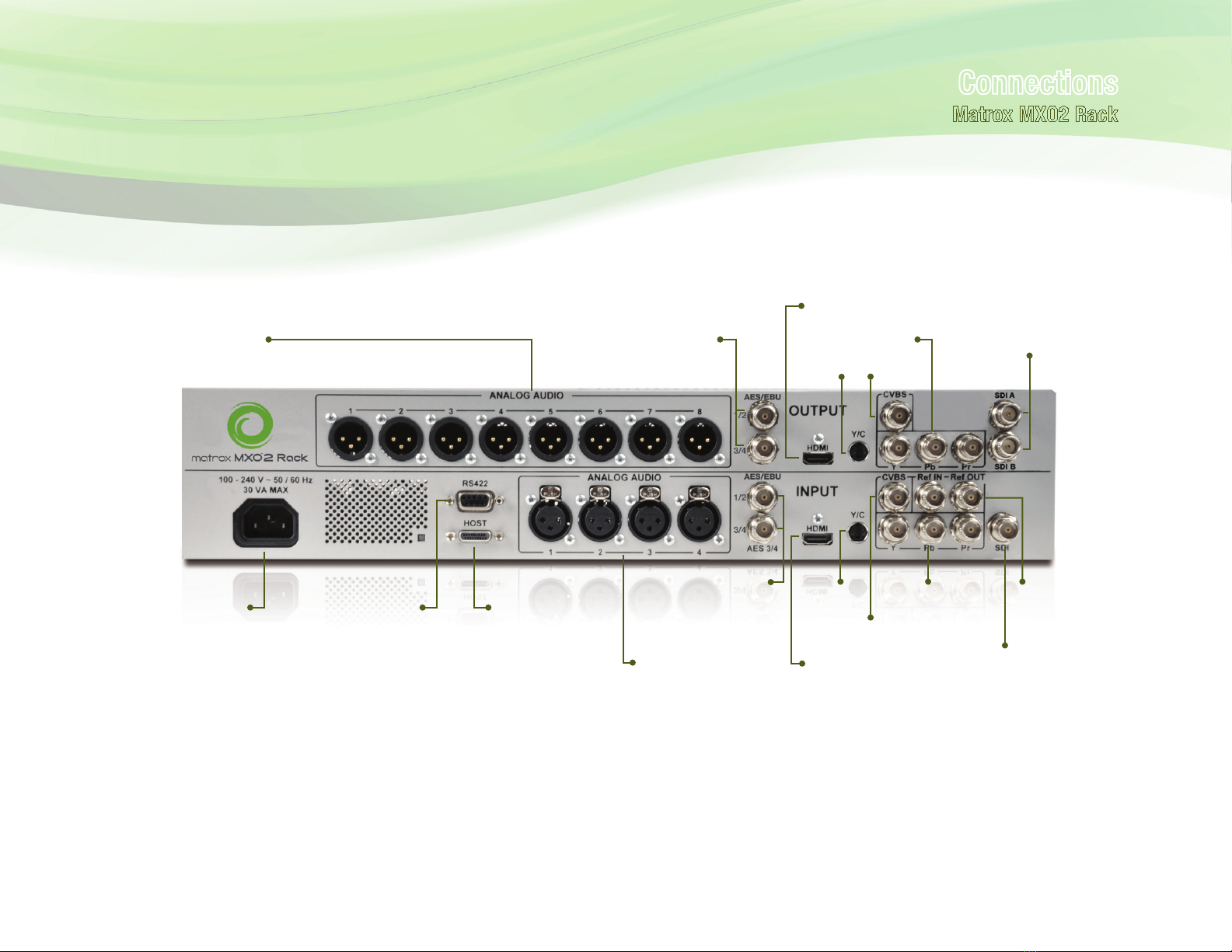
Matrox MXO2 Rack Connections
10
Matrox MXO2 Family for PC Product Guide
Connections
Matrox MXO2 Rack
XLR - 8 channels of
balanced audio
Analog component
HD/SD
Two SDI – HD/SD with up to 8
channels of embedded audio
per output
Power connector RS422 Host interface
XLR - 4 channels of
balanced audio
Y/C
Y/C
SDI – HD/SD with
up to 8 channels of
embedded audio
HDMI – HD/SD with up to 8
channels of embedded audio
HDMI – HD with up to 8
channels of embedded
AES/EBU – 4 channels via 2
BNC connectors
Composite
Composite
Genlock – bi-level and
tri-level genlock via a
single BNC connector
with loop through
AES/EBU – 4 channels
via 2 BNC connectors Analog component
HD/SD
Other manuals for MXO2 Mini
14
This manual suits for next models
1
Table of contents
Other Matrox I/O System manuals