
Matrix Telecom COSINE-64P User manual

COSINE
User’s Guide
MATRIX TELECOM PVT. LTD.MATRIX TELECOM PVT. LTD.
MATRIX TELECOM PVT. LTD.MATRIX TELECOM PVT. LTD.
MATRIX TELECOM PVT. LTD.
Corporate Office: Factory:
394-GIDC, Makarpura, 39-GIDC, Waghodia-391 760
Vadodara-390 010, India Dist. Vadodara, India
Tel : +91 265 2630555 Tel : +91 2668 263172/73
Fax: +91 265 2636598 Fax: +91 2668 262631
E-mail: Info@MatrixTeleSol.com E-mail: Support@MatrixTeleSol.com
URL: www.MatrixTeleSol.com
Version 4
August 2006


Welcome
Welcome to the world of telecom solutions from Matrix and
thanks for purchasing a Matrix product.
We want you to get the maximum performance from our product.
If you run into technical difficulties, we are here to help. But
please consult this user’s guide first.
If you still can’t find the answer, gather all the information or
questions that apply to your problem and, with the product close
to you, call your dealer. Matrix dealers are trained and ready to
give you the support you need to get the most from your Matrix
product. In fact, most problems reported are minor and can be
easily solved over the phone.
In addition, technical consultation is available from Matrix
engineers every business day. We are always ready to give
advice on application requirements or specific information on
installation and operation of our products.
This user’s guide is designed to help the station user to use the
system features intelligently. Every feature is explained with
regard to its usage and application with relevant example.
This is a common user’s guide for the users of Cosine-64P and
Cosine-32P. The configuration of both the variants is tabulated
below:

4 x 3 x 12 3 x 2 x 8
Maximum Standard Phones (SLT) 32 12 8
Maximum Digital Key Phones (DKP) 8 3 2
Maximum Analog Trunks (TWT) 8 4 3
Maximum BRI Trunks 2(4 channels) 1(2 channels) 1(2 channels)
Auto-Attendant Modules 16x16 sec. 16x16 sec. 16x16 sec.
Cosine-32P
Specifications Cosine-64P
Also note that, this also is a common user’s guide for all the
customers worldwide. Few feature access codes are region
dependent and hence the use of system is subject to the
settings (region selection) made in the system.
The feature access codes used in this user’s guide are
referenced to the default region code: Asia. The user is
requested to change the region code explicitly first and then use
the feature access codes depending on the region where the
system is installed. e.g. if the region code is selected as North
America, then the operator is accessed by dialing ‘0’. The
equivalent feature access codes for different regions are listed in
the relevant topics. The features are arranged alphabetically.
The Cosine users can be of two types:
1. SLT Users
2. DKP Users
This user’s guide is designed keeping in mind the SLT users.
The DKP users have the facility of using advanced features.
They are requested to use ‘Eon-45 User’s Guide’.
We hope this user’s guide assists you to use the system smartly.

Contents
Welcome .................................................................................... 3
Abbreviated Dialing .................................................................... 7
Alarms ........................................................................................ 8
Auto Call Back ......................................................................... 13
Auto Redial .............................................................................. 14
Barge-In ................................................................................... 16
Call Follow Me ......................................................................... 17
Call Forward............................................................................. 17
Call Park .................................................................................. 23
Call Pick Up ............................................................................. 24
Call Splitting ............................................................................. 24
Call Transfer ............................................................................. 26
Cancel Station Features........................................................... 29
Conference-3 Party .................................................................. 29
Conference-Multi Party ............................................................ 31
Continued Dialing..................................................................... 33
Conversation Recording .......................................................... 33
Department Call ....................................................................... 34
Direct Inward System Access (DISA)....................................... 34
Do Not Disturb (DND) .............................................................. 35
Dynamic Lock .......................................................................... 36
Emergency Dialing ................................................................... 37
Forced Answer ......................................................................... 38
Hold.......................................................................................... 38
Hotdesk .................................................................................... 39
Hotline ...................................................................................... 39
Interrupt Request ..................................................................... 42
Last Caller Recall ..................................................................... 42
Last Number Redial ................................................................. 43
Live Call Supervision ............................................................... 43
Message Paging ...................................................................... 44

Operator Dialing ....................................................................... 44
Override ................................................................................... 44
Paging ...................................................................................... 45
Raid.......................................................................................... 46
Room Monitor .......................................................................... 46
Selective Trunk Access ............................................................ 46
System Administrator (SA) Mode ............................................. 47
System Engineer (SE) Mode.................................................... 47
Time Tables .............................................................................. 48
Trunk Access Groups ............................................................... 48
Trunk Reservation .................................................................... 49
User Absent/Present ................................................................ 50
User Password......................................................................... 50
Walk-in Class Of Service ......................................................... 51
Matrix
Cosine V4 User’s Guide 7
Abbreviated Dialing
Personal Abbreviated Dialing
• You can store up to 10 numbers of your choice in personal
memory. The location codes for Personal Abbreviated Dialing
are 01-10.
How to program numbers in personal memory?
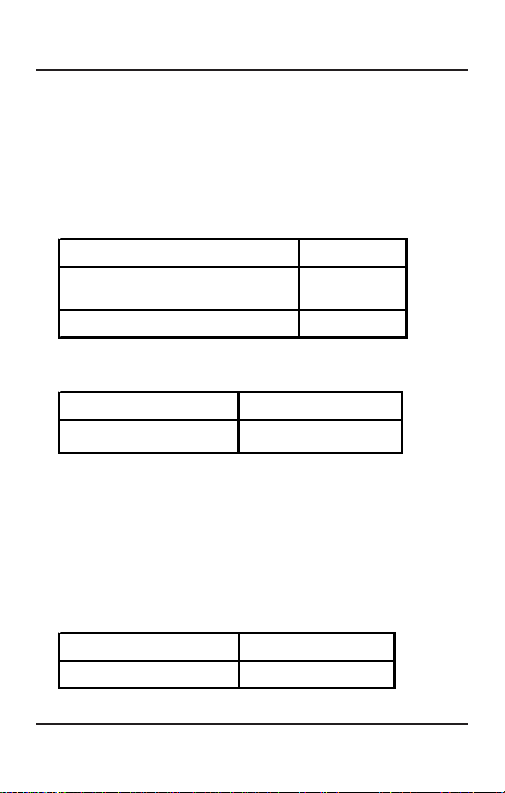
Lift the handset. Dial tone
Dial 108-Location Code-Trunk
Access Code-Number-#*. Confirmation
tone
Replace the handset.
How to use it?
(For Asian/Australasian/European/African users)
Lift the handset. Dial tone
Dial 8-Location Code. Number gets dialed.
Example:
To program telephone number 0265-2630555 at Location
Index 05 with trunk access code ’62’.
Dial 108-05-62-02652630555-#*.
Once this location IS programmed with the number, dial 805
to call the number.
(For North American/South American Users)
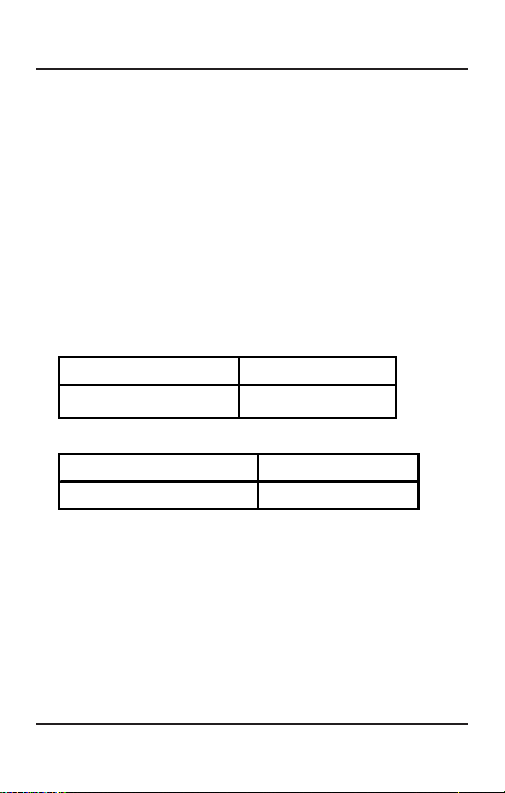
Lift the handset. Dial tone
Dial 6-Location Code.Number gets dialed.
Matrix
Cosine V4 User’s Guide
8
Example:
To program telephone number 265-2630555 at Location
Index 05 with trunk access code ‘82’.
Dial 108-05-82-02652630555-#*
Once this location is programmed with the number, dial 605
to call the number.
Global Abbreviated Dialing
• You can dial out numbers stored in the global memory of the
system using specific codes. The global memory is common
for all system users. The Location Code for Global
Abbreviated Dialing are 11-99.
(For Asian/Australasian/European/African users)
Lift the handset. Dial tone
Dial 8-Location Code. Number gets dialed.
(For North American/South American Users)
Lift the handset. Dial tone
Dial 6-Location Code.Number gets dialed.
Alarms
Duration Alarm
• You can ask the Cosine to remind you after some specific
time. On expiry of the set time, your station starts ringing. A
maximum of 8 duration alarms can be set simultaneously.
Matrix
Cosine V4 User’s Guide 9
Single Alarm
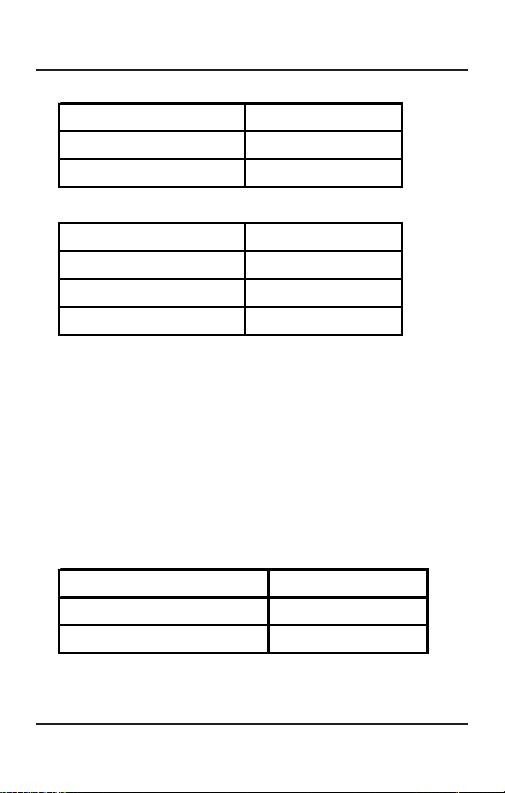
Lift the handset. Dial tone
Dial 161-Minutes. Confirmation tone
Replace the handset.
Multiple Alarms
Lift the handset. Dial tone
Dial 161-Minutes. Confirmation tone
Dial 161-Minutes. Confirmation tone
Replace the handset.
Example:
Dial 161-09 to set a reminder after 9 minutes (Single).
Dial 161-09 and 161-12 to set a reminder after 9 and 12
minutes (Multiple).
Time Alarm
• You can ask the Cosine to remind you at some specific time.
At the set time, your station starts ringing. A maximum of 8
time alarms can be set simultaneously. Time is in 24-hour
format i.e. 4:30PM is 1630 hrs.
Single Alarm
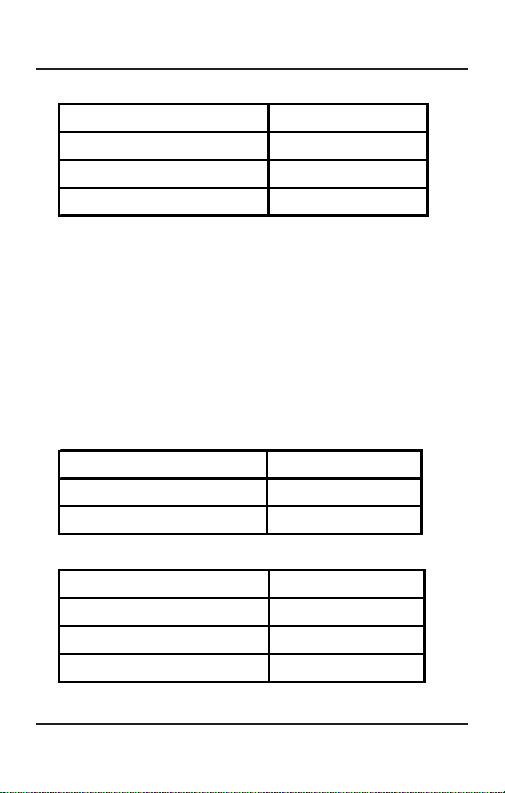
Lift the handset. Dial tone
Dial 162-Hours-Minutes. Confirmation tone
Replace the handset.
Matrix
Cosine V4 User’s Guide
10
Multiple Alarms
Lift the handset. Dial tone
Dial 162-Hours-Minutes. Confirmation tone
Dial 162-Hours-Minutes. Confirmation tone
Replace the handset.
Example:
Dial 162-1630 to set a reminder at 4:30PM (Single)
Dial 162-1630 and 162-1830 to set a reminder at 4:30PM
and 6:30PM (Multiple)
Daily Alarm
• You can ask the Cosine to remind you daily at some specific
time. At the set time, your station starts ringing. A maximum
of 8 daily alarms can be set simultaneously. Time is in
24-hour format i.e. 6:30PM is 1830 hrs.
Single Alarm
Lift the handset. Dial tone
Dial 163-Hours-Minutes. Confirmation tone
Replace the handset.
Multiple Alarms
Lift the handset. Dial tone
Dial 163-Hours-Minutes. Confirmation tone
Dial 163-Hours-Minutes. Confirmation tone
Replace the handset.
This manual suits for next models
1
Table of contents







