
MARSH SOUND DESIGN HT750 User manual

High Definition 5-channel Audio-Video Amplifier HT750
OWNER’S MANUAL


PREFACE
On your acquisition of your new H is a high
Audio/Video . As such, this
product represents a unique synthesis of form,
function and fidelity, superbly crafted to deliver all the
critical requirements of a truly high performance home
theater.
You will find only the finest audiophile-grade
electronic components used in the signal path. Without
any compromise, this product faithfully reproduces all of
the subtle details of the original signal.
Please follow the instructions contained in this
manual in order to derive the maximum performance,
flexibility and enjoyment from your new product.
T750
definition amplifier
wo
The MSD-HT750
The HT750 gives out 150 watts per channel, for a total
of 750 watts. The HT750 is designed with a High End
circuit with very low-noise Bi-Polar. A balanced,
complimentary differential input circuit makes the
HT750 even more linear than other systems.
Complex? Yes, but elegant and effective. The output
stage has t pairs of high current, paralleled, bi-polar
power transistors to meet the peak current demands of
any speaker system. Dynamic transient sounds come
through with full impact and clarity.
Marsh Sound Design
Congratulations!
3

HighDefinition 5-Channel Audio-Video Amplifier MSD-HT750
POWER
DIMMER
Marsh
UNPACKING
4
Your new product was diligently handcrafted,
thoroughly tested and carefully packed at our
factory
In the unlikely event that this product is damaged
during shipment, be sure to save the carton as evidence
for the freight carrier's inspection and call your local
dealer immediately. We strongly recommend that you
always save the box and packing materials should you
have to transport your product for any reason.
Please check and identify the following accessories
that are packed with this unit:
AC power cord (UL approved)
Product Warranty registration card
- This owner’s manual
.
-
-
CAUTION:
Never ship this product without the original
Packing.
WARNING:
People with back problems should not
unpack this equipment without assistance.
Marsh Sound Design
CONTENTS
1. Carefully lift the unit out of the box.
2. Remove the foam packing material.
3. Set up the unit for use
1
22
3

WARRANTY
1. A MARSH SOUND DESIGN warranty only applies to the original retail purchaser. The warranty certifies
that the product is free from defects in material and workmanship and authorizes free service and/or
parts exchange for a period of TWO years from the date of purchase. Service must only be done at an
authorized MARSH SOUND DESIGN Service center.
2. The warranty is subjected to the following conditions and limitations. The warranty is void if the product
has been used in a manner other than that specified within the operating manual, if the product has
been abused or misused, or if the product has been repaired by anyone other than an authorized MASH
SOUND DESIGN Service center.
3. The warranty does not apply to defects or failure caused by usage of unauthorized parts, improper
maintenance, fire, flood, lightning or other natural causes.
4. This warranty does not cover damage to the external parts, e.g. Front panel, knobs, casing etc.
5. A returned product must include a copy of the Warranty Certificate and the bill of sale and must be sent
in the original packaging.
6. The warranty does not extend to any incidental or consequential cost or damage to the purchaser caused
by a malfunction of the product.
The model number and serial number of this product can be found on either the back or the bottom of
the unit.
Please note them in the space provide below and retain this manual as a permanent record of your purchase
to aid identification in the event of theft.
Model Number: __________________________
Serial Number : __________________________
Marsh Sound Design
5
YOUR RECORD

TABLE OF CONTENTS
6
PREFACE 3
UNPACKING 4
CONTENTS 4
WARRANTY 5
YOUR RECORDS 5
RECOMMENDATIONS 7
FRONT PANEL CONTROLS 8
REAR PANEL CONNECTIONS 9
INTERNAL PROTECTIONS 10
GENERAL PRECAUTIONS 11
REPLACE THE AC POWER FUSE 12
TROUBLE SHOOTING GUIDE 13
SPECIFICATIONS 14
Marsh Sound Design

RECOMMENDATIONS
Placement Recommendation
Do not install the unit inthe following location
1. In a place subject to direct sunlight.
2. In a humid place.
3. In an extremely hot or cold place.
4. In a place subject to vibrations.
5. In a dusty place.
6. In a poorly ventilated place.
Listening Recommendation
Please note that your new HT750 will improve
sonically over the course of the first week. After the
first week, you will notice that the sound of your new
product has become richer, warmer and more open!
Marsh Sound Design
7

8
Marsh Sound Design
FRONT PANEL
CONTROLS
1. POWER
2. DIMMER
3.
Pressing the POWER button once to turn the unit ON. Press the POWER button again to turn the
unit OFF.
Press this button to adjust the brightness of the channel indicators on the front panel display. The
brightness can be adjust into five different levels for variety of room condition.
The numbers 1 to 5 on the front panel display will appear BLUE after the unit is ON, each number
indicates the status of each channel. After the unit is ON, the blue number on the front panel
display will be lit in order start from channel 1,2,3,4,and 5. In case of a malfunction, the blue
number will keep blinking until the unit turns off itself.
CHANNEL INDICATOR
REMARK: The an be linked with other MARSH SOUND DESIGN remote control
Preamplifiers to utilize the remote on/off option of your preamplifier.
MSD-HT750 c
Figure 1. HT750 Front Panel Controls.
High Definition 5-Channel Audio-Video Amplifier MSD-HT750
POWER
DIMMER
Marsh
Front Panel Controls
2
1
3
Marsh Sound Design
9
REAR PANEL
CONNECTIONS
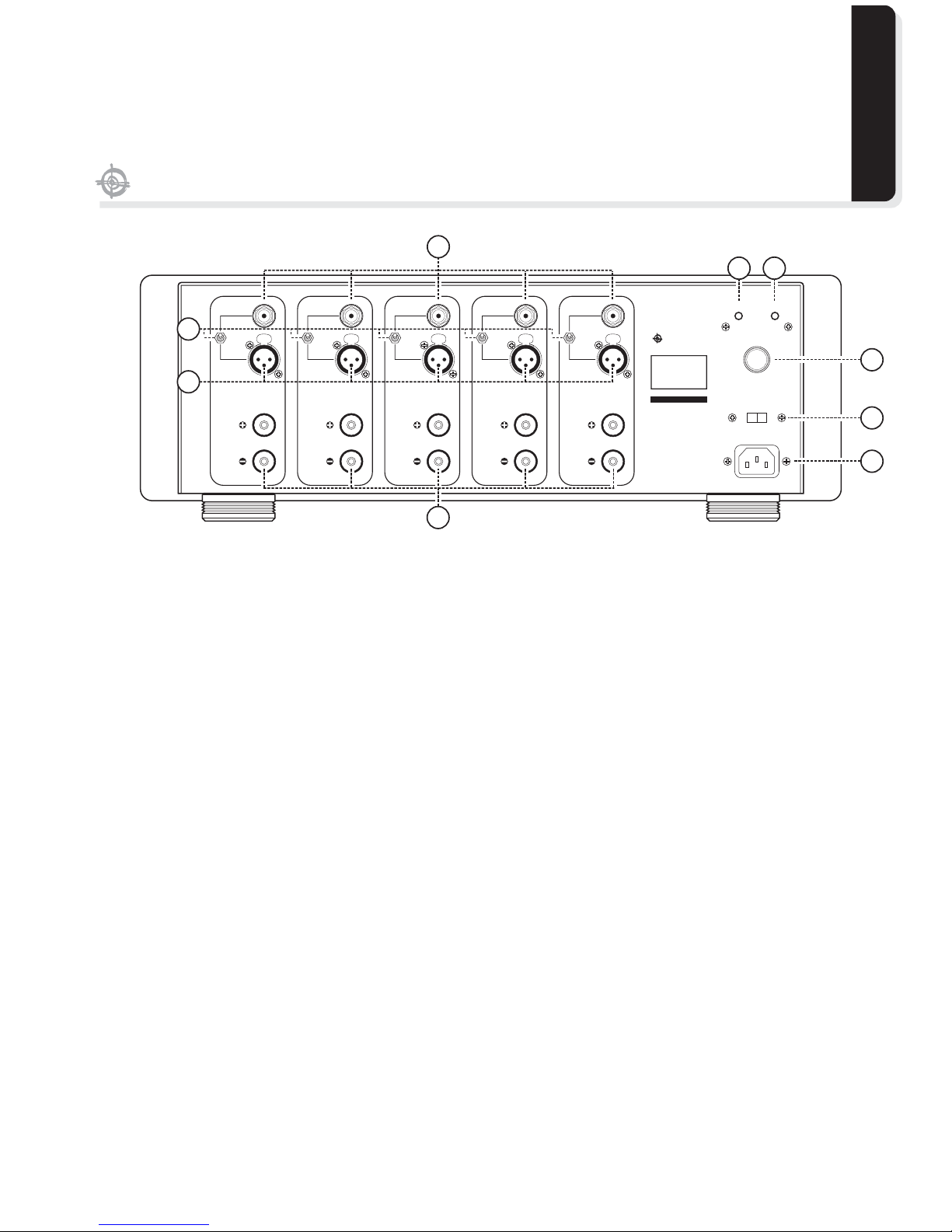
1.
2.
3.
4. SPEAKER OUTPUT
UNBALANCED INPUT
BALANCED INPUT
INPUT SELECTOR SWITCHES
Receive signals from unbalanced preamplifier outputs.
Receive signals from balanced preamplifier outputs.
Select according to the type of inputs being used.
Output signals to speakers.
This is a digitally controlled input designed to receive +12VDC from others MARSH SOUND
DESIGN preamplifiers with remote Turn on capability or from other equipment e.g. power control
center. With this function, the MSD-HT750 can be powered ON/OFF synchronized with that
equipment.
When the unit is ON there will be +12VDC output from this socket. Use it to turn on other related
equipments.
If there is a problem with the fuse, replace with a fuse of the same type and rating.
Connect the MSD-HT to the outlet with the enclosed power cord.
5. REMOTE IN
6. REMOTE OUT
7. MAIN FUSE
8. VOLTAGE SELECTOR SWITCH
9. AC POWER
IMPORTANT
Make sure to connect positive and negative output terminal.
120 or 220 Volts can be selected for a correct AC Voltage in different countries.
750
: Please make sure of an appropriate AC Voltage before making any adjustment at
voltage selector switch.
Rear Panel Connections
Figure 2. HT750 Rear Panel.
F
U
S
E
PUSHPUSHPUSHPUSHPUSH
MARSH SOUND DESIGN
S/N
IN OUT
I2 VDC REMOTE
TRIGGER
AC IN
VOLTAGE SELECTOR
FUSE 15A SLOW 120V
FUSE 8A SLOW 240V
CHANNEL 5
CHANNEL 4
CHANNEL 3
CHANNEL 2
CHANNEL 1
CHANNEL 5
UNBALANCED
INPUT
CHANNEL 4
UNBALANCED
INPUT
CHANNEL 3
UNBALANCED
INPUT
CHANNEL 2
UNBALANCED
INPUT
CHANNEL 1
UNBALANCED
INPUT
CHANNEL 5
SPEAKER OUTPUT
CHANNEL 4
SPEAKER OUTPUT
CHANNEL 3
SPEAKER OUTPUT
CHANNEL 2
SPEAKER OUTPUT
CHANNEL 1
SPEAKER OUTPUT
CHANNEL 5
BALANCED
INPUT
CHANNEL 4
BALANCED
INPUT
CHANNEL 3
BALANCED
INPUT
CHANNEL 2
BALANCED
INPUT
CHANNEL 1
BALANCED
INPUT
Marsh
MSD-HT750
High Definition
Five Channel
Audio-Video
Power Amplifier
2
1
3
4
56
7
8
9

10
Marsh Sound Design
INTERNAL
PROTECTIONS
Internal protections
1. Over-current protection
2. DC-fault protection
3. Over heat protection
The MSD-HT750 will go into protect mode
and cut off the main power supply to protect
the amplifier and speakers. This usually
happens when the speaker terminals or wires
are accidentally shorted together.
The MSD-HT750 will go into protect mode
when it detects DC voltage at the speaker
output. This is caused by a DC voltage leak
from the pre-amplifier outputs or by an
internal fault that gives a DC voltage leak at
the speaker output.
When in the above mentioned protect mode,
the unit will shut down to prevent damage to
itself or the speakers. If this occurs, wait
about 3 seconds for the unit to reset and turn
itself on again. This process will be repeated
for three times before the unit is shut down.
If protect mode continues, turn the unit off
and contact our service department.
If the temperature of the heat sink exceed
76 degrees C, the MSD-HT750 will shut itself
down. It will not restart automatically. Wait 5
to 10 minutes to let the unit cool down, and
then press the POWER button to turn it back
on.
Table of contents
Other MARSH SOUND DESIGN Amplifier manuals


