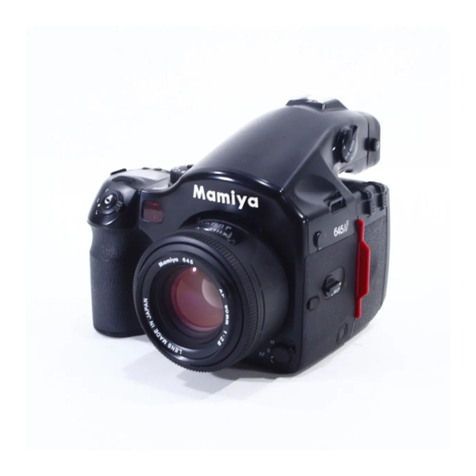
Mamiya PRO 645 User manual

Instructions

Congratulations on your purchase of the Mamiya 645 PRO
Mamiya pioneered the 6x4.5 film format and introduced the world’s first 645
SLR in 1975. The 645 PRO is the latest masterpiece in this series and
incorporates all the latest mechanical, electronic and optical advances. Its
external appearance, too, has been modernized and its ergonomic design
further enhanced.
We are sure that you will enjoy the many advantages this camera and its
accessories offer and want to particularly mention:
The 645 PRO has a built-in self-timer (delayed shutter release) which will also
facilitate time exposures. Attaching special leaf shutter lenses will automati-
cally set the focal plane shutter to
1/8
sec. Heavy duty gears connect to the
improved Power Drive Grip WG401. This grip also
automatically cocks the lea
f
shutter lenses and permits remote control.
The AE Prism Finder FE401, specially created for this camera, automates
exposure and shows LED safety signals. 35mm film holders now come with
panoramic adapters. A super fast 300mm f/2.8 APO lens was also designed
for this camera.
We are convinced that your camera will serve you well, because we have
designed it for heavy professional use. However, we ask you to please read
all operating instructions carefully before you put your equipment to work, in
order to ensure proper operation and maximum results.
This manual covers the
basic camera. Sepa-
rate instructions are
supplied with all sys-
tem accessories, in-
cluding lenses,finders,
film holders, etc.
For additional informa-
tion please feel free to
contact your author-
ized Mamiya dealer or
the Mamiya importer in
your country.
1

Special Features of Mamiya 645PRO....................3
Names and Function of Parts..................................7
Attaching and Removing Lenses
.........................10
Attaching and Removing Roll Film Holders
........
.11
Attaching
andRemoving
Viewfinders.................12
Attaching and Removing the Film Advance
Crank.........................................................................13
Inserting
Battery andBatteryCheck ........
...............14
Shutter Release Selector.......................................16
A Trial Familiarization Test...................................17
Film Loading...........................................................18
Advancing Film to the First Exposure.................21
Aperture
Ring/Stop-downOperation
...................23
Focusing
................................................................ .24
Depth-of-field
..........................................................25
FilmTransport andFilmUnloading
.....................26
Using the Self-timer/Delayed Shutter Release.
.
..2 7
Multiple Exposures
................................................27
TimeExposures
.....................................................28
MirrorLock-upPhotography
................................29
Infrared Photography............................................30
Using Flash
............................................................
.31
Using a Tripod
........................................................32
Holding the Camera Steady and Securely...........33
Attaching andRemoving the Neck Strap
............34
Specifications
.........................................................35
Trouble Shooting
...................................................37
Basic Accessories
.................................................39
System Chart.........................................................
.41
StoringandChecking
the
Camera
.......................42
Features and specifications subject to change without notice.
2

3 x More Negative Area Than the 35mm Format
Plus
Superior Image
Quality
From Mamiya World-
Class Lenses
The
6x4.5cm
format offers approx. 3 times more image
area than the 35mm
(24x36mm)
format, Man’s vision is
horizontal and rectangular.
Film Holders are rectangular and so are most pictures in
them. The
6x4.5 format
is also large enough to be viewed
without a magnifier and its aspect ratio (horizontal
/
vertical)
is ideal, requiring minimum cropping. Mamiya’s high
performance medium format lenses assure sharpness
and beautiful color fidelity.
2
Sturdy, Versatile, Safe and Highly Reliable Body
-
Tailored to Satisfy Pro Needs
-
Introduced in 1975 to not only provide an alternative to
the 35mm format, but to afford the user with advanced
versatility given its much larger format, the Mamiya 645
Series is constantly being upgraded. Elements such as
speed and handling plus a host of other special features
have been enhanced to satisfy the needs of most de-
manding professionals.
Two new convenient safety features have been added to
the 645 PRO in the form of state-of-the-art optoelectronics
which immediately identifies problems with the shutter
(i.e. when it will not release) when the AE Prism Finder
FE401 is used. Whether these malfunctions develop from
failure to draw out the Dark Slide, or if there are problems
in film take-up, the LED will indicate the source of the
trouble. With these new advancements, Mamiya believes
the most demanding pro will be more than satisfied with
the new edition 645.
Enhanced Interchangeable Roll Film Holder System
3
-
Enables Polaroid and Even 35mm Panoramic
Photography
-
The 645 PRO features an interchangeable film holder
system capable of using a far wider range of roll film
holders than before. Depending on the application, the
system can be quickly attached to or detached from the
camera, ensuring the ability to catch even fast changing
scenes. It also features fail-safe devices including, for
example, one that warns when you have failed to take out
the dark slide when the AE Prism Finder FE401 is being
used.
3

Interchangeable Viewfinders
1. AE Prism Finder FE401
The AE (automatic exposure) Prism Finder FE401 fea-
tures three modes of TTL metering, including automatic
switching from center-weighted averaging to spot me-
tering. It also has a
+/-3EV
exposure compensation ad-
justment.
2. Prism Finder
PF401
The Prism Finder
PF401
is without metering electronics
and designed for manual photography mode. Both Prism
Finders show an unreversed, upright image and are ideal
for eyelevel photography.
3. Waist Level Finder N
The Waist level Finder N is desirable for low angle
photography and particularly for horizontal composition.
A self erecting hood with built-in magnifier shields
groundglass from all ambient light. A built-in sportsfinder
permits eyelevel viewing and is ideal for action photog-
raphy.
Bright, Dynamic Images Visible on the Focusing
Screen
-
5 Selectable Types Available
-
The 645
PRO can reproduce bright, dynamic and sharp
images on the focusing screen, enabling optimum com-
position to be obtained according to the photographic
purpose. In addition, the 645 PRO greatly enhances
focusing.
5 types of focusing screens are available to facilitate
photographing a wide variety of subjects.
6
A Comprehensive Series of Interchangeable Lenses
-Sharp Images and Outstanding Color Balance -
There are an amazing variety of interchangeable lenses
in the PRO 6 x 4.5 format series. Mamiya has concen-
trated an all-out effort on the systematic production of
lenses in an effort to satisfy a multitude of needs. All
lenses are multi-coated to eliminate flare and ghosting
even under the most adverse light conditions. While the
series now also features three leaf shutter lenses, all
lenses exhibit the utmost in color balance, high
resolu-
4

tion and crystal clear definition. A feature lens is the new
300mm f/2.8 APO lens which eliminates chromatic aber-
ration and produces photos with the sharpest definition.
Given the wide variety of lenses in the 645 PRO Series,
they greatly expand the world of images that are possible.
Auto winding with the Power Drive Grip WG401
This Power Drive Grip WG401 has been specially de-
signed for heavy duty, motorized operation with the 645
PRO. It also permits automatic shutter cocking of the leaf
shutter lenses and can be remote controlled. Another
feature, not available previously is the following:
When attaching a partially exposed film holder (in which
the film has not been advanced to a new frame), to the
645 PRO equipped with the Power Drive Grip WG401, a
built-in camera mechanism will automatically advance
the film to the next frame, when the shutter release is
activated, either on the camera body or on the Power
Drive Grip WG401.
8
New Automatic Leaf Shutter Lenses for added
versatility.
55mm (Wide Angle), 80mm (Standard) 150mm
(Telephoto) lenses
These
lenses are all in Seiko #0 shutter, offer the advan-
tages of syncroflash photography at all shutter speeds
1/
30,
1/60,
1/125,1/250 and
1/500sec.
The optional Power
Drive Grip WG401 will automatically cock the shutters as
it transports the film and moves the mirror.
The camera’s focal plane shutter must be set at 1/8 sec.
for leaf shutter mode operation. The leaf shutter lenses
can do it automatically.
5

A Broad Accessory System
For Specialized Applications
A useful accessory system to serve the specialized
needs of the photographer. It includes Auto Bellows and
Auto Extension Rings for close-up and copying work;
Infrared Remote Control for studio and nature photogra-
phy; External Battery Case for operating in cold sur-
roundings; Camera Grips for convenient holding and
more.
10
Other Features
<Mirror Lock-up>
After focusing, the
Mirror
can be locked up before making
an exposure. This is convenient when the camera is used
at slow shutter speeds and is mounted on a tripod for
telephotography, copy work, etc., since even
a very
small
amount of vibrations should be eliminated.
<Self-timer>
Self-timer for delayed shutter release. When activated it
will light a red pilot lamp in the front of the camera for eightlamamp in the front
seconds and will blink for two seconds before triggering
the shutter.
<Time Exposure>
Time exposures are made by utilizing the Self-timer and
the “B” shutter setting. A new power saving circuit design
switches the battery off and extends is life.
6

Focusing Screen
N
13 Gold Plated Contacts
These contacts interface the
Aperture Ring Couping Pin
This
pin
is fitted into the
Ex-
posure
Meter Coupler of the
lens, to
transmit the aperture
data
to
the AE Prism Finder.
AEPrism
Finder with the ISO
dial on the film holder and
the shutter speeds.
Hot-shoe (X contact)
A
cordless flash can be used
Battery Check Lamp
Focusing Screen Release Pin
When
you
want to change
the screen. slide this pin to
the left and
remove
the
screen.
with
this
shoe.
Lens Release Button
collar is turned to the
red dot.
Auxiliary Release Contact
When the cover is moved to
the left. the contact appears.
This contact is used for
con-
nections of external
releases
such as a special hand
grip
and remote control unit.
Mirror
/
*
Never touch the surface of
the mirror.
Battery Check Button
LED displays the present
battery condition.
7

Finder Coupling Panel (Front)
Finder
Coupling
Panel (Rear)
Electric Contact for Film
Holder
This contact receives film
sensitivity data from the film
holder.
Film Holder Mount
Film Holder Coupling
Pin
Shutter Curtain
Exposures are controlled by
opening and closing the cur-
tain
Film Holder Mounting
/
Bracket
Shutter Speed Dial Lock
Release Button
This
button is used for un-
locking the Shutter Speed
Dial from an AE position.
Shutter Speed Dial
This
dial
selects the shutter
speed, and switches the op-
eration mode from AE
to
manual photography.
Neck Strap Lug
Film Advance Crank
A
Single complete turn cocks
the shutter and advances the
film for each exposure.
Multiple Exposure Lever
When this lever is set at
“MULTI”, film
is not advanced
even
when the Film Advance
Crank
is
turned.
thus
allow-
ing multiple exposures on the
same film frame.

Tripod Socket
1/4" tripod socket. To con-
vert to a 3/8" socket, remove
the small screw in the base of
the socket. Then remove the
bushing. See page 32.
Distance Scale
The camera to subject dis-
tance can be set or confirmed
with this scale.
Lens Alignment Dot
Depth-of-field Scale
Provides a quick reading of
depth-of-field for various ap-
ertures and distances.
Exposure Meter Coupler
This coupler is engaged with
the Aperture Ring Coupling
Pin, transmitting diaphragm
information to the AE Prism
Finder.
Battery Chamber Cover
Latch
This manual suits for next models
2
Table of contents
Other Mamiya Digital Camera manuals

Mamiya
Mamiya 645 AFD III User manual

Mamiya
Mamiya RB67 Pro-S User manual

Mamiya
Mamiya Leaf Credo User manual

Mamiya
Mamiya M645 Super User manual

Mamiya
Mamiya 645DF User manual

Mamiya
Mamiya C330 User manual

Mamiya
Mamiya PRESS SUPER 23 User manual

Mamiya
Mamiya 645 AFD III User manual

Mamiya
Mamiya ZD User manual

Mamiya
Mamiya RB67 Pro SD User manual

Mamiya
Mamiya 6MF User manual

Mamiya
Mamiya RZ67 PRO II User manual

Mamiya
Mamiya C220 Professional User manual

Mamiya
Mamiya DM System User manual

Mamiya
Mamiya 645DF User manual

Mamiya
Mamiya 7 User manual

Mamiya
Mamiya 645DFplus User manual

Mamiya
Mamiya M645 Super User manual

Mamiya
Mamiya RZ67 User manual

Mamiya
Mamiya 645DF User manual