Magnetek SMART TRAC DM6420 Quick start guide

Engineer's Guide
S
SM
MA
AR
RT
T
T
TR
RA
AC
C™
™
D
DM
M6
64
42
20
0
M
Mu
ul
lt
ti
i
I
I/
/O
O
C
Ca
ar
rd
d
MagneTek, Inc. -Drives & Systems Division


SMART TRAC DM6420 Multi I/O Card
Engineer's Guide EM-3643-0050 Contents •• i
Contents
Important Safety and Warranty Information 1
Warnings, Cautions and Notes.....................................................................................................................1
General Safety Precautions -Warnings ......................................................................................................2
Important Warranty Information................................................................................................................2
DM6420 Multi I/O Driver Installation 3
Installing the Smart Trac DM6420 Multi I/O Driver.................................................................................3
DM6420 Capabilities 7
DM6420 Ports and Tags................................................................................................................................7
Digital................................................................................................................................................7
Analog...............................................................................................................................................7
Software Configuration 9
The Configuration Procedure.......................................................................................................................9
Troubleshooting the DM6420 Multi I/O Card 13
Glossary of Terms 15
Index 17

SMART TRAC DM6420 Multi I/O Card
Engineer's Guide EM-3643-0050 Contents •• i
THIS PAGE INTENTIONALLY LEFT BLANK

SMART TRAC DM6420 Multi I/O Card
Engineer's Guide EM-3643-0050 Important Safety and Warranty Information •• 1
Important Safety and Warranty
Information
Warnings, Cautions and Notes
WARNING
A statement of conditions which MUST BE OBSERVED to
prevent personal injury or death.
WARNING -ESD
A statement of conditions which must be observed to prevent
damage to components due to ESD (ElectroStatic Discharge) and
to prevent personal injury or death.
CAUTION
A statement of conditions which must be observed to prevent
undesired equipment faults, Smart Trac AC1 system degradation
and damage to equipment.
IMPORTANT
A statement of conditions which should be observed during Smart Trac AC
DeviceNet setup or operation to ensure dependable service.
NOTE: Notes indicate information that is in addition to a discussion of the topic
in adjoining text. Alternatively, it may limit or restrict the paragraph(s) that
follow(s) to specific models or conditions.
TIP -Tips indicate information that should make a procedure easier or more
efficient.

SMART TRAC DM6420 Multi I/O Card
2•• Important Safety and Warranty Information Engineer's Guide EM-3643-0050
General Safety Precautions -
Warnings
Important safety information follows. Please read and understand all
precautions listed below before proceeding with the specification, installation,
set-up or operation of your Smart Trac AC1. Failure to follow any of the
following precautions may result in personal injury or death, or damage to the
equipment.
WARNING -ESD
The Control Printed Circuit Board (PCB) employs CMOS
Integrated Circuits that are easily damaged by static electricity.
Use proper ElectroStatic Discharge (ESD) procedures when
handling the Control PCB. See Smart Trac AC1 Technical Manual
for details. Failure to comply may result in damage to equipment
and/or personal injury.
Important Warranty Information.
Do not modify your Smart Trac AC1, its components, or any of the procedures
contained in the technical documentation supplied by MagneTek. Any
modification of this product by the user is not the responsibility of MagneTek
and will void the warranty.

SMART TRAC DM6420 Multi I/O Card
Engineer's Guide EM-3643-0050 DM6420 Multi I/O Driver Installation •• 3
DM6420 Multi I/O Driver
Installation
Installing the Smart Trac DM6420
Multi I/O Driver
1. Click START, PROGRAMS, MAG-300, CONTROL MANAGER.
The Control Manager software loads.
2. Expand the Project folder tree and right click the Drivers folder. A
selection box appears with New… highlighted.
Figure 1. The New Device Driver Selection box.
3. Click the New selection box. The Install Driver dialog box appears.
SMART TRAC DM6420 Multi I/O Card
4•• DM6420 Multi I/O Driver Installation Engineer's Guide EM-3643-0050
Figure 2. I/O Driver Install dialog box.
To view driver .dll files, you
must select View All Files in
Windows NT Explorer. If you
have Windows NT without
IE4.0 installed: from
Explorer, click View,
Options, click View tab. In
Hidden Files, click Show all
files If you have IE4.0
installed: from Explorer, click
View, Folder Options,
click the View tab. In
Advanced Settings,click
Show All Files in the
Hidden files folder.
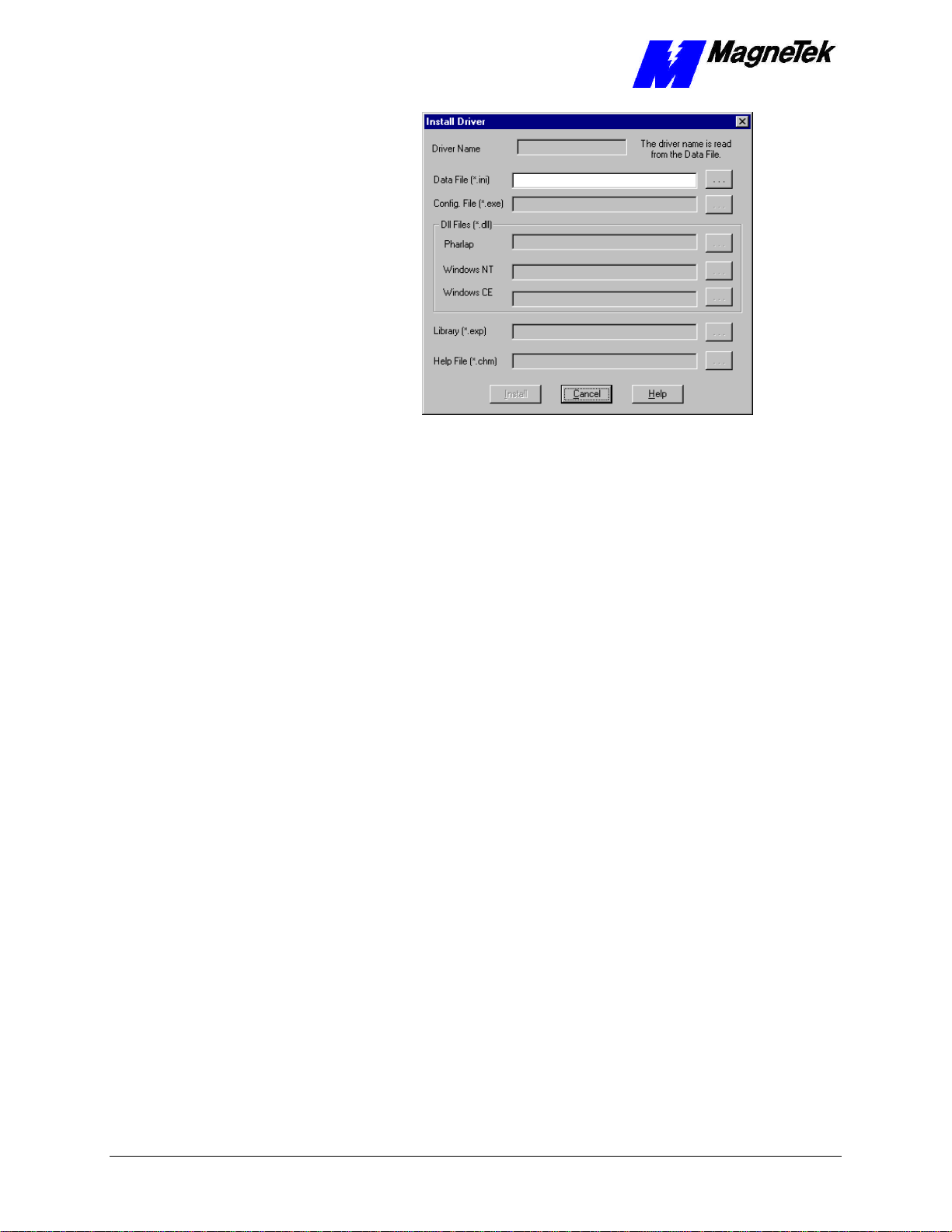
4. Click the small box containing three dots (…) to the far right of the
Data File (*.ini) box. This allows you to browse for the initialization
file on your system (generally the driver will be installed from your
CD_ROM). For our example, we assume the file is on a floppy in the
A: drive. Find the file DM6420.ini and OPEN it. Two more b
oxes, for
entry of Config.exe and Help.exe, become active.
5. Click the small box containing three dots (…) to the far right of the
Config (*.exe) box. Browse for the DM6420CFG.EXE file. Press
TAB or ENTER. More boxes will become active.
6. Click the small box containing three dots (…) to the far right of the Dll
files (*.dll), Pharlap box. Browse for the DM6420.dll file. Press
TAB or ENTER.
7. Click the small box containing three dots (…) to the far right of the
Help (*.chm) box. Browse for the STDM6420EM.CHM file. Press
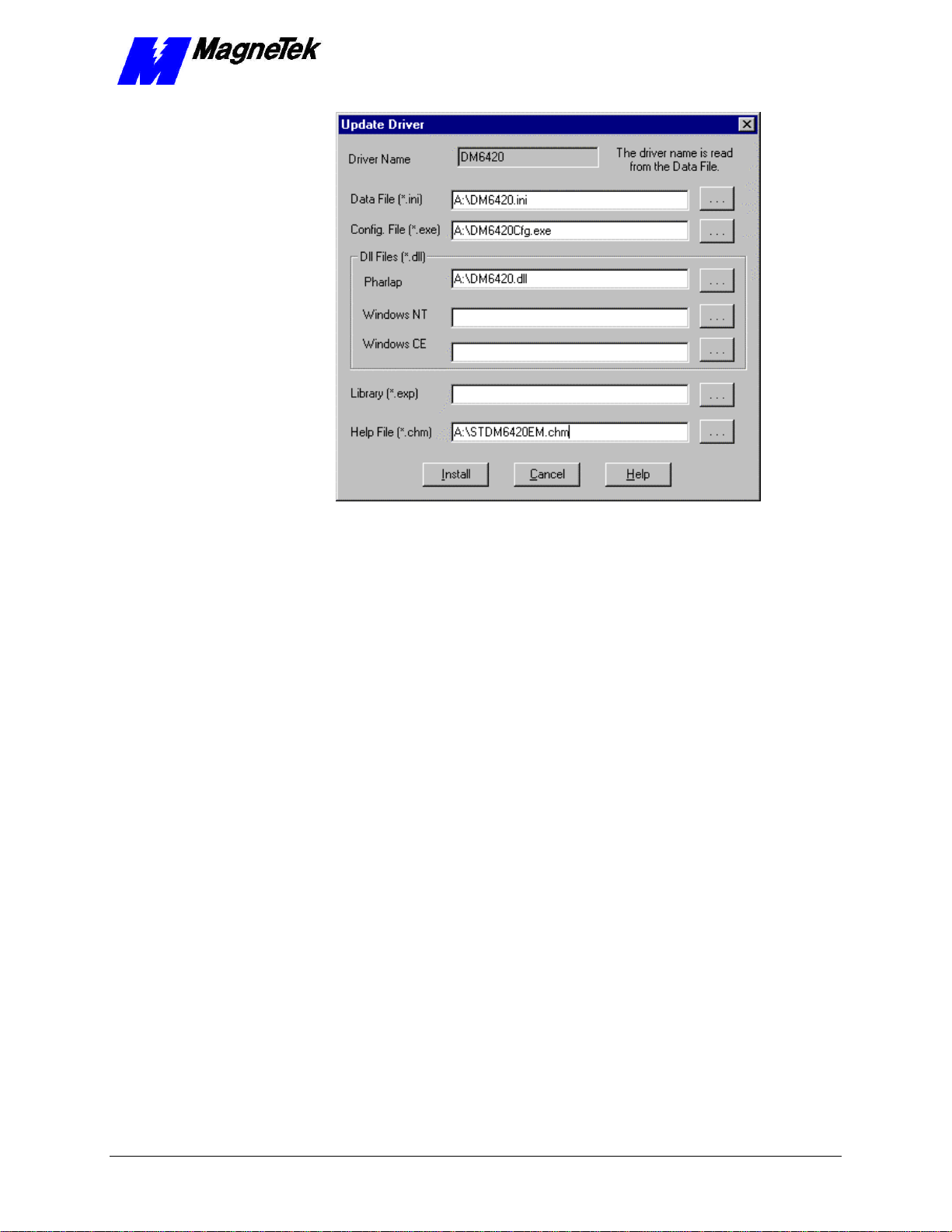
TAB or ENTER. The screen should look like the following (if
installing from the A:\drive).
SMART TRAC DM6420 Multi I/O Card
Engineer's Guide EM-3643-0050 DM6420 Multi I/O Driver Installation •• 5
Figure 3The completed example DM6420 Multi I/O Driver Install screen
8. Click INSTALL. When finished, you are returned to Control Manager.
The driver name should appear in its own folder within the Drivers
folder.
9. The DM6420 card library is ready for use.

SMART TRAC DM6420 Multi I/O Card
6•• DM6420 Multi I/O Driver Installation Engineer's Guide EM-3643-0050
THIS PAGE INTENTIONALLY LEFT BLANK
Table of contents