Mad Catz R.A.T.M User manual

FOR POUR FÜR*
PC
MAC
®
multiplatform :: multi-plateforme
via Bluetooth
®
Smart technology
*Any device supporting mouse input over Bluetooth 4.0 :: *Jedes Gerät unterstützt Mauseingaben über Bluetooth 4.0 ::
* Toutes les entrées de la souris au-dessus de dispositif de support Bluetooth 4.0
:: WIRELESS MOBILE GAMING
:: KABELLOSE MOBILE GAMING-MAUS
:: SOURIS DE JEU MOBILE SANS FIL

.2
Configuring your Cyborg software
AA
.C
A
B
C
D
R.A.T.MWireless Mouse
Dongle
Pouch
2 x AAA Battery
R.A.T.MSouris Sans Fil
Dongle
Housse
2 piles AAA
A
B
C
D
R.A.T.MFunkmaus
Dongle
Hülle
2 Mikrobatterien
A
B
C
D
R.A.T.MMouse wireless
Adattatore
Borsa
2 batterie ministilo
A
B
C
D
R.A.T.MRatón inalámbrico
Llave electrónica
Bolsa
2 x batería AAA
A
B
C
D
R.A.T.M Trådlös mus
Dongle
Fodral
2 x AAA-batterier
A
B
C
D
R.A.T.MTrådløs mus
Dongle
Lomme
2 x AAA-batterier
A
B
C
D
R.A.T.MRato Sem Fios
Dongle
Bolsa
2x pilhas AAA
A
B
C
D
ENGLISH
DEUTSCH
FRANÇAIS
ITALIANO
ESPAÑOL
SWEDISH DANISH PORTUGUÊS
.D
5 21
5 21
.B
5 21
PACKAGE INCLUDES
.A

.3
R.A.T.MRato Sem Fios
Dongle
Bolsa
2x pilhas AAA
ENGLISH
Mouse Overview
Mouse Status LEDs
Setup Instructions
4
6
7
Présentation de la souris
Témoins lumineux (DEL)
Instructions d’installation
14
16
17
Mausübersicht
LED-Anzeigen
Installationsanleitung
9
11
12
Musöversikt
LED-indikatorer
Istallationsanvisningar
29
31
32
Panoramica del mouse
Spie LED di indicazione
Istruzioni di configurazione
19
21
22
Oversigt over mus
Lysdioder
Opsætningsvejledning
34
36
37
Descrição geral do rato
Indicadores LED
Instruções de configuração
24
26
27
Descrição geral do rato
Indicadores LED
Instruções de configuração
39
41
42
DEUTSCH
SWEDISH
FRANÇAIS
ITALIANO
DANISH
ESPAÑOL
PORTUGUÊS
CONTENTS

.4
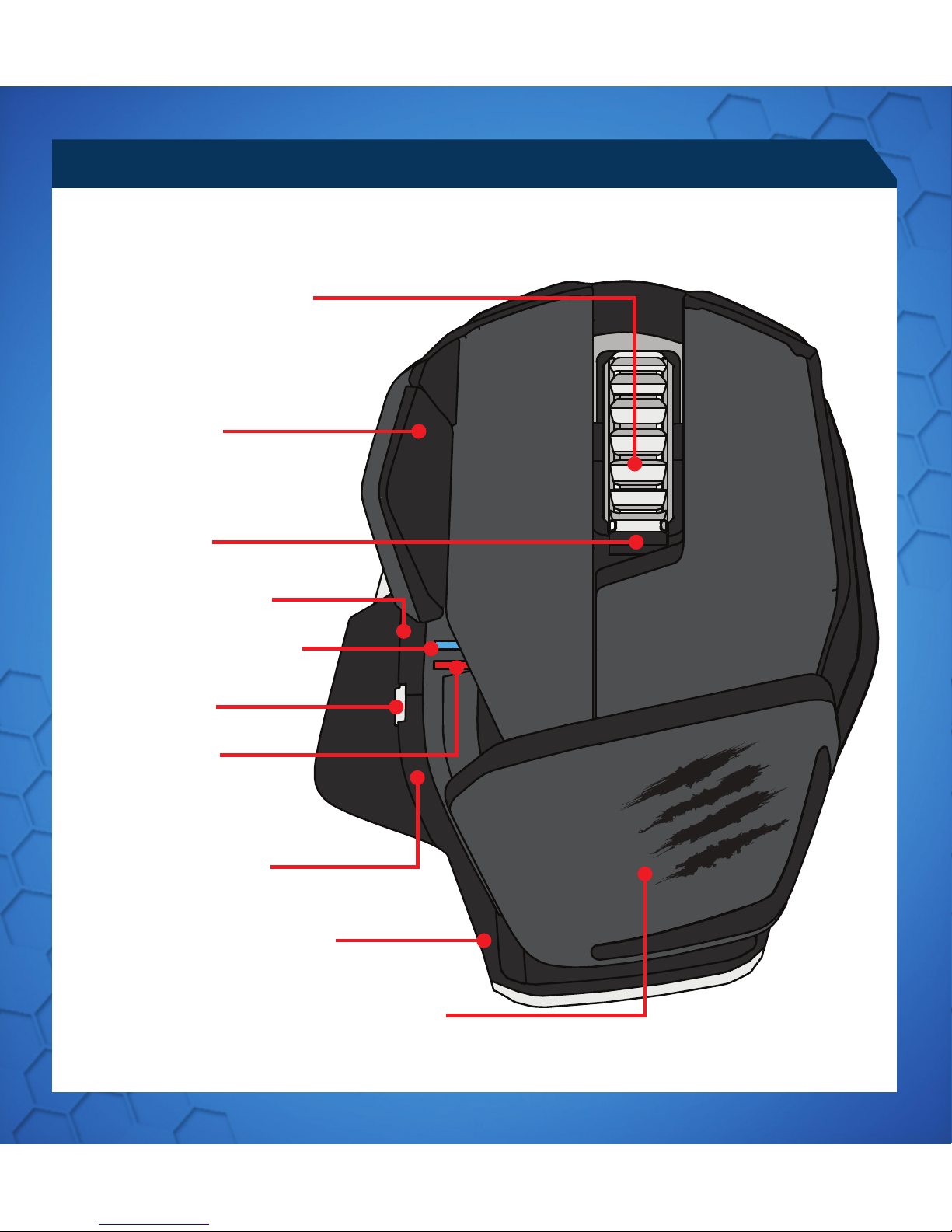
MOUSE OVERVIEW
INTERNET BACKWARD
ADJUSTABLE PALM REST
INTERNET FORWARD
BLUETOOTH INDICATOR
DPI INDICATOR
5D™ BUTTON
BATTERY RELEASE BUTTON
MIDDLE MOUSE BUTTON
VERTICAL SCROLL
WING BUTTON
DPI CYCLE

.5
5 21
ON/ OFF
LASER
BATTERY COMPARTMENT
DONGLE STORAGE

.6
Red LED - DPI indicator
Blue LED - Bluetooth indicator
MOUSE STATUS LEDS
Blue LED flashes once every second
Blue LED pulses every 5 seconds
(5%) - Blue LED pulses every 2 seconds
Red LED Low Brightness = DPI Setting 1
Red LED Full Brightness = DPI Setting 2
LED indication will remain active for one minute upon any change of status, after
which it will extinguish in order to conserve battery.
5 2
1
5
21
5
2
1
PAIRING MODE
BATTERY LOW
DPI LED
PAIRED AND OPERATING
LED COLOR INDICATORS

.7
SETUP INSTRUCTIONS
BLUETOOTH SMART TECHNOLOGY
CONNECTING TO DEVICES WITH BUILT-IN BLUETOOTH®SMART
TECHNOLOGY (DONGLE NOT REQUIRED)
1. Insert 2 x AAA batteries into the mouse
2. Plug the USB dongle into an available port
3. Turn the mouse ON
Bluetooth Smart is a new, power-efficient version of Bluetooth wireless technology
and is already being used in many devices. Check with your manufacturer to see if it is
Bluetooth Smart ready. Check with your device manufacturer for support for Bluetooth
Smart mice and then follow their instructions for pairing.
WINDOWS®8
1. Ensure the USB dongle is unplugged and power the R.A.T. Mon
2. Press and hold the 5D™ and Wing buttons for 5 seconds until the Blue LED starts
flashing
3. Move mouse to bottom right corner of the screen to open the Charms bar
4. Click Settings
5. Click Change PC Settings
6. Click Devices
7. Click Add a device
8. Select R.A.T. M
CONNECTING THE MOUSE USING THE DONGLE

.8
SETUP INSTRUCTIONS
1. Go to www.madcatz.com/downloads to download and install the Mad Catz
software application
2. Use the drag-and-drop interface to customize your mouse
3. Go to the Support section of the software for full programming instructions
SOFTWARE FOR WINDOWS AND MAC
SOFTWARE INSTALLATION
•
If your R.A.T. Mdoes not appear to be working with your device then, with it powered
on, press and hold the Wing and 5D™ buttons for 5 seconds until the Blue LED starts
flashing. If you wish to connect to the USB dongle then ensure that it is connected
to your computer. If you wish to connect to another device then follow the Bluetooth
pairing procedure for that device to rediscover the R.A.T .M
TROUBLESHOOTING
• Information for Customers in the United States
• FCC & IC Warning
• This device complies with part 15 of the FCC Rules and Industry Canada licence-exempt RSS standard (s).
Operation is subject to the following two conditions: (1) This device may not cause harmful interference, and (2)
this device must accept any interference received, including interference that may cause undesired operation.
• Any Changes or modifications not expressly approved by the party responsible for compliance could void
the user’s authority to operate the equipment.
•
• FCC Radiation Exposure Statement:
• This equipment complies with FCC radiation exposure limits set forth for an uncontrolled environment.
• This transmitter must not be co-located or operating in conjunction with any other antenna or transmitter.
•
• IC RF Exposure Statement:
• The device meets the exemption from the routine evaluation limits in section 2.5 of RSS 102 and compliance
with RSS-102 RF exposure, users can obtain Canadian information on RF exposure and compliance.
•
• Under Industry Canada regulations, this radio transmitter may only operate using an antenna of a type and
maximum (or lesser) gain approved for the transmitter by Industry Canada. To reduce potential radio inter-
ference to other users, the antenna type and its gain should be so chosen that, the equivalent isotropically
radiated power (e.i.r.p.) is not more than that necessary for successful communication.

.9
1. Go to www.madcatz.com/downloads to download and install the Mad Catz
software application
2. Use the drag-and-drop interface to customize your mouse
3. Go to the Support section of the software for full programming instructions
MAUSÜBERSICHT
INTERNET ZURÜCK
ANPASSBARE HANDBALLENAUFLAGE
INTERNET WEITER
BLUETOOTH-ANZEIGE
DPI-ANZEIGE
5D™-TASTE
BATTERIEFREIGABETASTE
MITTLERE MAUSTASTE
VERTIKALER BILDLAUF
FLÜGELTASTE
DPI-ZYKLUS

.10
EIN/AUS
LASER
BATTERIEFACH
DONGLE-FACH
MAUSÜBERSICHT
5 21
Table of contents
Languages:
Other Mad Catz Mouse manuals