Luxul XAP-1500 User manual

Simply Connected
User Guide
XAP-1500
High Power Dual-Band Wireless 900N
Low Profi le Access Point
Use the XAP-1500 to:
Deliver Broader Wi-Fi Coverage and Eliminate Client
Device Roaming Issues with Fewer APs
Maximize Data Rates with Concurrent Dual-Band
(2.4GHz and 5GHz) Technology
Optimize VoIP, Streaming Media and Other
Demanding Applications
Create a Secure Guest Network
Simplify Wi-Fi Installation while Minimizing
Setup Time and Costs
Minimize Unsightly Cables and Equipment

2
XAP-1500
a: 14203 Minuteman Drive, Suite 201, Draper, UT 84020-1685 | luxul.com | 801-822-5450
LUX-UG-XAP-1500 Vers: 07314
User Guide
Model Number: XAP-1500
Luxul High Power Dual-Band Wireless 900N Low Profile Access Point
FCC ID: W59XAP1500
IC: 8584A-XAP1500
© 2014 Luxul. All Rights Reserved.
No part of this publication may be modified or adapted in any way, for any purposes
without permission in writing from Luxul. The material in this manual is subject to change
without notice. Luxul reserves the right to make changes to any product to improve
reliability, function, or design. No license is granted, either expressly or by implication or
otherwise under any Luxul intellectual property rights. An implied license only exists for
equipment, circuits and subsystems contained in this or any Luxul product.
This product is covered by one or more U.S. and foreign patents.
Patents: 7,379,717, 6,606,075, 6,373,448, other patents pending
DOCUMENT CONVENTIONS
The following graphical alerts are used in this document to indicate notable situations:
NOTE: Tips, hints, or special requirements that you should take note of.
CAUTION: Care is required. Disregarding a caution can result in data
loss or equipment malfunction.
WARNING!: Indicates a condition or procedure that could result in
personal injury or equipment damage.
CONTACT LUXUL
FCC COMPLIANCE
This device complies with Part 15 of the FCC Rules. Operation is subject to the
following two conditions: (1) this device may not cause harmful interference, and
(2) this device must accept any interference received, including interference that
may cause undesired operation.
Sales
P: 801-822-5450
Technical Support
P: 801-822-5450
E: suppor[email protected]

3
User Guide
© 2014 Luxul. All Rights Reserved.
Other trademarks and registered trademarks are the property of their respective owners
CONTENTS
DOCUMENT CONVENTIONS 2
FCC COMPLIANCE 2
1 INTRODUCTION 4
1.1 Warnings 4
1.2 Site Preparation 5
2 XAP-1500 SPECIFICATIONS 5
3 GETTING STARTED 6
3.1 System Requirements 6
3.2 Package Contents 6
4 HARDWARE FEATURES AND INSTALLATION 7
4.1 Front View 7
4.2 Rear View 8
4.3 Environmental Requirements 8
4.4 Hardware Installation 9
5 CONFIGURATION 11
5.1 Login 11
5.2 Quick Setup 12
5.3 Wireless 15
5.4 Network 18
5.5 Administration 19
5.6 Status 25
5.6.2 Connections 26
6 REGULATORY COMPLIANCE 26

4
XAP-1500
a: 14203 Minuteman Drive, Suite 201, Draper, UT 84020-1685 | luxul.com | 801-822-5450
LUX-UG-XAP-1500 Vers: 07314
1 INTRODUCTION
Congratulations on your purchase of the Luxul XAP-1500 - High Power Dual-Band
Wireless Low Profile Access Point. The XAP-1500 is designed for use in residential and
commercial Wi-Fi installations—delivering optimal wireless network performance. With
this high powered, concurrent dual-band wireless access point, wireless devices that
are compatible with 802.11a/b/g/n can sustain high data rates and improved overall
performance at significantly greater distances.
The XAP-1500 features Luxul’s web based management interface. provides a simple
method for setting up the wireless network. The XAP-1500 is also enabled for instal-
lation simplicity when installed with Luxul Routers, Gigabit Switches, and other Luxul
products.
XAP-1500 Features:
Highest FCC Approved Performance (Effective EIRP 36dBm) for Farther Reaching
Signal and Maximum Data Rates
Complies with IEEE 802.11n Standard. Backward Compatible with IEEE 802.11a/b/g
Supports WMM QoS Functionality to Prioritize Multimedia Traffic
Enhanced Multi-Level Security with WPA-PSK (TKIP, AES, TKIP & AES), WPA2-PSK (AES),
WPA-PSK/WPA2-PSK Personal (TKIP & AES) and 128-bit WEP
Supports up to 12 SSIDs - 6 on 2.4GHz and 6 on 5GHz with Individual Security Settings
Multiple SSIDs Support with VLAN Tagging (1 VLAN per SSID)
Single Cable Installation with PoE (requires the use of enclosed injector)
Firmware Upgradeable
Easy 3 Step Setup through Web-based User Interface
Enabled for Maximum Compatibility and Performance with
other Luxul Products
Install on Wall, Ceiling or Desktop
1.1 Warnings
Read all installation instructions and site survey reports, and verify correct equip-
ment installation before connecting this device to its power source.
Connect all power cords to a properly wired and grounded electrical circuit.
Verify that the electrical circuits have appropriate overload protection.
Verify there is adequate ventilation around the device, and that ambient tempera-
tures meet equipment operation specifications.
Products outside the approved configurations may be in violation of Part 15 of the
FCC Rules.

5
User Guide
© 2014 Luxul. All Rights Reserved.
Other trademarks and registered trademarks are the property of their respective owners
1.2 Site Preparation
Consult your site survey and network analysis reports to determine
specific equipment placement, power drops, and so on.
Assign installation responsibility to the appropriate personnel.
Identify and document where all installed components are located.
Ensure adequate, dust-free ventilation to all installed equipment.
Identify and prepare Ethernet connection.
Verify that cable lengths are within the maximum allowable distances
for optimal and certified signal transmission.
2 XAP-1500 SPECIFICATIONS
Standards Compliance 802.11n (900Mbps)
Interface Two 10/100/1000M Ports
Antenna Three Internal 5GHz and Three Internal 2.4GHz High
Performance Antennas
Button Reset button
Power PoE (Injector Included)
Dimensions D x H in. (mm) 8”x1” (203.2x25.4)
LEDs Power, 2.4GHz, 5GHz
(Can be turned Off/On Via User Interface)
Wireless and Other Features
Frequency Concurrent 2.4GHz and 5GHz
Wireless Speed 2.4GHz: 450Mbps;
5GHz: 450Mbps.
Wireless Security 64/128bit WEP, WPA-PSK, WPA2-PSK, WPA/WPA2
Operating Modes Wireless AP
Other Functions and Features Remote Web Management
System Logging
Backup & Restore Configurations
VLAN/Guest Network Support
Support for Setup on iOS and
Android Devices
QoS Support
Up to 12 SSIDs
Firmware Upgradeable via Browser
Certifications CE, FCC, RoHS

6
XAP-1500
a: 14203 Minuteman Drive, Suite 201, Draper, UT 84020-1685 | luxul.com | 801-822-5450
LUX-UG-XAP-1500 Vers: 07314
3 GETTING STARTED
3.1 System Requirements
Devices Supporting 802.11a, 802.11b, 802.11g or 802.11n
Web Browser (Microsoft IE 9.0 and up, Mozilla Firefox 24 and up,
Safari 5.1 and up, Google Chrome 18 and up)
CAT5/6 Ethernet Cable, CAT6 recommended
AC Power Socket (100 – 240 V, 50/60 Hz)
3.2 Package Contents
XAP-1500 Wireless Access Point
Mounting Ring and Hardware
Single Port PoE Injector and Power Adapter
2-CAT6 patch cables
Quick Install Guide
NOTE: If any of the listed items are missing or damaged, please contact
the reseller from whom you purchased for return/replacement.
3.3 Safety Information
To maintain the safety of users and property, follow these safety instructions:
The XAP-1500 wireless access point is designed for indoor use only. DO NOT place
this access point outdoors. If you require an outdoor access point, please consider
the Luxul XAP-1040.
DO NOT install this access point in or near hot or humid places, such as a kitchen or
bathroom. Take care to minimize exposure to excessive heat or moisture.
DO NOT pull any connected cable with force. When disconnecting cables, do so by
disconnecting first from the access point. When reconnecting, connect the AP first
and then the Power/data source.
Accessories of this access point, such as mounting screws, the PoE injector and
power supply may be dangerous to small children under 3 years of age. KEEP All
ACCESSORIES OUT OF THE REACH OF CHILDREN!
The access point may become hot when in use for extended time periods. This is
normal and is not a malfunction. DO NOT install this access point where it will be
exposed to paper, cloth or other flammable materials.

7
User Guide
© 2014 Luxul. All Rights Reserved.
Other trademarks and registered trademarks are the property of their respective owners
The XAP-1500 contains no user-serviceable parts. If the access point is not working
properly, contact your dealer and ask for help. DO NOT attempt to disassemble the
access point.
4 HARDWARE FEATURES AND INSTALLATION
4.1 Front View
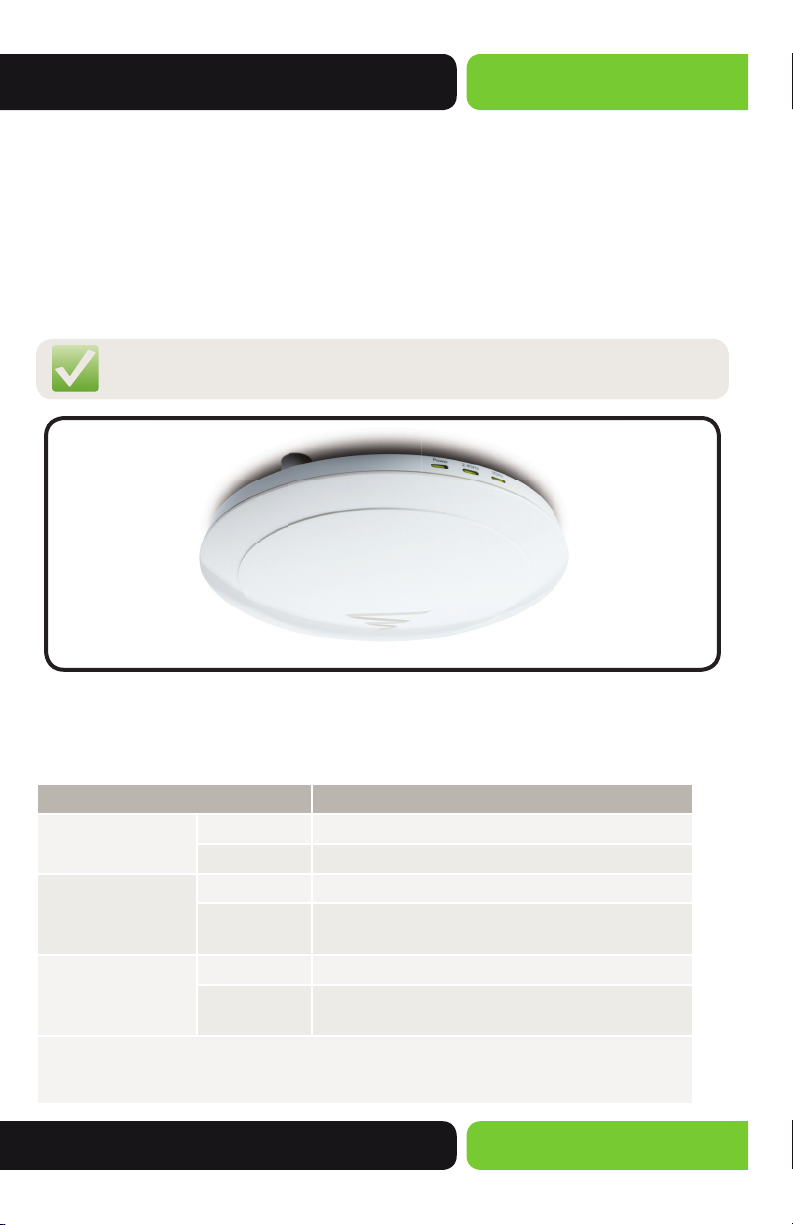
The XAP-1500 has three LEDs, positioned on the side of the access point 1) Power, 2)
2.4GHz wireless activity and 3) 5GHz wireless activity.
NOTE: The LEDs may be enabled or disabled through the user
interface. The LEDs are enabled by default.
XAP-1500 Front View
Status Indicators:
The following table describes the LED functionality:
Indicator Description
Power On The power is on
Off No power, check power connections
2.4 GHz Status Flashing Indicates 2.4 GHz wireless activity
Off The wireless radio is not active and wireless access
is disabled
5 GHz Status Flashing Indicates 5GHz wireless activity
Off The wireless radio is not active and wireless access
is disabled
At startup, the Green Power LED will stay on while the 2.4GHz and 5GHz LEDs will blink
once the wireless networks are functional. Note: LEDs may be enabled or disabled through
the user interface. LEDs are enabled by default..

8
XAP-1500
a: 14203 Minuteman Drive, Suite 201, Draper, UT 84020-1685 | luxul.com | 801-822-5450
LUX-UG-XAP-1500 Vers: 07314
4.2 Rear View
The back of the XAP-1500 provides two RJ-45 connections. The fi rst port is used to
deliver both power and data to the access point and is labeled PoE. The second port is
optional and may be used as a switch port to connect any other device to the network.
The reset button is also located on the back of the AP for restoring the access point to
factory default settings.
XAP-1500 Rear View
To Restore the Default Settings:
With the XAP-1500 powered on, press and hold the Reset button for 15 seconds. Release
the reset button. The XAP-1500 will reboot and be reset to factory defaults.
CAUTION: Please note that pressing and holding the Reset button will
remove any custom confi gurations done to the XAP-1500.
4.3 Environmental Requirements
Ethernet cable to PoE injector to provide Power and Data to the XAP-1500.
A device with a Web browser. Supported Web browser versions include Microsoft IE
9.0 and up, Safari 5.1 and up, Mozilla Firefox 24 and up, and Google Chrome 18 and up.
The Web browser is used to confi gure the XAP-1500.
The XAP-1500 uses 48VDC power. The PoE injector power supply requires AC 100V ~
240V, 50Hz ~ 60Hz.
Temperature of the operating environment: 32F~131F (0C~55C). Be sure to place the
access point away from heat generating devices.
Humidity of the operating environment: 5%-95% non-condensing. Do not place the
access point in an extremely dirty or damp location.
First port delivers both
power and data Second port is optional

9
User Guide
© 2014 Luxul. All Rights Reserved.
Other trademarks and registered trademarks are the property of their respective owners
Keep the access point away from strong electromagnetic fi elds (i.e. Air Conditioner
compressors, fl uorescent light ballasts, CRT monitors/televisions, etc.), and free from
vibration, dust and direct sun light.
4.4 Hardware Installation
4.4.1 Access Point Placement
This XAP-1500 uses an omnidirectional antenna. The ideal placement is the center of
the desired coverage area.
4.4.2 Mounting the Access Point on a Wall or Ceiling
The XAP-1500 may be installed on a wall, ceiling or desktop (fl at surface). A separate
mounting ring is included for ease of installation. The Quick Install Guide (QIG) has a
mounting template to assist in positioning the AP correctly.
XAP-1500 mounted on a ceiling XAP-1500 mounted on a wall

10
XAP-1500
a: 14203 Minuteman Drive, Suite 201, Draper, UT 84020-1685 | luxul.com | 801-822-5450
LUX-UG-XAP-1500 Vers: 07314
4.4.3 Connecting to the Power Source
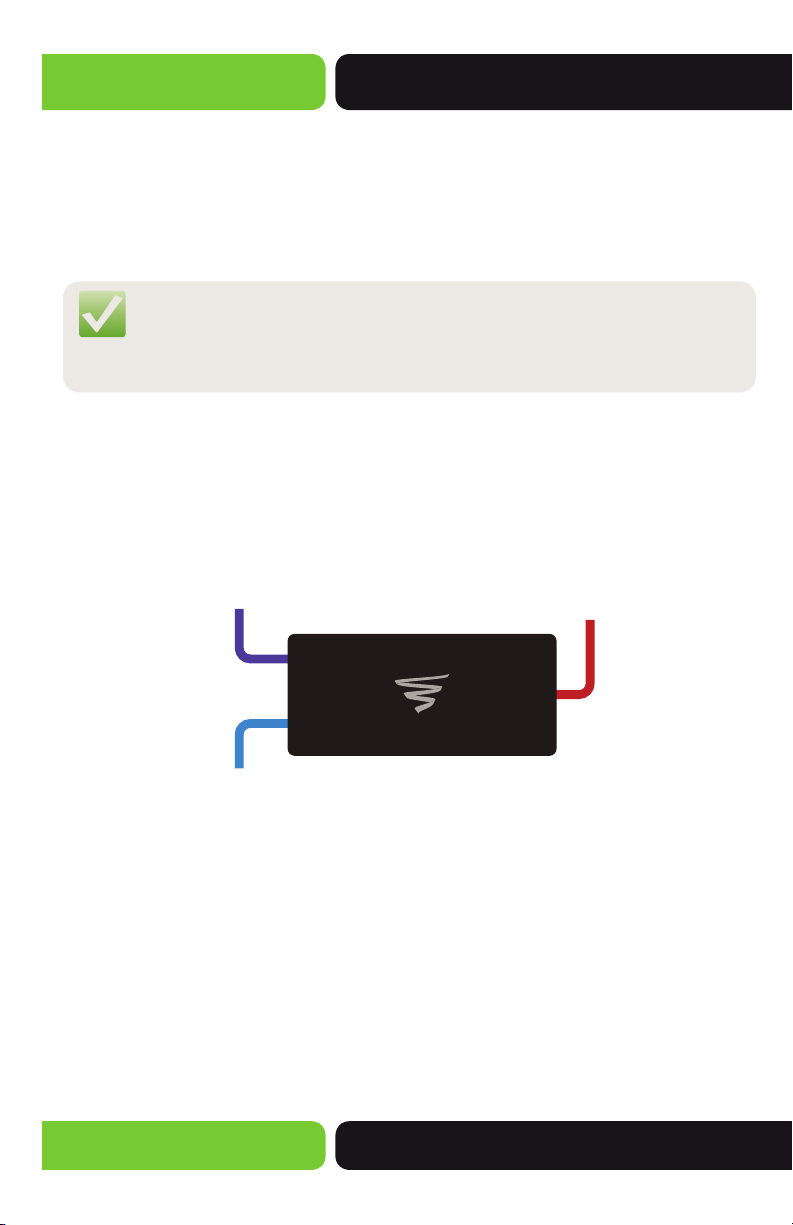
The XAP-1500 is PoE ready. Please ensure you ONLY use the PoE injector that is included
in the product box. To apply power, simply connect an Ethernet cable to the PoE injec-
tor (Power/Data port) and the opposite end of the Ethernet cable to the PoE port of
the AP. An Ethernet cable length of up to 100 meters can be used. DO NOT apply power
to the PoE injector yet.
NOTE: Category-5, super Category-5 or Category-6 unshielded twisted pair
(CAT5/CAT5e/CAT6 UTP) cables should be used. For best results, it is
recommended that CAT6 shielded twisted pair be used to ensure stable
data transmission at highest data rates.
4.4.4 Connecting to the Internet Source
Note that this Luxul device is not a router and in most installations will be connected
to a Router or Switch in order to deliver Internet access. To do so, connect the PoE
injector to the desired Internet source using another Ethernet cable.
Power
Source
POE
Injector
From your
Router or Switch
XAP-1500
DATA IN
DATA &
PWR OUT
4.4.5 Applying Power
Once the Ethernet cables have been properly connected, connect the power supply to
the PoE injector and plug it in to a standard AC power outlet.
4.4.6 LED Visual Verifi cation
With power applied, you can now verify that the XAP-1500 is connected and function-
ing properly. The Green Power LED should be on.
Other manuals for XAP-1500
2
Table of contents
Other Luxul Wireless Access Point manuals

Luxul
Luxul XAP-1500 Manual

Luxul
Luxul Xen XAP-1032 User manual

Luxul
Luxul XAP-1010 User manual

Luxul
Luxul Xen XAP-1040 User manual

Luxul
Luxul XAP-1020 User manual

Luxul
Luxul XAP-1030 User manual

Luxul
Luxul XAP-1030 User manual

Luxul
Luxul AC1900 User manual

Luxul
Luxul XAP-310 User manual

Luxul
Luxul AC1900 User manual

Luxul
Luxul XAP-310 User manual

Luxul
Luxul XWO-BAP1 User manual

Luxul
Luxul XAP-1240 User manual

Luxul
Luxul Xen XAP-1031 User manual

Luxul
Luxul XAP-1020 User manual

Luxul
Luxul Xen XAP-1040 User manual

Luxul
Luxul XWS-1310 User manual

Luxul
Luxul XAP-1010 User manual

Luxul
Luxul XAP-1210 User manual

Luxul
Luxul Xen XAP-1230 User manual