Luna PP-84 User manual
Thank you for purchasing the LUNA™ state-of-the-art PowerPro™ 8400 Portable Charger, with 8400 mAh of on-the-go
mega power. Many portable chargers give you only a few extra hours of use before they are depleted. However, the
LUNA PowerPro™ will fully charge most smart phones over four mes before it has to be re-charged.
This manual explains the basic steps involved in charging and using your LUNA PowerPro™ portable charger.
Read this manual carefully before use.
1 LUNA PowerPro™ Portable Charger
1 USB to Micro-USB Cable
1 USB AC Adapter
Please remove product components from the case and conrm that you have the following items:
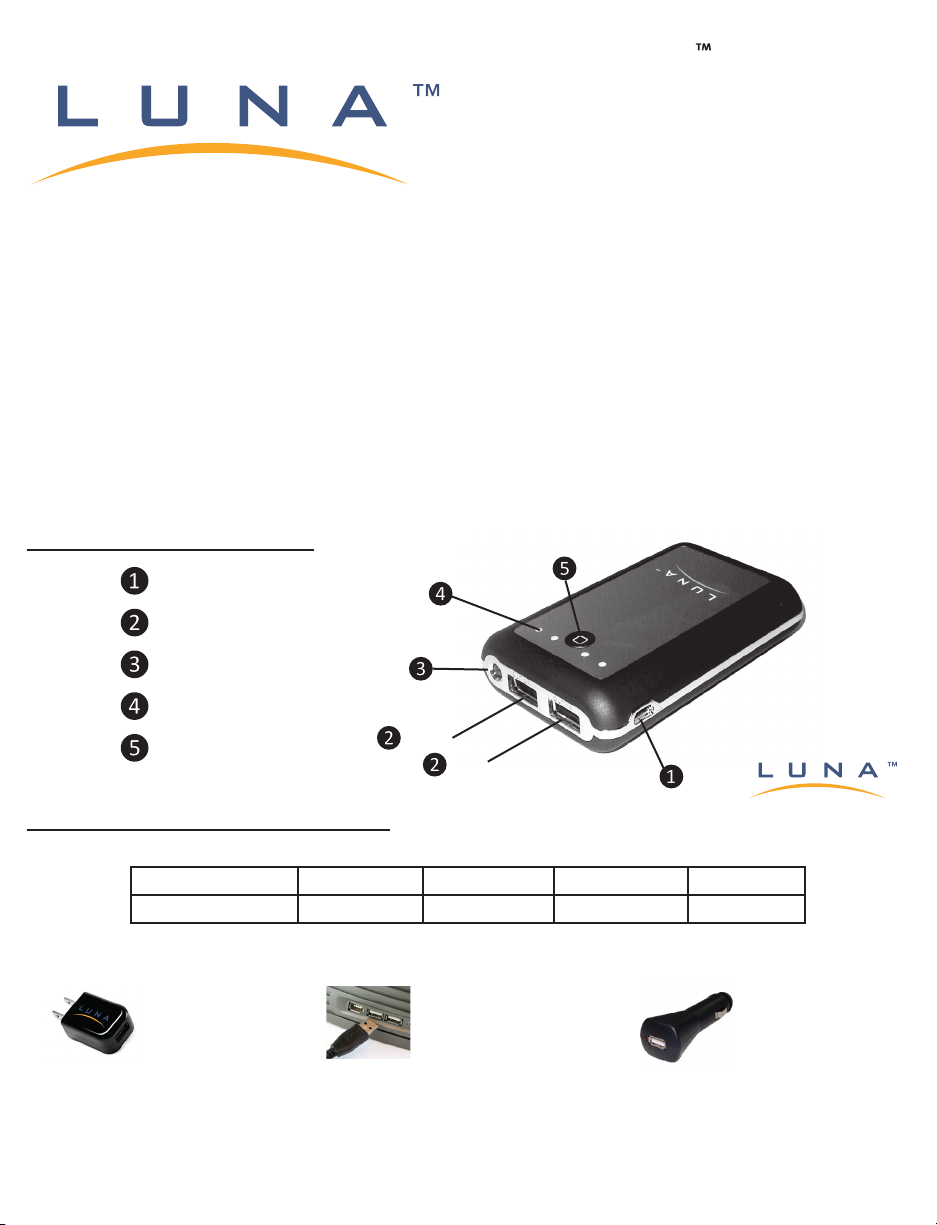
Plug the Micro-USB Connector on the Charging Cable into the Input Port ❶ on the
LUNA PowerPro™
and connue
charging unl no Power Indicator Lights ❹ are blinking. A blinking light indicates that the
LUNA PowerPro™
is being
charged. For instance, if two lights are on, and a third light is blinking, it means the
LUNA PowerPro™
is more than 50%
charged, but less than 75% charged. Four non-blinking Power Indicator Lights indicates the
LUNA PowerPro™
is fully
charged. Fully charging the
LUNA PowerPro™
can take 8-9 hours.
Input: Charging the PowerPro™
Before charging the LUNA PowerPro™, press the Power Buon ❺ to determine the level of available power.
To charge the LUNA PowerPro™, plug the USB Connector on the Charging Cable into a power supply using a
USB AC adapter, computer USB port, or a car charger with USB connecvity.
Power Indicator One Light On Two Lights On Three Lights On Four Lights On
Power of PowerPro™ <25% 25-50% 50-75% 75-100%
USB AC ADAPTER COMPUTER USB PORT USB CAR CHARGER
PowerPro™ Components
Input
Output (2.1A and 1A)
(2.1A)
(1A)
LED Flashlight
Power Buon
Power Indicator Lights
PowerPro 8400
Portable Charger
USER MANUAL
Model PP-84

Warranty & Returns
LUNA Internaonal, LLC (LUNA™) agrees to repair or replace without cost any LUNA PowerPro™ which,
under normal and intended use, has proven to be defecve in material or workmanship within one (1) year
from the date of original purchase. Returned packages will only be accepted with a pre-authorized RMA
number wrien on the outside of the package. An RMA number can be obtained via the LUNA™ website at:
www.LunaTechUSA.com. The shipping costs of the returned items to LUNA™ shall be the sole responsibility
of the purchaser. Proof of purchase is required.
LUNA™ is not responsible or liable for any mishandling, neglect or damage arising from improper use of the
LUNA PowerPro™. Any modicaon to the product shall make the warranty oered herein null and void,
thereby relieving LUNA™ from any and all responsibility or liability.
Specicaons
Capacity: 8400 mAh
Input: DC 5V/1A
Input Charging Time: 8-9 hours
Output: DC 5.3V/2.1A and 1A
Dimension: 3.7″/95mm (L) x 2.4″/60mm (W) x 0.8″/20mm (H)
Weight: 6 oz/170g
Charging Cable Connectors: USB and Micro-USB
Charging Cable Length: 24″/60cm
LED Flashlight
The LUNA PowerPro™ is equipped with a handy LED Flashlight ❸ that can be turned “on” or “o” by
pressing the Power Buon ❺ twice. The LED Flashlight will illuminate for approximately 250 hours before
the LUNA PowerPro™ has to be re-charged.
Cauon
Do not use the LUNA PowerPro™ outdoors in inclement weather or expose it to wet or damp condions. Do
not leave in a locaon exposed to direct sunlight or near a heater. Do not drop the LUNA PowerPro™ on a
hard surface or into a liquid. Do not disassemble. Storage temperature: –4°F to +140°F (–20°C to +60°C).
Copyright © LUNA Internaonal, LLC - Tampa, Florida • 813.260.2630
All products menoned are trademarks or registered trademarks of their respecve owners.
MADE IN CHINA Rev. 1.0
www.lunatechusa.com
Output: Charging Your Devices
Charging Cable Compability
To charge a mobile phone, MP3 player, tablet PC, or other device that has a Micro-USB input port, the
LUNA
PowerPro™
Charging Cable may be used to charge the device. If your device has a dierent type of power input
port, you will need a USB charging cable that is compable with your device to be able to use the
LUNA PowerPro™
.
In recent years, most AC chargers sold with mobile phones and tablet PCs (including Apple) have USB funconality,
so please check your exisng AC adapter for USB funconality before buying a USB charging cable for your device.
Charging
Simply plug in your USB charging cable into the Output Port ❷ on the
LUNA PowerPro™
and connect to your
device. Press the Power Buon ❺ and charging will begin immediately. The Power Indicator Lights ❹ will remain
on unl your device is fully charged. The LUNA PowerPro 8400 is uniquely designed to support the charging of two
devices simultaneously. It is recommended to charge tablets (including iPad) on the 2.1A port.
This manual suits for next models
1
Table of contents