
Longshine GFT-150 Series User manual

Flexible / Classy / High Performance
POS GFT-150 Series
USER’SMANUAL
All-in-One Touch Screen POS System
Intel Pentium Mobile Motherboard, 15 inches LCD Monitor
Available in BLACK & SILVER colors

Preface
ii
About this Manual
Thank you for purchasing POS GFT-150 Series All-in-One system. This terminal offers all the
enhanced features and is easy to connect to various optional devices for optimal performance.
This user manual describes how you setup and connect your terminal.
Copyright
The information in this guide is subject to change without prior notice.
© Copyright 2008
All rights reserved. This product and related documentation are protected by copyright and are
distributed under licenses restricting their use, copying, and distribution. No part of this
documentation may be reproduced in any form by any means without prior written authorization
of the manufacturer and its licensors, if any.

Preface
iii
t or relocate the interference receiving antenna.
nt and interference receiver.
zd radio/TV technician for help.
ARNING: AC power cord so as not to interfere with radio and television reception.
Federal Communications Commission (FCC)
Declaration of Conformity
This device complies with part 15 of the FCC Rules. Operation is subject to the following two
conditions:
1. This device may not cause harmful interference.
2. This device must accept any interference received, including interference that may cause
undesirable operation.
This equipment has been tested and found to comply within the limit of a ClassA digital device,
pursuant to Part 15 of the FCC Rules. These limits are designed to provide reasonable protection
against harmful interference in a residential installation. This equipment generates, uses, and can
radiate radio frequency energy and, if not installed and used in accordance with the instructions,
may cause harmful interference to radio communications. However, there is no guarantee that
interference will not occur in a particular installation. If this equipment does cause harmful
interference to radio or television reception, which can be determined by turning the equipment off
and on, the user is encouraged to try to correct the interference by one or more of the following
measures:zReorien
zIncrease the distance of separation between the equipme
zConnect the equipment to a power outlet on a circuit different from that to which the
interference receiver is connected.
Consult the dealer or an experience
W
Use the included
If you use other cables, it may cause interference with radio and television reception.
WARNING: IRE OR SHOCK HAZARD, DO NOT EXPOSE THIS APPLIANCE TO RAIN OR MOISTURE.TO PREVENT F
WARNING: of Class A. This device could cause interferences in residential areas; in the case of interferencesThis is a equipment
it can be demand from the user to provide appropriate solutions for it.
WARNING: ed cables for connection of the monitor to the graphics card is required to assure compliance withThe use of shield
FCC regulations. Changes or modifications to this unit not expressly approved by the party responsible for
compliance could void the user’s authority to operate this equipment.
RoHS

Important Safety Information
iv
BEFORE YOU PROCEED
zRead the safety notices and the User’s Manual carefully before using the product.
zKeep the box and packaging in case the product needs to be shipped in the future.
zFollow the product and warning label instructions.
zFor safety reasons, only qualified service personnel should open the terminal.
zAny changes or modifications that do not follow the instructions in this manual will void
this product/s warranty.
!SAFETY PRECAUTIONS
In the interest of safety, please observe the following precautions:
Power Requirement:
This product is designed to operate on 230VAC 50/60Hz in Europe.
Never connect to any outlet or power supply having a different voltage or frequency.
!POWER SUPPLY SAFETY NOTICE
zDisconnect this terminal from theAC outlet before cleaning. Use only a moistened cloth for
cleaning.
zCheck the voltage of the power source when connecting the equipment to the power outlet.
Make sure the voltage of the power outlet conforms within voltage range of the terminal.
Failure to comply may cause the electric shock or damage to the terminal. If you are not sure
of the electricity voltage that you are using, contact your local electricity company.
zTo avoid electric shocks, disconnect the power cord from the electrical outlet before
relocating the system.
zDo not overload electric power outlets to avoid fire or electric shocks.
zProtect the power cord from being walked on or pinched particularly at plug.
zIf the equipment is not used for a long time, disconnect the equipment from the mains to
avoid damage.
zNever allow liquid into ventilation openings. This could cause fire or electrical shock.

Important Safety Information
v
!OPERATING INSTRUCTIONS
zKeep the User’s Manual for future reference.
zFollow the product label instructions.
zLay this terminal on a stable surface when installing. Heavy objects placed on the product
can cause damage or obstruct proper ventilation.
zIf one of the following situations arises, notify a qualified service technician immediately:
a. The power cord or plug is damaged.
b. Liquid has been split on to the terminal.
c. The terminal has been dropped and damaged.
d. The terminal does not function according to the user manual.
e. The terminal has obvious signs of damage.
zVentilation slots and holes are provided on the sides of this unit. Do not block any
ventilation openings to prevent the equipment from overheat.
zDo not place the unit locations with high humidity and dust. They can cause extensive
damage. Avoid places where unit is likely to be exposed to oily fumes and vapors.
zPlaces exposed to direct sunlight, or near heating appliances can attain extremely high
temperatures, which may deform the cabinet, or can become a prime cause of damage.
zThe operating ambient temperature range is 41゚F - 104゚F (0゚C to 40゚C), and humidity of
10% - 90%. When using the unit on the system rack, be sure to keep this ambient
temperature inside the range.
zAvoid shaky places or hot-springs areas where hydrogen sulfide and acidic ions are likely to
be generated.
zWhen transporting this unit, make sure it is not likely to be subjected to impacts. They can
be a prime cause for damage.

Introduction
vi
CONTENTS
1. Introduction......................................................................................................................................1
Welcome.......................................................................................................................................1
1.1 How to Use This Manual...............................................................................................1
1.2 A Visual Tour of POS GFT-150 Series Terminal ...........................................................2
1.2a What Comes With POS GFT-150 Series Terminal ..............................................4
1.2b Dimension 15” .....................................................................................................6
1.2c Adjustable LCD Operation Angle........................................................................7
1.3 Features..........................................................................................................................7
1.4 Connector Panels............................................................................................................8
1.5 Switch Panels.................................................................................................................9
2. Hardware Setup..............................................................................................................................10
Getting Started ...........................................................................................................................10
2.1 Pre-installation Notice..................................................................................................10
Hardware Assembly...................................................................................................................11
2.2a COM power selection.................................................................................................11
2.2b Compact Flash Installation…… ................................................................................12
2.2c Magnetic Stripe Reader Installation……...................................................................13
2.2d 3-in-1 Card Reader Installation…..............................................................................17
2.2e VFD Customer Display Installation….......................................................................20
2.2f WiFi Installation…… .................................................................................................23
2.2g RFID Installation……................................................................................................26
2.2h Wall Mount Installation…..........................................................................................29
CMOS Setup..............................................................................................................................29
2.3 LCD and Touch Panel Replacement ............................................................................30
3. Specification ..................................................................................................................................33
Technical Information................................................................................................................33
Motherboard Configuration .......................................................................................................34

Introduction
1
1. Introduction
Welcome
Congratulations on your purchase of POS GFT-150 Series Terminal. Your easy-to-use POS terminal
is designed to help you enhance your business flexibility by offering a superior customer
experience.
1.1 How to Use This Manual
This manual contains all the information needed for setting up a POS GFT-150 Series Terminal. In
addition, you can also consult the manual for the operation system and added peripheral hardware.
zProvides an introduction to POS GFT-150 Series Terminal and this user’s manual.
zProvides all necessary information for all hardware setup.
zList all the specifications of POS GFT-150 Series Terminal and information for the
motherboard configuration.
zProvides information for troubleshooting POS GFT-150 Series Terminal.
Introduction
2
1.2 A Visual Tour of POS GFT-150 Series Terminal
Before you start, take a few moments to become familiar with POS GFT-150 Series Terminal.
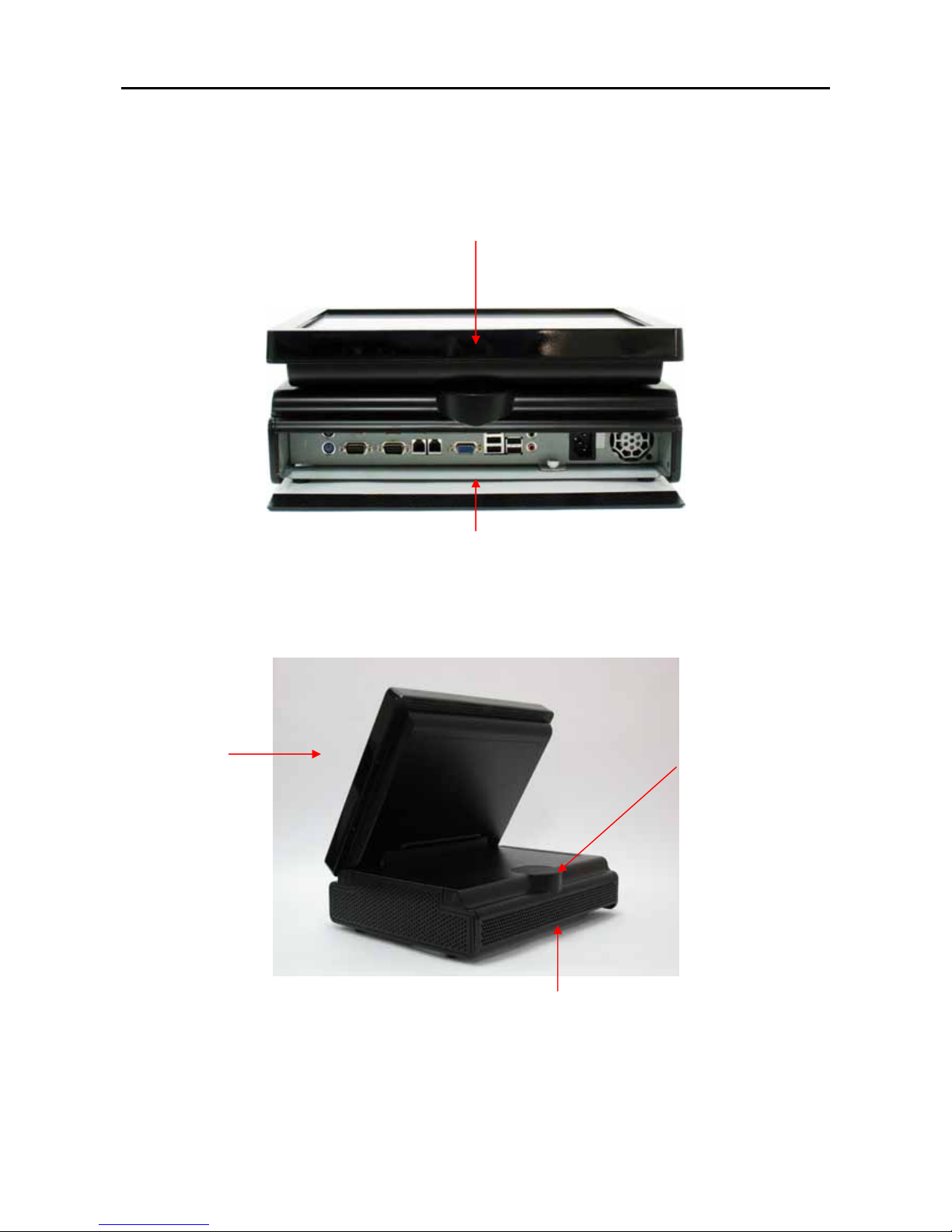
Elegant, Solid, Fashionable Compact Design
Easy to reach I/O Connector Ports
(Back Side of Machine)
Main Unit VFD Mounting Cover
I/O Connector Ports Cove
r

Introduction
3
Available in 15”
TFT LCD Touch
Monito
r
3 in 1 MSR
+
Smartcard
+
i-Button Reade
r
WIFI
Air Vent
(on both left and right sides)
Finger print-Free
Front Bezel Design
Auto Power Switch,
Bright Control Cover
Speak Hole

Introduction
4
“Very easy to Maintain”
Take ONLY 4 Steps to reach all the POS inner components:
Step 1:
Slide out the rear plate
Step 2:
Unscrew this screw
Step 3:
Slide the case outwards
Step 4:
Remove the rear monitor cover
1.2a What Comes With POS GFT-150 Series Terminal
The following items are standard with POS GFT-150 Series terminal.
Before setting up your POS GFT-150 Series terminal, check that the package contains the following
items. If any of the items are missing or damaged, contact your supplier immediately.
¾Main system with LCD panel
¾User’s Manual
¾Touch screen and related POS peripherals driver and utility CD
¾Motherboard chipset driver and user’s manual CD
¾Power adapter + AC power cord
Other manuals for GFT-150 Series
1
Table of contents
Other Longshine Touch Terminal manuals

Longshine
Longshine POS GT-150 Series User manual

Longshine
Longshine GFT-150 Series User manual

Longshine
Longshine COBRA15 User manual

Longshine
Longshine CRANE 1 User manual

Longshine
Longshine POS GFT-150 Series User manual

Longshine
Longshine COBRA15 User manual

Longshine
Longshine RDT-150F Series User manual

Longshine
Longshine RCT150 User manual

Longshine
Longshine 15IW Series User manual


