Loewe alphaTel 5000 DE User manual

*Print Job: , 28.07.01, 15:33
alphaTel 5000 DE and DL
User's guide
LOEWE.

*Print Job: , 28.07.01, 15:33
Concerning your telephone
Dear customer!
Congratulations on your purchase of this Loewe product. The
Loewe alphaTel 5000 DE / DL is designed and certified in accor-
dance with the European standard for cordless telephones (DECT).
You can use this unit on both an analog exchange line and a PABX.
The alphaTel 5000 consists of a handset and a base station (al-
phaTel 5000 DE). You can log in up to six handsets on the base
station.
To increase the range of your telephone, you can register handsets
on up to four base stations.
The transmission technology used between handset and base sta-
tion meets the DECT standard and offers a high degree of privacy
on your calls.
The Loewe alphaTel 5000 DE/DL offers several special fea-
tures.
→5-line illuminated LCD
→Speaker and hands-free operation
→Family telephone book for 180 entries, 16 characters for name,
24 characters for numbers
→Personal telephone book for 30 entries
→Call list for 30 calls with phone number, name, date and time
→Wake up call function
→Remote control for TV/audio equipment (infrared, RC5)
Before you start using your telephone, please take a few minutes to
read this user's guide.
What the alphaTel 5000 includes:
DE DL
Base station x -
Charging unit - x
Handset x x
AC adapter x x
2 NiMh batteries, 1.2 V, type
AAA/Micro
xx
Line cord x -
Stand x -
User's guide x x
*Print Job: , 28.07.01, 15:33
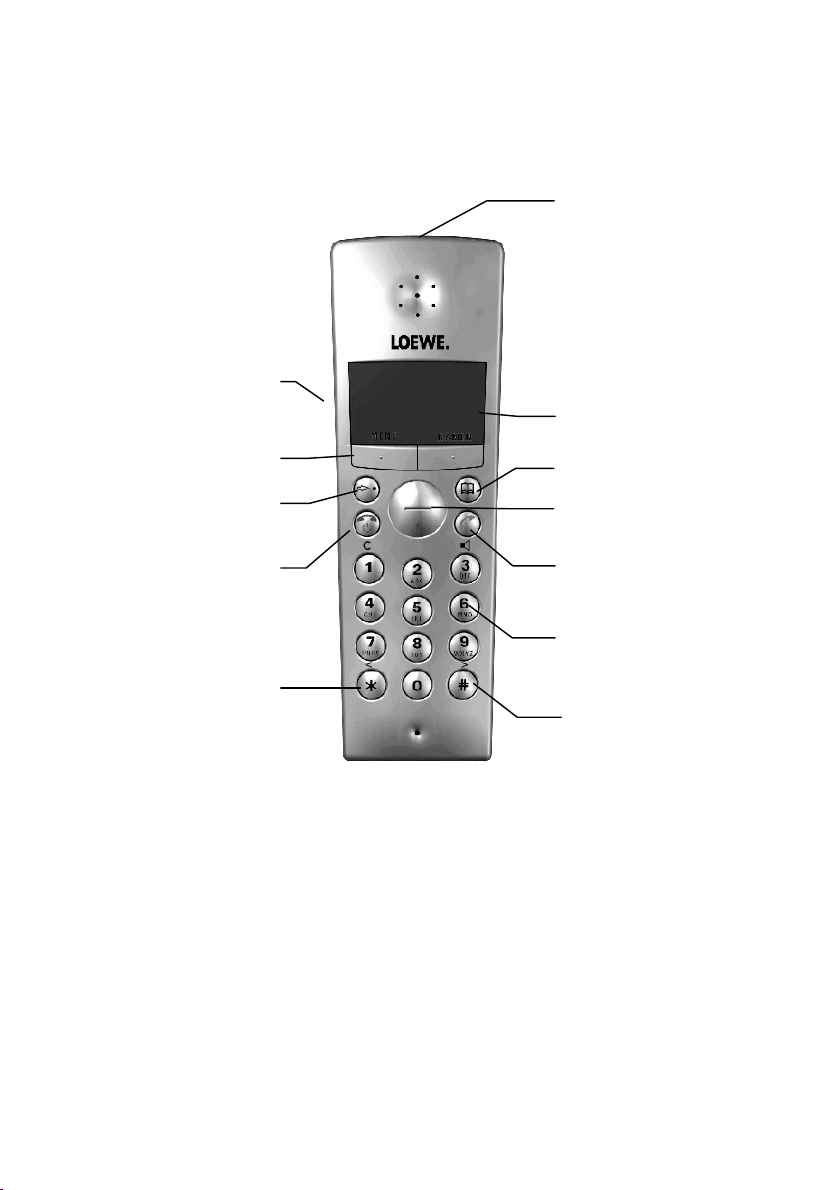
Loewe alphaTel 5000 Handset
Dis
p
la
y
Fast dialling key
"Unhook"
S
p
eaker
,
Hands-free
"Hang up"
Phone book
Number/Letter keys
Function ke
y
s
Select key
For internal call
Loudspeaker (rear)
For three-party conference
Infra-red
transmitter

*Print Job: , 28.07.01, 15:33
Loewe alphaTel 5000 Base Station and Charging Unit
Paging key
Busy LED
Charge LED
Charge LED

How to find the right function fast
*Print Job: , 28.07.01, 15:33
1
How to find the right function fast
Key functions
The key functions are listed in the table below. Some keys have different functions depending on which
mode is active (for
and
also depending on how long you press the key).
During a call Programming mode /
Phone book
Standby state
(
)
Unhook key
Speaker, hands-free Confirm functions or entries •"Seize” line
•Dial after preparing
dialling
Hang up key
(C)
Go on-hook at end of call Return
•to previous menu (short
press) or
•standby (long press)
•Keypad lock on/off
(press 1 sec)
•Handset power on/off
(off - 2 sec)
(long press)
•Accept external call
while internal call waits
(connection to handset
is put on hold)
•Broker between internal
and external call
Call handset
(long press)
Start and end three-party
conference
Function
keys
Select the option shown in the display with the button
(see below)
Fast dialling
key
Quick access to frequently used memory locations and functions
Select key
Receiver and Speaker Vol-
ume
Selection in the menus and
phone book
Calling the redialling mem-
ory
Call phone book

How to find the right function fast
*Print Job: , 28.07.01, 15:33
2
Menu
The Loewe alphaTel 5000 is a menu-prompted telephone. The menu offers access to all setting
procedures and many of the telephone functions. Selection of a menu item often opens a sub-menu
which is sometimes followed by even more menus.
The various options are selected with the Select key and confirmed with the right function key if OK
appears above it in the display.
Faster operation is often possible with the numeric keys. Selection and confirmation take place already
when the numeric keys are pressed (digits are assigned to the menu items which are shown in the
bottom display line).
The abbreviations used are usually self-explanatory, look in the appropriate section of the user guide if
you are not sure.
Below you will find the functions which are executed when you press the function keys:
Text above the
function key
Executed function
MENU Call the menu
EMERGENCY
CALL
Call the list of stored emergency numbers (long press)
HCall the caller list in the case of new entries
CRM Call the redialling memory
CANCEL Cancel the function
RINGER OFF Ringer is switched off, the call can still be answered
IR-MUTE Muting of TV and audio system when a call is received
BACK Short press: Back to the previous menu or operating state
Long press: Back to the standby state
OK Confirmation
CALL HOLD Short press: Flash, long press: With hook flash, line functions can be performed
on the exchange line, with flash call hold or seize outgoing line on PABX may
be possible.
BROKERING Switching back and forth between two callers.
YES Executing a delete function, reset to ex-factory state
NO Delete function not executed
The character to the left of the flashing cursor is deleted, the menu exited
when pressed long
SPEAK Muting of microphone is reset
ALL Call all handsets
AUTO-CRM Start automatic redialling

How to find the right function fast
*Print Job: , 28.07.01, 15:33
3
Display
The following symbols are visible in the handset display depending on the operating state
aInformation on the connection between the handset and the base
E
Information about the battery charging state
Telephone is in speaker or hands-free mode
QKeypad locked
HNew call in the caller ID list
PAlarm
The display is illuminated for 10 seconds after pressing any key.

Table of Contents
*Print Job: , 28.07.01, 15:33
4
Table of Contents
1 PREPARING THE TELEPHONE FOR USE 7
1.1 Base Station 8
1.2 Handset 9
2 DURING A CALL 11
2.1 Incoming Calls 11
2.2 Caller ID List 13
2.3 Outgoing Calls 15
2.3.1 General 15
2.3.2 Call Preparation 16
2.3.3 Dialling via Other Network Providers 18
2.3.4 Dialling from the Caller ID List 19
2.3.5 Dialling via the Phone Book 19
2.3.6 Redialling 20
2.4 Receiver and Speaker Volume 23
2.5 Hands-free / Group Listening 24
2.6 Muting the Microphone 24
2.7 Infrared Remote Control 25
2.8 Notebook Function 26
2.9 Displaying the Call Time 26
2.10 Timer 27
2.11 Network Functions 28
2.12 Automatic Redialling 29
3 PHONE BOOK 30
3.2 Creating a New Entry 31
3.3 Finding an Entry 33
3.4 Editing an Entry 33
3.5 Copying an Entry 34
3.6 Clearing an Entry 35
3.7 Copying an Entry into the Redialling Memory 36
3.8 Calling Memory Info 36
4 SETTINGS FOR NETWORK PROVIDERS 37
4.1 Creating the Network Provider List 37
4.2 Time Table for Network Providers 38
4.3 Codes (for Telephoning without Network Providers) 39
4.4 Network Provider List / Activate/Deactivate Time Table 40
5 SETTING THE HANDSET INDIVIDUALLY 41
5.1 Changing the Handset PIN 41
5.2 Setting the Display Language 42
5.3 Automatic Dial Tone 43
5.4 Setting the Volume and Melody of the Ringer 43

Table of Contents
*Print Job: , 28.07.01, 15:33
5
5.5 Touch Tone 45
5.6 Locking the Keypad 45
5.7 Baby Call 46
5.8 Entering the Handset Name 47
5.9 Logging Handset On/Off 48
5.10 Fast Dialling Key (Direct Memory) 49
5.11 Activating / Deactivating the Infrared Remote Control 50
5.12 Factory Settings Handset 51
5.13 Acoustic Signalling on the Handset 52
6 INDIVIDUAL BASE STATION SETTINGS 53
6.1 Changing the BASE PIN 53
6.2 Entering Emergency Call Numbers 54
6.3 Dialling Restrictions 55
6.3.1 Phone Number Lock for Specific Phone Numbers 55
6.3.2 General Dialling Restrictions 56
6.4 Setting the Volume and Melody of the Ringer 57
6.5 Setting the Date and Time 58
6.6 Setting the Unit Price 59
6.7 Displaying the Call Time and Costs 59
6.8 Factory Settings Base Station 62
7 OPERATING SEVERAL HANDSETS / BASE STATIONS 63
7.1 Selecting the Base Station 63
7.2 Internal Calls 64
7.3 Functions during a Call 65
7.3.1 Accepting a Call / Brokering 65
7.3.2 Call Hold 66
7.3.3 Call Transfer 67
7.3.4 Three-party Conference 68
7.4 Paging 68
7.5 GAP Function 69
8 OPERATION ON A PABX 70
8.1 Line Access Number 70
8.2 Recall Key (Flash Recall/Hook Flash) 71
9 GENERAL INFORMATION 72
9.1 General Allocation of Frequencies by the Telecommunication Authorities 72
9.2 European Standards Compatibility 73
9.3 Conditions of Warranty 75
9.4 Cleaning 75
9.5 Disposing/Recycling of Chargeable Batteries/Batteries 76
10 HELP WHEN MALFUNCTIONS OCCUR 77
11 WHAT TO DO WHEN ... 78

Table of Contents
*Print Job: , 28.07.01, 15:33
6
12 TECHNICAL DATA 80
13 ERROR REPORT 81
14 INDEX 83
15 POCKET GUIDE 87
This manual suits for next models
1
Table of contents