
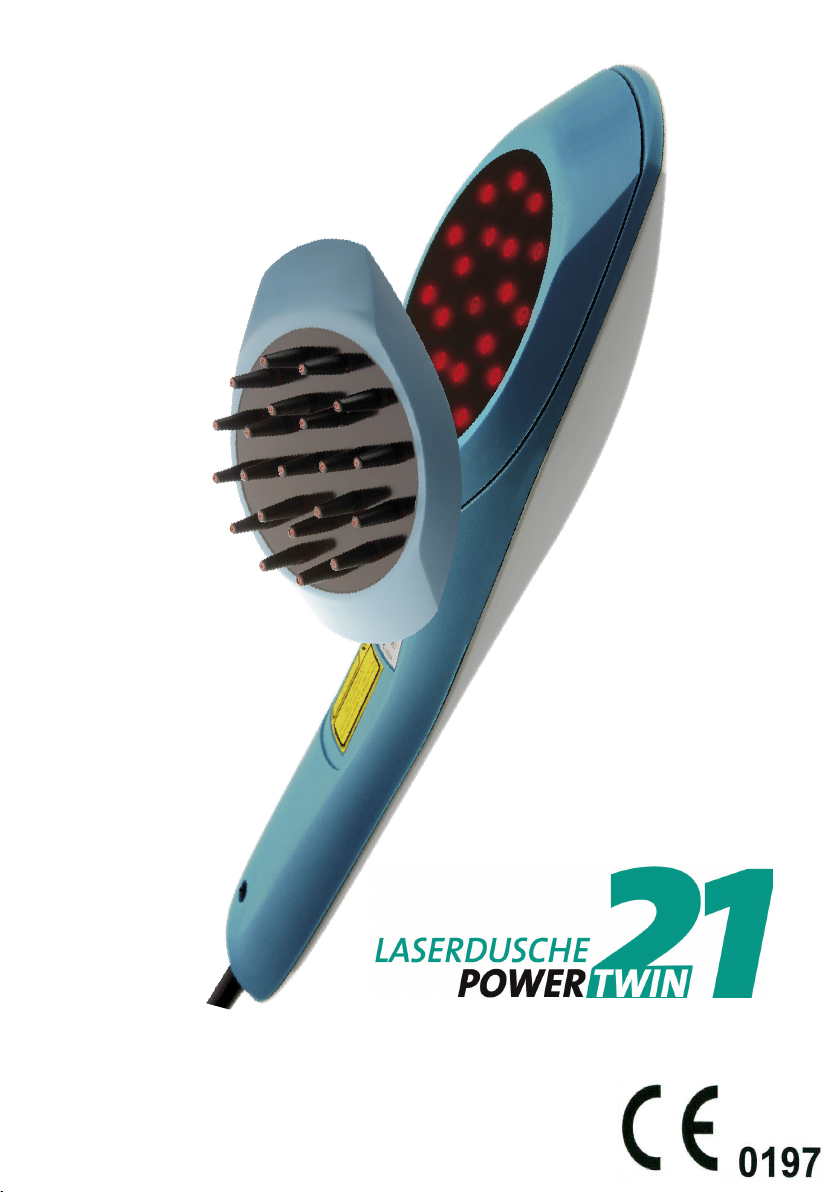
LIVETEC PowerTwin 21 User manual
Operang Instrucons
Last revised: February 28th, 2019

page 2 of 29
Preface
The Operang Instrucons are directed at healthcare professionals physicians, who
are familiar with the handling and of low level laser systems.
The laser shower PowerTwin21 is a therapy device for the low level laser therapy
of large body areas. Low level laser therapy belongs to the eld of complementary
therapy.
Advice
Please read the Operang Instrucons carefully before using the device. The
Operang Instrucons should always be kept at the place where the low level laser
system is employed.
Users must be able to reduce the risks and complicaons that are associated with
the use of low level laser systems by taking the appropriate acon.
Copyrights
These Operang Instrucons are subject to copyright law. All rights are reserved.
Copying, duplicang, translang and converng into an electronic format, in whole
or in part, are prohibited without the express permission of the manufacturer.
Manufacturer:
livetec Ingenieurbüro GmbH
Marie-Curie-Str
.
8
79539 Lörrach
GERMANY
info@livetec.de
www.livetec.de
Your Distributor / Hotline / Contact:
MKW Lasersystem GmbH
Landstr. 67
D-76547 Sinzheim / Germany
Fon: +49 7221 / 98 83 91
Fax: +49 7221 / 98 83 93
E-mail: mkw@mkw-laser.de
Internet: www.mkw-laser.de

page 3 of 29
Content
Scope of delivery (case and content) .............................................................3
1. Funcon keys and display elements ...........................................................4
2. Intended Use ..............................................................................................6
3. Contra indicaons .......................................................................................6
4. Display and LED indicators ..........................................................................7
5. Operaon ...................................................................................................8
6. Changing the laser parameters ...................................................................9
7. Using the laser ..........................................................................................13
8. Applicaon ...............................................................................................14
9. Replacing the adapters .............................................................................15
10. Maintenance and care ............................................................................16
11. Safety informaon ..................................................................................16
12. Manufacturer's labels and warning signs ..............................................18
12.1 Denion of symbols of the laser shower PowerTwin 21 ....................19
13. Error messages and safety informaon ..................................................20
14. Technical data - Laser Shower PowerTwin21 ..........................................21
15. Appendix - Denion of frequencies ......................................................22
16. Notes on electromagnec compability ................................................24
16.1 Manufacturer's declaraon on electromagnec emissons ..................25
16.2 Manufacturer's declaraon on electromagnec immunity ............ 26-28
Scope of Delivery
MKW Low-Level Laser unit PowerTwin21 (Item-Code 010211)
adapter laser shower (Item-Code 021101)
adapter comb [oponal] (Item-Code 021102)
AC adapter 230V (Item-Code 021005)
Laser safety goggles for therapist (Addional periphery, oponal)
(Item-Code 020102)
Laser safety goggles for paent *Socaps* (Addional periphery, oponal)
(Item-Code 020103)
Device case (Addional periphery, oponal) (Item-Code 020301)
Acrylic tray (Addional periphery, oponal) (Item-Code 020405)
User Manual in English
page 4 of 29
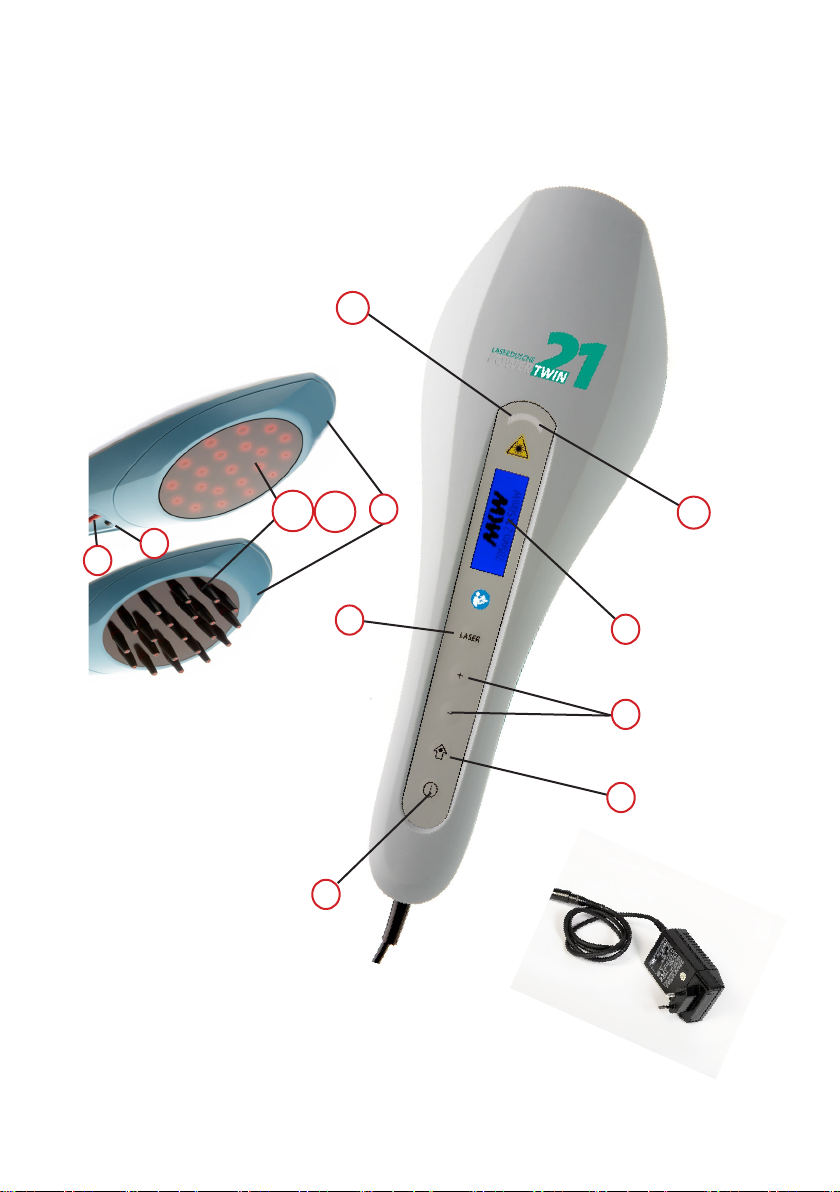
g.1:
PowerTwin21 (casing from above)
g.2:
shower adapter (top g.)
comb adapter (lower g.)
g.3:
AC adapter for PowerTwin21
1
3
2
6b
5
4
6a
9
10 (11)
78
page 5 of 29
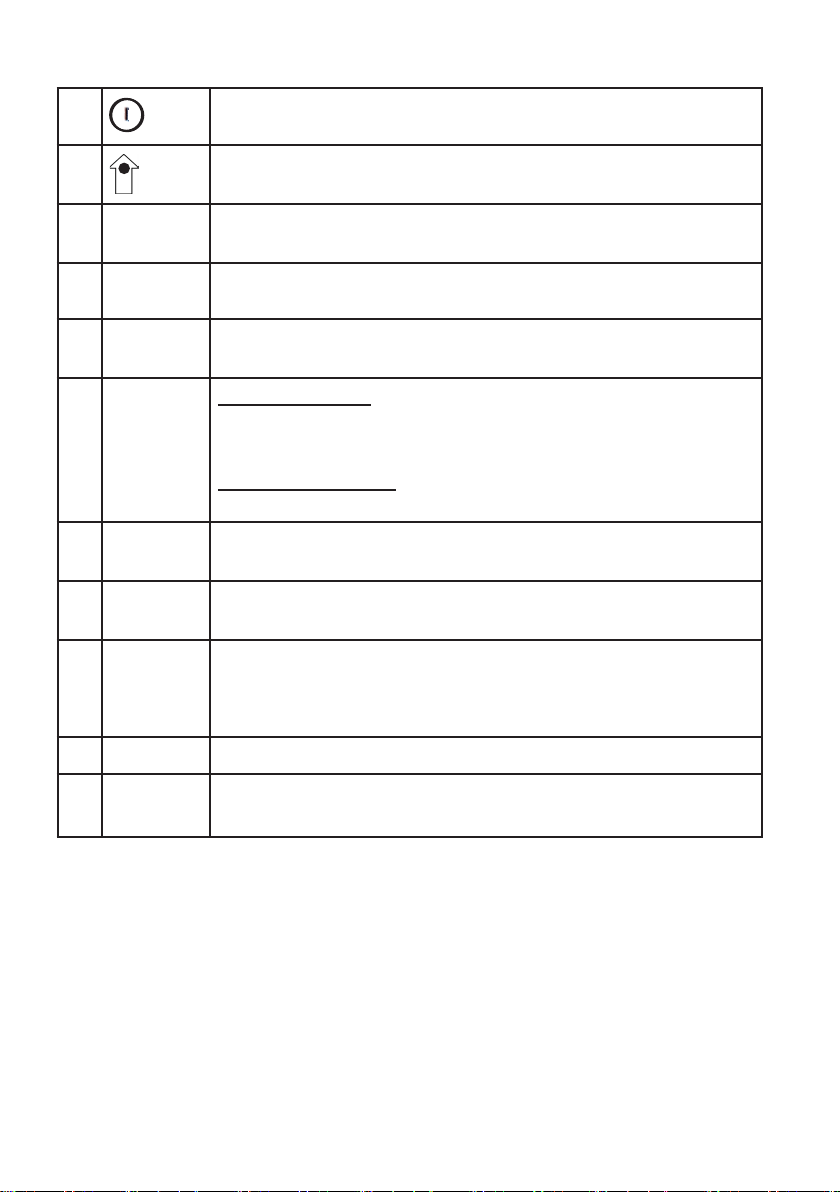
1Power on/o key for PowerTwin21
2= SET Select and store values with the SET key (arrow key = SET-
key)
3+/- Use Plus and Minus keys to change the values previously
selected with the SET-key
4 LASER Acvate/Deacvate laser output
5DISPLAY Display screen (menu-driven) of selected laser power,
operang mode, indicaon of therapy me as well as dose.
6 LEDs 6a: Two red LED:
On as error indicaon of LED diode operaon, please
contact customer service.
6b: Two yellow LED:
On when laser output acve
7 red
connector
Connector for the key pin - operaon of PowerTwin21 is
only possible when the key pin is in correct posion.
8black
connector
Storage for key pin when lasershower is o.
9Adapter-
ring
An adapter is available for PowerTwin21 laser shower (with
protecve glass) and a laser comb adapter (with comb ps,
oponal accessory).
10 Laser beam outlet
11 LEDs 4 red LEDs at the boom indicate acve laser output.
1.1 Funcon keys and display elements

page 6 of 29
2. Intended Use
The laser shower PowerTwin 21 is a device to apply low level laser (laser with low
energy) for the treatment of large body areas.
The laser shower PowerTwin21 is a therapy device and can be used for wound
healing and relief of pain and inammaon.
3. Contraindicaons
The professional literature lists the following contraindicaons. They also apply to
the laser shower PowerTwin21.
Absolute contraindicaons:
Irradiaon of the eyes
Photo sensivity
Tumour paents
Open fontanelles and epiphyseal plates in children
Hyperthyroidis
Relave contraindicaons:
Pacemaker paents (thorax)
Epilepsy (head)
Pregnancy (abdomen and back region)
Endocrine organs (thyroid, tescles, ovaries)
Obstacles to therapy:
Deep X-ray therapy
Long-term medicaon
Chemotherapy
1.1 Funcon keys and display elements
page 7 of 29
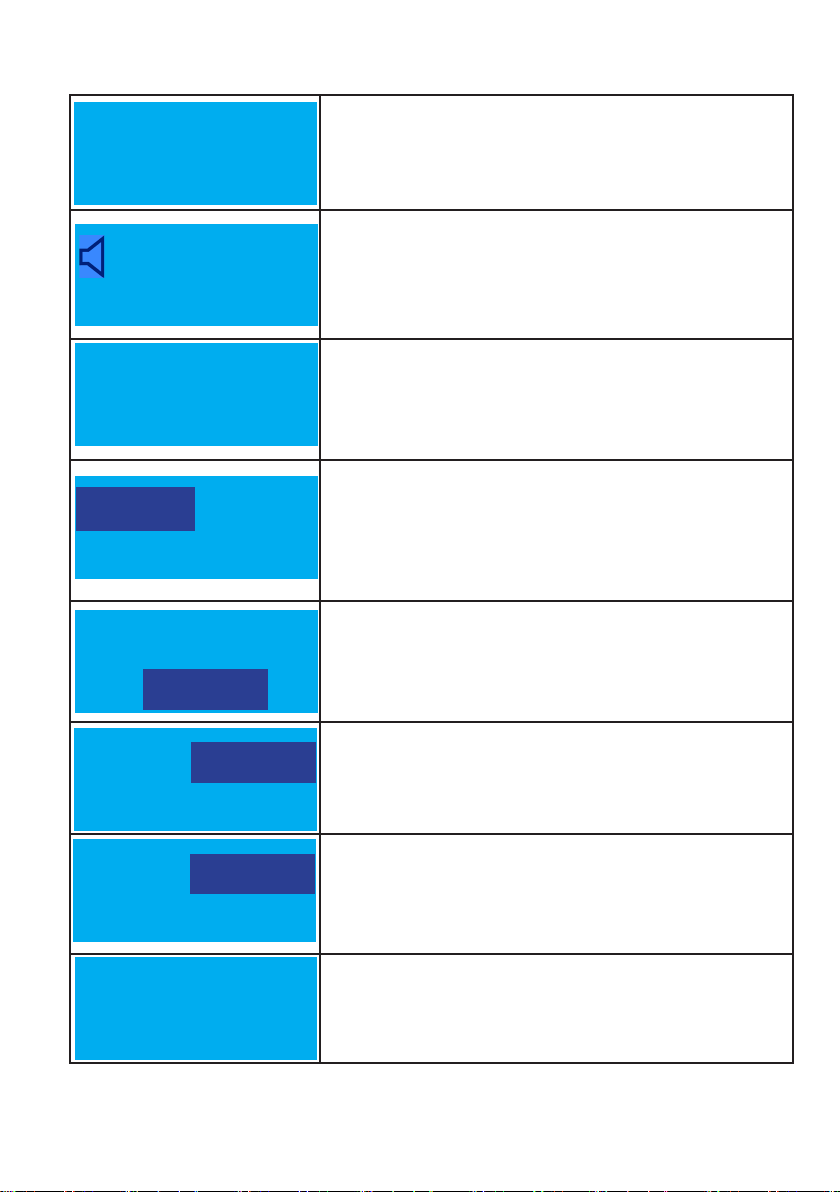
This screen appears during the boong process aer the
laser unit has been turned on. The second line indicates
the soware status of the unit.
This screen appears aer the laser unit has been turned
on once the boong process is nished. The second line
shows the wavelength and the maximum CW output. The
loudspeaker icon indicates the sound is acvated.
Inial seng. The sengs which were used last and
the current therapy parameters (laser power, therapy
program, energy dose rate) are displayed. Factory seng
when delivering is: 50 mW * Mul * 10 min (15 J/LD)
A value that appears inverted can be changed with the “+”
and “–” keys. On this screen the laser power level can be
altered. Pressing the SET key saves the respecve value.
Eding possible for: Therapy program Energy
dose and/or therapy me.
Seng the therapy program
Seng the energy dose
Seng the therapy me:
Maximum treatment me is 15 minutes.
This screen appears when the laser is acvated. Laser
power level, remaining therapy me and discharged
energy dose rate in Joule (J) are shown
.
4. Display and LED indicators
50mW 15 J/LD
MULTI
21x50 mW
15:00 - 0,0 J/LD
50mW 15:00
CW
50mW 45 J/LD
CW
50mW 45 J/LD
CW
50 mW 45 J/LD
CW
PowerTwin21
785nm 21x50mW
Software
V.x.x EU
page 8 of 29
5. Operaon
5.1 Unlocking
Insert the key pin into the red connector at the boom of the housing of
the laser shower PowerTwin21 (● page 4, g. 1/7). The adapter ring for the
laser shower or laser comb must be plugged in (● secon 9, “Replacing the
Adapters”, page 15, resp. page 4, gures 2/10+11).
The PowerTwin21 cannot be operated without the adapter ring. Only the
power supply unit AC/DC adapter type FW7555M/12 which was shipped with
the unit must be used.
Connect AC adapter with adapter plug
The power supply unit (AC adapter) and the PowerTwin21 are connected with
an intermediate plug. Should you wish to remove the power supply unit from
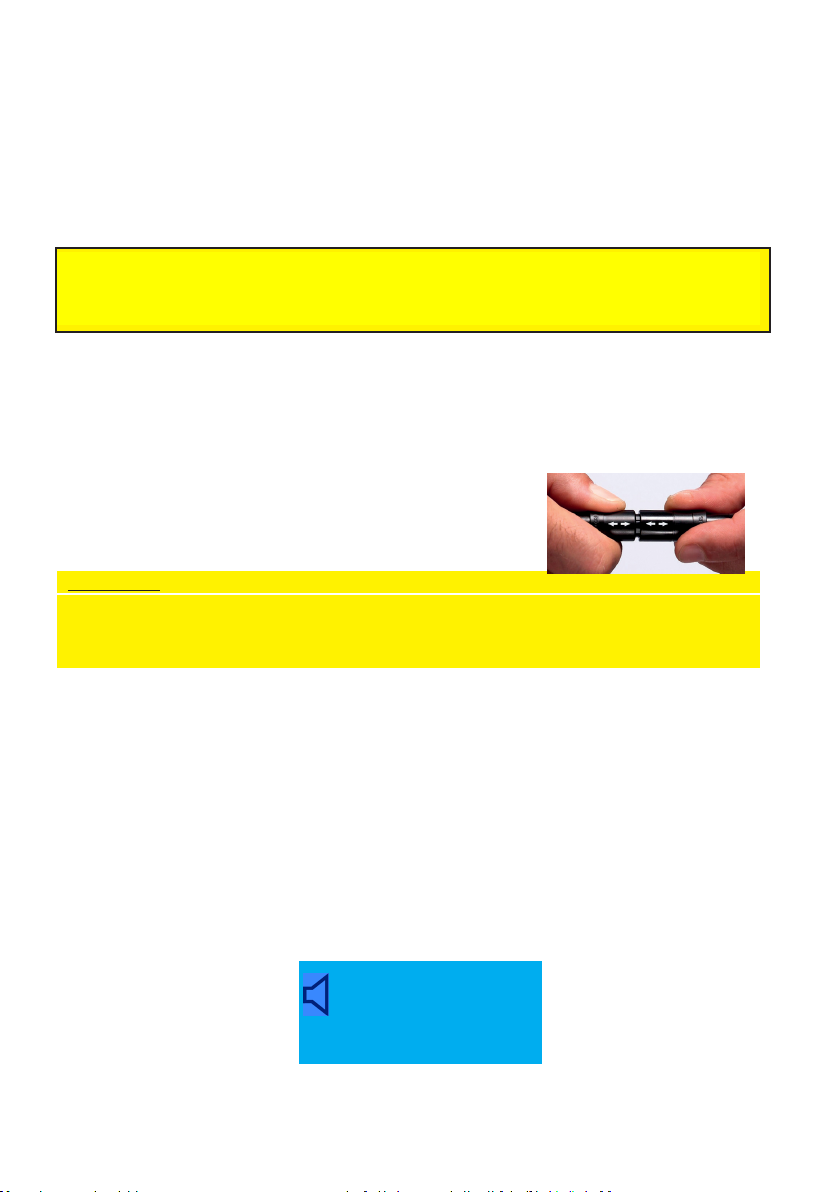
the laser shower PowerTwin21, please proceed as follows:
Slightly push back the locking device (black sleeve)
at the plug, and pull the two plugs apart.
Aenon!
The plug-in connecon is a push-pull locking system. Hold the plug-in
connecon only by the sleeves with the arrows, as illustrated. Never twist
the plugs or pull at the back ends of the plug.
If you reconnect the PowerTwin21 with the AC adapter, make sure you
observe the direcon of the arrows on the plugs.
5.2 Connect AC Adapter to the power supply
Connect the AC adapter to the mains (100–240 V~). A correct connecon is
indicated by a green control light at the AC adapter.
5.3 Inial sengs aer boong
Aer switching the device on, the output data of your lasersystem (wavelength
and max. output) are indicated in the second line.
PowerTwin21
785nm 21x50mW

page 9 of 29
5.4 Further inial sengs
You can turn the display (right-handed/le-handed users) with the “+”key (paghe
4, g. 1/3). With the key “laser” you can turn o the fans (Our recommendaon:
only work with acvated fans).
5.5 Display of saved therapy parameters
By pressing the “SET” key, the currently set parameters (inial seng) of the
unit are displayed. With rst use you'll be indicated the following inial sengs:
The maximum output of 50 mW, the operaon mode Mul and an energy dose
of 15 J/LD (LD = laser diode) are preset when operated for the rst me.
Following this the laser power values selected and stored previously will be
displayed, as well as the therapy program and therapy dose used the last me.
Changing the laser parameters:
Chapter 6.0 “Changing of laser parameters” (page 10 )
Acvang the laser:
Chapter 7.0 “Using the Laser” (page 14 )
50mW 15 J/LD
MULTI

50 mW 45 J/LD
CW
6. Changing of laser parameters
Having pressed the SET key, the output value is blinking as highlighted in below
gure. Changes can be made by pressing “+/-“-keys accordingly. Sengs can be
done from 10% to 100 % (in regard to the maximum value) in increments of 10%.
By pressing the SET key again, the selected value is conrmed and stored. The
display changes, showing the following informaon.
The therapy program can be changed with the “+” and “–” (page 4, g. 1/3) keys
and saved with the SET key.
The seng opons are:
● CW ● Mulfrequency ● Alphafrequency ● Nogier-Frequencies A-G, L
● Nogier-Frequencies pot. A‘-G‘ ● Bahr-Frequencies 1-7 ● Reininger-
Frequencies ● free programmable frequencies 1-9.999 Hz.
New frequencies (purchase oponal): ● Bahr+
,
● Solfeggio-frequencies
● FI-bands (FI: Regeneraon, Pain, Interference, Trauma, Inner Center, Detox, In-
fecon, Bones, Nerve, Transcranium, Psyche/Vegetavum, Lymph, Trigger Points)
● Sweeps (Sweep: Alpha, Purr, Beta, Theta, Delta) ● Cranio
Please note: therapy programs and frequencies on pages 22-23, appendix 1
page 10 of 29
50mW 45 J/LD
CW
Table of contents
Other LIVETEC Medical Equipment manuals









