LinQTab LQCP - Mini Setup guide

LQCP – Mini DLP Projector
Quick Start Users Guide

Table Of Contents
LQCP – Mini DLP Projector Quick Start Users Guide.............................................................................................1
Table Of Contents............................................................................................................................................2
Important Notice..................................................................................................................................................3
LinQTab LQCP - Mini DLP Projector Features: ..................................................................................................4
LinQTab LQCP - Mini DLP Projector Safety Precautions:...................................................................................4
About the Lithium Polymer Rechargeable Battery: ..............................................................................................4
Lithium Polymer Rechargeable Battery Precautions:............................................................................................4
Packing list:.........................................................................................................................................................5
Product Features, Controls and Connections: .......................................................................................................6
Projector Lens And Front View:.......................................................................................................................6
Side And Back View:.......................................................................................................................................7
Connectors View:.............................................................................................................................................8
LQCP – Mini Projector Controls:.....................................................................................................................9
LQCP – Mini Projector Input / Output Ports:....................................................................................................9
LQCP – Mini Projector Infrared Remote Control:..............................................................................................10
LQCP – Mini Projector Infrared Remote Control Button Functions:...............................................................11
Operating The LinQTab Mini DLP Projector:........................................................................................................12
Basic operation: .................................................................................................................................................12
Powering ON and OFF:..................................................................................................................................12
Focus: ............................................................................................................................................................13
Home Menu:......................................................................................................................................................14
Home Menu - Micro SD card and USB disk:..................................................................................................15
Home Menu – HDMI & MHL:.......................................................................................................................17
Home Menu – VGA:......................................................................................................................................17
Home Menu – Settings:..................................................................................................................................18
Battery:..................................................................................................................................................................19
Battery Installation:............................................................................................................................................19
Recharging The Battery: ................................................................................................................................19
Battery Status:................................................................................................................................................20
Maintenance: .....................................................................................................................................................21
Cleaning The Projector Lens:.........................................................................................................................21
Cleaning The Case Of The Projector:.............................................................................................................21
Storage:..........................................................................................................................................................21
Appendix A - Product Specifications: ....................................................................................................................22
Appendix B - Questions and Answers:...................................................................................................................23

Important Notice
Thank you and congratulations on your purchase of our LinQTab Mini DLP Projector. This manual contains the
product instructions and any cautions for using this product successfully and safely. We sincerely hope that you will
read through this manual so that you will get the most from our product.
While we endeavour to maintain the content included in the Quick Start Users Guide this manual may not match all
the specific features of the product you have purchased. If you find this is the case please check our web site for any
available updates.
Please do not try to and/or dismantle the product yourself, doing so will void your warranty and may cause your
device to stop working. Any product that has been tampered with will be ineligible for return or refund.
The LinQTab Mini DLP Projector is ready to go for both your next business presentation and for your
entertainment needs at home or when traveling. Before starting to use the LinQTab Mini DLP Projector is, please
read the manual in order to get the most from your LinQTab Mini DLP Projector.

LinQTab LQCP - Mini DLP Projector Features:
Slim and cute, brilliant and portable
Excellent image quality
Audio and Video display
High capacity and removable lithium polymer battery
LinQTab LQCP - Mini DLP Projector Safety Precautions:
Please don't aim the projection at somebody's eyes or an animal’s eyes.
Please keep it away from rain and direct sun.
Please don't store it in a damp or hot area, do not place the unit near any heat generating device.
Please don't use the device on an uneven surface as it may fall and be damaged.
Use a dry soft cotton cloth to clean the device.
Keep the device out of reach of children.
Please be careful when inserting the battery inside the device to comply with the direction of the negative
and positive connections. Inserting the battery incorrectly could damage your product and may void your
warranty.
Please do not use the device when driving or riding.
Use the manufacturer’s parts and accessories only to ensure your device lasts and to maintain your warranty.
If the device falls down and is damaged, please power off, remove the battery and contact the authorized
retailer or the maintaining service center to inspect and repair the product.
About the Lithium Polymer Rechargeable Battery:
Device Model No LQCP
Battery Type Lithium polymer rechargeable battery (LI-PO)
Battery Voltage 3.7 volts
Battery Capacity 4600 mAh
Lithium Polymer Rechargeable Battery Precautions:
Using the authorized power adapter only when charging your device.
Never dismantle the product and/or the battery.
Do not insert the battery with the poles in the wrong order or direction.
Store the LI-PO battery safely.
Never expose the battery to excessive heat, fire and/or water, this may result in an explosion and/or injury.
Keep the battery at 70% power if you are not using the device for extended periods and charge the battery
monthly but store the battery separately.

Packing list:
Please check that all the accessories are accurately in listed, if something is missing, please contact the point of sale
immediately.
LinQTab LQCP - Mini DLP Projector
Quick Start Users Guide
LQCP Power Adapter
LI-PO rechargeable battery
Triangle Stand (optional)
VGA Cable (optional)
HDMI Cable (optional)
MHL Cable (optional)
Mini-HDMI cable (optional)
Carrying Bag (optional)

Product Features, Controls and Connections:
Projector Lens And Front View:
In the images below you will find the LQCP – Mini DLP Projector features and controls pointed out for the
projector lens and the front view where most of the projectors operation controls are present.
Side And Back View:
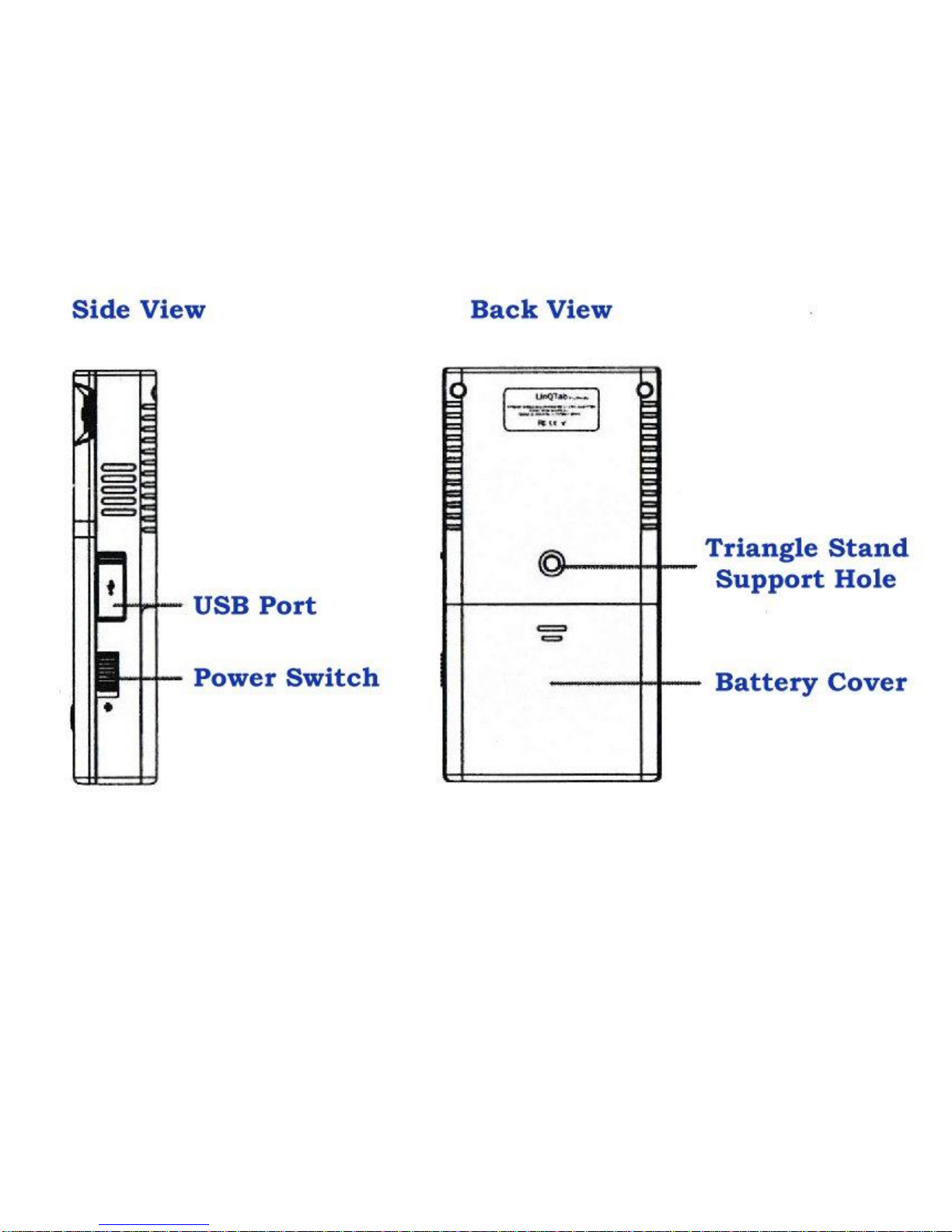
In the images below you will find the LQCP – Mini DLP Projector features and controls pointed out for the side
and back views of the device.

Connectors View:
In the image below you will find the LQCP – Mini DLP Projector features and available connections pointed out
for the bottom view of the device.

LQCP – Mini Projector Controls:
CONTROL FUNCTION
Power Switch Power the Projector On / Off
Home Button Home Menu
Return or Back Button
Return to the previous step
Direction (four way) Direction Switching
OK or Confirmation Enter or OK
Focus Adjust the Projectors Focus
LQCP – Mini Projector Input / Output Ports:
PORT FEATURE
VGA Input VGA input for Laptop or Desktop Computer connection
DC Input 12 volt DC Adapter Input
Headphone 3.5 mm Stereo Headphone Output
Infrared Infrared Remote Control Receiver
Setup Button Device Reset/Setup Button
HDMI / MHL Input
HD Multimedia Port for connecting computers, gaming
console, HD digital camera or other multimedia devices.
USB Input USB Stick / Disk and USB OTG
LQCP – Mini Projector Infrared Remote Control:
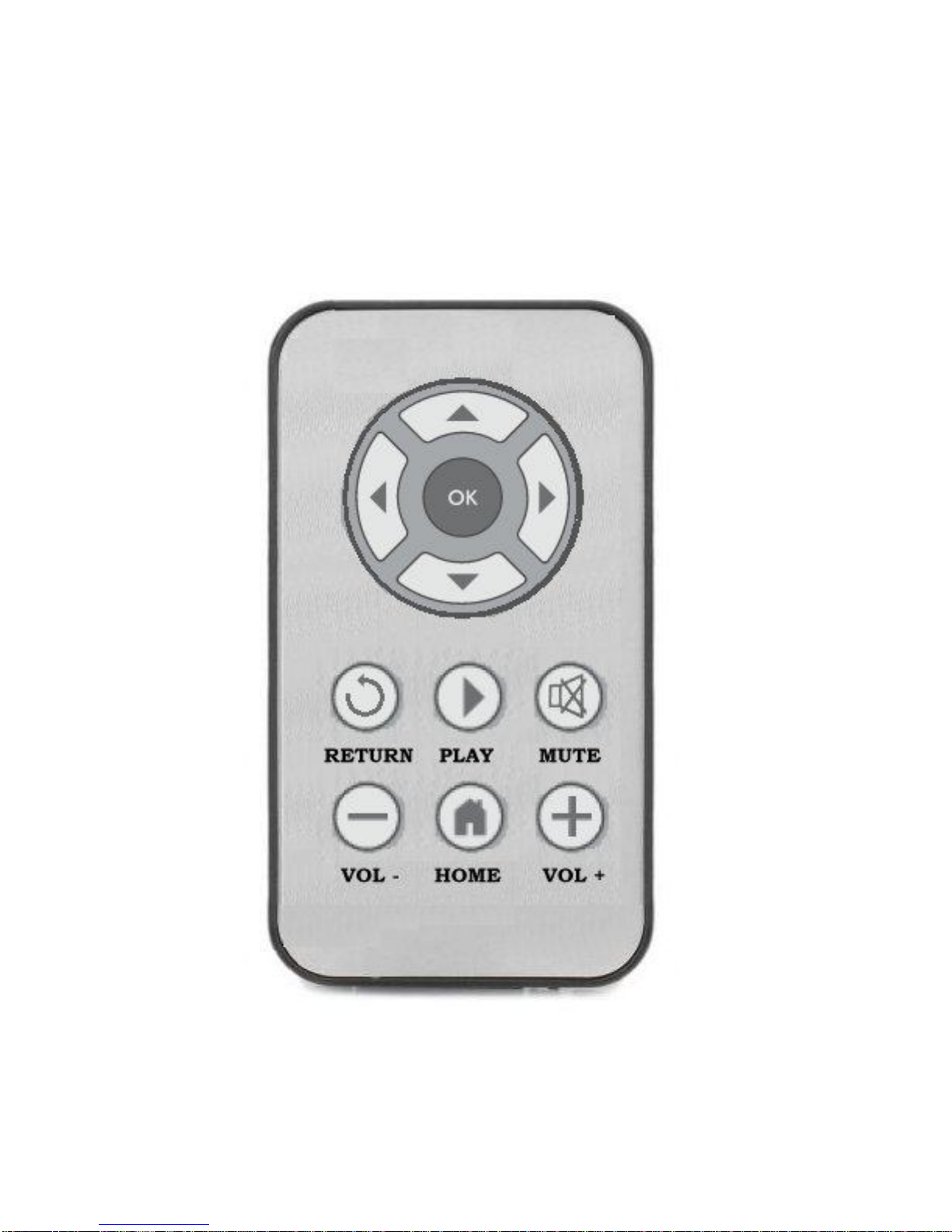
For Business Presentations or Entertainment use an infrared remote control allows you to control your LinQTab
LQCP Mini DLP Projector from a distance. Ensure that the infrared remote receiver on the bottom of the device is
not blocked to ensure that your remote functions correctly.
The LinQTab LQCP Mini DLP Projector Remote includes all the controls you will need during a presentation,
direction buttons, OK or Enter, Return (Back), Play, Mute, Volume Decrease, Volume Increase and the Home
Menu button. The remotes range of operation may vary due to the environment being operated in, ensure the
infrared receiver is not blocked.
This manual suits for next models
1
Table of contents
Other LinQTab Projector manuals