
LIFEBOX Bluedot B-HA02 User manual

BTE HEARING AID
เครื่องชวยฟง แบบชารจ
EN User manual
B-HA02
0
INTENDED USE:
SIGNS AND SYMBOLS :
INCLUDED IN DELIVERY:
The following symbols appear in these instructions for use.
WARNING: Warning instruction indicating a risk of
injury or damage to health.
IMPORTANT: Safety note indicating possible damage
to the unit/accessory.
Note: Note on important information.
The device is only to be used to help people to hear better.
The device is only intended for the purpose described in
these instructions for use. The manufacturer is not liable
for damage resulting from improper or careless use. The
device is an amplifying device and is not a therapeutic
medical device.
BTE HEARING AID
เครื่องชวยฟง
• BTE HEARING AID 1 pc.
• Eartip : 5 size (4 closed eartip, 1 double eartip)
• Cleaning brush 1 pc.
• Adapter with Micro USB
• Storage box
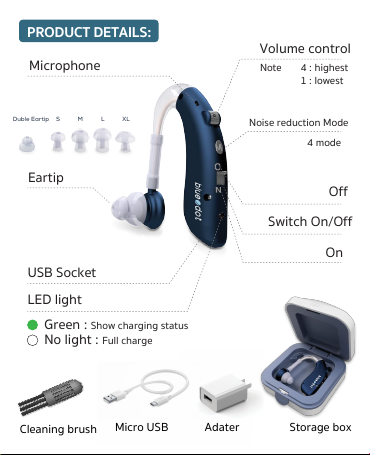
PRODUCT DETAILS:
0
S M L XLDuble Eartip
Storage boxMicro USB Adater
Microphone
USB Socket
LED light
Noise reduction Mode
4 mode
On
Off
4 : highest
1 : lowest
Note
Volume control
Switch On/Off
Eartip
Green : Show charging status
No light : Full charge
Cleaning brush

WARNING:
• Do NOT use the device if you are suffering from an
inflammation of the middle ear or ear canal.
• Do NOT use the device at maximum volume over
a longer period of time. This could damage your hearing.
• If you feel unwell or experience pain when wearing the hearing
amplifier, stop using it immediately and contact your doctor.
• If your ear becomes inflamed or your skin irritated or you
experience an increased accumulation of ear wax when wearing
the device, stop using it immediately and contact
your doctor.
• This device is not intended for use by people (including children)
with restricted physical, sensory or mental skills or a lack of
experience and/or a lack of knowledge, unless they are
supervised by a person who has responsibility for their safety or
they receive instructions from this person on how to use the
device. Children should be supervised around the device to
ensure they do not play with it.
• Do NOT use the device in potentially explosive and hazardous
environments.
• Keep the device, the accessories and the batteries away from
children, as there is a risk of choking.

IMPORTANT : Do NOT wear the device while bathing,
showering or swimming.
• If you have any doubts, do not use a damaged device;
contact your retailer or the specified Customer Services address.
• Switch the device off immediately if it is faulty or not working
properly.
• Do not attempt to open and/or repair the device yourself.
Repairs may only be carried out by Customer Services
or authorised retailers. Failure to comply will result in voiding of
the warranty.
• Do NOT wear the device while applying cosmetics
(e.g. makeup, hairspray, perfume or sun cream).
• Do NOT wear the device while undergoing shortwave
therapy or medical treatments that are subject to strong radio
frequency or magnetic fields.
• Do NOT wear the device in the vicinity of strong electromagnetic
fields or X-rays.
• Protect the device from impacts, humidity, dirt, marked
temperature fluctuations and direct sunlight.
• Never dry your device in the microwave.
• Service your device at regular intervals. Make sure there are no
foreign objects in between the earplug and head-
phones, as this could impair the sound.
• Batteries must not be taken apart or short circuited.
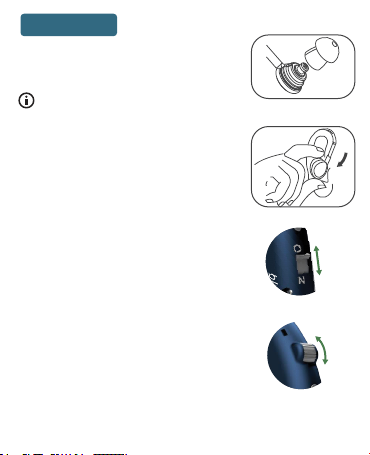
3 On-Off Switch
1 .Insert Eartip
4 Volume Control
Move the On/Off switch to “N” to turn on
the device.
The volume can be adjusted to 4 levels.
- Increase the volume by turning this
control knob to other numbers.
- Turn the volume down by turning this
control button towards a lesser number.
* Please adjust the volume to the level that is
most comfortable for you to listen.
please select eartip not too tight or too
loose into the ear canal.
Slowly insert the earplug into your ear canal
applying no force. Make sure not to insert
the earplug too deeply into the ear canal.
If the earplug is not properly in place or
feels uncomfortable, try a different earplug.
2 Wear device
Selecting Eartip
Connect your desired eartip to the headphones.
0
0
OPERATION:
RECHARGEABLE:
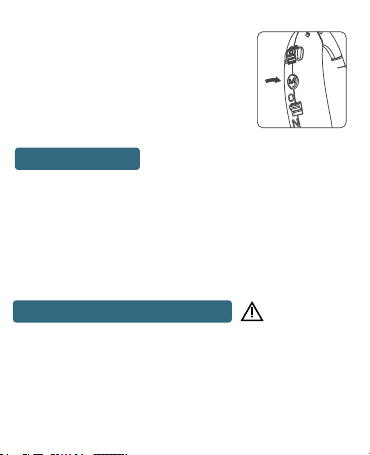
5 Mode selectable
In noisy environment,you can press the mode
button to change the different program for
listening. the hearing Aid device will “Beep”
after press mode button each time.
1 Normal mode “Beep”
2 Noise reduction mode “Beep”
3 Noise reduction mode “Beep”
4 Noise reduction mode “Beep”
1.When sound of the hearing aid is very low and the hearing aid does
not work, hearing aid’s battery might low. The hearing aid will “Beep”
when the hearing aid is low battery, please charge the hearing aid in time.
2.Turn off the hearing aid when charge and insert one end of USB cable to
DC 5V/50mA~1A charger and connect end of micro USB into the
hearing aid USB socket.
3.Plug the charger into power outlet.
4.The new hearing aid should be charged for 6 hours for first few times
you use,for second time it’s better.
• Clean the device and the earplugs with a clean, dry cloth after
each use. If they are very dirty, you can also moisten the cloth with
a mild soapy solution. Never use abrasive, corrosive or solvent based
cleaning products.
• Allow the device to dry fully after cleaning. Store the device in a safe,
dry and clean place.
• Under no circumstances should you hold the device under
water, as this can cause liquid to enter and damage the device.
MAINTENANCE AND CLEANING:

1.When sound of the hearing aid is very low and the hearing aid does
not work, hearing aid’s battery might low. The hearing aid will “Beep”
when the hearing aid is low battery, please charge the hearing aid in time.
2.Turn off the hearing aid when charge and insert one end of USB cable to
DC 5V/50mA~1A charger and connect end of micro USB into the
hearing aid USB socket.
3.Plug the charger into power outlet.
4.The new hearing aid should be charged for 6 hours for first few times
you use,for second time it’s better.
DISPOSAL:
Dispose of the device in accordance with
Directive 2002/96/EC – WEEE
(Waste Electrical and Electronic Equipment).
Is volume level set too high?
• If the eartip of the hearing aid does not fit
the ear properly, or a pitched sound
may be hear.
You can avoid this as follows.
• Turn the device off and reposition
the eartip properly in the ear.
• If the eartip does not fit with your ear
properly, please try to replace it with another eartip type.
High pitched sound
Is battery exhausted ?
• Please charge the device.
Is the eartip clogged with earwax ?
• Remove the joint and carefully wash these parts with lukewarm
water or cleaning brush.
Cannot hear sound well
Please don't wash or soak the device in water or any
kinds of liquid.

specification
Item No. B-HA02
Peak OSPL 90 (dB SPL): Max. power output 130 dB
HAF OSPL 90 (dB SPL): average output 120 dB
Peak Gain(dB) : Max. gain 50 dB (output minus input)
HAF/FOG Gain (dB) : average gain 40 dB
Frequency range(Hz) : 300-5000 Hz
Noise reduction Mode : 4 mode selectable
Distortion: 500Hz : 5%
800Hz : 3%
1600Hz : 3%
Equivalent Input Noise (dB): 28 dB
Voltage: DC 3.7 V
Current: ≤2 mA
เวลาในการชารจ (H): 4 - 6 h
Working Time(H): ~80 h
Adjustable level: 4 levels
Battery type: Lithium Battery (60mA)
Dimensions (WxLxH): 14 x 40 x 45 mm.
Weight: 7 g

LIFEBOX ASIA.Co.,Ltd
26, Soi Sukhumvit 62, Phra Khanong Tai,
Phra Khanong, Bangkok Thailand 10260 Tel : 065-5078989
Table of contents
Languages:
Other LIFEBOX Hearing Aid manuals


