LG Smart AC User manual
Smart Inverter
Remote Control System
User’s Manual
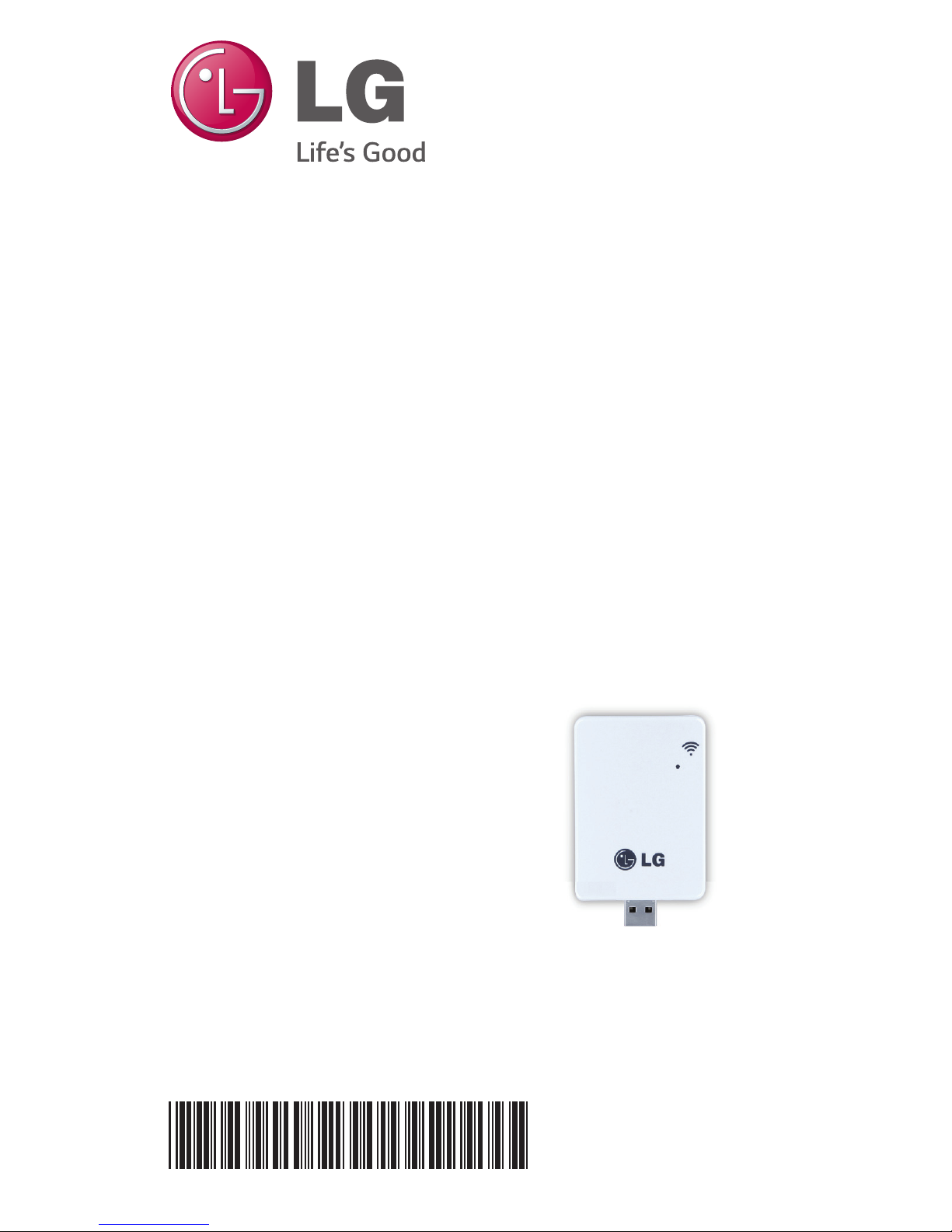
WLAN Module for
LG Smart Air Conditioning Application
Model: PCRCUDT2/ PCRCUDT3
LG Smart AC
P/NO : MFL67891012
Thank you for using LG Smart AC.
If you read the user manual before using the product, you can will have a
better and longer use of the product.
* Please read this manual to use LG Smart AC safely and correctly.
TABLE OF CONTENTS
3SAFETY INSTRUCTIONS
4INTRODUCTION
5INSTALLATION
5WLAN MODULE INSTALL
6MOBILE APP INSTALL
6SIGNING UP FOR A MEMBERSHIP
8WLAN Connection
15 FINDING PASSWORD
16 REFERENCE FOR EACH FUNCTION
16 DATA GUIDE
17 A CHECK LIST BEFORE CALLING TO A
CUSTOMER SERVICE TO REPORT A
PROBLEM
Due to our policy of continuous product innovation, some specifications may change without notification.
“LG” is a registered trademark of LG Corp.
3
User Manual
SAFETY INSTRUCTIONS
READ ALL INSTRUCTIONS BEFORE USING THE APPLIANCE.
Always comply with the following precautions to avoid dangerous situations and ensure
peak performance of your product.
It can result in serious injury or death when the directions are ignored.
It can result in minor injury or product damage when the directions are ignored.
• Installation or repairs made by unqualified persons can result in hazards to you and
others.
• Appliance shall be installed in accordance with national wiring regulations.
• If the supply cord is damaged, it must be replaced by the manufacturer, its service
agent or similarly qualified persons in order to avoid a hazard.
• The information contained in the manual is intended for use by a qualified service
technician familiar with safety procedures and equipped with the proper tools and
test instruments.
• Failure to carefully read and follow all instructions in this manual can result in
equipment malfunction, property damage, personal injury and/or death.
• When the power cord is to be replaced, replacement work shall be performed by
authorized personnel only using genuine replacement parts only.
Installation
• Make sure to check if there is a refrigerant leak after you install or repair the air condi-
tioner. Failure to do so may result in product failure.
• Install the drain hose properly for smooth drainage of condensed water. Failure to do
so may result in product failure.
• Keep level even when installing the product.
• Install the air conditioner where the noise from the outdoor unit or the exhaust gas
will not inconvenience the neighbors. Failure to do so may result in conflict between
neighbors.
• When transporting the equipment, there should be at least 2 or more people, or a
forklift.
It may result in serious injury.
• Do not install the air conditioner where it will be exposed to sea wind (salt spray) di-
rectly.
It may result in product failure.
• I.T.E.(Information Technology Equipment) regulation is not applied as the USB port in
WLAN module is only applicable to specific products(Air conditioner).
CAUTION
!
CAUTION
!
WARNING
!
WARNING
!
Este equipamento opera em caráter secundário,
isto é, não tem direito a proteção contra interferên-
cia prejudicial, mesmo de estações do mesmo
tipo, e não pode causar interferência a sistemas
operando em caráter primário.
0197
0197
Due to our policy of continuous product innovation, some specifications may change without notification.
“LG” is a registered trademark of LG Corp.
4
LG Smart AC
Symbols used in this Manual
This symbol alerts you to the risk of electric shock.
This symbol alerts you to hazards that may cause harm to the air conditioner.
This symbol indicates special notes.
Installation Parts Installation Tools
INTRODUCTION
!
!
Name
Quantity
Shape
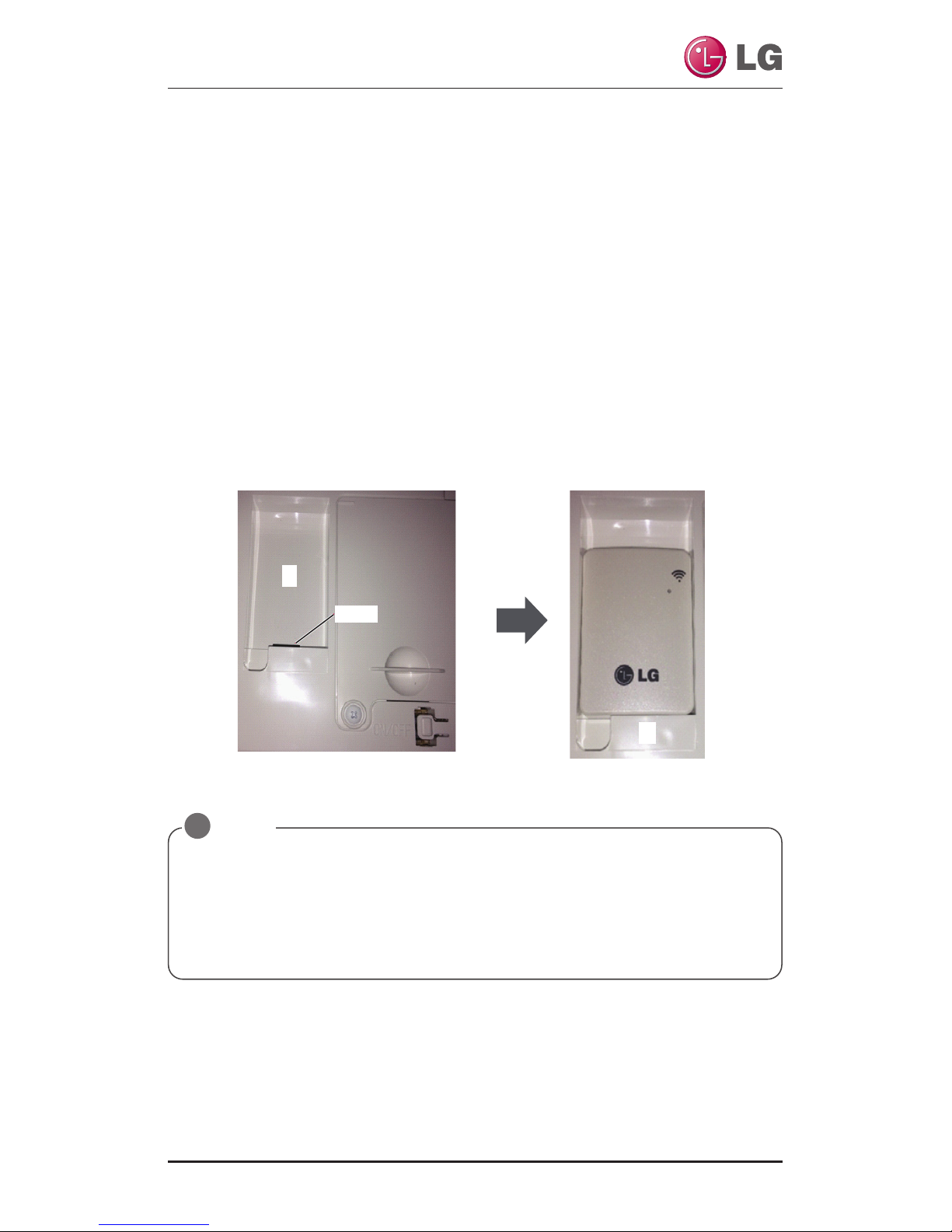
WLAN
Module 1EA
Manual 1EA
Figure Name
Screw Driver
Support web page
If you want more information, Please visit to support web page.
http://au.smartthinq.com(Australia)
http://nz.smartthinq.com(New Zealand)
http://se.smartthinq.com(Sweden)
http://no.smartthinq.com(Norway)
http://fi.smartthinq.com(Finland)
http://br.smartthinq.com(Brazil)
http://mx.smartthinq.com(Mexico)
http://dk.smartthinq.com(Denmark)
http://sg.smartthinq.com(Singapore)
http://us.smartthinq.com(USA)
Due to our policy of continuous product innovation, some specifications may change without notification.
“LG” is a registered trademark of LG Corp.
5
User Manual
INSTALLATION
WLAN Module Install
* The feature can be changed according to a type of model.
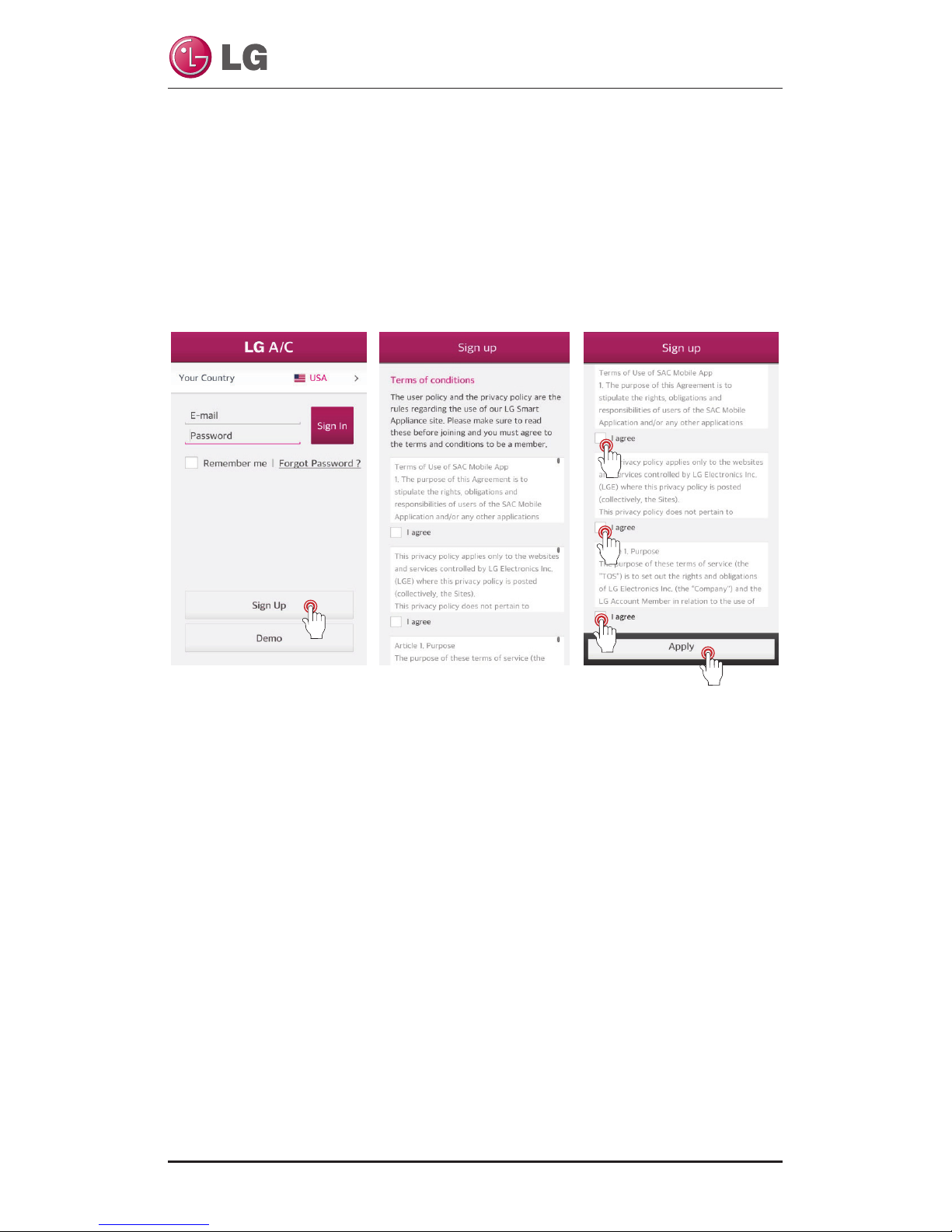
1. Open the LG Smart AC box, and remove the module from the plastic wrapper.
2. Verify that indoor unit is turned off and power is cut off at the outdoor unit’s
input power circuit breaker.
3. Open the front panel of the indoor unit and remove the USB port plastic cap
(1) and insert WLAN module (2). Close front panel of unit.
4. Turn power on by turning back on through the power breaker and then turn in-
door unit on.
5. Optionally, place a WLAN module into each indoor unit as necessary before
proceeding.
※Other details, please refer to the Products manual.
• Avoid to install WLAN module in a place blocked by the wall.
• Router should be installed near the WLAN module.(When distance is far, communi-
cation becomes unstable and can be difficult to use)
• If there is the wall or a barrier between WLAN module and wireless router, commu-
nication will be not smooth. (It depends on wall construction or a barrier)
• Do not install WLAN module around high humidity and temperature place.
NOTE
!
1
2
CAP
Due to our policy of continuous product innovation, some specifications may change without notification.
“LG” is a registered trademark of LG Corp.
6
LG Smart AC
Mobile app installation
The mobile app can be downloaded from the Google play/App Store through Wi-Fi
or 3G/4G. (LG Smart AC)
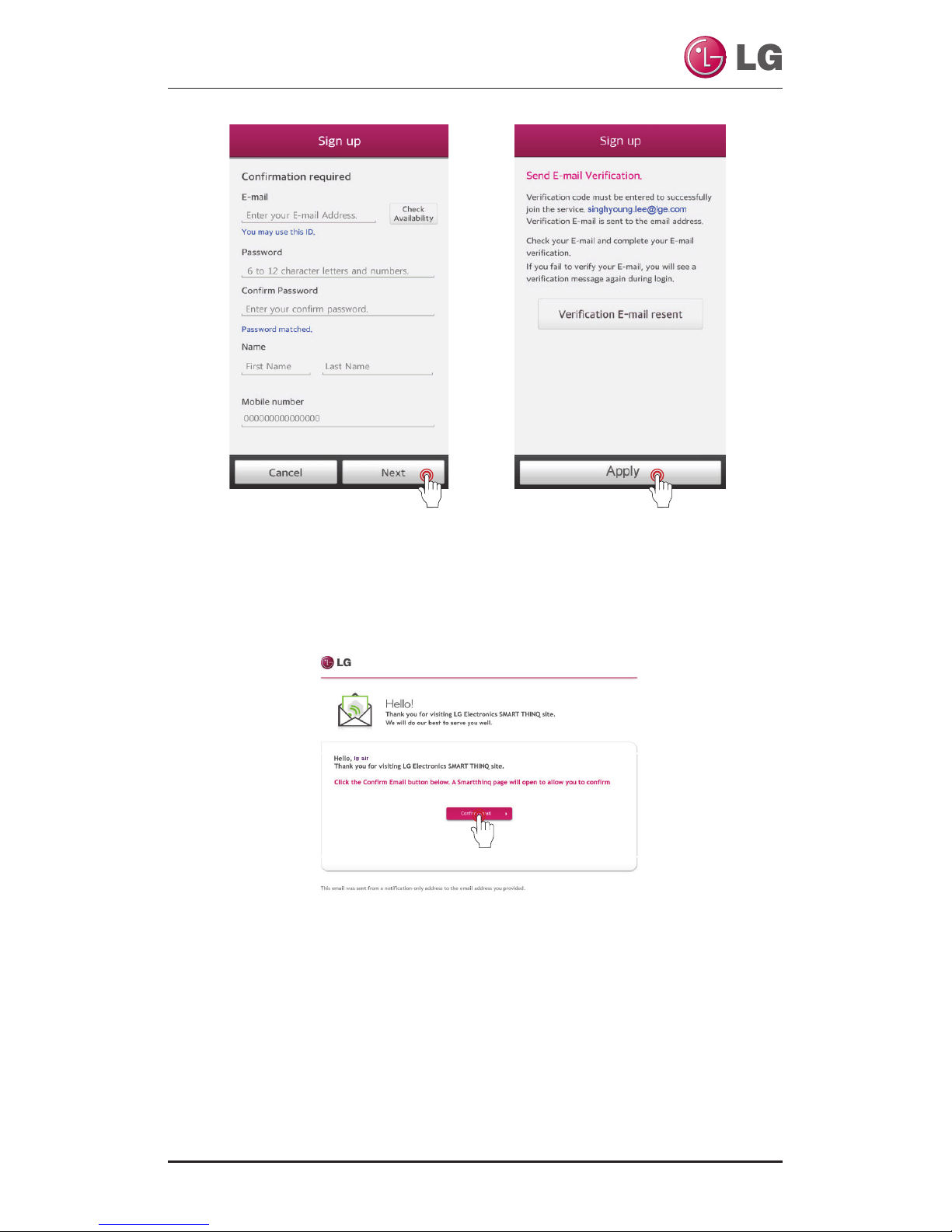
Signing up for a membership
After signing up for a membership on the mobile app or Your own country web
page.(Please refer to the 4 page.)
Selected your country.
If you select a country,
it will change to that lan-
guage. After that, touch
the “Sign Up”
After checking and agreeing to each user agreement,
touch “Apply”.
Due to our policy of continuous product innovation, some specifications may change without notification.
“LG” is a registered trademark of LG Corp.
7
User Manual
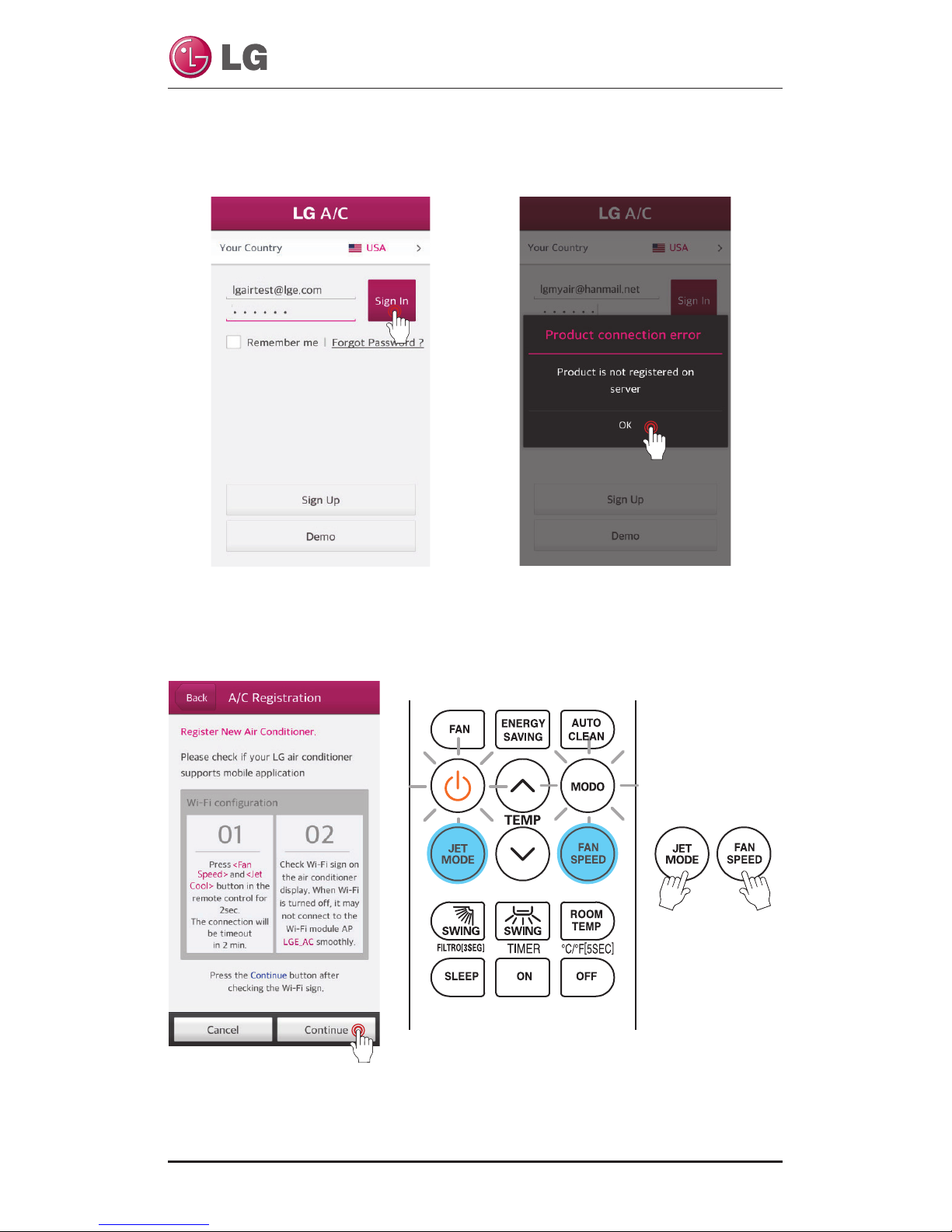
Enter the user registration infor-
mation to sign up for the service,
and touch "NEXT"
A confirmation email has been sent to
your email address that you provided.
Please touch the “Apply” button.
Once you touch the “Confirm Email” button
on your email, signing up will be completed
Due to our policy of continuous product innovation, some specifications may change without notification.
“LG” is a registered trademark of LG Corp.
8
LG Smart AC
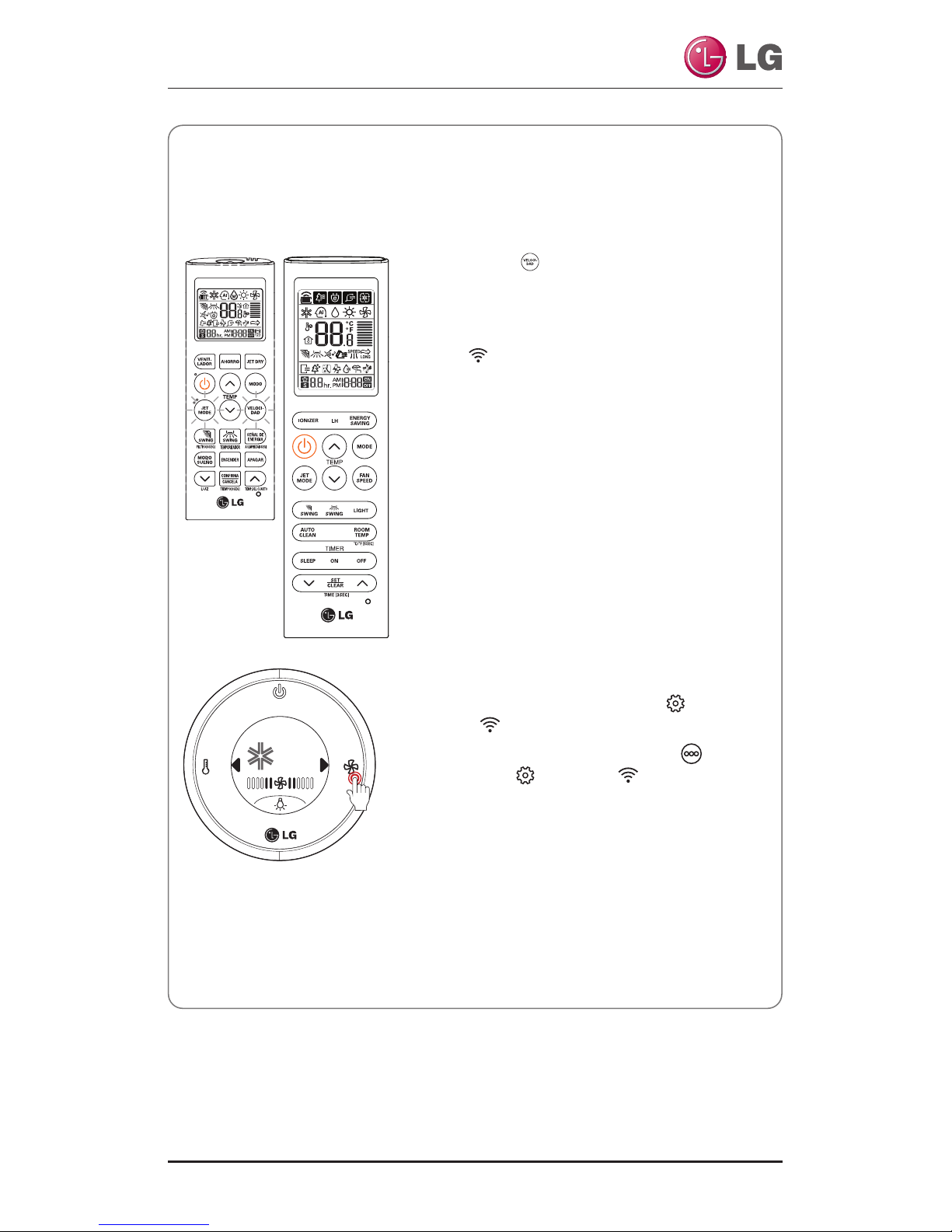
Before touch the “Continue” button, you have to set registration mode and set-
ting Wi-Fi. Point the remote control at the indoor unit, and press the Jet Mode
and Fan Speed buttons simultaneously for 3 seconds.
WLAN Connection
A function to register an air conditioner on the server before using the mobile app.
Selected your country. If you select a coun-
try, it will change to that language.
After that, Entering the E-mail and the
password. Then touch the “Sign In” button
When registering the product for the first
time, a pop-up will be activated. Once the
“Ok” button is touch, it will change to the
air conditioner registration screen.
Due to our policy of continuous product innovation, some specifications may change without notification.
“LG” is a registered trademark of LG Corp.
9
User Manual
Reference
* Remote Controller may appear slightly different, depending on your model.
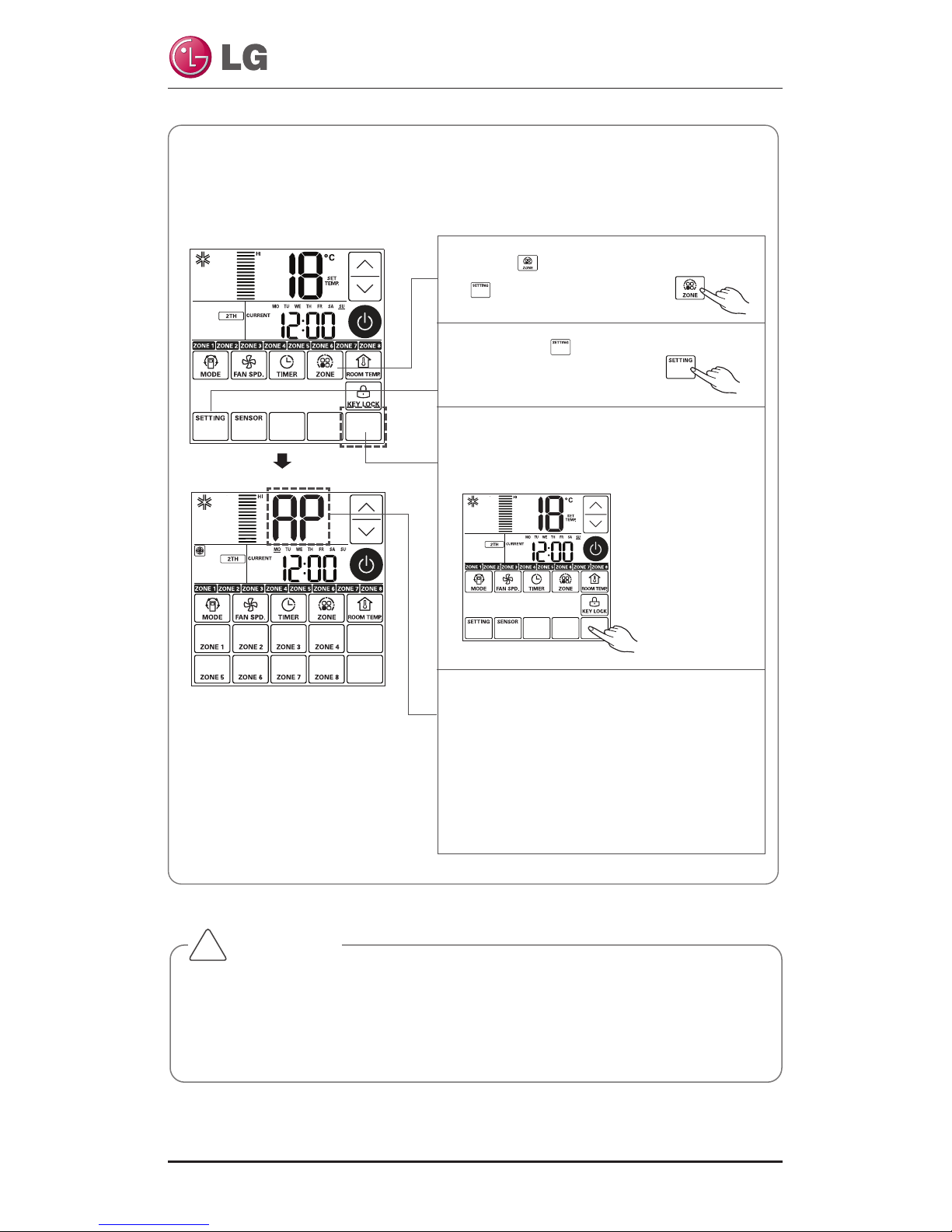
• Instruction to set registration mode
• Press Mand on the remote control for 3
seconds simultaneously to set the registration
mode on the air conditioner.
• Once the registration mode is set, the Wi-Fi in-
dicator blinks on the display of the body.
• 5minutes after the setting, the registration
mode on the air conditioner gets cancelled au-
tomatically.
❈If the registration mode is canceled during the
product registration, re-execute the registra-
tion mode. Then, proceed with the registra-
tion.
• Tap a menu as follows.
- Screen standby : ▶→Settings →
WLAN .
- Active home screen : ▶→More →▶
→Settings →WLAN .
• Once the registration mode is set, the upper
lighting blinks on the display of the body.
• 5minutes after the setting, the registration
mode on the air conditioner gets cancelled au-
tomatically.
❈
If the registration mode is canceled during the
product registration, re-execute the registration
mode. Then, proceed with the registration.
18
°C
Set Temp
Due to our policy of continuous product innovation, some specifications may change without notification.
“LG” is a registered trademark of LG Corp.
10
LG Smart AC
CAUTION
•
The Wi-Fi on smartphone must be turned on to start registering the product.
• If there is a problem with a connection, the ‘prevention of connection fail-
ing’ function in the advanced menu of the Wi-Fi setting in the smartphone
needs to be cancelled for some devices.
!
• Duct Setting – WLAN(Wireless LAN) Module Access Point mode
It is the function to operate WLAN (Wireless LAN) module connected to the
product in access point mode.
1Press button to appear
button on the screen.
2Press the button.
3Push the position of the button at the
third row of the fifth column on the
left figure for three(3) seconds.
4While WLAN module is operating in ac-
cess point mode, the term of 'AP' blinks
on the screen of cable remote control.
- It will take approx. five (5) seconds before
WLAN module operates in access point
mode.
- In the case WLAN module is not in-
stalled, the access point mode does not
work.
Other manuals for Smart AC
1
Table of contents
Other LG Remote Control manuals

LG
LG Magic Remote Owner's manual

LG
LG MR22GA Operation manual

LG
LG PZRCUSB0 Quick start guide

LG
LG Magic Remote User manual

LG
LG PQRCVSL0 Quick start guide

LG
LG PQRCVSL0 Quick start guide

LG
LG AN-MR400G Operation manual

LG
LG AN-MR600 Operation manual

LG
LG Magic Remote AN-MR300 User manual

LG
LG PQRCHCA0Q Quick start guide