
Lenovo IdeaTab A1000 User manual

Quick Start Guide
Lenovo A1000
Lenovo A1000
English/Français/Português

English .............................................................................1
Français/Português .........................................................14
Português........................................................................27
...............................................................................40
Contents
ﺔﻴﺑﺮﻌﻟﺍ

Read first — regulatory information
Be sure to read the Regulatory Notice for your country or region
before using the wireless devices contained in your Lenovo Mobile
Phone. To obtain a PDF version of the Regulatory Notice, see the
“Downloading publications” section. Some regulatory information is
also available in Settings > About phone > Legal information on your
smartphone.
Getting support
To get support on network service and billing, contact your wireless
network operator. To learn how to use your smartphone and view its
technical specifications, go to http://support.lenovo.com/.
Downloading publications
To obtain the latest smartphone manuals, go to:
http://support.lenovo.com/
Accessing your User Guide
Your User Guide contains detailed information about your
smartphone. To access your User Guide,go to
http://support.lenovo.com and follow the instructions on the screen.
Legal notices
Lenovo and the Lenovo logo are trademarks of Lenovo in the United
States, other countries, or both.
Other company, product, or service names may be trademarks or
service marks of others.
English
1
Read this guide carefully before using your smartphone.
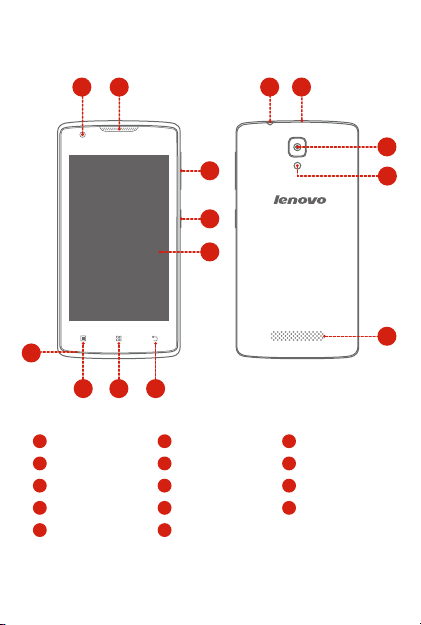
First glance
Front-facing camera
1
On/Off button
4
Headset connector
10
13 Flashlight
Home button
7
Receiver
2
Touch screen
5
Micro USB connector
11
Speaker
14
Menu button
8
Volume buttons
3
Back button
6
Rear-facing camera
12
9Microphone
12
14
13
10 11
1 2
3
4
5
678
9
2

Preparing your smartphone
You must insert the SIM card provided by your carrier to use cellular
services. Set up your smartphone as shown.
Step 1. Open the back cover.
Step 2. Insert the (U)SIM card
①
and the memory card.
Tip:
Insert the (U)SIM card into
SIM slot.
Insert the (U)SIM cards into
SIM1 slot and SIM2 slot.
Step 3. Install the battery.
a. Align the battery
connectors on the battery
with the pins in the battery
compartment.
b. Push the battery down into
place.
Step 4. Install the back cover.
Dual cards
②
Single card
Always turn off your smartphone first before you insert or remove
a SIM card. Insert or remove a SIM card with your smartphone
on may damage your SIM card or smartphone permanently.
Both of the card slots support 3G/2G data services, but you can
enable only one SIM card for data connection at a time. If you
want to change the SIM card used for data connection, see the
User Guide for instructions.
①
②
b
a
Single card
Dual cards
3
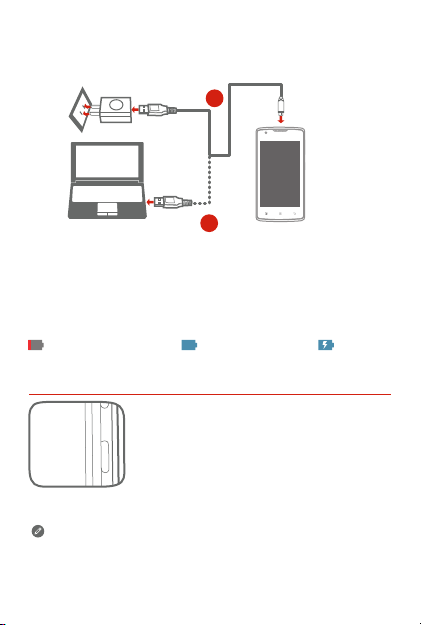
Charging the battery
Low battery power Fully charged Charging
Charge the battery as shown.
Turning on or turning off your smartphone
Turn on: Press and hold the On/Off button until
the Lenovo logo appears.
Turn off: Press and hold the On/Off button for a
few seconds, then tap Power off.
Method 1. Connect your smartphone to a power outlet using the
cable and USB power adapter that come with your
smartphone.
Method 2. Connect your smartphone to a computer using the cable
that comes with your smartphone.
Your smartphone has a rechargeable battery. For more information
about battery safety, see the “Rechargeable battery notice” section.
2
1
4

Important safety and handling information
This section contains important safety and handling information for
Lenovo smartphones. Additional safety and handling information is
provided in the User Guide. See the “Accessing your User Guide”
section for details.
Operating temperature
Use the Lenovo Phone only in the temperature range of -10°C (14°F)
— 35°C (95°F) to avoid damage.
Plastic bag notice
DANGER: Plastic bags can be dangerous. Keep plastic bags away
from babies and children to avoid danger of suffocation.
General battery notice
Batteries supplied by Lenovo for use with your product have been
tested for compatibility and should only be replaced with approved
parts. Risk of explosion if the battery is replaced with an incorrect
type. Dispose of used batteries according to the instructions.
Rechargeable battery notice
CAUTION: Risk of explosion if the battery is replaced with an
incorrect type.
When replacing the lithium battery, use only the same or an equivalent
type that is recommended by the manufacturer. The battery contains
lithium and can explode if not properly used, handled, or disposed of.
Dispose of used batteries according to the instructions.
Do not:
●Throw or immerse into water
●Heat to more than 100°C (212°F)
●Repair or disassemble
Built-in rechargeable battery notice
CAUTION: Do not attempt to replace the internal rechargeable
lithium ion battery. Contact Lenovo Support for factory
replacement.
Charging
Lenovo is not responsible for the performance or safety of products
not manufactured or approved by Lenovo. Use only approved Lenovo
ac adapters and batteries. Adapter shall be installed near the
equipment and shall be easily accessible.
Prevent hearing damage
The Lenovo Phone has a headphone connector. Always use the
headphone connector for headphones (also called a headset) or
earphones.
CAUTION: Excessive sound pressure from earphones and
headphones can cause hearing loss. Adjustment of the equalizer to
maximum increases the earphone and headphone output voltage
and the sound pressure level. Therefore, to protect your hearing,
adjust the equalizer to an appropriate level.
Excessive use of headphones or earphones for a long period of time
at high volume can be dangerous if the output of the headphone or
earphone connectors do not comply with specifications of EN
50332-2.
The headphone output connector of the Lenovo Phone complies with
EN 50332-2 Sub clause 7. This specification limits the Lenovo
Phone's maximum wide band true RMS output voltage to 150 mV. To
help protect against hearing loss, ensure that the headphones or
earphones you use also comply with EN 50332-2 (Clause 7 limits) for
a wide band characteristic voltage of 75 mV. Using headphones that
do not comply with EN 50332-2 can be dangerous due to excessive
sound pressure levels.
If the Lenovo Phone came with headphones or earphones in the
package, as a set, the combination of the headphones or earphones
and the Lenovo Phone already complies with the specifications of EN
50332-1. If different headphones or earphones are used, ensure that
they comply with EN 50332-1 (Clause 6.5 Limitation Values). Using
headphones that do not comply with EN 50332-1 can be dangerous
due to excessive sound pressure levels.
5

Important safety and handling information
This section contains important safety and handling information for
Lenovo smartphones. Additional safety and handling information is
provided in the User Guide. See the “Accessing your User Guide”
section for details.
Operating temperature
Use the Lenovo Phone only in the temperature range of -10°C (14°F)
— 35°C (95°F) to avoid damage.
Plastic bag notice
DANGER: Plastic bags can be dangerous. Keep plastic bags away
from babies and children to avoid danger of suffocation.
General battery notice
Batteries supplied by Lenovo for use with your product have been
tested for compatibility and should only be replaced with approved
parts. Risk of explosion if the battery is replaced with an incorrect
type. Dispose of used batteries according to the instructions.
Rechargeable battery notice
CAUTION: Risk of explosion if the battery is replaced with an
incorrect type.
When replacing the lithium battery, use only the same or an equivalent
type that is recommended by the manufacturer. The battery contains
lithium and can explode if not properly used, handled, or disposed of.
Dispose of used batteries according to the instructions.
Do not:
●Throw or immerse into water
●Heat to more than 100°C (212°F)
●Repair or disassemble
Built-in rechargeable battery notice
CAUTION: Do not attempt to replace the internal rechargeable
lithium ion battery. Contact Lenovo Support for factory
replacement.
Charging
Lenovo is not responsible for the performance or safety of products
not manufactured or approved by Lenovo. Use only approved Lenovo
ac adapters and batteries. Adapter shall be installed near the
equipment and shall be easily accessible.
Prevent hearing damage
The Lenovo Phone has a headphone connector. Always use the
headphone connector for headphones (also called a headset) or
earphones.
CAUTION: Excessive sound pressure from earphones and
headphones can cause hearing loss. Adjustment of the equalizer to
maximum increases the earphone and headphone output voltage
and the sound pressure level. Therefore, to protect your hearing,
adjust the equalizer to an appropriate level.
Excessive use of headphones or earphones for a long period of time
at high volume can be dangerous if the output of the headphone or
earphone connectors do not comply with specifications of EN
50332-2.
The headphone output connector of the Lenovo Phone complies with
EN 50332-2 Sub clause 7. This specification limits the Lenovo
Phone's maximum wide band true RMS output voltage to 150 mV. To
help protect against hearing loss, ensure that the headphones or
earphones you use also comply with EN 50332-2 (Clause 7 limits) for
a wide band characteristic voltage of 75 mV. Using headphones that
do not comply with EN 50332-2 can be dangerous due to excessive
sound pressure levels.
If the Lenovo Phone came with headphones or earphones in the
package, as a set, the combination of the headphones or earphones
and the Lenovo Phone already complies with the specifications of EN
50332-1. If different headphones or earphones are used, ensure that
they comply with EN 50332-1 (Clause 6.5 Limitation Values). Using
headphones that do not comply with EN 50332-1 can be dangerous
due to excessive sound pressure levels.
6

Sound pressure warning statement
For the device that is tested in accordance with EN 60950-1:
2006+A11:2009+A1:2010+A12:2011, it is mandatory to perform
audio tests for EN 50332.
This device has been tested to comply with the Sound Pressure Level
requirement in the applicable EN 50332-1 and/or EN 50332-2
standards. Permanent hearing loss may occur if earphones or
headphones are used at high volume for prolonged periods of time.
Warning statement: To prevent possible hearing damage, do not listen
at high volume levels for long periods.
Polyvinyl Chloride (PVC) cable and cord notice
WARNING: Handling the cord on this product or cords associated
with accessories sold with this product will expose you to lead,
a chemical known to the State of California to cause cancer,
and birth defects or other reproductive harm. Wash hands after
handling.
Disposing according to local laws and regulations
When the Lenovo Phone reaches the end of its useful life, do not
crush, incinerate, immerse in water, or dispose of the Lenovo Phone
in any manner contrary to local laws and regulations. Some internal
parts contain substances that can explode, leak, or have an adverse
environmental effect if disposed of incorrectly. See “Recycling and
environmental information” for additional information.
7

Service, support, and warranty information
The following information describes the technical support that is
available for your product, during the warranty period or throughout
the life of your product. Refer to the Lenovo Limited Warranty for a full
explanation of Lenovo warranty terms.
Online technical support
Online technical support is available during the lifetime of a product at:
http://www.lenovo.com/support
Telephone technical support
Where applicable, you can get help and information from the
Customer Support Center by telephone. Before contacting a Lenovo
technical support representative, please have the following information
available: model and serial number, the exact wording of any error
message, and a description of the problem.
Your technical support representative might want to walk you through
the problem while you are at your phone during the call.
Worldwide Lenovo Support telephone list
IMPORTANT: Telephone numbers are subject to change without
notice. The most up-to-date telephone list for the Customer
Support Center is always available at:
http://support.lenovo.com/supportphonelist
The Customer Support Center phone number is subject to change.
For the latest phone number, go to the e-support website. If the
telephone number for your country or region is not listed, contact your
Lenovo reseller or Lenovo marketing representative.
Lenovo Limited Warranty (LLW) notice
Read the full LLW at http://support.lenovo.com/smartphone-llw. You
can view the LLW in a number of languages from this Web site. If you
cannot view the LLW either from the Web site or from your phone,
contact your local Lenovo office or reseller to obtain a printed version
of the full LLW.
IMPORTANT: Lenovo Smartphone Products do not have
International Warranty Services.
8
Other manuals for IdeaTab A1000
10
Table of contents
Languages:
Other Lenovo Smartphone manuals

Lenovo
Lenovo S650 User manual

Lenovo
Lenovo VIBE K5 Plus A6020a46 User manual

Lenovo
Lenovo K5 A6020a40 User manual

Lenovo
Lenovo VIBE K5 Plus A6020a46 User manual

Lenovo
Lenovo A516 User manual

Lenovo
Lenovo A6020l36 User manual

Lenovo
Lenovo A2016a40 User manual

Lenovo
Lenovo VIBE P1 User manual

Lenovo
Lenovo K5 A6020a41 User manual

Lenovo
Lenovo VIBE K5 Plus A6020a46 User manual


