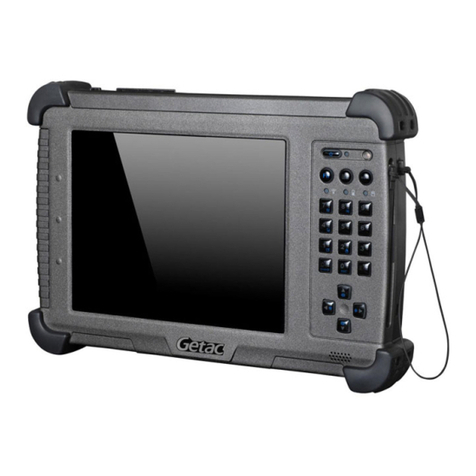
Leica CS25 GNSS User manual

Leica CS25
User Manual
Version 1.0
English

2
CS25, Introduction
Introduction
Purchase Congratulations on the purchase of a Leica CS25.
This manual contains important safety directions as well as instructions for setting
up the product and operating it. Refer to "6 Safety Directions" for further informa-
tion.
Read carefully through the User Manual before you switch on the product.
Product identifica-
tion
The type and serial number of your product are indicated on the type plate.
Enter the type and serial number in your manual and always refer to this information
when you need to contact your agency or Leica Geosystems authorised service work-
shop.
Type: _______________
Serial No.: _______________

CS25, Introduction 3
Symbols The symbols used in this manual have the following meanings:
Type Description
Danger Indicates an imminently hazardous situation which, if not
avoided, will result in death or serious injury.
Warning Indicates a potentially hazardous situation or an unintended
use which, if not avoided, could result in death or serious
injury.
Caution Indicates a potentially hazardous situation or an unintended
use which, if not avoided, may result in minor or moderate
injury and/or appreciable material, financial and environmental
damage.
)Important paragraphs which must be adhered to in practice as
they enable the product to be used in a technically correct and
efficient manner.

4
CS25, Introduction
Trademarks • Windows is a registered trademark of Microsoft Corporation in the United States
and other countries
• CompactFlash and CF are trademarks of SanDisk Corporation
• Bluetooth is a registered trademark of Bluetooth SIG, Inc.
• SD is a trademark of the SD Card Association
All other trademarks are the property of their respective owners.
Validity of this
manual
This manual applies to the Leica CS25 rugged tablet computer.
Available
documentation Name Description/Format
CS25 User
Manual
All instructions required in order to operate the product to a
basic level are contained in the User Manual. Provides an
overview of the product together with technical data and
safety directions.
9
Name Description/Format
Zeno GIS
Getting
Started Guide
Describes the general working of the product in standard use.
Intended as a quick reference field guide.
9
CS25, Introduction 5
* only available as Online Help
Refer to the following resources for all CS25 documentation/software:
• the Leica CS25 DVD
• Windows 7 Recovery DVD (including User Guide)
• https://myworld.leica-geosystems.com
myWorld@Leica Geosystems (https://myworld.leica-geosystems.com) offers a
wide range of services, information and training material.
With direct access to myWorld, you are able to access all relevant services whenever
it is convenient for you, 24 hours a day, 7 days per week. This increases your effi-
ciency and keeps you and your equipment instantly updated with the latest informa-
tion from Leica Geosystems.
Zeno GIS Help
*
Overall comprehensive help to the product and application
functions. Included are detailed descriptions of special soft-
ware/hardware settings and software/hardware functions.
Name Description/Format

6
CS25, Introduction
Service Description
myProducts Simply add all Leica Geosystems products that you and your
company own. View detailed information on your products, buy
additional options or Customer Care Packages (CCPs), update your
products with the latest software and keep up-to-date with the
latest documentation.
myService View the service history of your products in Leica Geosystems
Service Centers and detailed information on the services performed
on your products. For your products that are currently in Leica
Geosystems Service Centers view the current service status and the
expected end date of service.
mySupport Create new support requests for your products that will be
answered by your local Leica Geosystems Support Team. View the
complete history of your Support and view detailed information on
each request in case you want to refer to previous support
requests.
myTraining Enhance your product knowledge with the Leica Geosystems
Campus - Information, Knowledge, Training. Study the latest online
training material or download training material on your products.
Keep up-to-date with the latest News on your products and
register for Seminars or Courses in your country.

CS25, Table of Contents 7
Table of Contents
In this manual Chapter Page
1 Description of the System 10
1.1 Overview 10
1.2 Terminology 11
1.3 System Concept 12
1.3.1 Software Concept 12
1.3.2 Power Concept 13
1.3.3 Data Storage Concept 14
1.4 CS25 Components 15
2 User Interface 16
2.1 Keyboard 16
2.2 Operating Principles 18
3Operation 19
3.1 Equipment Setup 19
3.1.1 Fixing the Display Foil to the CS 19
3.1.2 Inserting and Removing a SIM Card 21
3.2 Power Functions 24

8
CS25, Table of Contents
3.3 Batteries 25
3.3.1 Operating Principles 25
3.3.2 Changing the Battery 27
3.3.3 Charging the Battery 30
3.3.4 Switching between Left and Right Battery 34
3.4 LED Indicators on CS25 35
3.5 Using the Digital Camera 38
3.6 Calibrating the Touch Screen 41
4 Software 42
4.1 Menu Button Options 42
4.2 Hot Tab Software Utility Functions 46
4.3 Mini GPS Application 50
4.4 WWAN Application 52
4.5 Installing a Language Pack in Windows7 55
4.6 Windows Activation Guide 60
4.7 Good to Know... 61
5 Care and Transport 62
5.1 Transport 62
5.2 Storage 63
5.3 Cleaning and Drying 64

CS25, Table of Contents 9
6 Safety Directions 65
6.1 General Introduction 65
6.2 Intended Use 66
6.3 Limits of Use 68
6.4 Responsibilities 69
6.5 Hazards of Use 71
6.6 Electromagnetic Compatibility EMC 77
6.7 FCC Statement, Applicable in U.S. 80
7 Technical Data 81
7.1 CS25 Technical Data 81
7.2 Conformity to National Regulations 85
7.2.1 CS25 85
8 International Limited Warranty, Software Licence Agreement 87
Index 89

10
CS25, Description of the System
1 Description of the System
1.1 Overview
System compo-
nents
CS25_001
CS25
Other manuals for CS25 GNSS
1
Table of contents
Other Leica Tablet manuals


Popular Tablet manuals by other brands

Laser
Laser MID-1060 Quick operation guide

MUNBYN
MUNBYN IRT09J Easy setup guide

Motorola
Motorola MC3090R - Win CE 5.0 Professional 520 MHz quick start guide

Dell
Dell Latitude ST Setup and features information

Lenovo
Lenovo IdeaTab S6000L Hardware Maintenance Manual

Venturer
Venturer WT9L11 quick start guide