
LeapFrog LeapPods Max User manual

Instruction Manual
This manual contains important information. Please keep it
for future reference. Ce guide contient des informations importantes.
Veuillez le conserver pour toute référence future.
INTRODUCTION
Thank you for purchasing the LeapPods Max™ headphones!
Dance to party songs, experience immersive adventures, unwind
with instrumental music or use with your own Bluetooth
®
wireless
technology enabled devices!
1
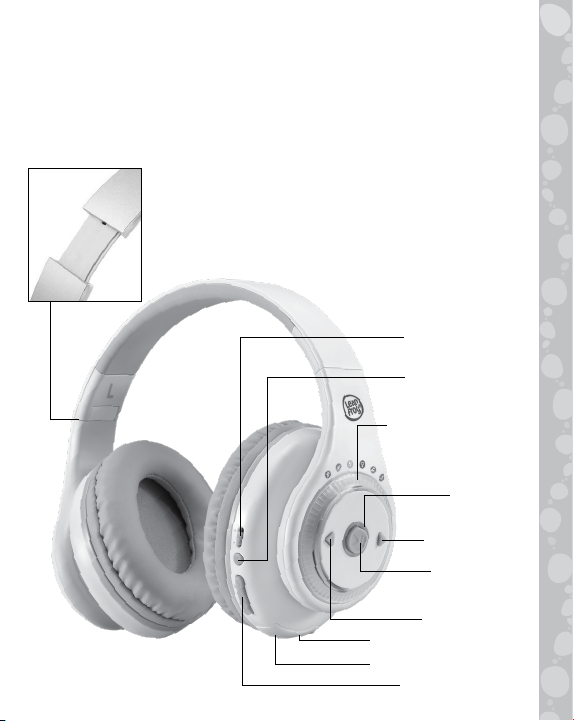
On/Off Switch
Indicator
Light
Back Button
Pairing Button
3.5mm Audio Port
Mode Select Dial
Play/Pause
Button
USB Charging Port
Volume Button
Next Button
Adjustable Headband

INCLUDED IN THE PACKAGE
• LeapPods Max™ • Adventure Passport booklet
• Micro-USB cable • 3.5mm audio cable
• Quick Start Guide
WARNING
All packing materials, including tape, plastic sheets, packaging
locks, removable tags, cable ties, cords and packaging screws
are not part of this toy, and should be discarded for your child’s
safety.
NOTE
Please save this Instruction Manual as it contains important
information.
ATTENTION
Pour la sécurité de votre enfant, débarrassez-vous de tous
les produits d’emballage tels que rubans adhésifs, feuilles de
plastique, attaches, étiquettes, cordons et vis d’emballage. Ils
ne font pas partie du jouet.
NOTE
Il est conseillé de conserver ce guide des parents car il comporte
des informations importantes.
2

GETTING STARTED
When you use the LeapPods Max™ for the first time, move the
On/Off Switch to the On position( ). When powered on,
the Indicator Light will turn green.
Battery Charging
Note: Adult operation required.
The LeapPods Max™ cannot be used while charging, even if
power is turned on.
When the battery is low, the Indicator Light will turn red.
To charge the LeapPods Max™, connect it to a computer using
the included Micro-USB Cable. To do so correctly, please follow
these steps:
• Please charge the LeapPods Max™ before first use.
• The LeapPods Max™ can be charged either in On or Off mode.
•Open the rubber cover of the USB Charging Port on the
bottom of the LeapPods Max™.
• Insert the small end of the included Micro-USB Cable into the
USB Charging Port on the LeapPods Max™.
• Insert the large end of the included Micro-USB Cable into a
USB port on your computer.
•The Indicator Light will turn orange while the LeapPods Max™
is charging. After the battery is fully charged, the Indicator
Light will turn green. You may then disconnect your fully
charged LeapPods Max™ headphones from the computer.
•
This toy contains a rechargeable battery that is non-replaceable.
USB port for battery charging:
The current output of USB DC 5V, with a minimum of 0.5A
3

Guidelines for Charging With the Micro-USB Cable
Charge this device using the included Micro-USB Cable connected
to a computer. Do not charge using a third party adapter. Before
use, inspect the cord to confirm that it is in good condition and
that there are no breaks or exposed wires. Ensure there are no
particles or liquid (water, juice, etc.) in either of the connectors
before plugging in either end of the cable. The device should
be completely dry with no debris in the cable connectors when
charging. Securely plug in the cable in the correct orientation.
Never leave the device unattended while charging. Do not charge
your device on soft surfaces, as they can trap heat around the
device.
Typical charging time is approximately 2-4 hours if the battery
is fully depleted. Disconnect the device when it is fully charged.
The actual charging time depends on the charging current, the
remaining charge in the battery prior to recharging and the
ambient temperature. The optimum ambient temperature is
32°F - 104°F (0°C - 40°C).
Battery Life
The time the battery lasts between charges depends on usage.
Like other electronic devices, more frequent usage will drain the
battery more quickly. When the battery level is low as shown by
the red Indicator Light, it is recommended to charge the battery
before further use. When the battery level is too low, the LeapPods
Max™ will not turn on until it is sufficiently recharged.
Battery Maintenance
Charge the battery regularly for optimal performance, even
when the LeapPods Max™ is not regularly in use. For example,
charge the LeapPods Max™ at least once every six months.
4

BATTERIES CANNOT BE REPLACED
The batteries in this toy are permanently encased. Before giving
this toy to a child make sure there are no signs of damage.
Regularly check the toy and dispose of it immediately if there
are any signs of damage. Do not dispose of the toy in a fire, as
the batteries may leak and explode. Keep batteries safely out
of children’s reach before disposing of them via a safe disposal
system.
PRODUCT FEATURES
1. On/Off Switch
Slide the On/Off Switch to the On position.
When powered on, the Indicator Light will
turn green.
2. Pairing Button
Press the Pairing Button to connect
with other Bluetooth®devices.
Note: See the Pairing Mode section
below for instructions.
3. Mode Select Dial
Rotate the Mode Select Dial to choose
a category: Dance Party, Adventures,
Learning Songs, Challenges, Quiet Time
and Instrumentals.
4. Play/Pause Button
Press the Play/Pause Button to play or
pause the track.
5

5. Next Button
Press the Next Button to skip to the
next track in the category.
6. Back Button
Press the Back Button once to go back
to the beginning of the current track.
Press the Back Button again to skip to
the previous track in the category.
7. Volume Button
Press the + on the Volume Button to
increase the volume and press the - on
the Volume Button to decrease the
volume.
8. Adjustable Headband
The headband can be adjusted by gently
pulling the headphones down from the
headband.
9. USB Charging Port
Connect the unit to your computer using
the included Micro-USB Cable to charge
the headphones.
10. Audio Port
Connect to other devices using the
included 3.5mm Audio Cable.
6

11. Automatic Shut-Off
To preserve battery life, the unit will automatically go to
sleep after 5 minutes of inactivity. The unit can be woken
up by pressing the Play Button.
PLAY MODES
1. Pairing Mode
•
Press the Pairing Button to turn the Bluetooth
®
connection on
or off. Press and hold the Pairing Button for 3 seconds to go
into Pairing Mode.
• The Indicator Light will flash blue when waiting for a
connection.
• Choose the LeapPods Max™ from your peer device to send
the connection request. Press and hold the Play Button for
3 seconds to confirm.
Bluetooth
®
will be disconnected after
60 seconds if the connection is not confirmed.
• When the connection is confirmed, the Indicator Light will
turn solid blue.
•The LeapPods Max™ will automatically connect to confirmed
devices.
2. Line-In Mode
Make sure the headphones are powered on. Plug in the
included 3.5mm Audio Cable to the 3.5mm Audio Port on
the headphones and connect the other end to an external
device.
7

ACTIVITIES
Content Categories
There are six categories of content:
Dance Party
1. Silly Willy Was a Walrus
2. Dance-O-Rama Llama
3. Stinky Bean
4. Dance Together
5. Don’t Stop Dancing
6. Dance It Out
7. Nature’s Music
8. Through the Seasons
9. Dancing Robots
10. Just Bounce
Adventures
Explore with the Adventure Passport booklet to enhance the fun.
1. Amazon Rainforest
2. African Savanna
3. Under the Sea
4. Australian Animal Sanctuary
5. The Countryside
6. Deciduous Forest
8

Learning Songs
1. Dew Drops
2. Brush My Teeth
3. Pick It Up
4. Wash My Hands
5. Super Hero Helper
6. I Am Me
7. Mistakes Are Okay
8. Grow Little Seed
9. Counting Dandelions
10. Healthy Snacks
Challenges
1. Wiggle Freeze
2. Bird’s the Word
3. Pop and Flop
4. Bunny Hop Hopscotch
5. Twinkle Toes
6. Ocean Motions
7. Creepy Crawlies
8. Jumpin’ Jellybeans
Quiet Time
1. I Am Still
2. My Actions Matter
3. I Am Patient
4. Kindness
5. Having Gratitude
6. My Body is Strong
7. Relax and Reset
8. Breathe With Me
9. Trying New Things
10. Practice Makes Progress
9
Table of contents


