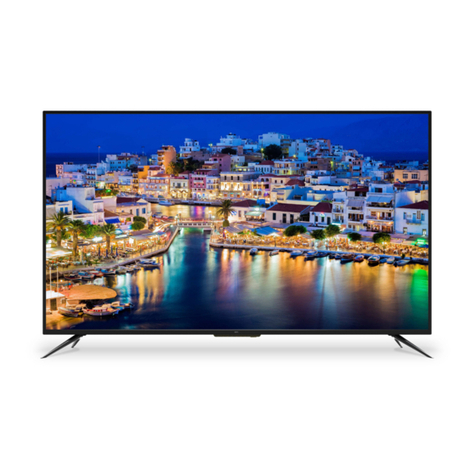
Kogan KALED42UHDZA User manual


Table of Contents
Safety Instructions.............................................................................................................................3
General Safety Instructions.......................................................................................................3
Installation........................................................................................................................................4
Cleaning............................................................................................................................................5
General Description..........................................................................................................................6
Specifications & Accessories........................................................................................................6
Specifications.................................................................................................................................6
Accessories......................................................................................................................................6
Input terminals...............................................................................................................................6
Overvie ................................................................................................................................................7
Back Panel........................................................................................................................................7
Front Panel.......................................................................................................................................7
Remote Control.............................................................................................................................8
Installing Batteries in the Remote Control.......................................................................10
External Connections.....................................................................................................................10
Antenna Connection .................................................................................................................10
Basic Operation..................................................................................................................................11
Turning the TV on and off.........................................................................................................11
Main Interface.................................................................................................................................11
TV Applications............................................................................................................................12
Menu System......................................................................................................................................13
TV Menu...........................................................................................................................................13
Sound ...................................................................................................................................................13
Sound Mode...................................................................................................................................13
Equalizer.........................................................................................................................................14
Balance............................................................................................................................................14
Auto Volume ................................................................................................................................14
Surround Sound...........................................................................................................................14
SPDIF Mode...................................................................................................................................14
HDMI Sound...................................................................................................................................14
Image.....................................................................................................................................................15
Picture Mode..................................................................................................................................15
Aspect Ratio .................................................................................................................................15
Color Temp ...................................................................................................................................15
Adjusting the Backlight.............................................................................................................15
Windo Adjust.............................................................................................................................15
Program................................................................................................................................................16
Auto Search...................................................................................................................................16
EPG(Used only in DTV).............................................................................................................16
ATV Manual Search....................................................................................................................16
DTV Manual Search....................................................................................................................16
Program Edit ................................................................................................................................17
Signal Information (Used only in DTV)...............................................................................17
Input Source...................................................................................................................................17
Function...............................................................................................................................................18
Time......................................................................................................................................................20
1

PVR (Personal Video Recorder).................................................................................................21
PVR File System...........................................................................................................................21
PVR Guide......................................................................................................................................22
Time shift........................................................................................................................................22
Instant recording.........................................................................................................................22
Recording in standby mode...................................................................................................22
DTV EPG (Electronic Program Guide) ..............................................................................23
Digital Media Player........................................................................................................................24
Device and File Management.....................................................................................................24
Initialization Interface...............................................................................................................24
External Connection.......................................................................................................................25
Connecting a VCR......................................................................................................................25
Connecting a Camcorder........................................................................................................26
Connecting a DVD Player/Blu-Ray Player/Set-Top Box via DVI...........................27
Connecting a DVD Player/Blu-Ray Player/Set-Top Box via HDMI........................28
Connecting a Digital Audio System....................................................................................29
Connecting to PC.......................................................................................................................30
Supported Signals......................................................................................................................30
Assembling the Stand................................................................................................................31
Wall Mounting Instructions.....................................................................................................32
Troubleshooting...............................................................................................................................33
Product Layout................................................................................................................................34
2

Safety Instructions
General Safety Instructions
Risk of electric shock. DO NOT OPEN!
Do not attempt to service the television yourself, as
opening or removing the covers may expose you to
dangerous voltage or other hazards. Refer all servicing to
the Kogan customer support team.
To reduce the risk of fire or electric shock, do not expose this
product to rain or moisture. The television should not be
exposed to dripping or or splashing, and no liquid filled objects
such as vases should be placed on the case.
In the event of smoke, strange noises or a strange smell from
the unit, you should follo these steps:
•Turn off the unit immediately.
•Disconnect the po er plug from the po er outlet.
•Contact the Kogan customer support team. Never
attempt to make repairs yourself.
Never push objects of any kind into the set through the
cabinet slots as they may touch dangerous voltage
points or short-circuit parts that could result in a fire or
electric shock. Never spill any liquids onto the set. Use
special caution in households here children are
present. The television is not suitable for children under
4 years old to operate.
Po er supply cords should be routed safely to prevent
dangers due to damaged cords.
The mains plug is the main disconnect method, so it should
be easily accessible and not be obstructed during use.
To avoid fires, no naked flame sources such as lit candles or
burning incense should be placed onto the casing of the
television.
Do not pull the plug out of a po er outlet by pulling on the
po er cable. Al ays grasp the plug and pull.
Never touch the plug ith et hands.
3

An outside antenna system should not be located in the
vicinity of overhead po er lines or other electric light or
po er circuits.
When installing an outside antenna system, extreme
care should be taken to keep from touching such po er
lines or circuits, as contact ith them may be fatal.
Al ays turn the set off hen it is not being used.
Unplug the television from the po er outlet hen it ill
not be used for a long time or hen there is an
electrical storm.
Never touch the antenna cable during a lightning storm.
Excessive volume from earphones and headphones can
cause permanent hearing loss. Al ays monitor the volume of
noise from these devices, especially hen children are using
them.
Installation
Ventilation should not be impeded or limited by
covering the ventilation slots ith items such as
ne spapers, tablecloths, curtains etc..
At least 10cm of space should be left around the
apparatus for sufficient ventilation.
The television should be situated a ay from heat
sources such as radiators, heaters, stoves or other
products that product heat.
Place the television in a position here the screen is
not exposed to direct sunlight. It is best to have soft
indirect lighting hile atching, and you should avoid
a completely dark vie ing environment and
reflections to avoid eye fatigue.
Keep the product a ay from high magnetic fields
(such as near an amplifier speaker) to avoid affecting
the tint.
Do not place the television on an unstable table, stand
or shelf. The set may fall, causing serious injury as ell
as damage to the television itself.
If moving the television on a cart, move the unit ith
care as sudden stops and starts may cause the
television to overturn.
4

Do not place this television near ater, for example
near a bathtub, ash bo l, kitchen sink, laundry tub,
s imming pool or in a damp basement etc..
When moving the television to a arm location from
a cold location, allo some time for any de or
condensation inside the television to evaporate fully
before you turn the unit on.
To prevent injury, the television must be securely
attached to the floor/ all in accordance to the
supplied installation instructions.
Cleaning
Unplug the television from the po er supply before
cleaning. Do not use any liquid cleaners or harsh
chemicals. Use a soft, damp cloth.
5

General Description
•Zero X radiation complies to green environment protection requirements
•Connect to computer directly to create a TV/Monitor combo
•MHL2.0
•Android4.2
•USB 3.0
•16:9 idescreen
•Auto tuning and fine tuning.
•PC VGA input
•Component compatible (480i, 480P, 576i, 576P, 720P, 1080i, 1080P)
•HDMI input
•Programmable sleep timer
•No signal automatic po er off
Specifications & Accessories
Specifications
Model KALED42UHDZA
Display Screen Size 42” Diagonal
Maximum Resolution 3840 x 2160
Po er Supply ~110-240V, 50/60Hz
TV Receive System PAL/SECAM: BG, DK, I DVB-T
Frequency Range DTV: 5-12, 21-69
Video In PAL/NTSC/SECAM
Antenna Input Impedance 75ohm unbalanced
Speaker Output Po er 2 x 5W
Remote Po er Input DC 3V (T o AAA batteries)
Po er Consumption 90W
Standby Consumption <0.5W
Dimensions
(LxWxH)
With stand 970 x 220 x 618mm
Without stand 970 x 60 x 577mm
Weight
(Net)
With stand 13.7kg
Without stand 11.8kg
Operating Temperatures 0C ~ 40C
Accessories
Remote Control
Input terminals
1 x Antenna jack 4 x HDMI inputs
1 x PC-RGB input 3 x USB inputs
1 x COMPONENT input 1 x CVBS output
1 x AV input 1 x SPDIF output
1 x Headphone output
6

Overview
Back anel
You can connect the TV to video devices such as DVD/Blu-Ray players, VCR and video cameras
as ell as gaming consoles.
Front anel
The buttons on the lo er left panel control your TVs basic functions. For advanced features you
must use your remote control.
1 Po er S itch Press to turn the TV on or off.
2 Remote control Sensor Aim the remote at this spot on the TV.
3 Po er Indicator
4 INPUT Toggles bet een all of the available input sources.
5 MENU Press to display an on-screen menu of your TVs features.
6 PROG Press to change programs.
7 VOL Press to increase or decrease the volume.
8 Standby Press “ ” to toggle bet een normal and standby mode.
7
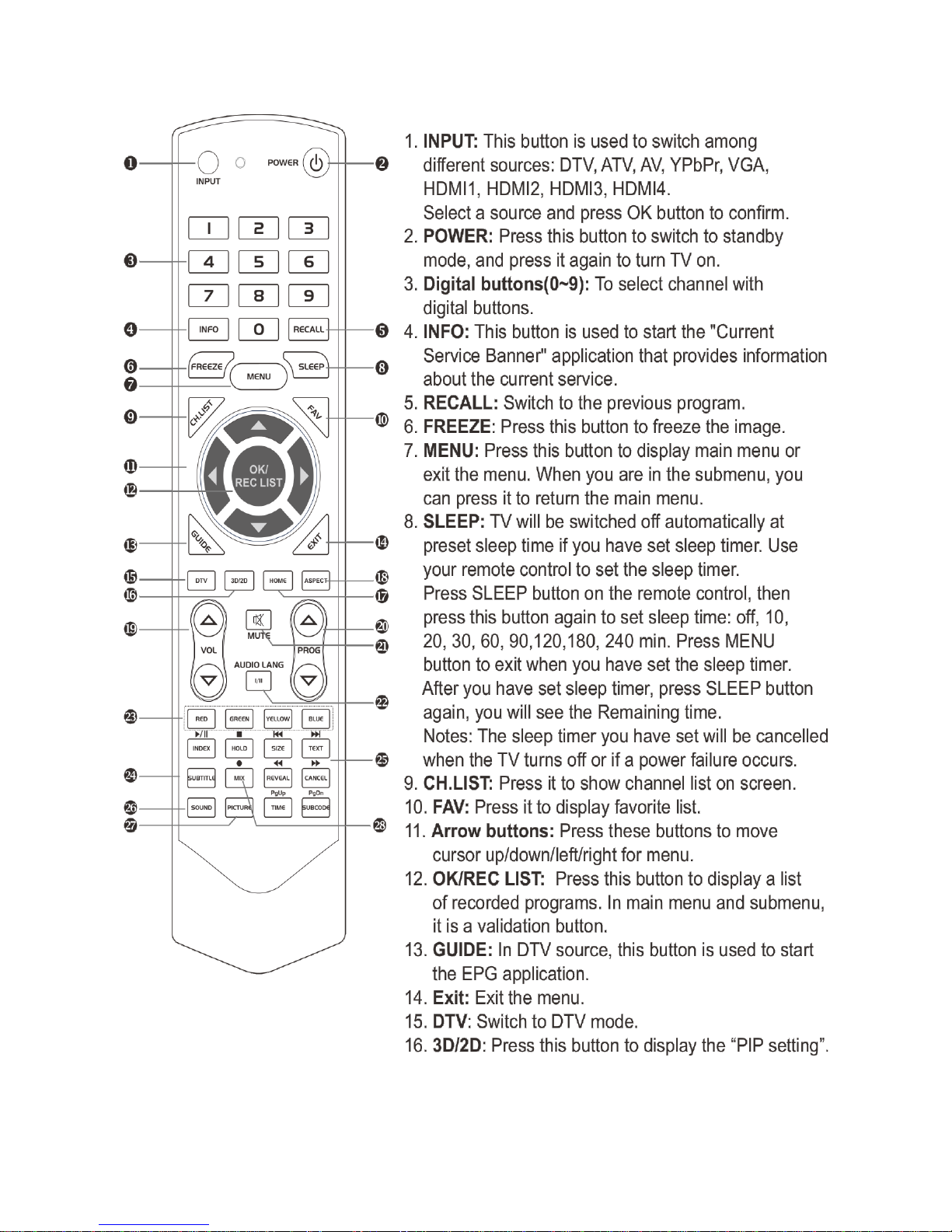
Remote Control
8

9
Note:
Before turning off the main po er, or turning off the po er supply, you must
s itch the television into standby mode by pressing the POWER button on
the remote control or on the television set itself.
Once the television is in standby mode, you may turn off the mains po er
supply.
Other Kogan LED TV manuals

Kogan
Kogan KALED32DVDZD User manual

Kogan
Kogan androidtv 9 Series User manual

Kogan
Kogan KALED32SMTZB User manual

Kogan
Kogan KALED55XXXWC User manual

Kogan
Kogan Series 8 JU8200 User manual

Kogan
Kogan KGNFHDLED24VBA User manual

Kogan
Kogan KALED553DXZB User manual

Kogan
Kogan androidtv 9 Series User manual

Kogan
Kogan KALED55CUHDUA User manual

Kogan
Kogan KGNFHDLED32VAA User manual

Kogan
Kogan 6 Series User manual

Kogan
Kogan KALED24XXXZA User manual

Kogan
Kogan Android TV 9 Series User manual

Kogan
Kogan LH6000 User manual

Kogan
Kogan KGNLED32 User manual

Kogan
Kogan KALED40XXXTB User manual

Kogan
Kogan KALED42SMTZA User manual

Kogan
Kogan KGNFHDLED42VBA User manual

Kogan
Kogan androidtv 9 Series User manual

Kogan
Kogan KALED24XXXZA User manual