Kodak Digital Science 4800 User manual

User’s
Guide
A-61038
Document Archive Writer
Model 4800

A-61038 July 1999 i
Important Safety and Regulatory Information
WARNING: TO PREVENT FIRE OR SHOCK HAZARD, DO NOT EXPOSE UNIT TO RAIN OR
MOISTURE. TO PREVENT POSSIBILITY OF INJURY OR DAMAGE TO THE UNIT,
DO NOT OPERATE WITH ANY COVERS OR PANELS REMOVED.
The exclamation point within an equilateral triangle is intended to alert
the user to the presence of important operating and maintenance
(servicing) instructions in the literature accompanying the appliance.
Le point d’ exclamation dans un triangle équilatéral avertit l’utilisateur
de la présence d’instrucions importantes de fonctionnement et de
maintenance (entretien) dans la brochure accompagnant l’appareil.
Das Ausrufezeichen in einem Dreiech soll den Benutzer darauf
aufmerksam machen, dab die mit dem Gerät gelie-ferte
Documentation wichtige Bedienungs-und Wartung-sanleitungen
enthält.
Il punto esclamativo all’interno del triangolo equilatero avverte della
presenze di importnati istruzioni per il funzionamento e la
manutenzione contenute nella documentazione allegata al dispositivo.
El signo de exclamación dentro del triángulo equilátero pretende
alertar al usuario ecerca de la existencia de importantes instrucciones
de operación y matenimiento (servicio) en la documentación que
acompaa al producto.

ii A-61038 July 1999
This equipment has been tested and found to comply with the limits for a Class Adigital device
pursuant to Part 15 of the FCC rules. These limits are designed to provide reasonable protection
against harmful interference when the equipment is operated in a commercial environment. This
equipment generates, uses, and can radiate radio frequency energy and, if not installed and used in
accordance with the instruction manual, may cause harmful interference to radio communications.
Operation of this equipment in a residential area is likely to cause harmful interference, in which
case the user will be required to correct the interference at their own expense.
This Class A digital apparatus meets all requirements of the Canadian Interference-Causing
Equipment Regulations.
Cet appareil numérique de la classe A respecte toutes les exigences du Réglement sur le matériel
brouilleur du Canada.
Acoustic Noise Level (sound power levels [Lwa])
Operating Status Noise Level dB (A)
Standby 33 db (A)
Operating 50 dB (A)
NOTE: All data measured in accordance with DIN 45 635, ANSI S12.10-1985, and ISO 7779 in a
hemi-anechoic chamber.
Getting technical
support If you experience problems with your system, you may contact the
Integrator or the Kodak Response Center at one of the following
telephone numbers:
Within New York State: 1-800-462-6494
Outside New York State: 1-800-822-1414
Alaska and Hawaii: 1-800-466-1414
For other countries, contact your local Kodak Service Support
Center.
When contacting Technical Support, be prepared to supply the
following information:
•The names and models of the computer and the Archive Writer
you are using.
•Any memory-resident software installed, including memory
managers, with version numbers.
•Any resident anti-virus software.
•Contents of the error log file.
•Any information and the action taken that can reproduce the
problem you experienced. Include the exact text of any error
messages you received.

A-61038 July 1999 1-1
1 Introduction
The
Kodak Digital Science
™ Document Archive Writer, Model
4800, provides the capability of writing digital images to microfilm.
Image files are accepted from a host system and converted to the
selected film format, including image marks and optional frame
annotation. The resulting images are written to
Kodak
Archive
Storage Media.
Features The Archive Writer provides the following:
•Filming of bi-tonal digital images for long-term archival storage
•Accepts standard TIFF images (Tagged Image File Format)*
•Accepts Group III, Group III 2-dimensional, Group IV, and
JBIG** compression types
•Scales images from 20:1 to 60:1 reduction ratio
•Writes one or two rolls concurrently
•Accepts mixed image sizes
•Films in simplex, duplex, and 2-up formats
•Provides image marks and frame annotations
•Assigns image addresses for image indexing
•Allows certain features to be performed in off-line mode
•Provides audible and visual alarms
•Provides the ability to make a film leader
•Allows for manual film advance or run-to-end of film
•Displays the film remaining in one or both storage media
cassettes
•Indicates the device is busy (image being filmed) or idle
•Intelligent energy control — after a period of no use, the Archive
Writer can automatically switch to an idle state. The actual
power consumed drops to less than 5% full power
* Does not accept tiled and stripped images.
** JBIG compression type is available with Release 1.3 or later.

1-2 A-61038 July 1999
System overview The
Kodak Digital Science
Document Archive Writer, Model 4800,
rapidly converts digital image documents to human-readable
images on microfilm and media for long-term storage and access
as part of the
Kodak Digital Science
Digital Document Archive
System.
The following components are also part of the
Kodak Digital
Science
Digital Document Archive System:
•
Kodak Digital Science
Archive Writer Cassette, Model 66 —
provides easy loading of
Kodak
Archive Storage Media.
•
Kodak
Archive Storage Media is a 16 mm microfilm specially
optimized for the Document Archive Writer. The standard
215-foot roll length provides an uninterrupted and unattended
writing session. The
Kodak
Archive Storage Media provides
AIIM/ANSI compliant image storage that meets archival
standards. Stored images can be accessed by automated
retrieval devices, including the
Kodak Imagelink
Digital
Workstation 2000, and scanned for electronic delivery back to
your digital document system.
•
Kodak Digital Science
Archive Writer Interface Software resides
on a host workstation. The Interface Software manages the
image formatting and indexing and simplifies integration with
digital document systems.

A-61038 July 1999 1-3
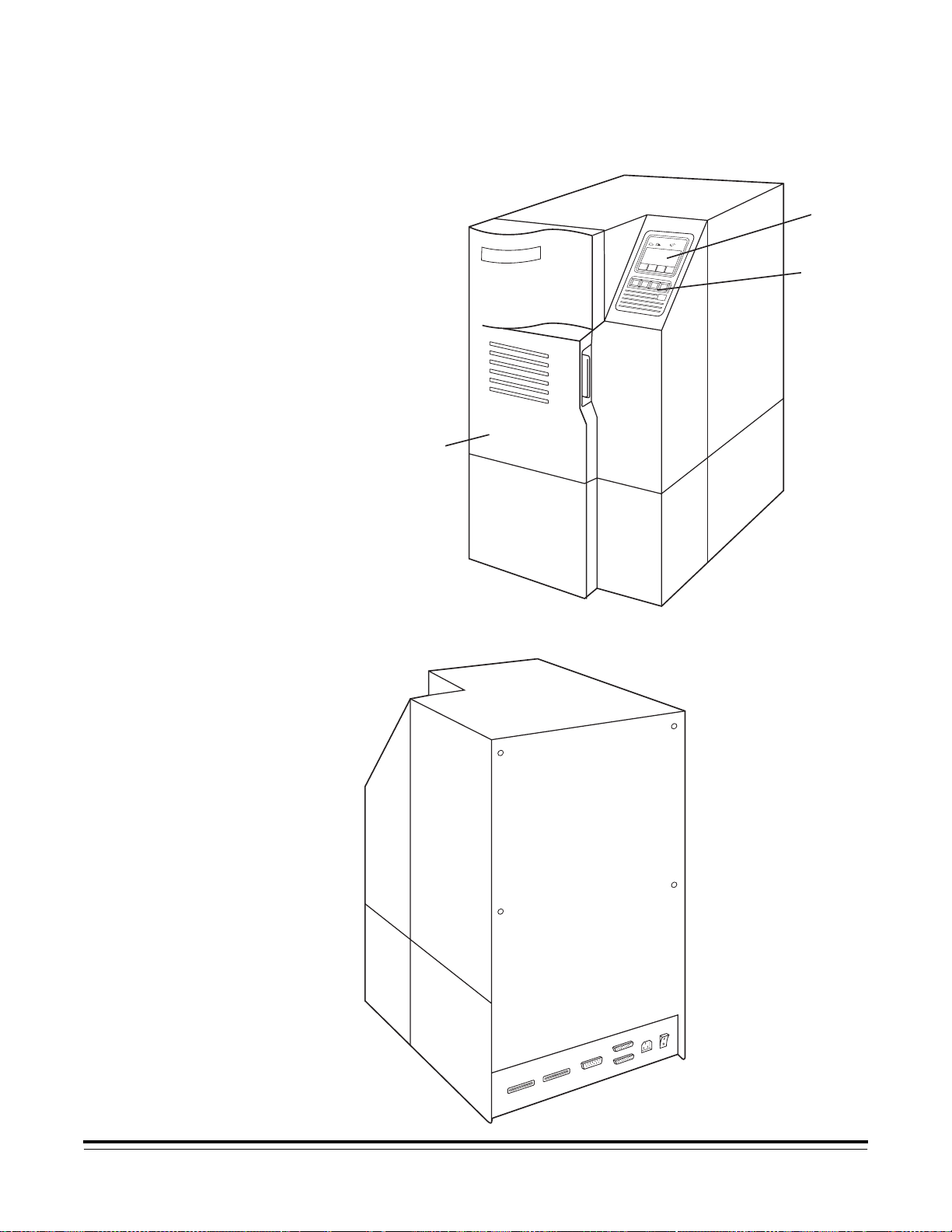
Views The front and rear views shown below illustrate the operating
components of the Archive Writer:
Front View
FEFE
OnLine
On/Off Clear Film
Status
display
Operating
buttons
Front door
Rear View
Status
display
Operating
buttons
Front door

1-4 A-61038 July 1999
Below is the illustration of the rear view panel of the Archive Writer
in more detail.
Status Monitor
Ethernet
Port
SCSI
Connections
(Not Used)
Diagnostics
Power Switch
Power Cord
Outlet
Status display The operator interface screen and operating buttons are shown
below. The message on each button will change depending upon
the function being performed.
On/Off
Line Clear
Messages Film
Supply
FEFE
On Line
Film Cassette
Indicators
Menu
Name
Operating Buttons
Icons
Lower
Cassette
Upper
Cassette
NOTE: The icons that appear on the status display are described
in Chapter 3,
Operating the Archive Writer
.
SCSI Connections
(Not used)
Power
switch
Ethernet port
Dia
g
nostics
Power cord outlet
Status monitor
Operating buttons
Menu
name
Film
cassette
indicators
Lower cassette Upper cassette Icons

A-61038 July 1999 2-1
2 Getting Started
This chapter provides you with instructions on how to do the
following:
•Turn on the power for the Archive Writer. (Be sure the host PC
is up and running.)
•Load the media into the cassette(s).
•Load the cassettes into the Archive Writer.
Powering up the
Archive Writer To power up the Archive Writer:
NOTE: Upon power-up, the Archive Writer downloads the
software from the host PC. Therefore, the host PC must
be up and running.
•Place the power switch (located in the back of the Archive
Writer) in the On position (|). When the Archive Writer is
powered on, the
Kodak Digital Science
logo is displayed with
the Archive Writer model information.
Document Archive Writer
Model 4800 Vx.x.x
Copyright ® mm/dd/yy
Press Any Key to Start
•The display backlight will turn on, and after a brief pause for
system initialization, the Main Menu will be displayed. Press any
key to display the Main Menu.
On/Off
Line Clear
Messages Film
Supply
FEFE
On Line
NOTE: After 15 minutes of keyboard inactivity the backlight is
turned off. To turn the backlight on, press any key on the
operator interface.

2-2 A-61038 July 1999
Archive Storage Media
Cassettes One or two cassettes are loaded with the media and inserted into
the Archive Writer when filming documents.
IMPORTANT:
The Archive Writer uses Kodak Archive Storage
Media. The 215-foot length of the storage media is
loaded into an Archive Writer Cassette, Model 66.
The 100-foot length of storage media is loaded into
an Kodak Imagelink Smart Cassette 100. Before
you begin, be sure you are using the correct media
in the proper cassette. The Kodak Digital Science
Digital Document Archive System Installation
Planning Guide, A-61055, contains additional
information about the media and cassettes.
The following illustrations and descriptions will assist you in
locating and becoming familiar with the media cassette
components and displays:
Battery Compartment — contains a 9-volt battery.
Top Cover — provides a lighttight seal to prevent
fogging/exposure of the media.
Unlocked Symbol — illustrates the unlocked position of the cover
latch (as shown).
Cover Latch — used to lock or unlock the top cover. To remove
the top cover, press in and turn the cover latch counterclockwise.
Locked Symbol — illustrates the locked position of the cover
latch.

A-61038 July 1999 2-3
Each cassette contains a window that displays graphic symbols
representing the media/cassette status conditions:
Cassette ID Number — a number you assign.
Media Indicator — indicates whether or not a spool of media is
correctly loaded into the cassette.
Media Supply Gauge — using a series of 10 bars, the gauge
indicates the amount of media remaining in the cassette. When all
bars are shown, the cassette is full. When no bars are shown, the
cassette is empty. When a striped pattern is shown, a new roll of
media has been loaded into the cassette, but the cassette has not
been inserted into the Archive Writer.
Low Battery Symbol — indicates whether or not the battery
needs to be replaced. Replace with a fresh battery immediately to
avoid losing cassette information.
Table of contents
Other Kodak Computer Hardware manuals

Kodak
Kodak X-Omat 2000 User manual

Kodak
Kodak X-Omat 1000 User manual

Kodak
Kodak X-Omat 270 RA PROCESSOR User manual

Kodak
Kodak M35M X-Omat User manual

Kodak
Kodak X-Omat 460 RA Processor User manual

Kodak
Kodak RP X-OMAT M6B User manual

Kodak
Kodak X-Omat 270 User manual

Kodak
Kodak Ektalite 1000 User manual

Kodak
Kodak Prostar User manual

Kodak
Kodak X-Omat 2000 User manual
Popular Computer Hardware manuals by other brands

EMC2
EMC2 VNX Series Hardware Information Guide

Panasonic
Panasonic DV0PM20105 Operation manual

Mitsubishi Electric
Mitsubishi Electric Q81BD-J61BT11 user manual

Gigabyte
Gigabyte B660M DS3H AX DDR4 user manual

Raidon
Raidon iT2300 Quick installation guide

National Instruments
National Instruments PXI-8186 user manual