
KLIM KLIM Pods User manual
KLIM PODS
USER MANUAL - MANUEL D’UTILISATION
BENUTZERHANDBUCH - MANUALE - MANUAL


1
INDEX
ENGLISH
Safety warnings
Technical specifications
Product Diagram & Package
content
Controls
Quick use guide
Detailed operating
instructions
Contact and
troubleshooting
FRANÇAIS
Avertissements de sécurité...
Caractéristique techniques...
Schéma du produit et
contenu de l’emballage...........
Contrôles.......................................
Guide d’utilisation rapide.......
Instructions d’utilisation
détaillées.......................................
Contact et dépannage.............
DEUTSCH
Sicherheitswarnungen.............
Technische Spezifikationen...
Produkt Diagramm &
Packungsinhalt............................
Kontrollen......................................
Kurzanleitung...............................
Ausführliche
Bedienungsanleitung................
Kontakt und
Fehlerbehebung..........................
ITALIANO
Avvertenze di sicurezza..........
Specifiche tecniche...................
Schema del prodotto e
contenuto della confezione..
Controlli.........................................
Guida rapida................................
Istruzioni operative
dettagliate....................................
Contatti e risoluzione dei
problemi.........................................
ESPAÑOL
Advertencias de seguridad....
Especificaciones técnicas.......
Diagrama del producto y
contenido del paquete............
Controles.......................................
Guía de uso rápido....................
Instrucciones detalladas de
uso...................................................
Contacto y solución de
problemas.....................................
2
2
2
3
4
5
9
10
10
11
12
13
14
17
18
18
19
20
21
22
25
26
26
27
28
29
30
33
34
34
35
36
37
38
41

2
SAFETY WARNINGS
Don’t attempt to disassemble the unit and change any
part by yourself.
Don’t expose the product to any liquid, moisture or
humidity.
Don’t expose the earphones to extreme temperatures
Don’t use the earphones near a fire source.
Don’t store the unit in an electromagnetic interference
environment to avoid any malfunction.
TECHNICAL SPECIFICATIONS
Earphones
BT Version: 5.3
Working Range: < 10 m
Battery: 40mAh
Playing time: ~6 hours (without ANC)
Charging time: ~ 1h30
Input: 5V - 40mA
Charging case
Battery: 300mAh
Charging time: ~2 hours
Input: 5V - 300mA
ENGLISH
3
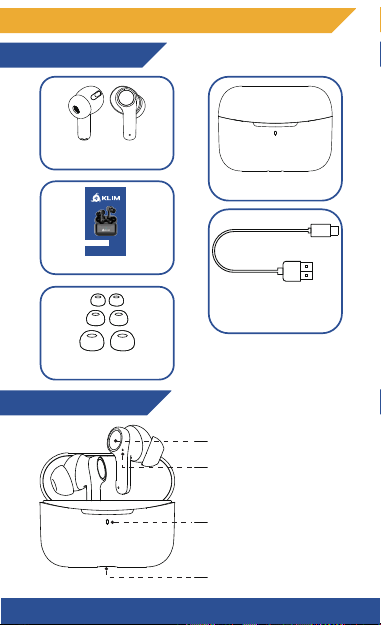
PRODUCT DIAGRAM & PACKAGE CONTENT
Package content
Product Diagram
Earphone
Charging case
User manual
USB-C charging cable
Ear tips x 6
Multi Function buttons
Earphones LED indicator
Case LED indicator
Charging Port (USB-C)
KLIM PODS
4
L
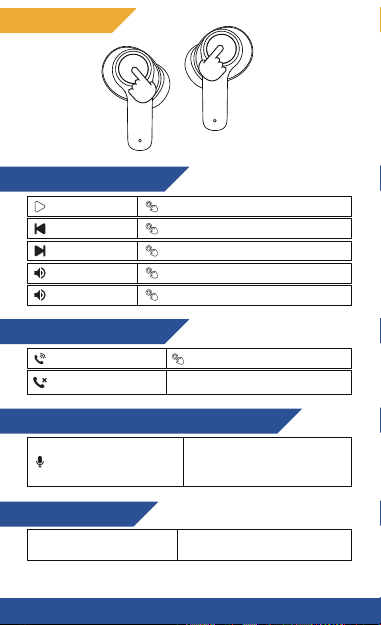
Music playing mode
R
Play/Pause
Previous Track
Next Track
Volume +
Volume -
X 2 (L/R)
X 3 (L)
X 3 (R)
X 1 (R)
X 1 (L)
Answer/End a call
Hands-free mode
Reject a call
ANC Mode (Active Noise Cancellation)
Voice assistant
X 2 (L/R)
Press 2 seconds and release (L/R)
Switch between ANC
Off, ANC On and
Transparency mode
Open the Voice assistant Press 2 seconds and release (L)
Press 2 seconds and
release (R)
CONTROLS
QUICK USE GUIDE
Note: it is highly recommended to fully charge the
earphones and the case before using the earphones for
the first time. Refer to the section “charging” for more
instructions.
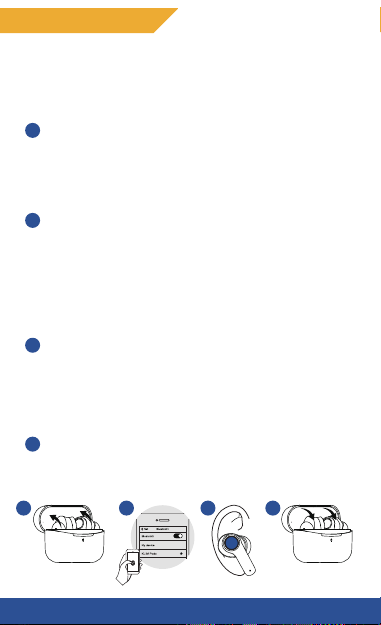
1) Open the case, the earphones will turn on
automatically.
Note: If one or both earphones are off, simply press the
multi function button for 3 seconds to turn them on.
2) If the earphones were not already paired with a
device, they will enter directly in pairing mode.
Activate the Bluetooth on your device, then search
and select “KLIM Pods” from the list of available BT
devices.
Note: If a password is required, just type: 0000
3) You’re ready to use the earphones, use the multi
function button of each earphone to adjust the
volume, jump to the next/previous tracks,
answer/reject a call or switch between the different
ANC modes.
4) To turn off the earphones, simply put them back into
the charging case, or press the multi function buttons
for 6 seconds.
4
3
2
1
432
1
5
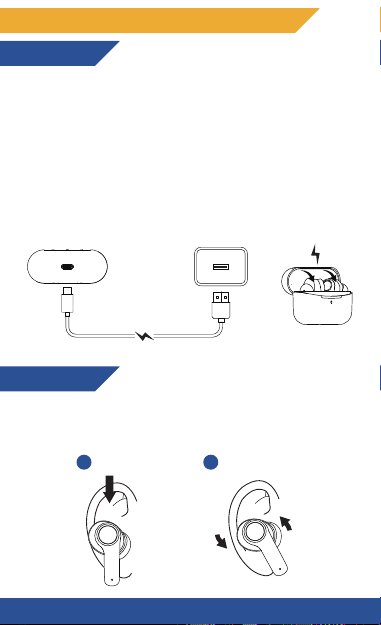
Case
Connect the USB-C charging cable to a USB Port of your
laptop/computer or directly to a DC 5V adapter to
charge the case.
Earphones
Simply put the earphones into the charging case, and
they will start to charge automatically.
DETAILED OPERATING INSTRUCTIONS
Charging
Wearing
Insert the earphones into the inner canal of your ears
and turn them gently until you find the most
comfortable and secure position.
2
1Insert Twist and Lock
6
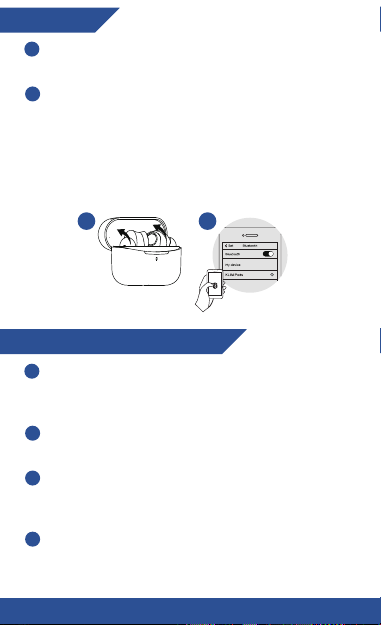
Pairing
Open the case and take the earphones, they will
automatically enter in pairing mode.
Activate the Bluetooth on your device, then search
and select “KLIM Pods” from the list of available
devices.
Note: You can also take only one earphone (left or right)
from the case to pair it in single mode to your
phone/laptop.
2
1
21
Bluetooth connection reset
Open the lid of the charging case and take the
earbuds out. After that, a white light will turn on and
the earbuds will turn on automatically.
Press the multifunction touch button on any of the
earbuds five times. A LED light will start flashing.
When the light turns off, place the earbuds into the
charging case and close its lid. After that, the earbuds
will turn off automatically.
After that, the reset process will be done.
2
1
3
4
7

Active Noise Cancellation Modes (ANC)
Press and hold for 2 seconds the multi function button
of the right earphone to switch between the three ANC
modes. A prompt voice will indicate the current mode
selected.
ANC On: The ANC is turned on to reduce the environment
noise around you and let you focus on your music/call
only.
ANC Off: The ANC is turned off.
Transparency mode: The ANC is turned on, but external
human voices are amplified to allow you to hear people
around you.
LED Indicator status
Earphones LED indicator
Turned on: fixed white.
Pairing: flashing in blue and white alternatively.
Reset: flashing in white, then turns off when the reset is
done.
Case LED indicator
Charging status (earphones): fixed green while charging,
which turn off when fully charged.
Low battery (case): flashing green, which turn off when
the battery is completely discharged.
Charging status (case): flashing white while charging,
fixed white when fully charged.
8
Other manuals for KLIM Pods
1
Table of contents
Languages:
Other KLIM Headphones manuals


