
Keatec Energy T SERIES User manual

KE 4256-xxxx Keatec T Series 25-100kVA PF1.0 208Vac with 7.0 Touch Screen Users Guide English 20190209
This manual is for qualified personnel only
T SERIES UPS
25 - 100 kVA PF 1.0 208 Vac
with 7.0 Touch Screen
User Guide
UNLESS SPECIFICALLY AGREED TO IN WRITING, SELLER
(A) MAKES NO WARRANTY AS TO THE ACCURACY, SUFFICIENCY OR SUITABILITY OF ANY TECHNICAL OR OTHER INFORMATION PROVIDED IN ITS
MANUALS OR OTHER DOCUMENTATION;
(B) ASSUMES NO RESPONSIBILITY OR LIABILITY FOR LOSSES, DAMAGES, COSTS OR EXPENSES, WHETHER SPECIAL, DIRECT, INDIRECT,
CONSEQUENTIAL OR INCIDENTAL, WHICH MIGHT ARISE OUT OF THE USE OF SUCH INFORMATION. THE USE OF ANY SUCH INFORMATION WILL BE
ENTIRELY AT THE USER’S RISK; AND
(C) REMINDS YOU THAT IF THIS MANUAL IS IN ANY LANGUAGE OTHER THAN ENGLISH, ALTHOUGH STEPS HAVE BEEN TAKEN TO MAINTAIN THE
ACCURACY OF THE TRANSLATION, THE ACCURACY CANNOT BE GUARANTEED. APPROVED CONTENT IS CONTAINED WITH THE ENGLISH LANGUAGE.
(D) INFORMS YOU THE INFORMATION IN THIS DOCUMENT IS SUBJECT TO CHANGE WITHOUT NOTICE.
(E) RESERVES ALL RIGHTS.

KE 4256-xxxx Keatec T Series 25-100kVA PF1.0 208Vac with 7.0 Touch Screen Users Guide English 20190209
This manual is for qualified personnel only Page 1
Contents
1Safety ........................................................................................................................................ 3
1.1 Symbols used in this guide ........................................................................................... 4
2Main Features ........................................................................................................................... 5
2.1 Summary...................................................................................................................... 5
2.2 Functions and Features ................................................................................................ 5
2.3 Unpacking and Inspection ............................................................................................ 6
2.4 Cabinet Overview ......................................................................................................... 7
2.5 Touch Display and Control Panel ................................................................................ 14
2.6 Installation Notes ........................................................................................................ 14
2.7 External Protective Devices ........................................................................................ 15
2.8 Power Cables ............................................................................................................. 16
2.9 Power Cable Connections .......................................................................................... 18
2.10 Battery Connection ..................................................................................................... 23
2.11 External Battery Connection ....................................................................................... 23
2.12 Parallel Installation ..................................................................................................... 24
2.13 LBS Installation .......................................................................................................... 25
2.14 Installation with STS ................................................................................................... 26
2.15 Computer Access ....................................................................................................... 26
3Operation ................................................................................................................................ 28
3.1 Operation Modes ........................................................................................................ 28
3.2 Startup (ON), Shut Down (OFF) and Testing Procedures ............................................ 29
3.3 Parallel Settings ......................................................................................................... 32
3.4 Touch Display and Control Panel - Pages & Settings .................................................. 34
3.5 Display Messages / Troubleshooting .......................................................................... 54
3.6 Optional Cards – SNMP / Relay ................................................................................. 57
4Specifications .......................................................................................................................... 58
4.1 Appendix 1 Problems and Solutions ........................................................................... 59
4.2 Appendix 2 USB Communication Port ........................................................................ 60
4.3 Appendix 3 RS232 Communication Port ..................................................................... 61
4.4 Appendix 4 RS485 Communication Port ..................................................................... 62

KE 4256-xxxx Keatec T Series 25-100kVA PF1.0 208Vac with 7.0 Touch Screen Users Guide English 20190209
This manual is for qualified personnel only Page 2
4.5 Appendix 5 Optional Port ............................................................................................ 63
4.6 Appendix 6 REPO Port ............................................................................................... 63

KE 4256-xxxx Keatec T Series 25-100kVA PF1.0 208Vac with 7.0 Touch Screen Users Guide English 20190209
This manual is for qualified personnel only Page 3
1 Safety
Important safety instructions
SAVE THESE INSTRUCTIONS - The instructions in this manual are deemed important and should
be closely followed at all times during installation and follow-up maintenance of the UPS and batteries.
Safety instructions in this manual act as a supplement to local safety codes and laws. Our company
does not assume any liability or responsibility caused by disobeying local safety codes and laws.
Servicing of batteries should be performed or supervised by personnel with knowledge of batteries
and the required precautions. Keep unauthorized personnel away from batteries.
Before conducting any maintenance, repair, or shipment, first ensure that the UPS is turned off and
disconnected from all sources of internal and external energy
WARNING! This UPS contains lethal voltages and high temperature inside. All repairs and service
should be performed by AUTHORIZED AND QUALIFIED PERSONNEL ONLY. Keep unauthorized
personnel away from UPS.
WARNING! To reduce the risk of personal injury and equipment damage, abide by all local safety
codes and laws during operation, installation and maintenance.
WARNING! To reduce the risk of electric shock, disconnect the UPS from the main supply before
installing a computer inter-face signal cable. Reconnect the power cord only after signaling
interconnections have been made.
WARNING! (UPS having Internal Batteries): Risk of electrical shock – Hazardous live parts inside this
unit are energized from the battery supply even when the input AC power is disconnected.
WARNING! (No User serviceable Parts): Risk of electrical shock, do not remove cover. No user
serviceable parts inside. Refer servicing to qualified service personnel.
WARNING! (Non-isolated Battery supply): Risk of electric shock, battery circuit is not isolated from
AC input, hazardous voltage may exist between battery terminals and ground. Test before touching.
WARNING! (Fuses): To reduce the risk of fire, replace only with the same type and size of fuse.
WARNING! UPS units are extremely heavy. Caution should be taken in moving and positioning
equipment.
WARNING! To reduce the risk of fire or electric shock, install the UPS in a temperature and humidity
controlled, indoor environment, free of conductive contaminants (flammable gas, excessive dust, etc.).
Ambient temperature must not exceed 40°C (104°F). Do not operate near water or in excessive
humidity (95% maximum).
WARNING! To reduce the risk of overheating and fire, operate the UPS in a well-ventilated area.
WARNING! To reduce the risk of fire or electric shock, output overcurrent protection and disconnect
switch must be installed in accordance with local Electrical Codes.
WARNING! To reduce the risk of fire or electric shock, an external DC Circuit over current protective
device must be installed in accordance with the National Electric Code, ANSI/NFPA 70.
• 10kVA UPS connect only to a circuit provided with DC 63 amperes maximum branch circuit
over current protection in accordance with the National Electric Code, ANSI/NFPA 70.
• 15/20kVA UPS connect only to a circuit provided with DC 125 amperes maximum branch
circuit over current protection in accordance with the National Electric Code, ANSI/NFPA 70.
WARNING! A battery can present a risk of electric shock and high short circuit current. The following

KE 4256-xxxx Keatec T Series 25-100kVA PF1.0 208Vac with 7.0 Touch Screen Users Guide English 20190209
This manual is for qualified personnel only Page 4
precautions should be observed when working on batteries:
• Remove watches, rings, or other metal objects.
• Use tools with insulated handles.
• Wear rubber gloves and boots.
• Do not lay tools or metal parts on top of batteries.
• Disconnect charging source prior to connecting or disconnecting battery terminals.
• Determine if battery is inadvertently grounded. If inadvertently grounded, remove source from
ground.
WARNING! Contact with any part of a grounded battery can result in electrical shock. The likelihood
of such shock can be reduced if groundings are removed during installation and maintenance.
WARNING! Risk of explosion if battery is replaced by an incorrect type. When replacing batteries,
replace with the same type and number of batteries or battery packs.
WARNING! Do not dispose of batteries in a fire. The batteries may explode. Dispose of used
batteries according to the instructions.
WARNING! Do not open or mutilate batteries. Released electrolyte is harmful to the skin and eyes
and is toxic.
1.1 Symbols used in this guide
WARNING!
Risk of Personal Injury - Observe the warning that a risk of personal injury such as
electric shock, fire or chemical hazard is present
CAUTION!
Risk of Equipment Damage - Refer to the operator’s manual for additional information,
such as important operating and maintenance instructions
Please recycle batteries appropriately.

KE 4256-xxxx Keatec T Series 25-100kVA PF1.0 208Vac with 7.0 Touch Screen Users Guide English 20190209
This manual is for qualified personnel only Page 5
2 Main Features
2.1 Summary
This series UPS is a three-in-three-out high frequency online UPS. The UPS helps avoid power supply
problems, such as blackout, over-voltage, under-voltage, sudden voltage drop, high voltage pulse,
voltage fluctuation, surge, inrush current, harmonic distortion (THD), noise interference, frequency
fluctuation, etc.
This UPS can be applied to different applications including computer device, automatic equipment,
communication system and industry equipment.
2.2 Functions and Features
3 Phase In / 3 Phase Out UPS
It is 3 Phase In / 3 Phase Out high-density UPS system.
Digital Control
This series UPS is controlled by Digital Signal Processor (DSP) which enhances and increases
reliability, performance, self-protection, self-diagnostics and so on.
Charging Current is configurable
Using the PC Software, the user may set the capacity of the batteries as well as the maximum charging
current. Constant voltage mode, constant current mode or floating mode can be switched
automatically and smoothly.
Advanced three-stage charging
1st stage: High constant current charging to 90%
2nd stage: Constant voltage to finish charging
3rd stage: Float replaces battery self-discharge
The 3-stage charging extends the life of the batteries and recharges batteries quickly.
Touch Display
With Touch screen and LED display it is quick and easy to determine UPS status and operational
parameters, such as input/output voltage, frequency, load%, battery% and ambient temperature, etc.
Intelligent Monitoring
An optional SNMP card can be used to remotely control and monitor the UPS.
Emergency Power Off Function
The UPS may be completely shut off when the EPO button is pressed. Remote EPO (REPO) function
is also available.
Integration with Electrical System
The UPS can be integrated with external battery cabinet, PDU and external maintenance bypass.
KE 4256-xxxx Keatec T Series 25-100kVA PF1.0 208Vac with 7.0 Touch Screen Users Guide English 20190209
This manual is for qualified personnel only Page 6
2.3 Unpacking and Inspection
If any equipment received has been damaged during shipment, keep the shipping cartons
and packing materials and file a claim for shipping damage with the carrier. If you discover
damage after acceptance, file a claim for concealed damage with the carrier.
Unpacking the UPS in a low-temperature environment may cause condensation to occur
inside the UPS enclosure. To reduce the hazard of electrical shock, do not install the UPS
until the inside and outside of the enclosure are absolutely dry.
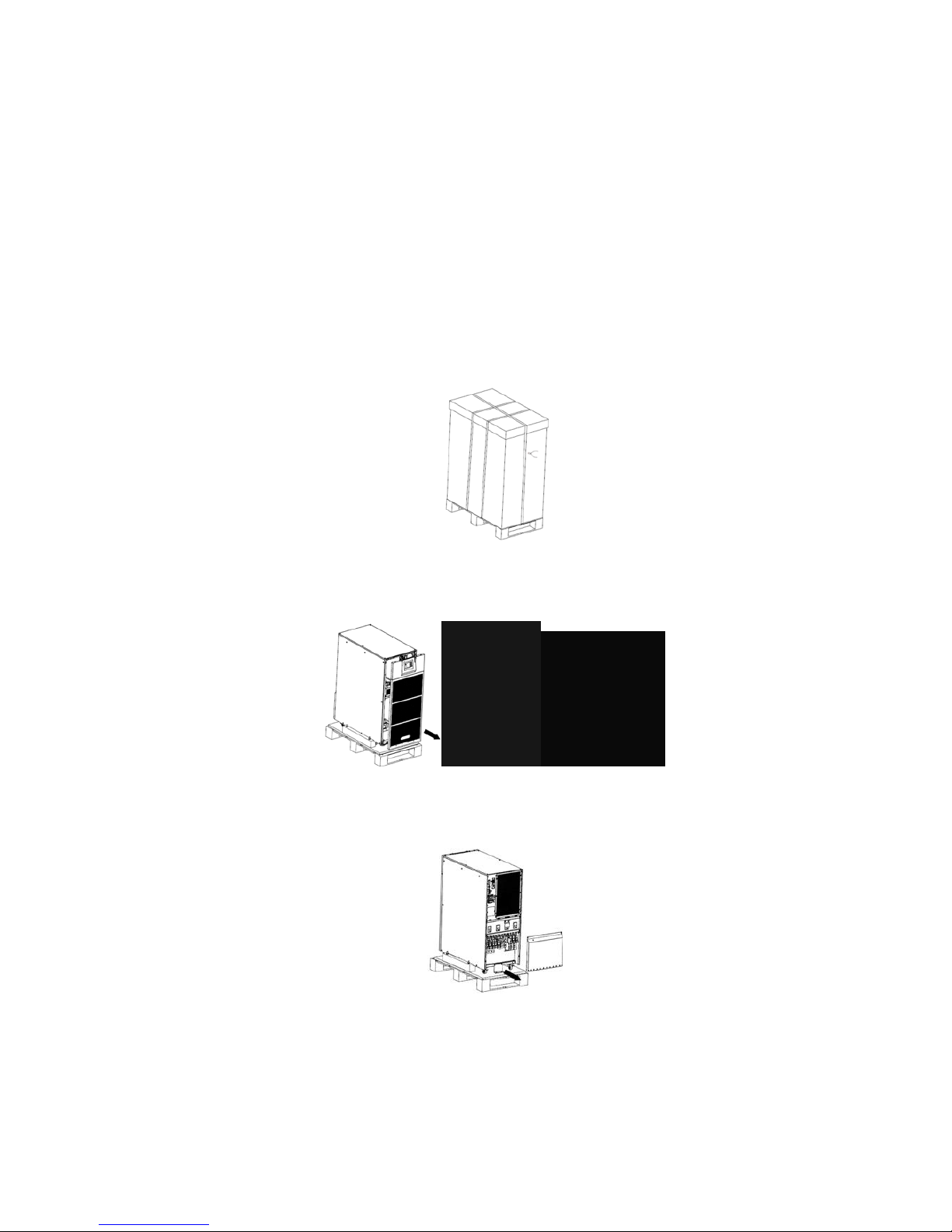
Use a pallet truck to transport the UPS to the installation position. Cut off the straps on
the outside of the packaging and remove the outer packaging. Remove the plastic bag and
take out the fittings box.
Remove the front panel and rear panel. Remove the L-shaped bracket and the plates to the
left and right side of the UPS that secure the cabinet to the pallet.
Place the ramp on the ground, use the screws unfastened from the last step to fasten the
ramp to the pallet.

KE 4256-xxxx Keatec T Series 25-100kVA PF1.0 208Vac with 7.0 Touch Screen Users Guide English 20190209
This manual is for qualified personnel only Page 7
2.4 Cabinet Overview
25kVA & 30kVA Front and Side View
25kVA & 30kVA Rear View

KE 4256-xxxx Keatec T Series 25-100kVA PF1.0 208Vac with 7.0 Touch Screen Users Guide English 20190209
This manual is for qualified personnel only Page 8
25kVA & 30kVA Rear View
(1) LCD panel / LEDs
(2) Parallel port 1
(3) Parallel port 2
(4) Temperature sensor port (for NTC)
(5) RS485 port (for RS485 temperature sensor)
(6) RS485 port (for RS485 temperature sensor)
(7) USB port
(8) RS232
(9) LBS port
(10) BAT_SW: detect battery switch status
(11) Optional port (for backfeed protection,
or for battery breaker driver to prevent battery
discharge after UPS shuts down)
(12) MAINTENANCE-AUXSWS port
(13) REPO port
(14) Intelligent Slot 1 (SNMP card/ Relay card)
(15) Cold-start
(16) Intelligent Slot 2 (SNMP card/ Relay card)
(17) EPO button
(18) Cover for UPS Maintenance
(19) SPD (optional) for 50-60kVA
(20) Maintenance breaker
(21) Maintenance breaker
(22) Bypass breaker
(23) Mains breaker
(24) Output breaker
(25) Terminal block cover

KE 4256-xxxx Keatec T Series 25-100kVA PF1.0 208Vac with 7.0 Touch Screen Users Guide English 20190209
This manual is for qualified personnel only Page 9
40kVA, 50kVA & 60kVA Front and Side View
40kVA, 50kVA & 60kVA Rear View
Other manuals for T SERIES
1
Table of contents
Other Keatec Energy UPS manuals

Keatec Energy
Keatec Energy T 3310E User manual

Keatec Energy
Keatec Energy RTM Series User manual

Keatec Energy
Keatec Energy DBL MX-U Series User manual

Keatec Energy
Keatec Energy C Series User manual

Keatec Energy
Keatec Energy T SERIES User manual

Keatec Energy
Keatec Energy RTM Series User manual

Keatec Energy
Keatec Energy RT 6KVA User manual










