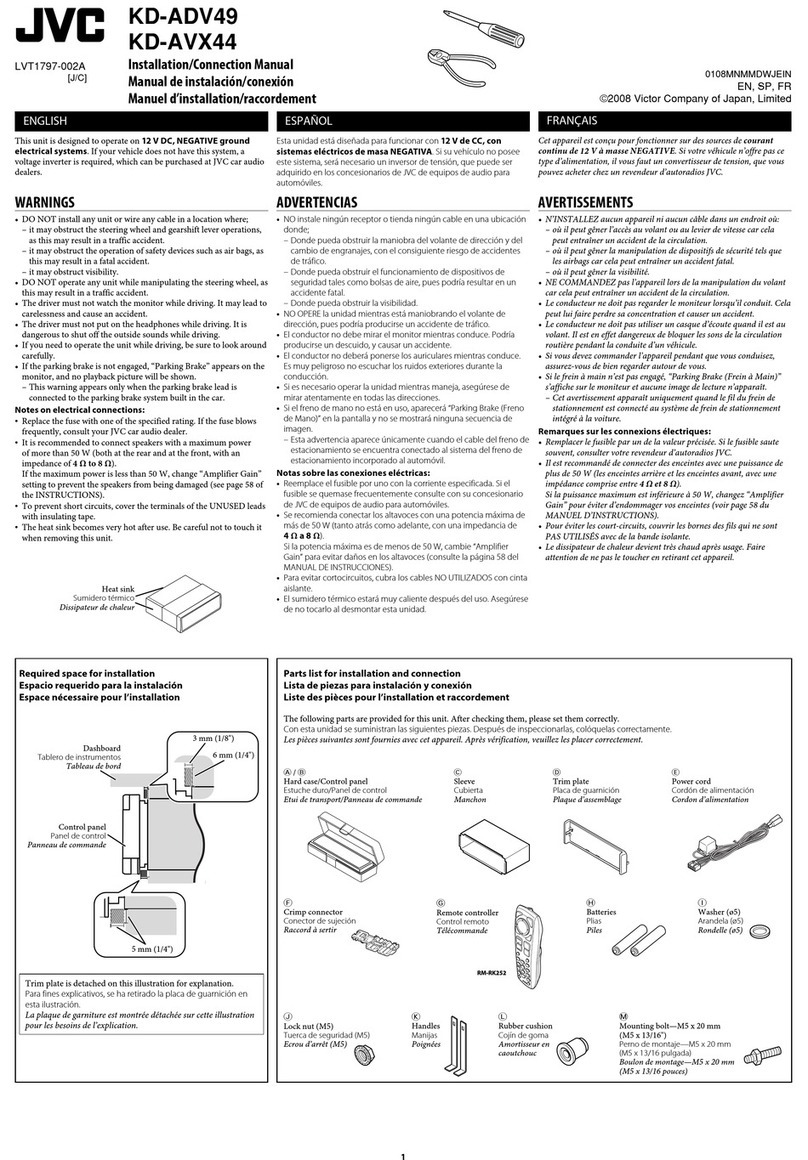
JVC KD-G384 User manual

For canceling the display demonstration, see page 6.
For installation and connections, refer to the separate manual.
INSTRUCTIONS
GET0445-001A
[UI]
CD RECEIVER KD-G384
Cover_KD-G384[UI]f.indd 1Cover_KD-G384[UI]f.indd 1 10/3/06 6:09:00 PM10/3/06 6:09:00 PM

2
Thank you for purchasing a JVC product.
Please read all instructions carefully before operation, to ensure your complete understanding and to obtain the best
possible performance from the unit.
IMPORTANT FOR LASER PRODUCTS
1. CLA 1 LA ER PRODUCT
2. CAUTION: Do not open the top cover. There are no user serviceable parts inside the unit; leave all servicing to
qualified service personnel.
3. CAUTION: Visible and/or invisible class 1M laser radiation when open. Do not view directly with optical
instruments.
4. REPRODUCTION OF LABEL: CAUTION LABEL, PLACED OUT IDE THE UNIT.
How to reset your unit
• Your preset adjustments will also be erased.
How to forcib y eject a disc
• Be careful not to drop the disc when it ejects.
• If this does not work, reset your unit.
Warning:
If you need to operate the unit while driving, be
sure to look ahead carefully or you may be involved
in a traffic accident.
Caution on vo ume setting:
Discs produce very little noise compared with other
sources. Lower the volume before playing a disc
to avoid damaging the speakers by the sudden
increase of the output level.
[European Union only]
EN02-07_KD-G384[UI]f.indd 2EN02-07_KD-G384[UI]f.indd 2 10/3/06 6:08:19 PM10/3/06 6:08:19 PM

3
How to use the M MODE button
If you press M MODE, the unit goes into functions mode,
then the number buttons and 5/∞ buttons work as
different function buttons.
Ex.: When number button 2 works as
MO (monaural) button.
To use these buttons for their origina functions
again after pressing M MODE, wait for 5 seconds
without pressing any of these buttons until the
functions mode is cleared or press M MODE again.
Detaching the contro pane
Attaching the contro pane
CONTENTS
Contro pane .................................. 4
Remote contro er — RM-RK50 ........... 5
Getting started ................................ 6
Basic operations ................................................... 6
Radio operations ............................. 7
Disc operations ................................ 8
Playing a disc in the unit ..................................... 8
Sound adjustments .......................... 10
Externa component operations ....... 11
Genera settings — PSM .................. 11
Maintenance ................................... 13
More about this unit ........................ 14
Troub eshooting .............................. 16
Specifications .................................. 17
For safety...
• Do not raise the volume level too much, as this will
block outside sounds, making driving dangerous.
• top the car before performing any complicated
operations.
Temperature inside the car...
If you have parked the car for a long time in hot or cold
weather, wait until the temperature in the car becomes
normal before operating the unit.
EN02-07_KD-G384[UI]f.indd 3EN02-07_KD-G384[UI]f.indd 3 10/3/06 6:08:22 PM10/3/06 6:08:22 PM

4
o RND (random) button
; M MODE button
a (control panel release) button
s Disc information indicators—
TAG (Tag information), (track/file), (folder)
d DI C indicator
f Playback mode / item indicators—RND (random),
(disc), (folder), RPT (repeat)
g Tuner reception indicators—MO (monaural),
T (stereo)
h .BA (super bass) indicator
j EQ (equalizer) indicator
k Tr (track) indicator
l ource display / Volume level indicator / Time
countdown indicator
/ Main display
z ound mode (iEQ: intelligent equalizer)
indicators—JAZZ, ROCK, HIP HOP, CLA IC, POP ,
U ER
Parts identification
Disp ay window
Control panel
1 Control dial
2 0 (eject) button
3 Loading slot
4 EQ (equalizer) button
5 DI P (display) button
6 4 / ¢ buttons
7 Display window
8 (standby/on attenuator) button
9 AUX (auxiliary) input jack
p 5 (up) / ∞ (down) buttons
q EL (select) button
w BAND button
e RC (source) button
r Remote sensor
DO NOT e pose the remote sensor to strong light
(direct sunlight or artificial lighting).
t MO (monaural) button
y M ( trong-station equential Memory) button
u Number buttons
i RPT (repeat) button
EN02-07_KD-G384[UI]f.indd 4EN02-07_KD-G384[UI]f.indd 4 10/3/06 6:08:22 PM10/3/06 6:08:22 PM

5
Remote controller — RM-RK50
Insta ing the ithium coin battery
(CR2025)
Aim the remote contro er direct y at the remote
sensor on the unit. Make sure there is no obstac e
in between.
Warning:
• Do not install any battery other than CR2025 or
its equivalent; otherwise, it may explode.
• Do not leave the remote controller in a place
(such as dashboards) exposed to direct sunlight
for a long time; otherwise, it may explode.
• tore the battery in a place where children
cannot reach to avoid risk of accident.
• To prevent the battery from over-heating,
cracking, or starting a fire:
– Do not recharge, short, disassemble, heat the
battery, or dispose of it in a fire.
– Do not leave the battery with other metallic
materials.
– Do not poke the battery with tweezers or similar
tools.
– Wrap the battery with tape and insulate when
throwing away or saving it.
Main e ements and features
1 (standby/on/attenuator) button
• Turns the power on if pressed briefly or
attenuates the sound when the power is on.
• Turns the power off if pressed and held.
2 5 U (up) / D (down) ∞ buttons
• Changes the FM/AM bands with 5 U.
• Changes the preset stations with D ∞.
• Changes the folder of the MP3/WMA discs.
3 VOL – / VOL + buttons
• Adjusts the volume level.
4 OUND button
• elects the sound mode (iEQ: intelligent
equalizer).
5 OURCE button
• elects the source.
6 2 R (reverse) / F (forward) 3 buttons
• earches for stations if pressed briefly.
• Fast-forwards or reverses the track if pressed and
held.
• Changes the tracks if pressed briefly.
EN02-07_KD-G384[UI]f.indd 5EN02-07_KD-G384[UI]f.indd 5 10/3/06 6:08:22 PM10/3/06 6:08:22 PM

6
Basic settings
• ee also “General settings — P M” on pages 11 and
12.
1
2
1 Cance ing the disp ay demonstrations
elect “DEMO,” then “DEMO OFF.”
2 Setting the c ock
elect “CLOCK H” (hour), then adjust the hour.
elect “CLOCK M” (minute), then adjust the
minute.
3 Finish the procedure.
To check the current c ock time whi e the
power is turned off
Clock time is shown on the
display for about 5 seconds. ee
also page 12.
Getting started
Basic operations
Turn on the power.
Ÿ
* You cannot select “CD” as the playback source if
there is no disc in the unit.
! For FM/AM tuner
⁄ Adjust the vo ume.
@ Adjust the sound as you want. (See
page 10.)
To drop the vo ume in a
moment (ATT)
To restore the sound, press the
button again.
To turn off the power
Volume level appears.
EN02-07_KD-G384[UI]f.indd 6EN02-07_KD-G384[UI]f.indd 6 10/3/06 6:08:23 PM10/3/06 6:08:23 PM

7
Storing stations in memory
You can preset six stations for each band.
FM station automatic presetting —
SSM (Strong-station Sequentia
Memory)
1 Se ect the FM band (FM1 – FM3) you want to
store into.
2
3
“ M” flashes, then disappears when automatic
presetting is over.
Local FM stations with the strongest signals are
searched and stored automatically in the FM band.
Manua presetting
Ex.: toring FM station of 92.5 MHz into preset number
4 of the FM1 band.
1
2
3
Radio operations
Ÿ
! Start searching for a station.
When a station is received,
searching stops.
To stop searching, press the
same button again.
To tune in to a station manua y
In step ! above...
1
2 Se ect a desired station frequency.
When an FM stereo broadcast is hard to
receive
Reception improves, but stereo effect will be lost.
To restore the stereo effect, repeat the same
procedure. “MONO OFF” appears and the MO indicator
goes off.
Lights up when receiving an FM stereo
broadcast with sufficient signal strength.
Lights up when monaural mode is activated.
Preset number flashes for a while.
EN02-07_KD-G384[UI]f.indd 7EN02-07_KD-G384[UI]f.indd 7 10/3/06 6:08:23 PM10/3/06 6:08:23 PM

8
To fast-forward or reverse the track
To go to the next or previous tracks
To go to the next or previous folders (only for
MP3 or WMA discs)
To locate a particular track (for D) or folder
(for MP3 or WMA discs) directly
To select a number from 01 – 06:
To select a number from 07 – 12:
• To use direct folder access on MP3/WMA discs it
is required that folders are assigned with 2-digit
numbers at the beginning of their folder names—
01 02 03 and so on.
To select a particular track in a
folder (for MP3 or WMA disc):
Listening to a preset station
1
2 Select the preset station (1 – 6) you want.
or
To check the other information while
listening to an FM or AM station
Disc operations
Playing a disc in the unit
~ Turn on the power.
Ÿ
All tracks will be played repeatedly until you
change the source or eject the disc.
To stop play and eject the disc
• Press SRC to listen to another
playback source.
lock Ô Frequency
EN08-13_KD-G384[UI]f.indd 8EN08-13_KD-G384[UI]f.indd 8 10/3/06 6:08:34 PM10/3/06 6:08:34 PM

9
Other main functions
Skipping tracks quickly during play
• For MP3 or WMA discs you can skip tracks within the
same folder.
Ex.: To select track 32 while playing tracks whose
number is a single digit (1 to 9)
1
2
Each time you press the button you can skip 10
tracks.
• After the last track the first track will be selected
and vice versa.
3
Prohibiting disc ejection
You can lock a disc in the loading slot.
To cancel the prohibition, repeat the same
procedure.
hanging the display information
While playing an audio D or a
D Text
While playing an MP3 or a WMA disc
• When “TAG DISP” is set to “TAG ON”
(see page 12)
• When “TAG DISP” is set to “TAG OFF”
: lock with the current track number
: Elapsed playing time with the current
track number
: orresponding indicator lights up on the
display
*1 If the current disc is an audio CD, “NO NAME” appears.
*2 If an MP3/WMA fi e does not have Tag information,
fo der name and fi e name appear. In this case, the
TAG indicator wi not ight up.
Selecting the playback modes
You can use only one of the following playback modes
at a time.
1
2 Select your desired playback mode.
7 Repeat play
Mode Plays repeatedly
TRK RPT : The current track.
FLDR RPT * : All tracks of the current folder.
RPT OFF : Cancels.
Continued on the next page
EN08-13_KD-G384[UI]f.indd 9EN08-13_KD-G384[UI]f.indd 9 10/3/06 6:08:36 PM10/3/06 6:08:36 PM

10
7 Random play
Mode Plays at random
FLDR RND * : All tracks of the current folder
then tracks of the next folder and
so on.
DIS RND : All tracks of the current disc.
RND OFF : Cancels.
* On y whi e p aying an MP3 or a WMA disc.
: orresponding indicator lights up on
the display
Sound adjustments
You can select a preset sound mode suitable to the
music genre (iEQ: intelligent equalizer).
Indication (For)
BAS*1MID*2TRE*3S.BS*4
USER
(Flat sound) 00 00 00 OFF
RO K
(Rock or disco music) +03 00 +02 ON
LASSI
(Classical music) +01 00 +03 OFF
POPS
(Light music) +02 +01 +02 OFF
HIP HOP
(Funk or rap music) +04 –02 +01 ON
JAZZ
(Jazz music) +03 00 +03 OFF
*1 : Bass; *2 : Mid-range; *3 : Treble; *4 : Super bass
Adjusting the sound
You can adjust the sound characteristics to your
preference.
Indication, [Range]
BAS *2 (bass) [–06 to +06]
Adjust the bass.
MID *2 (mid-range) [–06 to +06]
Adjust the mid-range frequencies sound level.
TRE *2 (treble) [–06 to +06]
Adjust the treble.
FAD *3 (fader) [R06 to F06]
Adjust the front and rear speaker balance.
BAL *4 (balance) [L06 to R06]
Adjust the left and right speaker balance.
S.BS *2 (super bass) [S.BS ON or S.BS OFF] [01 to 05]*5
Maintain the richness and fullness of the bass sound
regardless of how low you set the volume.
SUB.W (subwoofer) [00 to 08]
Adjust the subwoofer output level.
VOL (volume) [00 to 30 or 50 *6]
Adjust the volume.
*1 Disp ayed on y when “L/O MODE” is set to “WOOFER”
(see page 12).
*2 When you adjust the bass, mid-range, treb e, or super
bass, the adjustment you have made is stored for the
current y se ected sound mode (iEQ) inc uding “USER.”
*3 If you are using a two-speaker system, set the fader
eve to “00.”
*4 The adjustment cannot affect the subwoofer output.
*5 Range adjustment for super bass is adjustab e on y
when it is set to “S.BS ON.”
*6 Depending on the amp ifier gain contro setting. (See
page 12 for detai s.)
Preset values
EN08-13_KD-G384[UI]f.indd 10EN08-13_KD-G384[UI]f.indd 10 10/3/06 6:08:37 PM10/3/06 6:08:37 PM
Other manuals for KD-G384
1
Table of contents
Other JVC Car Receiver manuals