Jung 1723NE User manual


Table of Contents
1 Safety instructions.............................................................................................................3
2 Intended use .....................................................................................................................3
3 Operation ..........................................................................................................................3
4 Information for electrically skilled persons ........................................................................4
5 Technical data...................................................................................................................6
6 Troubleshooting ................................................................................................................6
7 Warranty............................................................................................................................6
2 / 6
82599423 25.08.2022
J0082599423
Satellite insert 3-wire, power supply

1 Safety instructions
Electrical devices may only be mounted and connected by electrically skilled
persons.
Serious injuries, fire or property damage possible. Please read and follow manual
fully.
Danger of electric shock. Always disconnect before carrying out work on the device
or load. In so doing, take all the circuit breakers into account, which support danger-
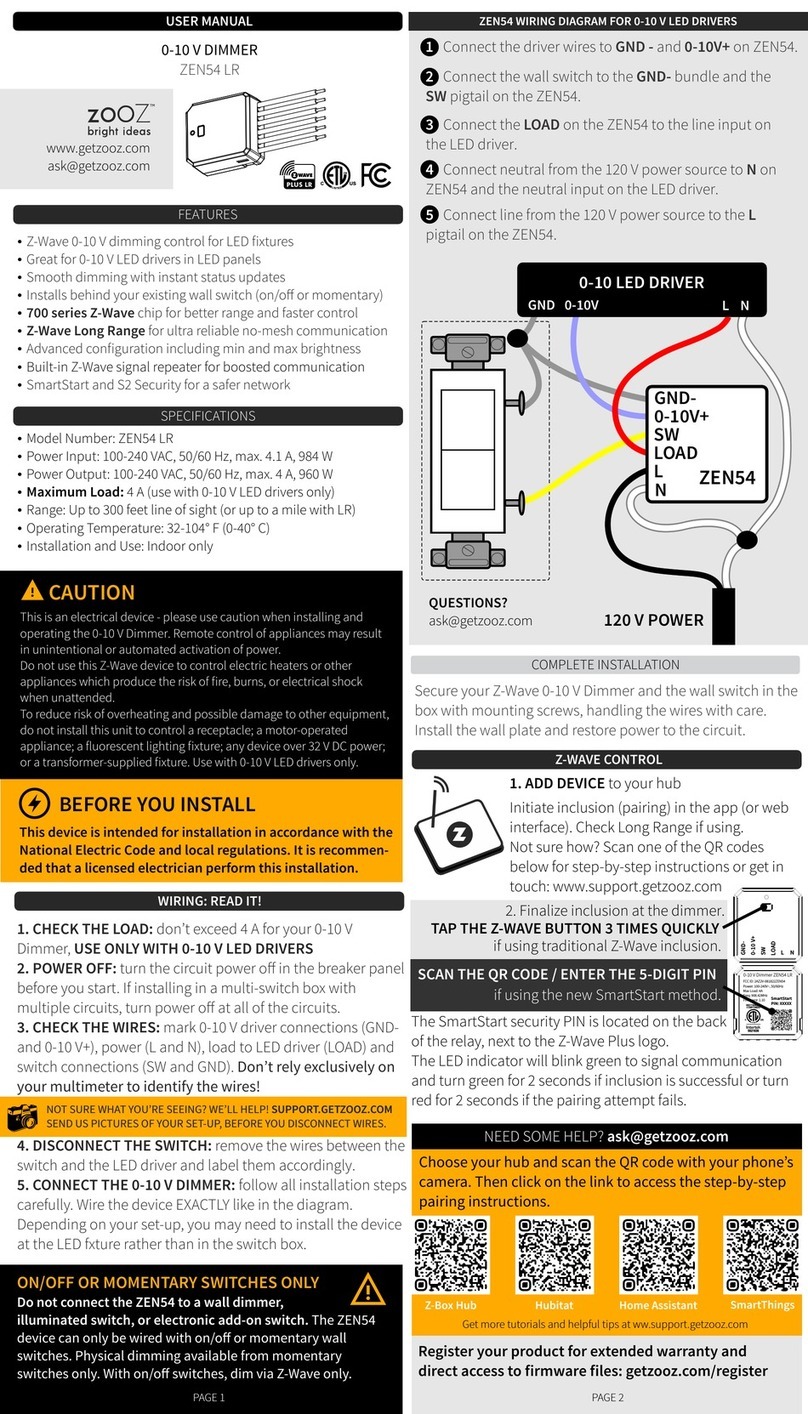
ous voltages to the device and or load.
This manual is an integral part of the product, and must remain with the end cus-
tomer.
2 Intended use
– Extension unit operation via LB management or eNet covers of inserts with ex-
tension input
– Voltage supply of wirelessly connected operating covers from the systems
JUNG HOME, eNet and KNX RF and JUNG HOME motion detectors
– Extension for extending the detection field of motion and presence detectors
– Central control of multiple main devices
– Operation with suitable cover from the systems LB-Management,
JUNG HOME, eNet and KNX RF
– Mounting in appliance box with dimensions according to DIN 49073
3 Operation
The function of the extension depends on the cover of the extension as well as on
the insert and cover of the main device.
Different applications are possible due to various combination options of covers from
the systems LB management, eNet and KNX RF and inserts with extension input. As
a result, these instructions only describe the essential basic functions of the exten-
sion unit operation via a LB Management push-button 1-gang. Operations with differ-
ent covers is described in the instructions for the cover in question.
Example 1: A LB Management push-button 1-gang is fitted on a switching or
dimming insert on the main device
Switching the light
■ Press the operating cover at the top.
Light is switched on.
■ Press the operating cover at the bottom.
Light is switched off.
Satellite insert 3-wire, power supply
3 / 6
82599423 25.08.2022
J0082599423

Adjusting the brightness (only dimming insert)
■ Long press on the operating cover at the top or bottom.
Saving the switch-on brightness (only dimming insert)
■ Adjust the brightness.
■ Press operating cover over entire surface for longer than 4 seconds.
Example 2: A motion or presence detector is fitted on a switch insert on the main
device
Switching the light
■ Press the operating cover at the top.
Light is switched on.
■ Press the operating cover at the bottom.
Presence detector: Light is switched off.
Motion detector: Run-on time will be restarted.
4 Information for electrically skilled persons
Connecting and mounting the devices
Image1: Connection diagram 3-wire extensions on a main device
Satellite insert 3-wire, power supply
4 / 6
82599423 25.08.2022
J0082599423

Up to ten 3-wire extensions (2) can be connected to a main device (1)
(see figure 1).
Image2: Connection diagram for multiple main devices to a 3-wire extension for the
central control
Up to five identical or different main devices (1) can be controlled together by
a 3-wire extension (2) (see figure 2).
Image3: Clampable cable cross-sections
■ Connect extension (2) according to connection diagram (see figure 1) and
(see figure 2). Note clampable cable cross-sections (see figure 3).
■ Install insert in appliance box, device connection terminals must be at the bot-
tom.
Do not attach or replace the cover under voltage, otherwise this might cause a
malfunction.
Satellite insert 3-wire, power supply
5 / 6
82599423 25.08.2022
J0082599423

■ Attach the frame and the cover.
■ Switch on mains voltage.
5 Technical data
Rated voltage AC 230 V ~
Mains frequency 50 / 60 Hz
Standby load depending on the cover approx. 0.1 ... 0.5W
Ambient temperature -20 ... +45 °C
Storage/transport temperature -20 ... +70 °C
Total length of extension device cable max. 100 m
6 Troubleshooting
Operation via extension does not function properly
Cause: power and extension unit cables are routed in a shared cable. Interferences
of the power cable in the extension unit cable can lead to errors in the telegram
transmission.
Route power and extension unit cables in separate cables.
Decrease current load on the power cable.
7 Warranty
The warranty is provided in accordance with statutory requirements via the specialist
trade.
ALBRECHT JUNG GMBH & CO. KG
Volmestraße 1
58579 Schalksmühle
GERMANY
Telefon: +49 2355 806-0
Telefax: +49 2355 806-204
www.jung.de
Satellite insert 3-wire, power supply
6 / 6
82599423 25.08.2022
J0082599423
Table of contents
Other Jung Dimmer manuals