Joyor S5 User manual

USER MANUAL
MANUAL DE USUARIO
MANUEL DE L’UTILISATEUR
S5/S10-S

01 EN
EN
1. TheMainParts&TechnicalSpecications
1.1 The Main Parts S5/S10-S
1.2TechnicalSpecicationsS5/S10-S
2.ImportantSafetyInstructions
3.OperationalInstructions
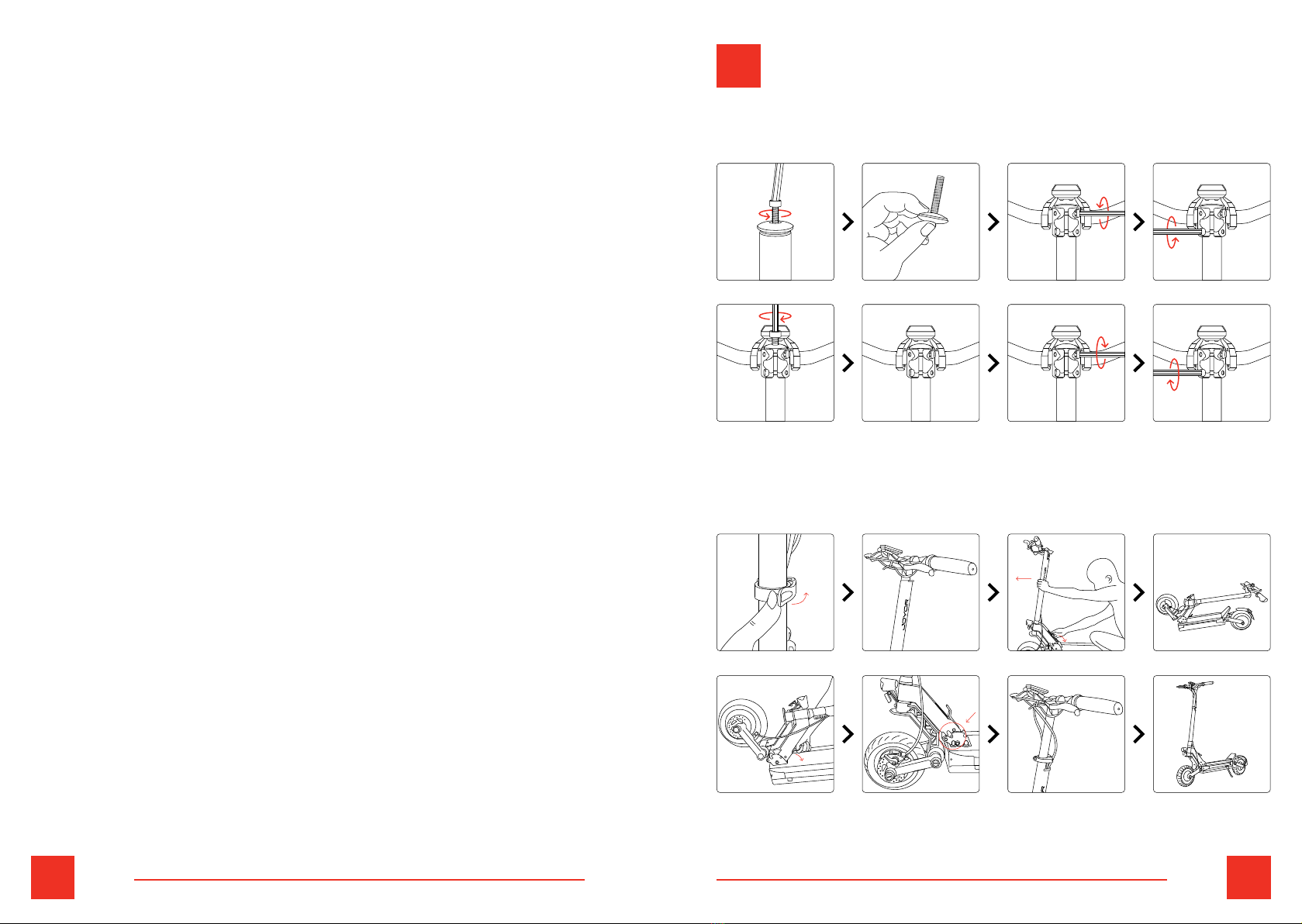
3.1 First Assembling
3.2Folding/Unfolding
3.3Display
3.4RidingOperationsInstructions
3.4.1 BeforeRiding
3.4.2Riding
3.4.3 Braking
4. Maintenance
4.1 Tyres
4.2 Battery
4.3 Charger
4.4GeneralRecommendations
5.WarrantyPolicy
5.1 WarrantyScope
5.2 WarrantyLimitations
5.3 WarrantyApplicationProcess
6.ContactUs
OriginalUserManual
CONTENTS
EN
ES
FR
USER MANUAL 1
25
51
MANUAL DE
USUARIO
MANUEL DE
L’UTILISATEUR
02 03 ENEN
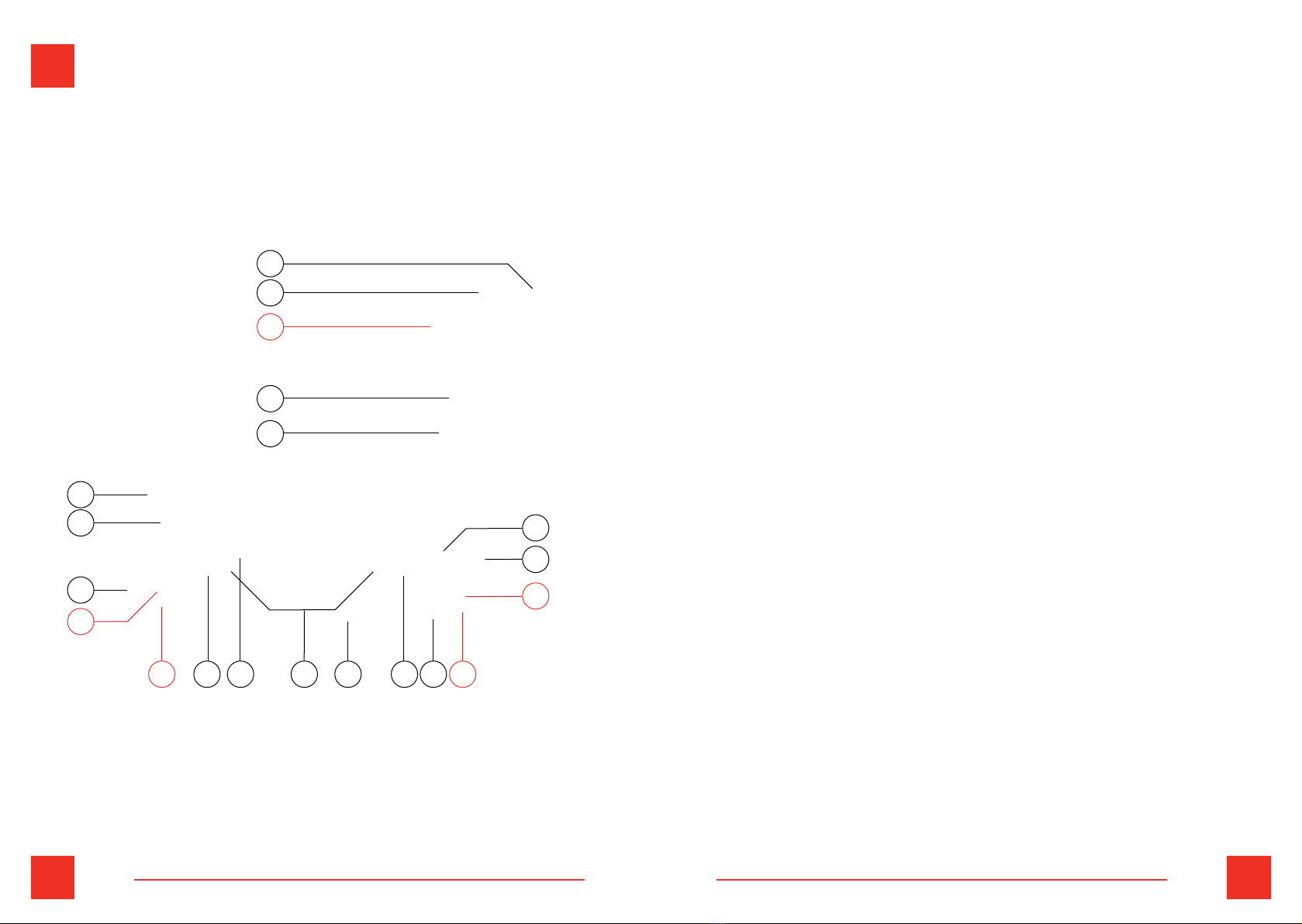
1. LCDdisplay
2. Leverlockforhandlebarheightadjustment
3. Handlebarsleeve
4. Brake wire
5. Brakehandle
6. Frontsuspension
7. Frontlight
8. Frontmudguard
9. Frontairtyre
10. Frontdiscbrake(hydrauliconS10-S)
11. Frontmotor(onlyS10-S)
12. Foldingsystem
13. Rear light
14. Sidelights
15. Parkingstand
16. Rearmotor
17. Rearairtyre
18. Rearmudguard
19. Reardiskbrake(hydrauliconS10-S)
20. Rearsuspension
1THE MAIN PARTS & TECHNICAL
SPECIFICATIONS
1.1 The Main Parts S5/S10-S
818
6 12 14 15 17
20
9
13
7
11
16
10 19
1
2
4
3
5
04 05 ENEN
1.2 Technical Specifications S5/ S10-S Vibrations:
• Thevibrationvalueexposedtothehand-armsystemis
2.5 m/s2.
• Measurementuncertainty0.5m/s2.Thevibrationcan
bealteredduetotheroughterrainwherethescooteris
circulated.However,thisalterationwillnotdependonthe
scooter.
Airborne noise:
• TheA-weightedemissionsoundpressurelevelis35db
(A)
Command systems:
Theelectricscooterdoesnothavethepossibilityofremote
control.Itisnotnecessarytouseanyadditionalmeansto
preventunauthorizeduseforsafetymeasuresbecausethis
machineisnotconsideredadangerousindustrialmachine
butavehicleforindividualtransportforpublicuse.
Fromthedriver’sposition,thedrivercanoperateallthe
drivecomponentsnecessaryfortheoperationofthe
machine:brake,displaywithaccelerator,handlebar,light
switch,bell.
Thedisplacementoftheelectricscooterwithdriveron
boardcanonlybeimplementedifthedriverisathis
commandpost,ispreparedandonlyifthespeedofthe
electricscooterisgreaterthan0km/h,beingstarted
mechanicallybypushingthescooterforwardandapplying
theelectricthrottleonlyafterwards.
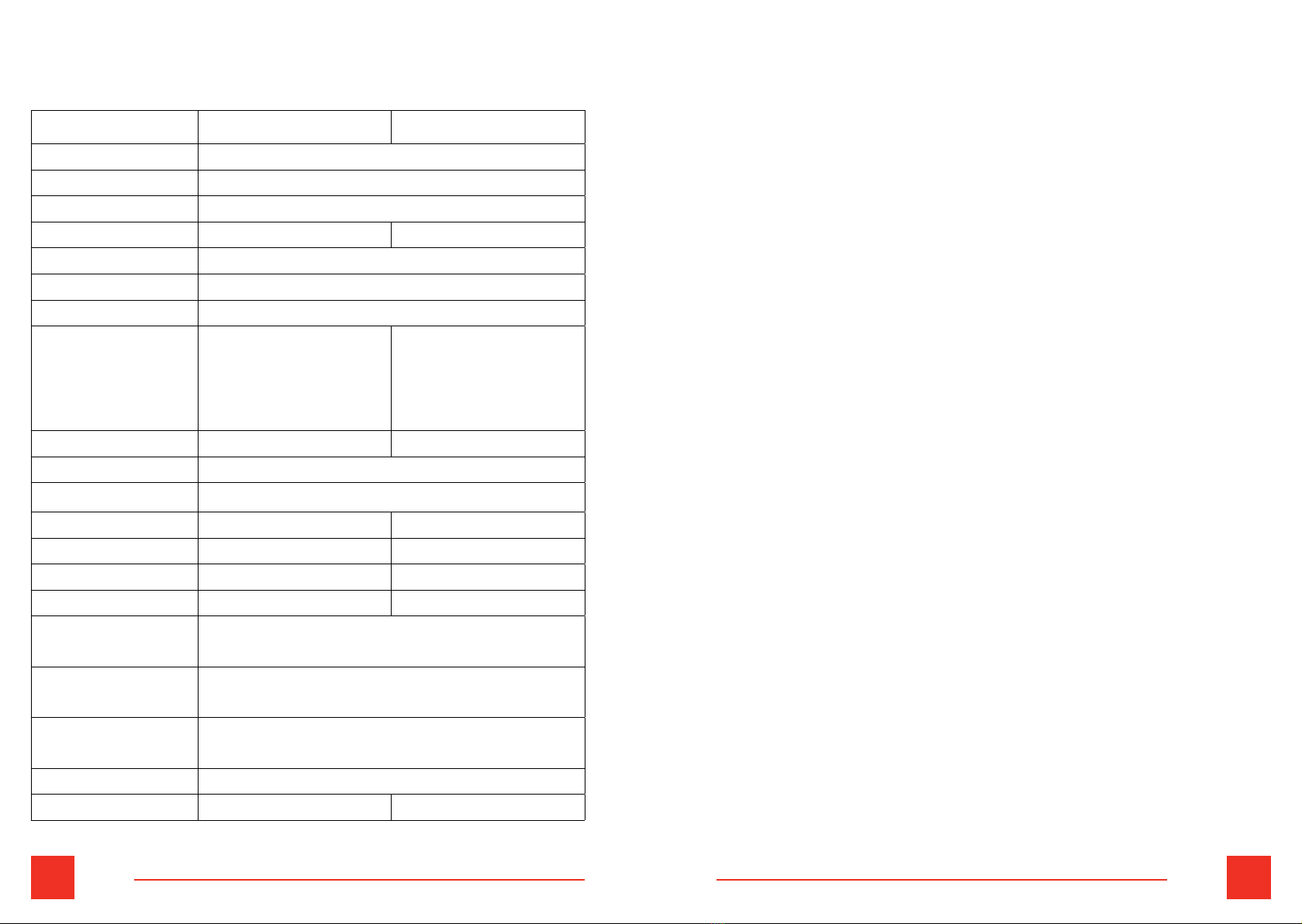
Model S5 S10-S
MaxLoad 120Kg
MaxSpeed 25Km/hlimited
Gradeability 20°
MaxRange 40-55Km 70-85Km
Frame Aluminumalloy
Tyresize 10 in.
Tyretype Airtyre
Brake Front&reardisk
brakes
Front&rear
hydraulicbrakes,
bothbrakehandles
withoilpump
Net weight 22.1kg 27.1 kg
Sizeunfolded 1245*610*1230mm
Sizefolded 1150*610*525mm
Voltage 48V 60V
Batterycapacity 13 Ah 18 Ah
Motors 1 2
Power 600W 2X 1000W
Chargerinput
voltage AC110-240 V
Chargerinput
current 2A
Suspension Doublefront&doublerearsuspension
with swingarm
Display MulticolorLCDdisplay
Charginghours 6,5-7h 10-12 h

6 7 ENEN
2IMPORTANT SAFETY INSTRUCTIONS
• Joyorelectricscooterisapersonaltransportationvehicle
andisdesignedforonepersononly.Pleasedonot
transportapassengeronthiselectricscooter.
• Joyorelectricscooterisdesignedforadultsonly.People
under the age of 16 cannot use this vehicle.Children
shouldnotusethevehicleorplaywithit.
• Pleasewearasafetyhelmetwhenridingtheelectricscooter.
• Thevehiclecannotbeusedinunauthorizedspacesand
theuserhastocomplywiththecurrentlocalnormsand
regulationsofthecirculationofthepersonalmobility
vehicles
• Donotridetheelectricscooterontheunsafesurface.
• Pleasepracticeonanopentrafc-freespaceongear
level1beforeridingonthebicyclelane.
• Pleaseduringtheridingoperationsalwayskeepboth
handsonthehandlebarandbothfeetonthestanding
board.Pleasedonotjumponthestandingboard.
• Donotturnoffthemotorpowerwhileridingthescooter.
• Ifyouencountersomeoneorobstaclesinfrontofyouduring
theriding,pleasereleasethethrottlerst,andbrakethe
leftbrakehandle(rearbrake)rstandthentherightbrake
handle(frontbrake)nexttodecelerationorstopbraking.
• Donottrytorideoveragapofmorethan3cm.Thismay
causeinjurytotheriderordamagethevehicle.
• Whenridingontheroughorbumpyroad,pleaseslow
downtheelectricscooterorstopridingthevehicle.
• Ausermustadjusttheheightofthehandlebartube
accordingtotheirheighttoensureasafe,stableand
comfortableride.
• DonotrideJoyorelectricscooteronslipperysurfaces
suchasoilorice.
• DonotuseJoyorelectricscooterintheweatherconditions
withthetemperaturebelow-5.
• Donotleavetheproductimmersedinawaterdepthof
morethan3cmtoavoiddamagetotheelectricalpartsof
thevehicle.Donotstorethevehicleinaplacewithhigh
humiditylevels.
• AvoidridingtheJoyorelectricscooterinadverseweather
conditionslikerain,snoworwindstormtopreventan
accident.Ifridingintheseconditions,neverexceedthe
speedof10km/h.
• Iftheelectricscooterisnotusedforaperiodoflonger
than30days,regularlychargeitatleastevery30days.
Thechargingportmustbekeptcleananddryatalltimes.
3.1 First assembling
3.2 Folding/Unfolding
8 9 ENEN
• Whenunfoldingthevehicle,pleasepressthefoldingsystem
handletillitclicksandmakesurethatitisinplace.
• Whencharging,alwaysensurethatsomebodyissupervising
thechargingsite.Ifthechargertemperatureincreases
toomuch,stopthechargingprocess.
• Alwaysonlyusetheoriginalchargerthatcorrespondsto
yourscooter’smodel.
• Pleasekeepallplasticbagsofthepackagingofthe
productawayfromchildrentoavoidsuffocation.
Instructions regarding installation and assembly, aimed at
reducing noise and vibrations:
Beforeusingtheequipment,tightenallthefasteningscrews
ofthescreenwiththeacceleratorandthebrakelever,
makingsurethatthesecomponentsarexedanddonot
move,toavoidvibrations.
Topreventthehandlebarvibrationsandshakingadjustand,
ifnecessary,loosenthescrewsinsidethehandlebarsleeves
whenfolded.
Beforeusingtheequipment,makesurethatthereareno
loosecablesontherearwheelandmotorpart,toavoid
highnoisefromthemotor.
Every2monthsitisrecommendedtocheckandtightenthe
nutsontherearwheelofthemotor,toavoidvibrationsand
highnoisefromthemotor.
3OPERATIONAL INSTRUCTIONS
10 11 ENEN
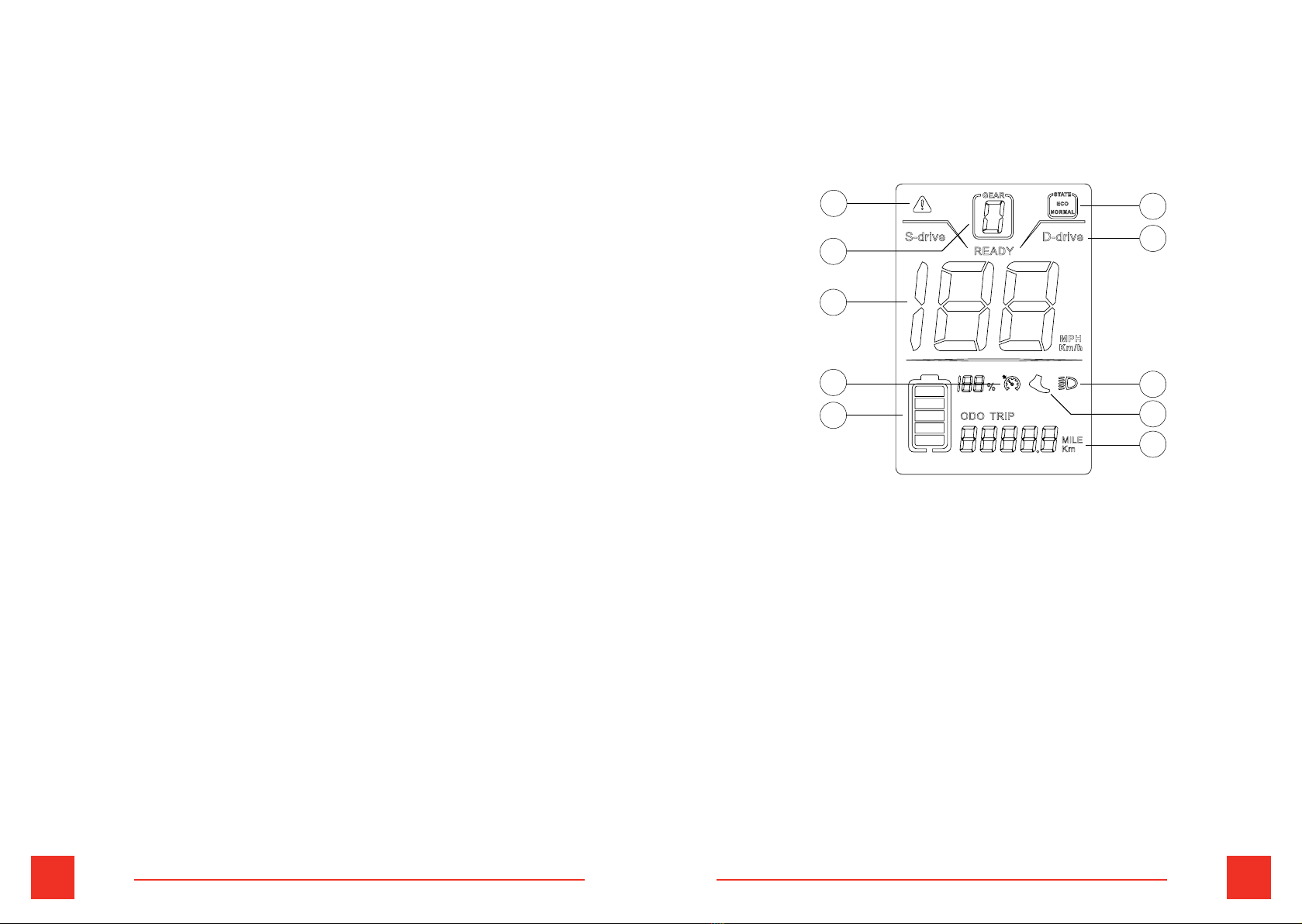
3.3 Display Home Screen
1. Errorcodedisplay
2. Powergeardisplay
3. SpeedDisplay
4. Cruise
5. Batterydisplay
6. Startingmode
7. Single/dualdriveriding
8. Lighting
9. 6km/hboostmode
10.Multifunctionaldisplay
1
2
3
4
5
8
6
7
9
10
12 13 ENEN
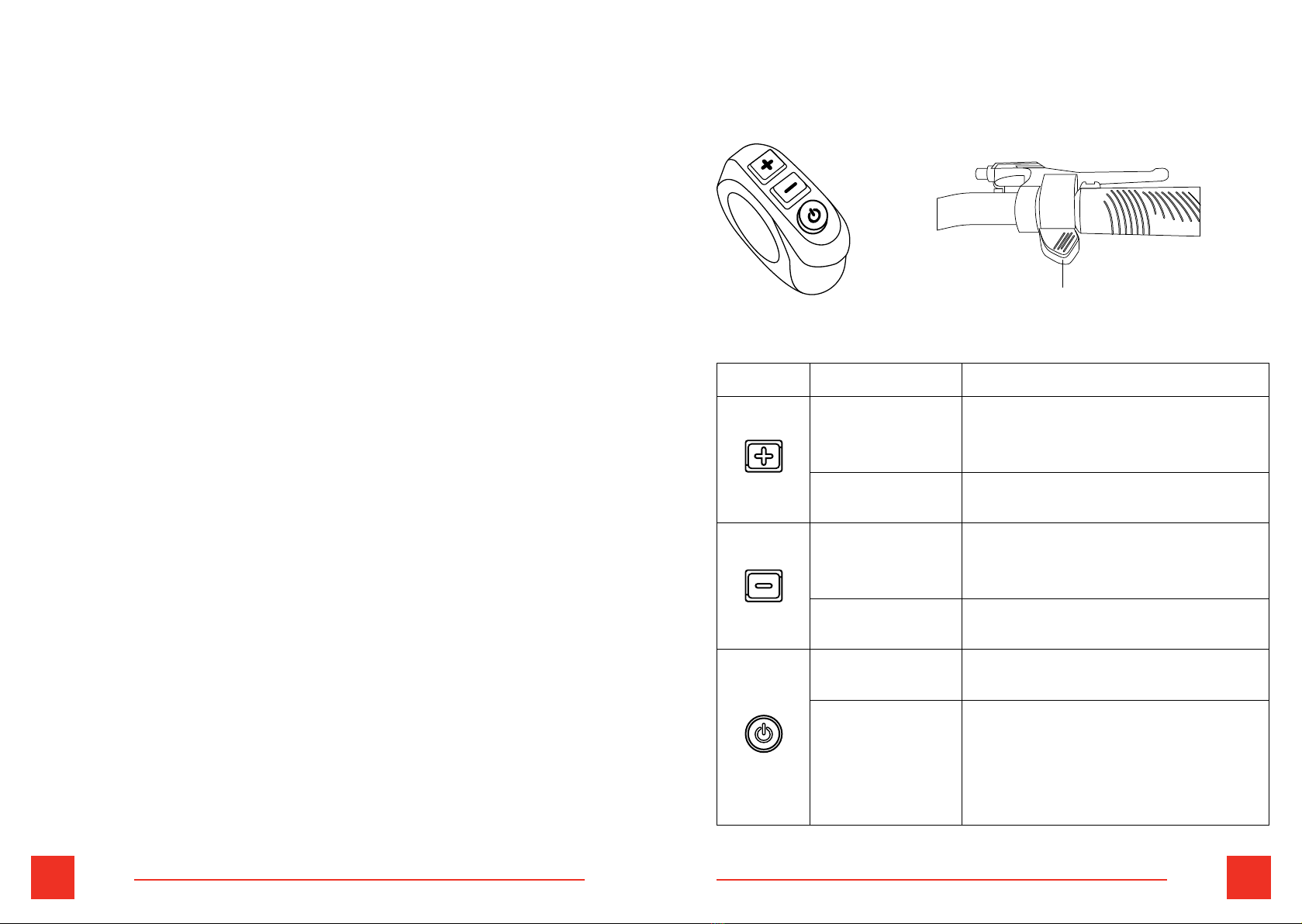
Introduction to key functions
Button Operation Function
Pressandhold
for3seconds
1.Turnon/offdualdrive
mode.(Onlyworksforelectric
scooterswithtwomotors.)
Shortpress 1.Inthemaininterface,increase
the gear.
Pressandhold
for3seconds
1.Inthemaininterface,startthe
pushfunction(needtobein1-3
gears,cancelwhenbraking).
Shortpress 1.Inthemaininterface,reduce
the gear.
Pressandhold
for3seconds
1.Turnon/offthedisplay.
Shortpress 1.Inthemaininterface,turnon/
offtheheadlamp.
2.Enterthefunctionmenu
interfacetoswitchfunction
options.
Accelerator
Home screen description
Battery display:
Frombottomtotop,thebatterylevelincreases
sequentially,thelowermostdisplaygridrepresentslow
battery,andtheuppermostdisplaygridrepresentshigh
battery.Theleftsidedisplaysthecorrespondingremaining
batterypercentage.
Multifunctional display area:
Displaytotalmileage,singlemileage,real-timevoltage
display,runningtimeprompt,faultpromptandswitch
handlevoltagevalue.
Single/dual drive riding:
Modeselection,thedefaultmodeissingledrive.S-driveis
onemotordriveandD-driveistwomotorsdrive
Starting mode of the scooter:
ECOisnon-zerostartupmodeandNORMALisZerostartup
mode.
14 15 ENEN
switchtoP09:pressorto0.
Note: The system default is 1 (non zero startups). After
startup, it defaults to gear 0. In order to ride safely, please
confirm to start in gear 1. Then press down the acceleration
handle while sliding with your feet to start riding.
P12: Strength setting
Range:0to5.Afterenteringthesettinginterface,then
presstoswitchtoP12:pressortoselectthe
strength(Default:5).
P15: Motor drive signal percentage
Range:1to100.Afterenteringthesettinginterface,then
presstoswitchtoP15:pressortoselectthe
percentage(Default:100).
P16: Enable cruise
Afterenteringthesettinginterface,thenpressto
switchtoP16:pressortoselect0(OFF)or1(ON).
Afterstartingcruise,presstheaccelerationhandleuntilthe
cruiseiconlightsup.Atthistime,releasingthehandlewill
notstoptheassistance.Whenshiftinggears,brakingor
pressingtheaccelerationhandleagain,youwillexitcruise.
P99: Restore to initial settings
Enterthemenu,shortpresstheorkey,thevalue
00099ashes,andthedisplayreturnstothemaininterface
afterlong-pressingthekeyfor5seconds,thesettingis
successfullydone.
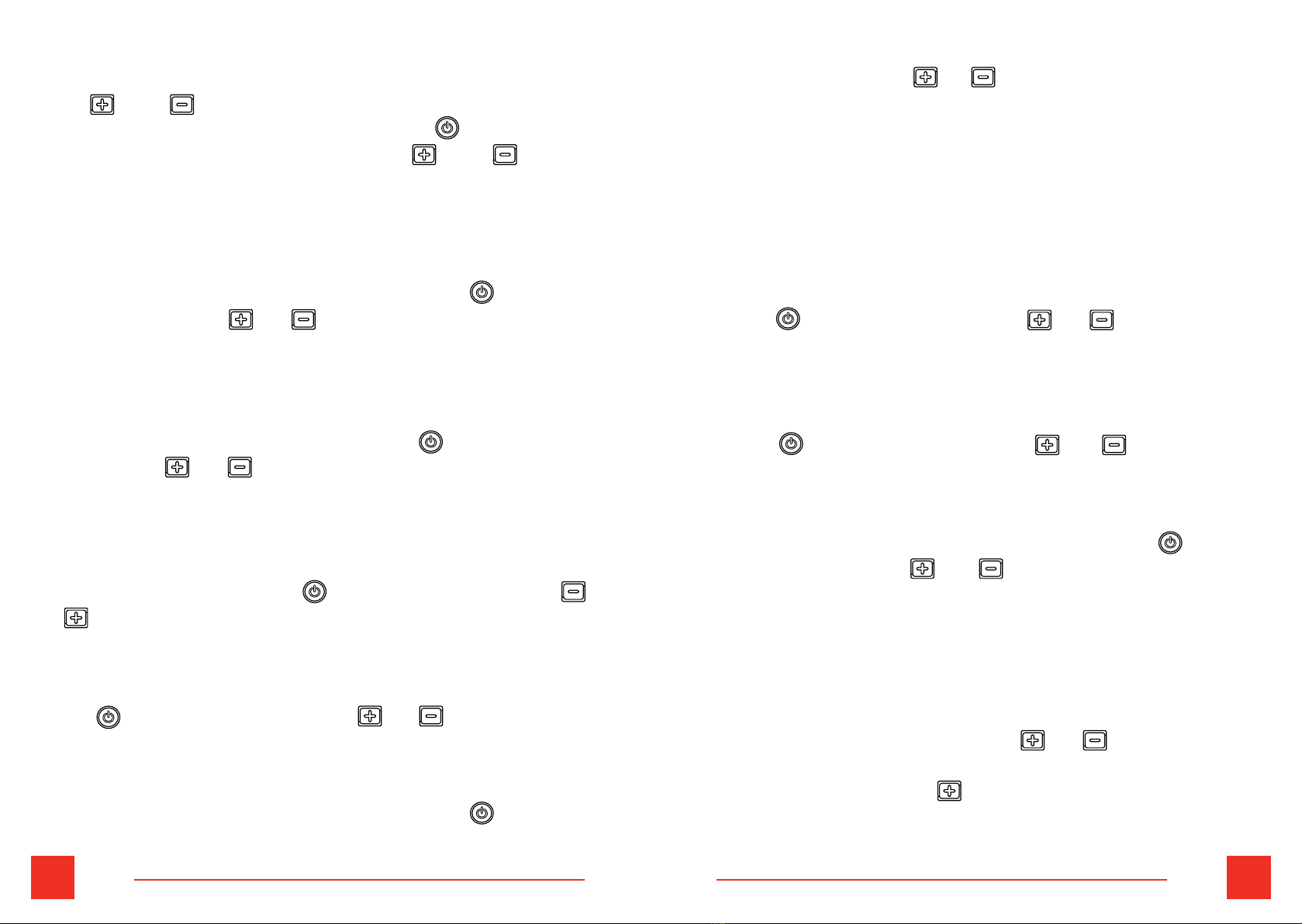
Pressandfor3Stoenterthesettinginterface
orreturntothemaininterface.Shortpresstoswitch
settingoptions.Aftersetting,longpressandto
returntothemaininterface.
Parameter setting and definition
P02: Mileage unit
Afterenteringthesettinginterface,thenpressto
switchtoP02:pressortoselect0(MILE-default)
or1(KM).
P04: Sleep time
From0to60minutes,0meansalwayson.After
enteringthesettinginterface,thenpresstoswitch
toP04:press ortoselectfrom0to60(Default:5
minutes).
P06: Wheel diameter
Calculatedbyinch,theprecisionis0,1.Afterenteringthe
settinginterface,thenpresstoswitchtoP06:press
ortoselectthediameter(Default:10).
P07: Number of tachometer magnets
Range:1-100.Afterenteringthesettinginterface,then
press toswitchtoP07:pressortoselectthe
numberofthemagnets(Default:30).
P09: Zero start
Afterenteringthesettinginterface,thenpressto
Function menu settings
16 17 ENEN
ODO: To clear ODO
IntheODOparametersettinginterface,brieypressthe
buttonandthenpressandholdfor5-6secondsuntilthe
numberiszero.
NO. Error
Code Definition
1 ERRO 1 Motorfailure
2 ERRO 2 Acceleratorthrottlefailure
3 ERRO 3 Controllerfailure
4 ERRO 4 Brakefailure
5 ERRO 5 Undervoltageprotection
6 ERRO 6 Communicationfailure,thedisplaycannot
receivetheoutputfromthecontroller
7 ERRO 7 Communicationfailure,thecontroller
cannotreceivetheoutputfromthedisplay
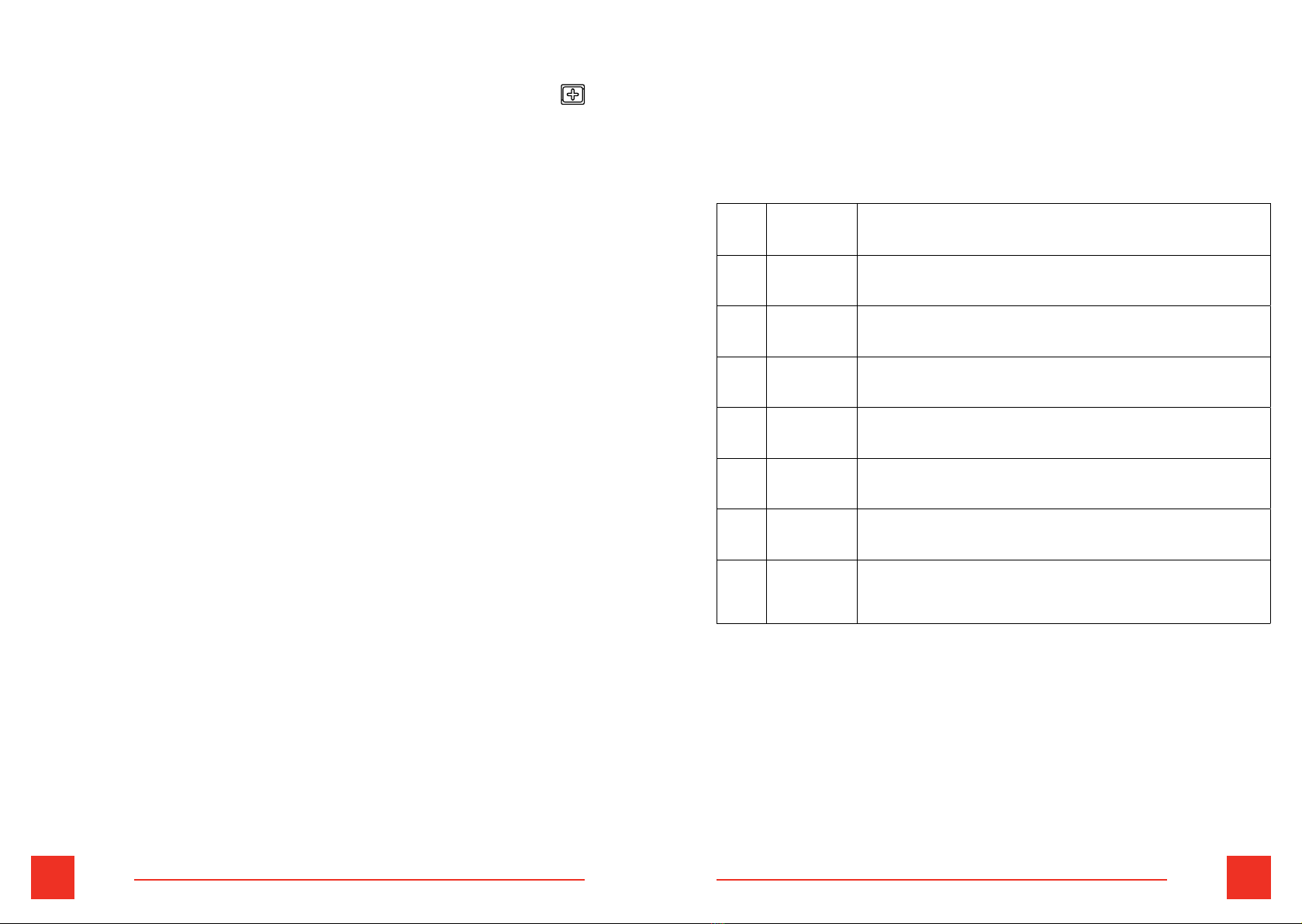
Error Codes
Thenumbercorrespondingtothemulti-functionarea
representsthecorrespondingfaultcontent.Thespecic
statusisasfollows:
Other manuals for S5
2
This manual suits for next models
1
Table of contents
Languages:
Other Joyor Scooter manuals