JBL On Time 400iHD User manual

JBL ON TIME™400iHD
HD/AM/FM SPEAKER DOCK FOR iPod
USER GUIDE
English............................... 2
iPod not included.
0033CSK - JBL On Time 400iHD Samlet v9.indd 1 15/08/08 12:35:36

2JBL ON TIME 400iHD USER GUIDE
IMPORTANT SAFETY INSTRUCTIONS
PLEASE READ THE FOLLOWING PRECAUTIONS BEFORE USE:
•Read these instructions, heed all warnings and keep for future reference.
•Do not use this apparatus near water.
•Clean only with a dry cloth.
•Do not block any ventilation openings; a minimum distance of 10mm around the entire apparatus is required for sufficient ventilation.
•No naked flame sources, such as lighted candles, should be placed on or near the apparatus.
•Attention should be drawn to the environmental aspects of battery disposal.
•The apparatus is to be used in moderate climates only.
•Do not install near any heat sources such as radiators, heat registers, stoves or other apparatuses (including amplifiers) that produce heat.
•Do not defeat the safety purpose of the polarized or grounding-type plug. A polarizing plug has two blades with one wider than the other. A grounding-
type plug has two blades and a third grounding prong. The wide blade or third prong is provided for safety. If the provided plug does not fit into your
outlet, consult an electrician for replacement of the obsolete outlet.
•Protect the power cord from being walked on or pinched, particularly at the plugs and convenience receptacles, and at the point where they exit from
the apparatus.
•Only use attachments/accessories specified by the manufacturer.
•Unplug this apparatus during lightning storms or when unused for long periods of time.
•Refer all servicing to qualified service personnel. Servicing is required when the apparatus has been damaged in any way, such as the power-supply
cord or plug is damaged, liquid has been spilled or objects have fallen into the apparatus, or the apparatus has been exposed to rain or moisture,
does not operate normally, or has been dropped.
•To be completely disconnected from the power input, the main plug of the AC/DC adapter shall be disconnected from the main.
•The main plug of the AC/DC adapter should not be obstructed OR should be easily accessed during intended use.
•The marking information is located at the bottom of the apparatus.
•The battery shall not be exposed to excessive heat such as sunshine, fire or the like.
•The apparatus and AC/DC adapter shall not be exposed to dripping or splashing, and no objects filled with liquids, such as vases, shall be placed on the
apparatus and AC/DC adapter.
•THERE IS A RISK OF EXPLOSION IF THE BATTERY IS REPLACED WITH AN INCORRECT TYPE OF BATTERY.
•TO PREVENT THE RISK OF ELECTRIC SHOCK, DO NOT REMOVE THE COVER (OR BACK). THERE ARE NO USER-SERVICEABLE PARTS INSIDE THIS UNIT.
PLEASE REFER SERVICING TO QUALIFIED HARMAN CONSUMER GROUP, INC., SERVICE PERSONNEL.
•Never remove grille covers in order to service the speaker system. The speaker system does not contain any user-serviceable parts.
IMPORTANT NOTE FOR ALL ELECTRONIC PRODUCTS:
Before inserting or unplugging audio cables from the source device’s headphones or line-level output jacks, it is good practice to turn off the device
first. This will prolong the life of your unit, help protect your device from static electricity and prevent potential damage.
0033CSK - JBL On Time 400iHD Samlet v9.indd 2 15/08/08 12:35:36

CAUTION
3
WWW.JBL.COM
IMPORTANT:
THE APPROPRIATE ADAPTER MUST BE INSTALLED BEFORE
INSERTING YOUR iPod INTO THE JBL®PRODUCT. MAKE SURE
THAT THE CONNECTOR FOR THE iPod IS PROPERLY ALIGNED
WITH THE JBL PRODUCT’S CONNECTOR WHEN INSTALLING
YOUR iPod. FAILURE TO DO SO MAY CAUSE PERMANENT
DAMAGE TO THE CONNECTOR FOR THE iPod, RENDERING
THE iPod INOPERABLE.
WARNING: TO PREVENT FIRE OR
ELECTRICAL SHOCK HAZARD, DO NOT EXPOSE
THIS PRODUCT TO RAIN OR MOISTURE.
WARNING: THE APPARATUS SHOULD
NOT BE EXPOSED TO DRIPPING OR SPLASHING
AND NO OBJECTS FILLED WITH LIQUID, SUCH AS
VASES, SHOULD BE PLACED ON THE APPARATUS.
THE EXCLAMATION
POINT WITHIN
THE TRIANGLE IS
A WARNING SIGN
ALERTING YOU
TO IMPORTANT
INSTRUCTIONS
ACCOMPANYING
THE PRODUCT.
CAUTION: TO REDUCE
THE RISK OF SHOCK, DO
NOT REMOVE COVER. NO
USER-SERVICEABLE PARTS
INSIDE. REFER SERVICING
TO QUALIFIED SERVICE
PERSONNEL.
THE LIGHTNING
FLASH AND
ARROWHEAD
WITHIN THE
TRIANGLE IS A
WARNING SIGN
ALERTING YOU
TO DANGEROUS
VOLTAGE INSIDE
THE PRODUCT.
RISK OF ELECTRIC
SHOCK — DO NOT OPEN
FCC STATEMENT AND WARNING
This device complies with Part 15 of the FCC Rules. Operation is subject to the following two conditions: 1) this device may not cause harmful interference, and
2) this device must accept any interference received, including interference that may cause undesired operation.
This equipment has been tested and found to comply with the limits for a Class B digital device, pursuant to Part 15 of the FCC Rules. These limits are designed
to provide reasonable protection against harmful interference in a residential installation. This equipment generates, uses and can radiate radio frequency
energy and, if not installed and used in accordance with the instructions, may cause harmful interference to radio communications. However, there is no
guarantee that interference will not occur in a particular installation. If this equipment does cause harmful interference to radio or television reception, which
can be determined by turning the equipment off and on, the user is encouraged to try to correct the interference by one or more of the following measures:
Reorient the receiving antenna.•
Increase the separation between the equipment and receiver.•
Connect the equipment into an outlet on a circuit different from that to which the receiver is connected.•
Consult the dealer or an experienced radio/TV technician for help.•
Any special accessories needed for compliance must be specified in the instruction manual.
MODIFICATIONSNOTEXPRESSLYAPPROVEDBYTHEMANUFACTURERCOULDVOIDTHEUSER’S AUTHORITYTO OPERATETHEEQUIPMENTUNDERFCCRULES.
English
0033CSK - JBL On Time 400iHD Samlet v9.indd 3 15/08/08 12:35:36

4JBL ON TIME 400iHD USER GUIDE
JBL ON TIME™400iHD
HD/AM/FM SPEAKER DOCK FOR iPod
The compact JBL On Time™400IHD speaker dock is an aesthetically pleasing, high-performance digital sound center that will revolution-
ize the way you discover music, listen to your radio and use your iPod.
The JBL On Time 400IHD system allows you to discover new music through the “TAG” feature. When using the HD Radio™feature,
simply press the illuminated TAG button and the JBL On Time 400IHD system will capture the song title, artist, album and all other data
associated with the song that the radio station is broadcasting. The tagged information will be transferred to your iPod; when you sync
your iPod to your iTunes library, you will have full access to all of the song information that you tagged.
The JBL On Time 400IHD speaker dock has full ability to navigate your iPod, both on the speaker dock itself and via IR remote. The
system also lets you wake up to your favorite radio station or iPod playlist. With the multiple-alarm option, you can set “his” and “hers”
alarms for whatever day or frequency you need.
EVERCHARGE TOPOLOGY
The JBL On Time 400IHD speaker dock charges your iPod, even when the system is off.
The system’s memory is maintained by a backup battery. Even with the power out, it will provide the alarm function.
COE (COMPUTER-OPTIMIZED EQUALIZATION)
The JBL On Time 400IHD system equalization is computer-optimized to provide a rich, complete soundstage.
OCT (OPTIMIZED COMPRESSION TOPOLOGY)
The JBL On Time 400IHD radio and speaker dock utilizes a proprietary compression technology to ensure clean, accurate sound at high
output levels.
0033CSK - JBL On Time 400iHD Samlet v9.indd 4 15/08/08 12:35:36

ENTER
TAG
AAA
AAA
AAA
DC In aux-in
FM AM antenna
FM
AM antenna
JBL
DC In aux-in
FM AM antenna
DC In
Aux In
or
5
WWW.JBL.COM
UNPACKING YOUR JBL ON TIME™400iHD
Carefully unpack your speaker system and identify all its components:
Adapters for iPod
IR remote
Audio cable
QUICK SETUP INSTRUCTIONS
•Choose the appropriate adapter for iPod and place it into the docking station. Then place your iPod into the adapter.
•For backup memory, install three AAA batteries in the battery compartment found underneath the unit.
•Connect the external AM antenna for better reception.
•Unwind the FM antenna and straighten the wire for the best reception.
•Plug the power adapter into the “DC In” jack and then plug the adapter into a wall outlet.
•If an additional audio source is used, connect the source to the “Aux In” jack.
JBL On Time™400IHD FM antenna
Power supply AM antenna
English
or
0033CSK - JBL On Time 400iHD Samlet v9.indd 5 15/08/08 12:35:37

TAG
TAG
Power
Enter
6JBL ON TIME 400iHD USER GUIDE
UNIT CONTROLS AT A GLANCE
TAG
The TAG feature is a music
exploratory feature allowing
you to capture information
about a song and artist
playing through an HD
channel. Press the TAG
button, and the song title and
artist information currently
broadcast from the HD radio
station will be transferred
to your docked iPod. The
next time you sync your iPod
to your iTunes library, all
the information that you’ve
tagged can be accessed.
HD Scan
The HD Scan feature will
surf all available HD stations
until you find the station you
would like to listen to.
Preset
The Preset feature allows you
to select or store your favorite
stations. Push the “PS” button
and a screen will come up to
give you the option of selecting
a stored favorite or storing a
new favorite station.
Mode
The Mode button allows you
to select AM, FM, AUX or
iPod listening preferences.
Volume Up
Volume Down
Select both Volume + and
Volume – buttons to mute.
Snooze
The Snooze feature allows you to set the
amount of time you would like to snooze
before the alarm sounds again. Push and
hold this button and you will be prompted
to select a snooze duration.
Menu Up
Step back one menu
per button push.
Scroll Down
Scroll Up
Alarm Setting
Push this button and you will be prompted
to set an alarm or turn on or off an existing
alarm. The alarm feature allows you to set
multiple alarms at frequency ranging from
daily to weekly (or limit it to just weekdays
and weekends).
Sleep Mode
Sleep mode
allows you to
fall asleep to
your favorite
radio station or
iPod playlist.
Push this
button and
select a Sleep
mode option.
0033CSK - JBL On Time 400iHD Samlet v9.indd 6 15/08/08 12:35:38

ENTER
TAG
7
WWW.JBL.COM
TAG
REMOTE CONTROLS AT A GLANCE
Power On/Power Off
HD Scan
Pause/Mute
Fast Forward
Fast Reverse
Tune/Seek Up
Snooze
Recalls Snooze menu screen.
Top Menu
Preset
Recalls and sets Preset stations.
Top Menu
TAG
Captures song and title information when
you are listening to an HD station.
Sleep Mode Hot Key
Volume Up
Volume Down
Tune/Seek Down
Mode
Scroll Down Scroll Up
iPod
Takes you to iPod mode.
English
0033CSK - JBL On Time 400iHD Samlet v9.indd 7 15/08/08 12:35:39

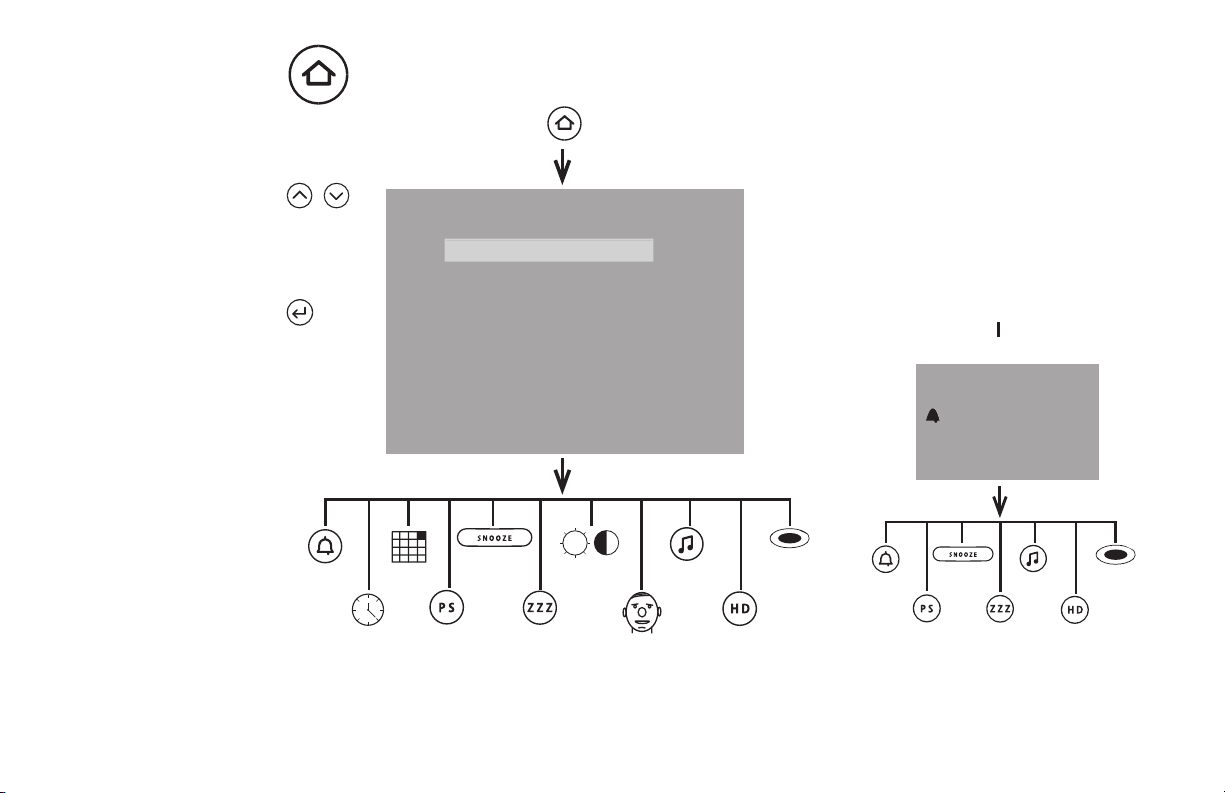
TOP MENU
8JBL ON TIME 400iHD USER GUIDE
These buttons
will allow the user
to scroll up and
down through the
highlighted text.
The Enter button will
allow the user to select
the desired setting.
Clock Setting
Alarm Setting
Preset Setting
Sleep Setting
Date Setting
Brightness/Contrast
Snooze Setting
Language Setting
Dimmer Setting
Version Info
Top Menu
1/28/09 10:34am 790am KABC
0033CSK - JBL On Time 400iHD Samlet v9.indd 8 15/08/08 12:35:39

9
WWW.JBL.COM
1/28/09 790 am KABC 1 - HD)))
10:34 am
Joe Smith Talk Show
Artist, song title, commercial information, etc.
1/28/09 10:34am 1 - HD)))
790 AM KABC
Joe Smith Talk Show
Artist, song title, commercial information, etc.
1 MAIN SCREEN — FM/AM
10:34 am
1/28/09
1 MAIN SCREEN — POWER OFF
6:30 AM
6:30 AM
6:30 AM
1/28/09 10:34am 1 - HD)))
Mode Information
Joe Smith Talk Show
Artist, song title, commercial information, etc.
2 MAIN SCREEN — MODE DISPLAY
6:30 AM
2 MAIN SCREEN — FM/AM
TOP MENU
English
0033CSK - JBL On Time 400iHD Samlet v9.indd 9 15/08/08 12:35:39
6:30 AM
TAG
TAG
10 JBL ON TIME 400iHD USER GUIDE
These buttons
allow the user
to scroll up and
down through the
highlighted text.
The Enter button
allows the user
to select the
desired setting.
Alarm Settings
See page 13
Clock Settings
See page 11
Date Settings
See page 12
Language Settings
See page 20
AM/FM Preset
Settings
See page 14
Snooze Settings
See page 16
Sleep Settings
See page 16
Brightness/Contrast
Settings
See page 17
Mode Settings
See page 18
HD Scan
See page 18
Tag Information
See page 19
Clock Setting
Alarm Setting
Preset Setting
Sleep Setting
Date Setting
Brightness/Contrast
Snooze Setting
Language Setting
Dimmer Setting
Version Info
Top Menu
1/28/09 10:34am 790am KABC
TOP MENU
1/28/09 10:34am 1 - HD)))
790 AM KABC
Joe Smith Talk Show
Artist, song title, commercial information, etc.
1 MAIN SCREEN — FM/AM
To Top Menu – See page 8
Alarm Settings
See page 13
AM/FM Preset
Settings
See page 14
Snooze
Settings
See page 16
Sleep Settings
See page 16
Mode Settings
See page 18
HD Scan
See page 18
Tag Information
See page 19
0033CSK - JBL On Time 400iHD Samlet v9.indd 10 15/08/08 12:35:40
Table of contents
Languages:
Other JBL Docking Station manuals

JBL
JBL JBL On Stage Micro User manual

JBL
JBL On Time User manual

JBL
JBL ON STAGE III User manual

JBL
JBL radial micro User manual

JBL
JBL ON STAGE MICRO III User manual

JBL
JBL ONBEAT AWAKE User manual

JBL
JBL ON TIME MICRO User manual

JBL
JBL OnBeat RIZE User manual

JBL
JBL ON STAGE 200iD User manual

JBL
JBL ON AIR WIRELESS User manual

JBL
JBL On Stage III WM User manual

JBL
JBL ON STAGE 400P User manual

JBL
JBL On Time User manual

JBL
JBL OnBeat air User manual

JBL
JBL ON TIME MICRO User manual

JBL
JBL 10950-0113-001 User manual

JBL
JBL On stage Quick start guide

JBL
JBL ON STAGE IV User manual

JBL
JBL ON TIME 400lHD User manual

JBL
JBL On Call 5310 User manual