
iPA SMART MUTT 9004A User manual

Uses Internal 12 Volt Motorcycle Battery.
Tests Trailers Using 7 Spade, 6 Round, 5 and 4 Pin Type Connections.
Innovative Products of America®Incorporated
888-786-7899 | www.ipatools.com
234 Tinker Street, Woodstock, NY 12498
OPERATOR’S MANUAL
Mobile Universal Trailer Tester
#9004A SMART MUTT®
© 2012 Innovative Products of America®, Incorporated. All
rights reserved. This material may not be reproduced, dis-
played, modied or distributed without the express prior
written permission of the copyright holder. For permission,
contact [email protected].

2
My name is Peter Vinci and I am the president of IPA®. I would like to rst thank you for
your interest in IPA®’s product line and share my commitment to you, our products and
our policies. In today’s world, we have all experienced the lack of service and consider-
ation demonstrated by many companies after you buy their products. They say whatev-
er they can to make the sale, and then it’s like pulling teeth to get any service response
out of them. I know this myself rst-hand and because of this, I want to be sure that your
experience with IPA® meets your expectations and that IPA® never disappoints you
with our service or customer response.
To prove my commitment to you, if for any reason you are not happy with one of our
products or more importantly, with the response from our customer service or any mem-
ber of the IPA® team for any reason, I invite you to contact me directly via my email,
me than the sale itself. We will not be in business for long if we don’t make you com-
pletely happy with our products and service. I want IPA® to be different and to be known
for its quality and service.
With that said, please take a look at our product line. You will see innovative rst time
products that were created to help you do your job faster and better than before. I would
also like to invite you to critique our products. If you can think of a better way to make
them or changes that will make them better, then again, please contact me directly and I
will be sure to look into it. If you have an innovation and would like some feedback, give
me a call.
From all of us at IPA®, we thank you for taking the time to review our product line and
wish you and your family the very best of everything.
Peter Vinci
President
IPA®
www.ipatools.com
Toll Free: 888-786-7899
Phone: 845-679-4500
Fax: 845-679-4600
LETTER FROM THE PRESIDENT OF IPA

3
A ANTENNA WIRE ASSEMBLY
B 30 AMP AMMETER GAUGE
C CONTROL KNOB
D CARRYING HANDLE
E 7 WAY FLAT/SPADE SOCKET
F FUSE HOLDER (30 AMP ATO/ATC)
G POWER SWITCH
H TRICKLE CHARGE INPUT
I REMOTE CONTROL FOB
J REMOTE CONTROL FOB BATTERY
K 7 WAY FLAT TO 6 ROUND & 4/5 FLAT ADAPTER
L 500 mA/12V TRICKLE CHARGER PLUG
9004A SMART MUTT® PARTS
USE THE REFERENCE NUMBERS PROVIDED WHEN
ORDERING PRODUCTS & PARTS ABOVE
Toll Free: 888-786-7899

4
IMPORTANT SAFETY INSTRUCTIONS
IT IS IMPORTANT TO READ, UNDERSTAND AND FOLLOW ALL SAFETY MESSAGES AND
INSTRUCTIONS PRINTED IN THIS MANUAL AND ON THE EQUIPMENT BEFORE OPERATING. IF
SAFETY INFORMATION IS NOT HEEDED, SERIOUS INJURY OR DEATH TO THE OPERATOR OR
BYSTANDERS MAY OCCUR.
THE FOLLOWING SAFETY ALERT SYMBOLS ARE USED IN THIS MANUAL.
DANGER: indicates a hazardous situation, if not avoided, will result in death or serious
injury. The possible hazards are shown in the adjoining symbols or explained in the text.
WARNING: indicates a hazardous situation, if not avoided, could result in death or serious
injury. The possible hazards are shown in the adjoining symbols or explained in the text.
CAUTION: indicates a hazardous situation, if not avoided, may result in minor or major
injury. The possible hazards are shown in the adjoining symbols or explained in the text.
SYMBOL 1: Potential burn hazard. Sparks from electrical shorts can ignite ammable
liquids such as fuel or oil. Heat from electrical overloads can cause re hazards.
SYMBOL 2: Potential electrical hazard. Batteries have enough electrical energy poten-
tial to ignite ammable liquids such as fuel or oil. Wire overloads can cause electrical
failures. Shock hazard exists.
SYMBOL 3: Potential explosive air hazard. Pneumatic pressures used with this
equipment can cause explosive failures on damaged equipment.
SYMBOL 4: Potential eye hazard. Wear OSHA approved safety glasses. Battery acid
and high air pressures create hazardous situations for eyes.
SYMBOL 5: Potential chemical burn hazard. Wear protective gloves. Battery acid is cor-
rosive and can cause skin damage.
SYMBOL 6: Potential electrical hazard. Electrical energy can cause heat and burn
hazards.
SYMBOL 7: Potential re hazard. Use caution with ammable liquids such as fuel and
oil. Electrical shorts can ignite ammable liquids and wiring.
SYMBOL 8: Important information is stated.

5
BATTERY GASES, TESTER PREPARATION
AND TESTER/CHARGER LOCATION
RISK OF EXPLOSION
• Gases produced by a battery are highly explosive.
• Wear safety goggles and protective clothing, both users and bystanders.
• Use in an area having at least four air changes per hour.
• Read, understand and follow all instructions for charger, battery, vehicle and any
equipment used near battery and charger.
• Do not smoke, strike a match, place metal tools on battery or cause a spark in the
vicinity of the battery. When removing battery cables, remove the ground cable rst.
• Clean terminals before charging battery. During cleaning, keep corrosive particles from
eyes, nose and mouth. Use baking soda and water to neutralize acid and help eliminate
airborne corrosion.
• Never allow clamps on charger cables to touch each other.
• Do not expose tester or charger to rain, snow, or wet conditions.
• Do not allow battery gases or acid to contact MUTT® cabinet. Do not place charger
directly above or below battery.
• Fill battery to level specied by battery manufacturer using distilled water.
• Do not remove cell caps while charging per manufacturer’s instructions.
• Make sure tester cable clamps make tight connections.
• Battery explosion can cause injury.
ACID BURNS
• Battery acid is highly corrosive sulfuric acid.
• Wear safety goggles, both user and bystanders.
• Wear safety gloves.
• Make sure someone can hear you or is close enough to provide aid when working
near battery.
• Have plenty of fresh water and soap nearby. If battery acid contacts skin, clothing or
eyes, ush the exposed area with soap and water for 10 minutes. Seek medical help.
• Do not touch eyes while working near battery.
• Battery acid can burn eyes and skin.

6
GENERAL CHARGER USE
RISK OF ELECTRIC SHOCK AND FIRE
• Before connecting power cord to charger, make sure
controls are set to off.
• DC power only.
• Do not plug directly into AC wall outlet.
• Do not remove or bypass the grounding pin.
• Do not operate charger with damaged cord or plug. Replace cord or plug immediately.
OPTIONAL CHARGER
• Position power cord and charger cables away from the hood, doors or hot and/or
moving engine parts where they could be damaged.
• Unplug power cord using plug rather than cord when disconnecting charger from outlet.
• Do not operate charger after a sharp impact, dropping or any other damage. Do not
disassemble charger.
• Use only recommended attachments.
• Do not charge a frozen battery. Do not overcharge a battery.
• Use charger only for lead-acid automotive batteries. Do not use charger for charging
dry cell batteries.
• Electric shock or re can cause injury.
RISK OF ENTANGLEMENT
• Keep yourself, clothing and battery charger leads clear of moving parts such as fan
blades, pulleys, hood, and doors.
• Moving parts can cause injury.
RISK OF BURNS
• Batteries can produce short circuit current high enough to weld jewelry such as rings,
bracelets and watches. You must remove them before working near batteries.
•Short circuits can cause injury.
SPECIFICATIONS
THE SMART MUTT® INCLUDES THE FOLLOWING:
• Key Fob Remote with Battery
• Battery Charger (500 mA)
•3-Way Trailer Socket Adapter
•Antenna
•Instruction Manual
DC POWER ONLY
Do not plug directly into
AC wall outlet

7
INTERNAL BATTERY REQUIREMENTS:
(Battery not included)
• Internal Battery Dimensions: H: 5 3/4” L: 5 7/8” W: 3 3/8” (YUASA YTX14 or similar)
• Battery Type: Lead Acid
• Battery Protection: Inline 30 Amp Fuse for Overcharge Current Protection
• Tester Output: Maximum output to trailer 20 Amps
• Maximum Charging Input: 10 Amps
SET-UP
• Place the tester on a at level surface.
• Chock trailer wheels to avoid rolling.
• Use the supplied battery charger or charger input no greater than 10 Amps to fully
charge the internal battery of the tester. It may take up to 12 hours to charge a fully
drained battery.
QUICK START-UP GUIDE
The SMART MUTT®uses a diagnostic program to quickly identify wiring problems
for the technician. When used properly, the Tester will spot the most common
causes for electrical failure before you walk around the trailer.
CHECK 7 PIN CONNECTORS: Before operating the SMART MUTT®, be sure the 7
at/spade pin connections on the right side of the unit are in good condition and pins
are spread to the proper width to ensure good connections. Check the end of the 7 at/
spade pin plug coming from the trailer.
MAINTAIN 7 PIN CONNECTORS: Dielectric grease should be used on all connections
to avoid corrosion. If a bad connection exists at the terminal junction, you may get an er-
roneous reading and the MUTT® will not work properly. Make sure that you have a solid
connection in the 7 way socket.
TO PROGRAM YOUR REMOTE: Turn the SMART MUTT® on while holding down
the large button on the remote, then let go after 3 seconds. Your remote is now pro-
grammed to the tester. (Up to 24 separate remotes can be purchased and programmed
to one SMART MUTT®.)
INITIAL POWER UP SCAN: Upon initial power up (while connected to trailer), the
MUTT® checks every circuit for ground integrity and open circuits. If at any time a circuit
indicator LED (e.g. clearance or brake lights) is steadily blinking immediately following
power up, this is an indication of an open circuit or poor ground. An open circuit could be
a cut wire, an improper pin connection, or the circuit is not available (hooked up) on that
trailer. Be sure to wiggle your 7 way connectors to make sure it is not just a loose pin
connection at the socket. If all the LEDs are ashing, you have a poor ground connection.

8
FUNCTIONAL DESCRIPTIONS
The SMART MUTT® is a diagnostic tool for trailers wired to North American style
congurations including 7 spade, 4, 5 and 6 round pin connectors.
A. CONTROL KNOB (Fig. 2)
Knob activates all electrical test modes and circuits to be diagnosed.
• Manual Mode • Auto Cycle Mode
• Warning Sound Bypass • Individual Circuit Select
B. VOLTAGE INDICATOR (Fig. 2)
Shows battery supply voltage integrity
• Green: 11.7V+ • Yellow: 11.6V
• Red: 11.0V • Shutoff: 10.5
AVOID MISDIAGNOSIS:
• Before attaching to trailer connector, make sure all sockets and pins are clean and tight.
Any loose or corroded connector may cause a misdiagnosis.
• Use a well-charged battery. (10 Amp max. charge rate)
LOW VOLTAGE POWER CUT OUT:
If the input battery voltage to the MUTT® drops below 11 volts at any time during testing,
you may experience erroneous readings. Be certain the battery stays charged while
testing. If the voltage drops below 10.5 while testing, the MUTT®’s microprocessor will
momentarily power down before reapplying power. This may occur repeatedly and will
correspond with the battery voltage indicator illuminated red, signifying a low battery
voltage. (Low voltage cutout should not be confused with overload/short circuit power
pulsing, which will apply and remove power when a short circuit is detected.)
Fig. 2 - Control & Information Panel

9
C. AUTO CYCLE INDICATOR (Fig. 2)
Illuminates when Auto Cycle is engaged.
Auto Cycle Mode cycles through all circuits in 5 second intervals in a clockwise
rotation. To enter Auto Cycle mode, press indicator knob once. To disable Auto
Cycle Mode, depress or rotate the control knob.
D. GROUND INTEGRITY (Fig. 2)
Large green LED above control knob indicates ground status. Ground Integrity is
automatically veried when power is turned on.
E. CIRCUIT INDICATORS (Fig. 2)
The six small green LEDs illuminate or blink during testing phase.
F. WARNING INDICATORS (Fig. 2)
Flashing red LEDs indicate problems that may exist in a selected circuit.
• Overload Indicator • Open Circuit Indicator • Polarity Indicator
G. BACKLIT 30 AMP AMMETER (Fig. 2)
Meter shows current draw of a selected circuit up to 30 Amps.
H. ANTENNA (Fig 2. & Fig. 5)
Receives RF signal from wireless remote.
Binding post allows antenna length insertion for further distances in inclement
weather. It is recommended the antenna be installed for optimum performance.
I. 12V DC BATTERY CHARGER INPUT (Fig. 3)
Use for connection of trickle charger to battery. Allows oat charge to be kept on
battery when unit is not in use.
J. POWER SELECTION SWITCH (Fig. 3)
Select between internal battery or power off.
• Center: OFF (battery charge in this position only)
• Left: internal battery ON
• Right: internal battery ON
K. FUSE HOLDER (30 AMP ATO/ATC) (Fig. 3)
Overload protection. The 30 Amp ATO/ATC fuse (included) is required for the Smart
MUTT®to function.
Fig. 3 - Power Panel

10
OPERATING INSTRUCTIONS
This section contains information on the usage of the #9004A Mobile Universal Trailer
Tester (SMART MUTT®).
7 WAY FLAT/SPADE PIN TESTING PROCEDURE
To avoid false readings:
• Visually inspect trailer socket for corroded and/or squeezed pins.
• Bad or broken socket pins can cause false readings. Clean all connections and load
socket with a dielectric grease.
MANUAL TESTING MODE
NOTE: Prior to any testing on the MUTT®, connect the trailer to the tester or you will
receive erroneous readings. The MUTT®is to be used while connected ONLY.
• Secure the 7 at/spade cable from trailer to socket on the right side of the tester.
Initial power starts a test cycle through all the LEDs. This performs the Ground
Integrity test / Open Circuit test.
• Check Voltage Indicator (Fig. 2-B) for green illumination. In the case of low or weak
supply voltage, yellow color illuminates. Red illumination from the Voltage Indicator
shows inadequate power supply. Also see Warning Indicator section (page 12).
• Ground Integrity Check: When the SMART MUTT® is rst turned on, notice the green
lights circling the dial. This indicates the SMART MUTT® testing for ground integrity.
If there is a lack of ground, all the green lights begin to ash to alert you to the ground
problem. If you only see one green light ashing, this indicates an open circuit (check
TRAILER CONFIGURATION SET-UP
The 9004A Smart MUTT is a microprocessor controlled diagnostic trailer tester speci-
cally designed for testing lights and electric brakes on trailers with 4, 5, 6 Round pin and
7 Spade Pin type connections. Every time you power up the tester, the internal com-
puter wants to know which type of trailer connection you are testing. Note, this phases
is known as Trailer Conguration Set up and is indicated by a high speed ickering of
the LEDs surrounding the control knob. If left untouched after 15 seconds, the tester will
always default to a 7-spade pin conguration. However, if the user is testing a 4, 5, or
6 round Pin type trailer connection, this setting can be adjusted by rotating the control
knob counterclockwise to select the desired number of circuits (as noted on the face
panel). Trailer Conguration Setup is repeated each time the unit is powered up.
Testing 4, 5, and 6 Round Pin Type Trailer Connections
The 9004A is hard wired to a 7-spade pin connector, located on the side of the tester.
Each unit is supplied with a plug-in adapter, which will adapt the 9004A to 4,5 and 6
round pin type connections. To test trailers with these types of connections, this adapter
must be plugged In line between the Tester and the Trailer. The instructions above for
Trailer conguration set up, should be used for more efcient and accurate testing.
Call 888-786-7899 with any technical questions.
Other manuals for SMART MUTT 9004A
1
Table of contents
Other iPA Test Equipment manuals
iPA
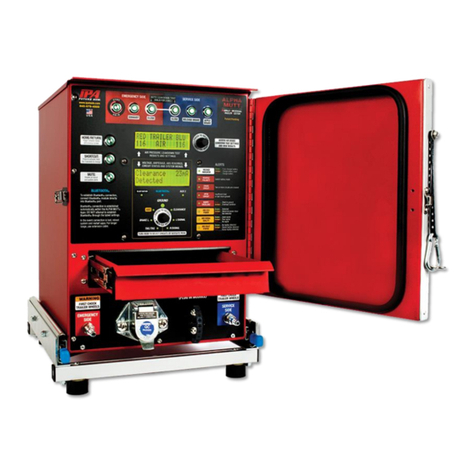
iPA ALPHA MUTT User manual

iPA
iPA HEAVY RANGER MUTT 9102 User manual

iPA
iPA Alpha MUTT 5700 User manual

iPA
iPA SMART MUTT 9004A User manual

iPA
iPA LIGHT RANGER MUTT 9101 User manual

iPA
iPA Alpha MUTT 5700 User manual

iPA
iPA SMART MUTT X User manual

iPA
iPA 8010 User manual

iPA
iPA SUPER RANGER MUTT User manual

iPA
iPA Alpha MUTT with ABS User manual


