invicon blue tron Manual

Information and directions for use
Informations concernant l‘utilisation
Foglio illustrativo
Instrucciones de uso
Gebrauchsinformation

2 | invicon blue:tron®

invicon blue:tron®| 3
blue tron®- Information and directions for use
1. Safety
1.1 General notes
1.2 Warning labels in the user manual
1.3 Safety notices
1.4 Intended use
1.5 Standards and classifications
1.6 Device identification
2. Description of device
2.1 Application areas
2.2 Device features
3. Tasks to be done before using blue:tron®for the first time
4. blue:tron®display
4.1 Display: Overview
4.2 Display: Distance protection
4.3 Display: 15 second exposure
4.4 Display: 60 second exposure
4.5 Display: N3 exposure
4.6 Display: Error messages
5. Function keys
5.1 Function key actions
5.2 On/off button
6. Exposure
6.1 Contact exposure: 15 seconds
6.2 Distance exposure: 60 seconds
6.3 Short exposure N2: 3 seconds
6.4 Distance protection
7. Storage
8. Online service/Diagnostics
9. Specifications
EU Declaration of Conformity
Warranty
4
4
4
4
5
6
6
7
7
7
8
9
9
9
10
10
10
11
12
12
12
13
13
13
13
14
14
14
15
16
17
english

4 | invicon blue:tron®
1. Safety
1.1 General notes
Please carefully read this user manual before using the device for the first time.
It contains important instructions for safely using your device and its accessories.
1.2 Warning labels in the user manual
The user manual contains the following types of special warning labels next to any dangerous work steps.
Note!
Note text
In addition to the warnings, there is a general note with useful information.
Danger!
A hazardous situation that can result in serious injury or death.
Warning!
A hazardous situation that could result in serious injury or property damage.
Caution!
A hazardous situation that could result in moderate injury or property damage.
1.3 Safety notices
Danger!
LED lighting – light source
Explosion hazard in rooms with highly flammable atmospheric conditions
-> Do not use the device in potentially explosive atmospheres.
Danger!
Electromagnetic interference
Could cause pacemakers or other implanted electronic devices to malfunction.
-> Do not use the device near a pacemaker or other implanted electronic medical device.

invicon blue:tron®| 5
english
1.4 Intended use
blue:tron®can be used to cure light polymerising materials.
Areas of application include repairing stone, artificial stone, ceramics, and surfaces of tiles. Other applications include designing
coloured surfaces on watches and pieces of jewellery.
blue:tron®is ideal for use in craft and industrial applications.
· Only trained personnel are allowed to use blue:tron®
· Always wear safety glasses when using blue:tron®
Caution!
Water impact on device
Water could damage the device.
- Do not hold the device under running water or immerse it in water.
- Keep the device out of reach of children.
- Only use original manufacturer accessories.
- In case of malfunctions, immediately request assistance from an authorised customer service or Invicon Chemical Solutions.
Warning!
LED lighting – light source
- Always wear safety glasses when using the device.
- Make sure that the anti-glare cap is correctly fitted.
- Never point the light beam toward anyone’s eyes.
- Always point the light beam toward the polymerisation surface.
Warning!
Defective device
Risk of injury from non-functioning parts of the device.
Each time before you use the device, check the following:
- That the device and accessories are in proper working condition
- That the anti-glare cap is correctly fitted
- That the ventilation slots are unobstructed

6 | invicon blue:tron®
1.5 Device identification
The following device identification information is located on the device and the charger:
· Model
· Serial number
· Supply voltage
· Power consumption
Please provide this information when you contact an authorised customer service or Invicon chemical solutions.
This information allows our customer service to quickly and efficiently resolve the problem.
1.6 Standards and classifications
Classification in accordance with IEC 62471:2006 / EN 62471:2008 Risk Group 2 (Medium Risk)
blue:tron®EMC measurements in accordance with:
Emissions:
CISPR 15 / EN IEC 55015
IEC 61000-6-3
IEC 61000-3-2
IEC 61000-3-3
Immunity:
IEC 61547
IEC 61000-6-1
0123456789

invicon blue:tron®| 7
english
2.1 Application areas
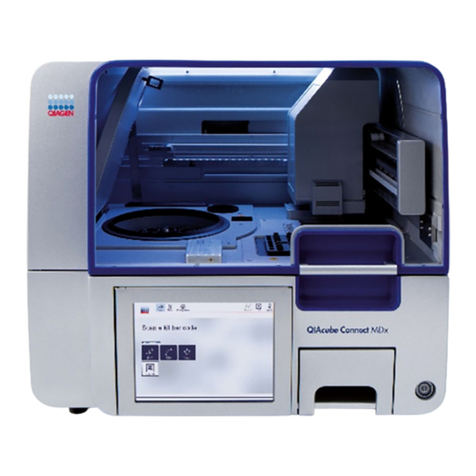
blue:tron®is a portable, mobile blue light curing device with built-in rechargeable battery. It is ideal for targeted curing of
light-curable, liquid materials in the 440 nm to 455 nm wave spectrum.
Recommendation: Always use blue:tron®in battery mode without the charger. Do not charge the blue:tron®battery while curing.
Application areas:
· StoneLux®2.0 repair materials
· HyCeram®Bond II materials
· HyCeram®Bond THX NF materials
·LuxArt®design composites
·Luxon®design acrylate
2.2 Device features
2. Description of device
Soft edge
Comfortable and practical working
OLED display
Simple, functional menu navigation and easy readability even
in bright light
Function keys
Control keys for all device functions and
device information
LEDs
3 powerful blue light LEDs for high-speed curing in seconds,
overheating protection: when the LED temperature reaches
90°C / 194°F
Battery packs
3 battery packs with 4 rechargeable batteries each for high
light output, long portable operation, overheating protection:
when the battery temperature reaches 55°C/131°F
USB port
For online diagnostics and function updates
Fan
Automatic cooling. Turns on automatically when the LED
temperature reaches 50°C/122°F
Power connection
To recharge the battery or to connect the device
to the mains power
Charging cable
To charge the battery
Anti-glare cap
Protects against glare, enlarges exposure area,
increases stability of device
Safety glasses
It is mandatory to wear safety glasses when using blue:tron®
in order to protect the eyes from high glare
See the user manuals for
StoneLux®2.0 I HyCeram®I LuxArt®I Luxon®
for detailed application information.

8 | invicon blue:tron®
OLED display
Function keys
Battery pack 1
Fan
On/off button
USB port
Power connection
Anti-glare cap
Battery pack 2
3 high-performance LEDs
Safety glasses
Charging cable
3. Tasks to be done before using blue:tron®for the first time
· Check if all parts were delivered
light curing device I charging cable I red anti-glare cap I safety glasses
· Check blue:tron®for any mechanical damage
· Fully charge the battery as follows
Step 1: Insert the output connector of the power adapter into the port on the underside of the device.
Step 2: Plug the power adapter into a power outlet.
Step 3: Fully charge the battery pack for about 3 to 5 hours or until the charging bar indicates a full charge and stops flashing.
Note!
The battery charge level is shown on the device display.
invicon blue:tron®| 9
Bluetron –Icon Redesign
Ansicht «Sensor»
Gestaltung: Wille Grafik DesignStand: 10.05.2022
Gerät eingeschaltet Abstandserkennung /Sensor Sensor deaktiviert
Bluetron –Icon Redesign
Ansicht «Sensor»
Gestaltung: Wille Grafik DesignStand: 10.05.2022
Gerät eingeschaltet Abstandserkennung /Sensor Sensor deaktiviert
english
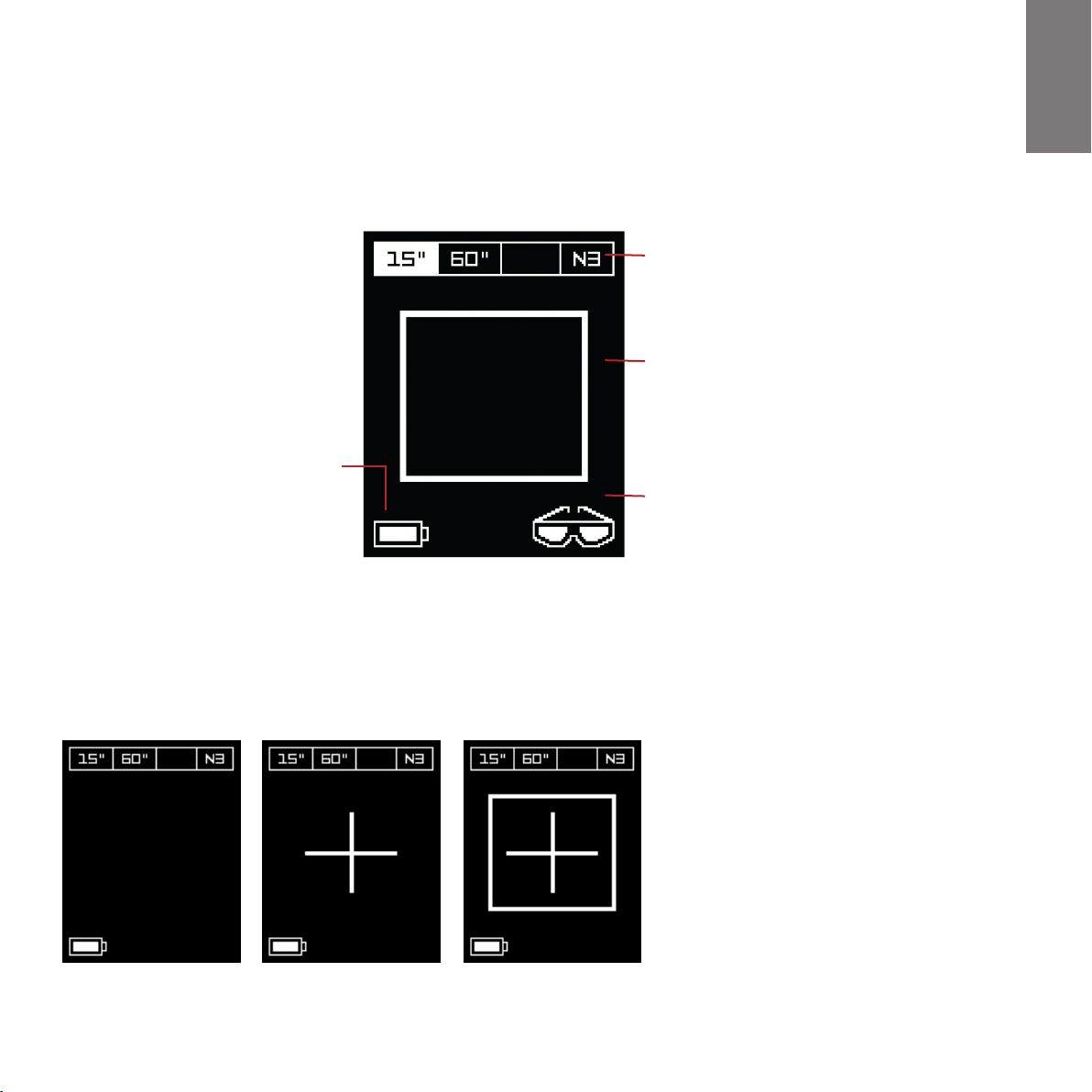
4. blue:tron®display
4.1 Display Overview
OLED display with 2 integrated function keys
Status bar
Provides information about the exposure mode
15 seconds I 60 seconds I N3 = 3 seconds
Display
Provides information about exposure,
device, and safety functions.
Safety glasses
Always wear safety glasses when using blue:tron®.
Battery charge level
Shows the battery
charge level (100%-0%).
Sensor deactivated Device on Distance detection/sensor
4.2 Display Distance protection

10 | invicon blue:tron®
Bluetron –Icon Redesign
Ansicht «Vorgang 15 Sekunden»
Gestaltung: Wille Grafik Design
Vorgang beendetVorgang starten Vorgang 15 Sekunden –Countdown
Stand: 10.05.2022
Bluetron –Icon Redesign
Ansicht «Vorgang 60 Sekunden»
Gestaltung: Wille Grafik Design
Vorgang 60 Sekunden– Countdown
Stand: 10.05.2022
Vorgang beendetVorgang starten
Gestaltung: Wille Grafik Design
Vorgang N3– Countdown «3» Vorgang N3 – Countdown «2» Vorgang N3– Countdown «1»
Bluetron –Icon Redesign
Ansicht «Vorgang N3»
Stand: 10.05.2022
4.3 Display 15 second exposure
4.4 Display 60 second exposure
4.5 Display N3 exposure
Curing: The tick indicates that curing
is complete (15 sec).
Curing: The tick indicates that curing
is complete (60 sec).
This short exposure is not suitable for
curing StoneLux®2.0 repair materials.
N3 countdown “3”
Start process
Start process
N3 countdown “2”
60 sec countdown
15 sec countdown
N3 countdown “1”
Process finished
Process finished
Table of contents
Languages: