Intellijel Cascadia User manual

Cascadia
Advanced, Performance-Oriented, Semi-Modular Synthesizer
Manual (English)
Revision: 2023.04.12
FCC COMPLIANCE STATEMENT
This device complies with part 15 of the FCC rules. Operation is subject to the following two conditions:
(1) This device may not cause harmful interference, and (2) this device must accept any interference
received, including interference that may cause undesired operation.
NOTE: This equipment has been tested and found to comply with the limits for a Class B digital device,
pursuant to Part 15 of the FCC Rules. These limits are designed to provide reasonable protection against
harmful interference in a residential installation. This equipment generates, uses and can radiate radio
frequency energy and, if not installed and used in accordance with the instructions, may cause harmful
interference to radio communications. However, there is no guarantee that interference will not occur in a
particular installation. If this equipment does cause harmful interference to radio or television reception,
which can be determined by turning the equipment off and on, the user is encouraged to try to correct the
interference by one or more of the following measures:
• Reorient or relocate the receiving antenna.
• Increase the separation between the equipment and receiver.
• Connect the equipment into an outlet on a circuit different from that to which the receiver is connected.
• Consult the dealer or an experienced radio/TV technician for help
EUROPEAN UNION REGULATION COMPLIANCE STATEMENT
This product has been tested to comply with the Low Voltage Directive 2014/35/EU and the Electromagnetic Compatibility
Directive 2014/30/EU. The product meets the requirements of RoHS 2 Directive 2011/65/EU.
This symbol indicates that your product must be disposed of properly according to local laws and
regulations.
CANADA
This Class B digital apparatus complies with Canadian ICES-003.
Cet appareil numérique de la classe B est conforme à la norme NMB-003.
LEGAL DISCLAIMER
The information in this document is subject to change without notice and should not be construed as a commitment by
Intellijel. Intellijel assumes no responsibility for any errors that may appear in this document. Intellijel may also make
improvements and/or changes in the products and programs described in this document at any time without notice. In no
event shall Intellijel be liable for any special, indirect, or consequential damages or any damages whatsoever resulting
from loss of use, data, or profits, whether in an action of contract, negligence, or other action, arising out of or in
connection with the use or performance of this information.
Cascadia Manual 2

IMPORTANT SAFETY & MAINTENANCE PRECAUTIONS
P lease read the following instructions carefully, and adhere to the operating advice:
● Do not use the device in or near water.
● Do not clean the device with harsh chemicals, nor allow moisture or any objects to enter the case through the
various jacks, sliders, etc. Remove dust, dirt and fingerprints with a soft, dry and non-abrasive cloth, disconnecting
all cables when doing so. Do not spray liquid cleansers onto or into the device.
● Install the device in accordance with the manufacturer’s instructions. Make sure you place it on a stable surface
before use. If you rack mount the device, be sure to tighten all mounting screws attaching the ears to the unit and
to the equipment rack.
● Connect the device to an easily accessible and nearby electrical outlet. Do not put heavy objects on the unit; place
it where it might fall; or where you might trip over any connecting cords.
● Use only the factory-supplied power adaptor, and do not pinch the power cable, nor allow it to be walked on. Do
not bend or damage its plugs.
● When transporting the device, use only manufacturer approved cases or the original box and padding.
● Do not install the device near any heat sources such as radiators, registers, stoves, heat lamps, or any other
equipment (including amplifiers) that produce heat.
● Do not cover the device while it’s powered on.
● The device (either via its internal headphones or through external amplification) is capable of producing sound
levels that could result in permanent hearing loss. Do not operate the device at excessively loud or uncomfortable
volumes.
● Only use attachments and accessories specified by the manufacturer.
● Always unplug the unit during lightning storms, or when it is not used for long periods of time
● Do not open the case. Refer any servicing to a qualified professional. Servicing is required when the unit has been
damaged in any way, such as when liquids have spilled on it; objects have fallen into it; it’s been exposed to rain or
moisture; it’s been dropped.
WARNING
To reduce the risk of fire, electrical shock or product damage:
● Do not expose the device to rain, moisture, dripping or splashing. Avoid placing liquid filled objects (such as vases,
beverage containers, etc) on or near the device.
● Do not expose the device to direct sunlight, nor use it in ambient temperatures exceeding 35°C. Do not use the
device in extremely hot, cold, humid or dusty environments.
● Do not open the case. There are no user repairable parts inside. Refer all service and repairs to trained service
technicians only.
● Do not exceed the limitations specified in the Electrical specifications.
HEARING WARNING
● To protect your speakers from damage and/or your ears from permanent hearing loss, always turn down the
volume on your amplifier before connecting Cascadia’s audio output.
● Do not use headphones in areas where situational awareness is required. Do not use headphones at high volume,
or for extended periods of time, and always reduce the volume level when first connecting them.
POWER ADAPTER SAFETY
● The adapter is not safety grounded and may only be used indoors.
● To ensure good ventilation for the adapter, do not place it in tight spaces. To prevent risk of electric shock and fire
because of overheating, ensure that no objects prevent adapter ventilation.
● Do not expose the power adapter to direct sunlight•
● Connect the adapter to an easily accessible electrical outlet close to the unit.
Cascadia Manual 3

TABLE OF CONTENTS
OVERVIEW 7
LAYOUT 8
Graphics & Conventions 9
MAKE A SOUND 11
MIDI / CV 17
VCO A 22
VCO A Controls 22
VCO A Jacks 25
VCO B 26
VCO B Controls 26
VCO B Jacks 27
ENVELOPE A 28
ENVELOPE A Controls 28
ENVELOPE A Jacks 32
ENVELOPE B 34
ENVELOPE B Controls 35
ENVELOPE B Jacks 39
LINE IN 40
MIXER 41
MIXER Controls 41
MIXER Jacks 43
VCF 44
VCF Controls 44
VCF Jacks 49
WAVE FOLDER 50
WAVE FOLDER Controls 50
WAVE FOLDER Jacks 51
Cascadia Manual 4

VCA A 52
VCA A Controls 52
VCA A Jacks 53
PUSH GATE 54
UTILITIES 55
S&H 56
SLEW / ENV FOLLOW 57
MIXUVERTER 59
LFO X / Y / Z 61
PATCHBAY 63
MULTS 63
SUM 65
INVERT 65
BI > UNI 66
EXP SRC 67
RINGMOD 68
VCA B / LPF 69
I/O CONTROL 71
EXTERNAL CV IN 71
FX SEND / RETURN 72
FX SEND / RETURN Controls 72
FX SEND / RETURN Jacks 73
OUTPUT CONTROL 74
OUTPUT CONTROL Jacks 74
OUTPUT CONTROL Controls 75
Cascadia Manual 5

BACK PANEL 76
POWER 76
AUDIO 76
FX 77
MIDI 77
DETAILS 79
DETAILS: Understanding FM 79
Exponential vs. Linear FM 79
Thru-Zero FM (TZFM) 80
DETAILS: Understanding OSC Sync 81
DETAILS: Envelope B as Envelope 82
Controls & Jacks 82
DETAILS: Envelope B as LFO 87
Controls & Jacks 89
DETAILS: Envelope B as Pulse Burst Generator 93
Controls & Jacks 95
INTELLIJEL CONFIG APP 98
System Region 98
Cascadia Config Column 100
MIDI Voice 101
MIDI CC Output 102
MIDI MOD Output 103
MIDI LFO 104
MIDI/Tap Clock 104
MIDI Out Config 105
Synth (Advanced) 106
FACTORY RESET 108
TECHNICAL SPECIFICATIONS 109
Cascadia Manual 6

OVERVIEW
Cascadia is a labor of love. A deep and flexible semi-modular mono synth, it was developed by
a team of veteran synth aficionados to be the realization of their collective dream. It is a
synthesist’s synthesizer — a well-considered, finely-honed, stand-alone instrument capable of
both nuance and bombast. You are never more than a slider away from turning sweet into
raucous; or a patch cable removed from corrupting the virtuous into the wicked.
To distill Cascadia into a bullet-list of features does not do justice to the sonic possibilities that lurk
just behind the panel. Instead, it’s best to imagine the potential of two oscillators (one capable of
operating at LFO rates; and one with full TZFM and sync capabilities) — each with multiple
independent outputs working as both sound and modulation sources. Think about the possibilities of
a fully-modulatable, self-oscillating, multimode filter with numerous modes simultaneously available,
or the sonic advantages of having both wavefolding and ring modulation built-in. Envision having a
pair of fully-configurable envelopes — one, a take on a classic ADSR with an assignable Hold
stage; the other, a powerful multimode function generator, which becomes an Envelope, LFO or
Burst generator with the flick of a switch. Picture using either MIDI or CV (or both) to drive your
sound and modulation; or using the built-in trio of utility LFOs; an additional VCA/LPF/LPG; slew;
sample & hold; multipliers, inverter; and mixuverters to refashion it. Ponder the sonic options of
bringing in external audio and using it to either modulate or mix into Cascadia’s architecture.
Speaking of mixing, consider the fully-featured on-board mixer that blends not only all these internal
and external sources, but also features multiple types of noise, a sub-oscillator, and soft clipping.
And because we wanted Cascadia to be as flexible as possible, we decided not to hamper it with a
limited selection of on-board effects but, instead, imbue it with the capability to fully integrate and
control external effects devices — allowing you to incorporate your favorite pedals into your own
personal playground of signature sounds, anywhere in the signal chain.
Cascadia is a semi-modular synthesizer, meaning that many of its capabilities reveal themselves to
the musician without the need to insert a single patch cable. Cascadia’s default signal path is
well-conceived and deep. But for those willing to dive even deeper, a plethora of new sounds are
possible when you start rerouting signals using the many available patch points. And to allow for the
ultimate flexibility, these patch points conform to the Eurorack standard, meaning you can expand
Cascadia’s capabilities through the use of external modules.
Cascadia leverages Intellijel’s long commitment to modular synthesis and coalesces it into a single
package of sonic possibility. Whether used stand-alone or as part of a larger system, we at Intellijel
believe this is the synth to bridge the past to the future; the novice to the pro; the desktop to the
eurorack; and you to your musical goals.
Cascadia Manual 7
LAYOUT
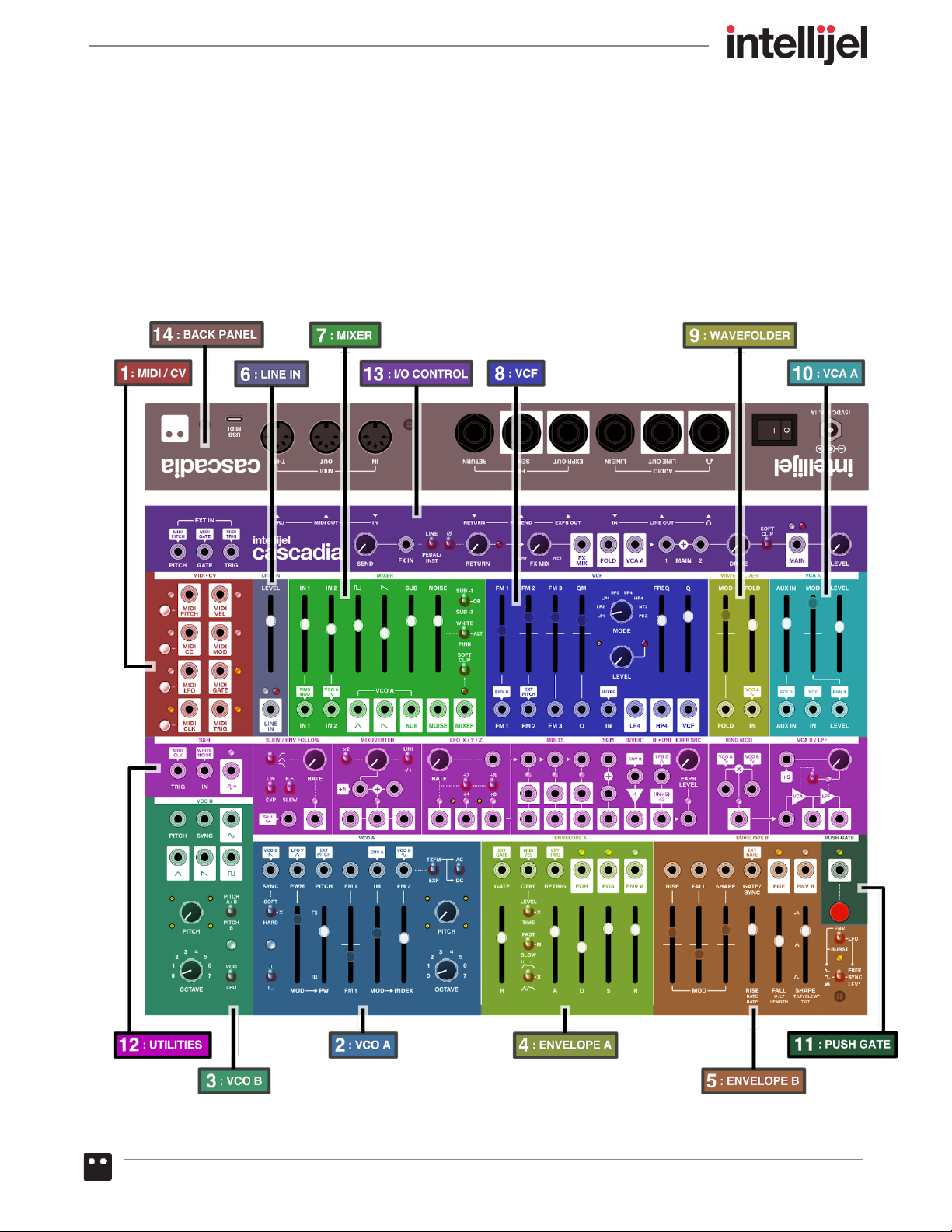
Cascadia is a standalone semi-modular tabletop synthesizer, encompassing many internally
connected synthesis modules, which facilitate deep and complex sound design without requiring a
single patch cable. But for those who wish to reconfigure the synth’s internal structure, or to
augment its architecture with external modules, Cascadia features over 100 eurorack-compatible
patch points.
Cascadia Manual 8
Graphics & Conventions
While Cascadia might appear complicated at first glance, it uses a number of graphical conventions
that make it easy to understand exactly what’s happening with the signal flow.
Specifically:
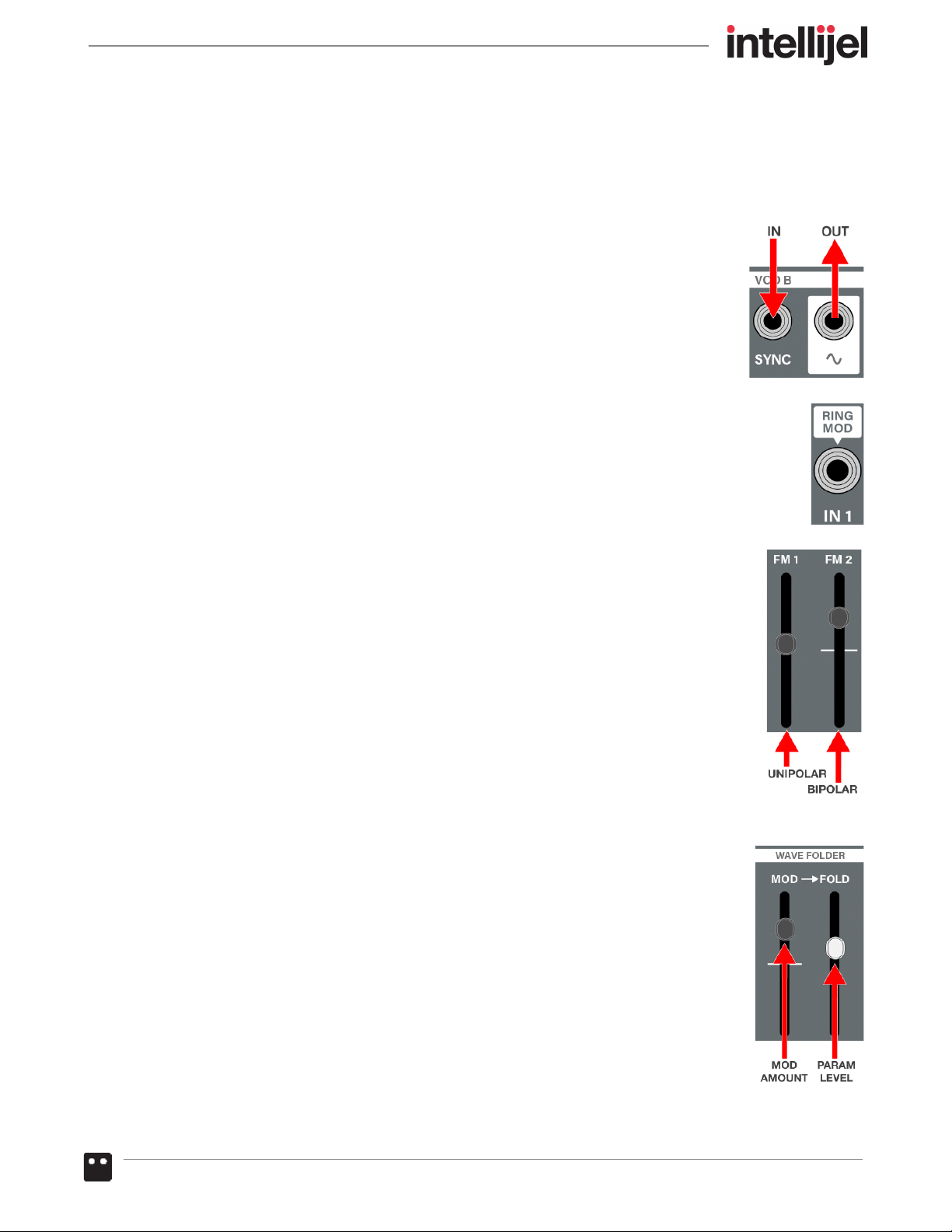
● OUTPUTS : Jacks enclosed within a block are outputs.
● INPUTS : Jacks not enclosed within a block are inputs.
● NORMALS : Text enclosed within a “bubble” that points toward a jack indicates a
normalled connection. This identifies the signal that is fed into the jack if nothing is
patched into it.
● UNIPOLAR vs BIPOLAR Sliders : Unipolar sliders produce maximum effect at
the top, and no effect (null) at the bottom. Bipolar sliders also produce maximum
effect at the top, but have their null (no effect) position in the middle. Below the
middle, Bipolar sliders have a negative (inverse) effect on the parameter they’re
controlling, with maximum negative effect at the bottom. Bipolar sliders are
identified by a line through the center of the slider track.
● CAP COLOR : Sliders with LIGHT caps are used to set a parameter’s initial (pre
modulation) value. Sliders with DARK caps are used to set the amount of
modulation applied to a destination.
Cascadia Manual 9
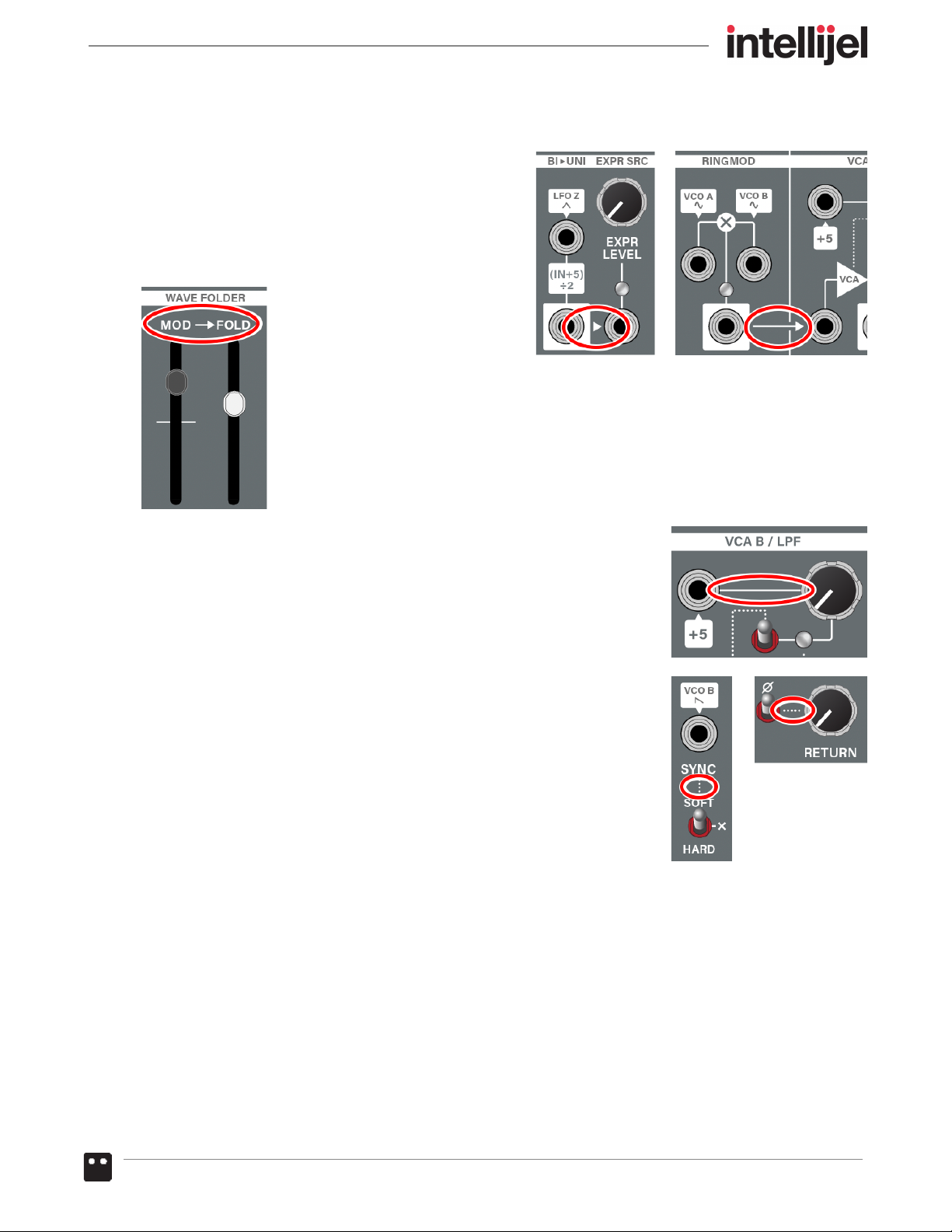
● ARROWS : Arrows indicate signal flow. For example:
An arrow between two jacks indicates that the
signal present at one jack will be normalled to the
other jack to which it points (provided nothing is
patched into that jack). If the jacks are far apart,
there may be a line that ends in an arrow.
Arrows between labels indicate one control affects the other (for example, in
the Wave Folder module, the arrow pointing between the MOD label and the
FOLD label indicates that the MOD value affects the FOLD value).
● SOLID LINES : Solid lines between a jack and a knob indicate direct
attenuation, meaning the knob will increase/decrease the amount of
signal appearing at the jack.
● DOTTED LINES : Dotted lines between elements indicate a level of
additional control. For example, in the VCO A section, a dotted line
connects the SYNC TYPE selector switch with the SYNC input jack.
This indicates that the switch has an effect on the way the signal is
synchronized. Similarly, the dotted line between the PHASE switch
and the FX RETURN LEVEL knob indicates the switch controls
something related to the return (in this case, its phase).
● LEDs : Unless otherwise noted, the brightness of an LED indicates the amount of signal present
at the corresponding jack. Where appropriate, the color of the LED indicates the signal’s polarity
(GREEN = positive; RED = negative). Amber LEDS indicate gates or triggers.
As shown in the previous panel diagram, Cascadia’s front panel is segmented into a number of
sections — each with a complement of related jacks, knobs, sliders and switches. We will discuss
each section in detail, and in the numerical order indicated. But first, let’s make some sound!
Cascadia Manual 10
Table of contents
Other Intellijel Synthesizer manuals

Intellijel
Intellijel Polaris User manual

Intellijel
Intellijel Plonk User manual

Intellijel
Intellijel Atlantis User manual

Intellijel
Intellijel VCO 1U User manual

Intellijel
Intellijel mScale User manual

Intellijel
Intellijel OR User manual

Intellijel
Intellijel Buff Mult User manual

Intellijel
Intellijel Atlantis User manual

Intellijel
Intellijel Plonk User manual

Intellijel
Intellijel Stereo Line In 1U User manual