
Insportline FIT User manual

USER MANUAL –EN
IN 2713 Sport Tester inSPORTline FIT

2
CONTENTS
INTRODUCTION ................................................................................................................................3
KEYS AND FUNCTIONS....................................................................................................................5
WEARING THE CHEST BELT............................................................................................................5
QUICK START....................................................................................................................................6
TIME...................................................................................................................................................6
HEART RATE MONITOR....................................................................................................................7
HEART RATE INTENSITY CHART.....................................................................................................9
DATA................................................................................................................................................10
ALARM.............................................................................................................................................11
BATTERY.........................................................................................................................................12
TROUBLESHOOTING......................................................................................................................13
TERMS AND CONDITIONS OF WARRANTY, WARRANTY CLAIMS ...............................................13
3
INTRODUCTION
Thank you for purchase of a highly reliable Heart Rate Monitor. Your new ECG-FIT is a user-friendly
fitness tool to keep track of your personal fitness level. To develop basic understanding and gain
maximum benefits from the ECG-FIT, read this manual carefully. We wish you an enjoyable workout
with your new ECG-FIT.
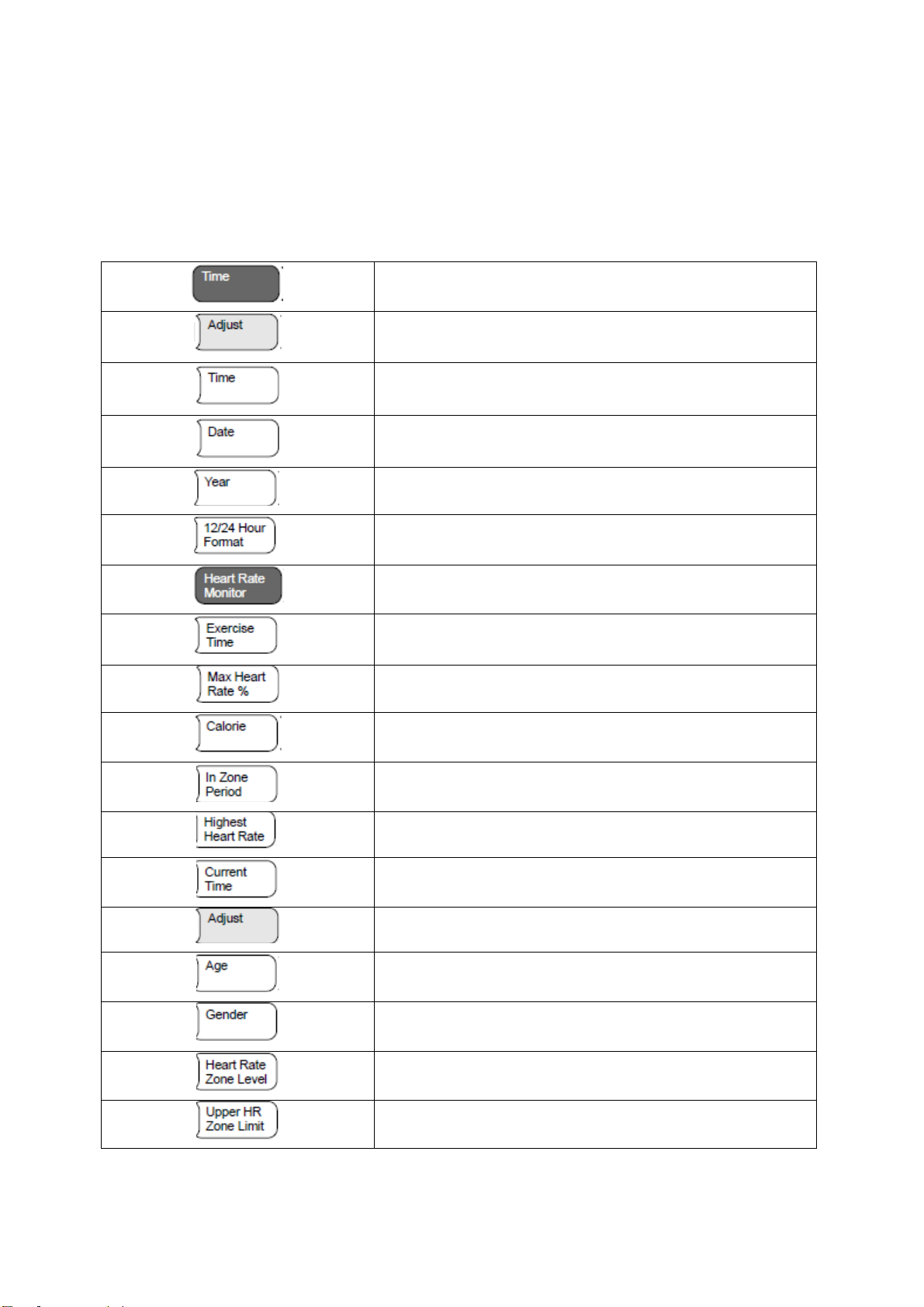
Functions and summary:
Time
Adjust
Time
Date
Year
12/24 Hour format
Heart rate monitor
Exercise time
Max. heart rate %
Calorie
In Zone Period
Highest Heart Rate
Current time
Adjust
Age
Gender
Heart Rate Zone Level
Upper HR Zone Limit
4
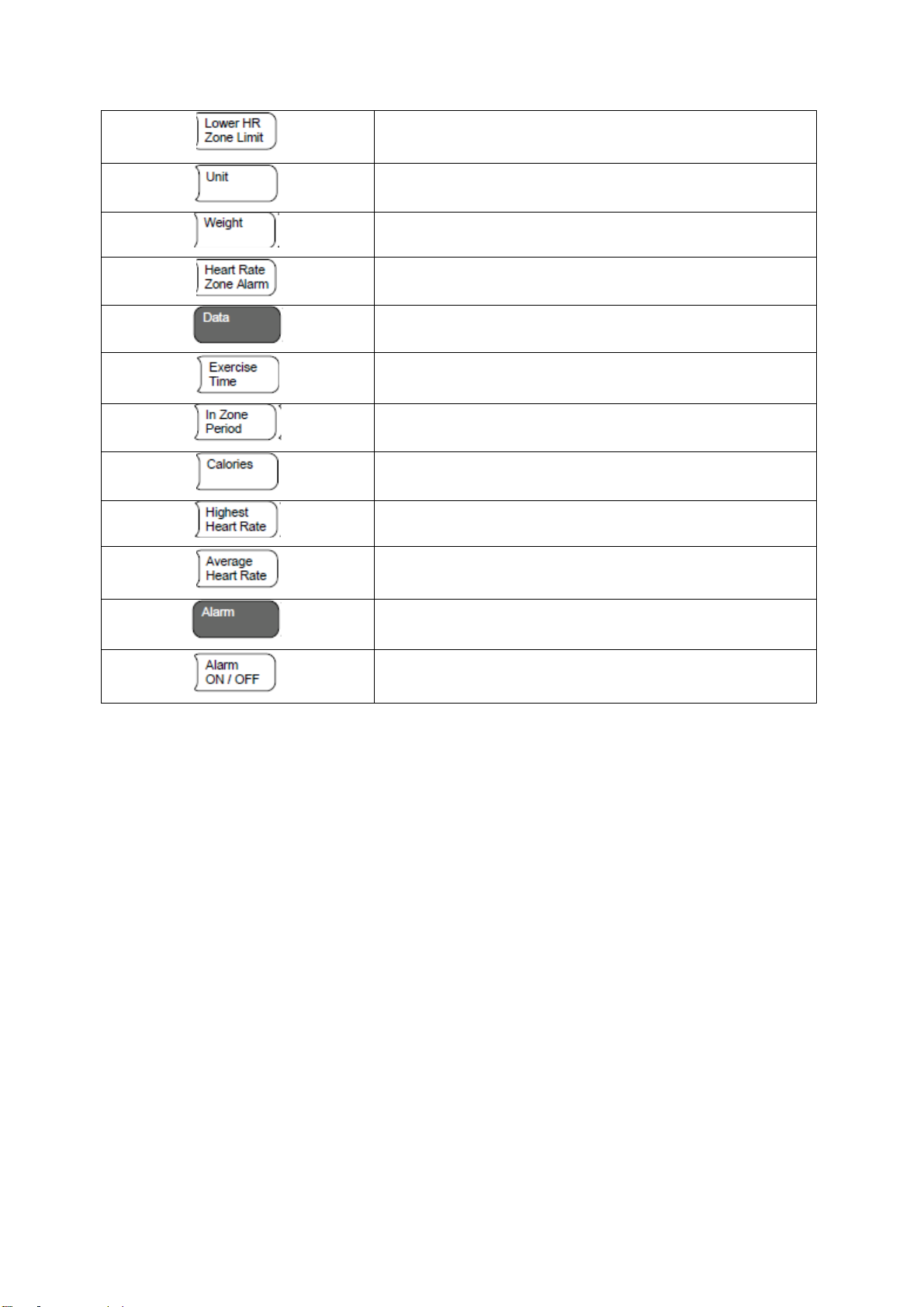
Lower HR Zone Limit
Unit
Weight
Heart Rate Zone Alarm
Data
Exercise time
In Zone Period
Calories
Highest Heart Rate
Average Heart Rate
Alarm
Alarm ON/OFF
5
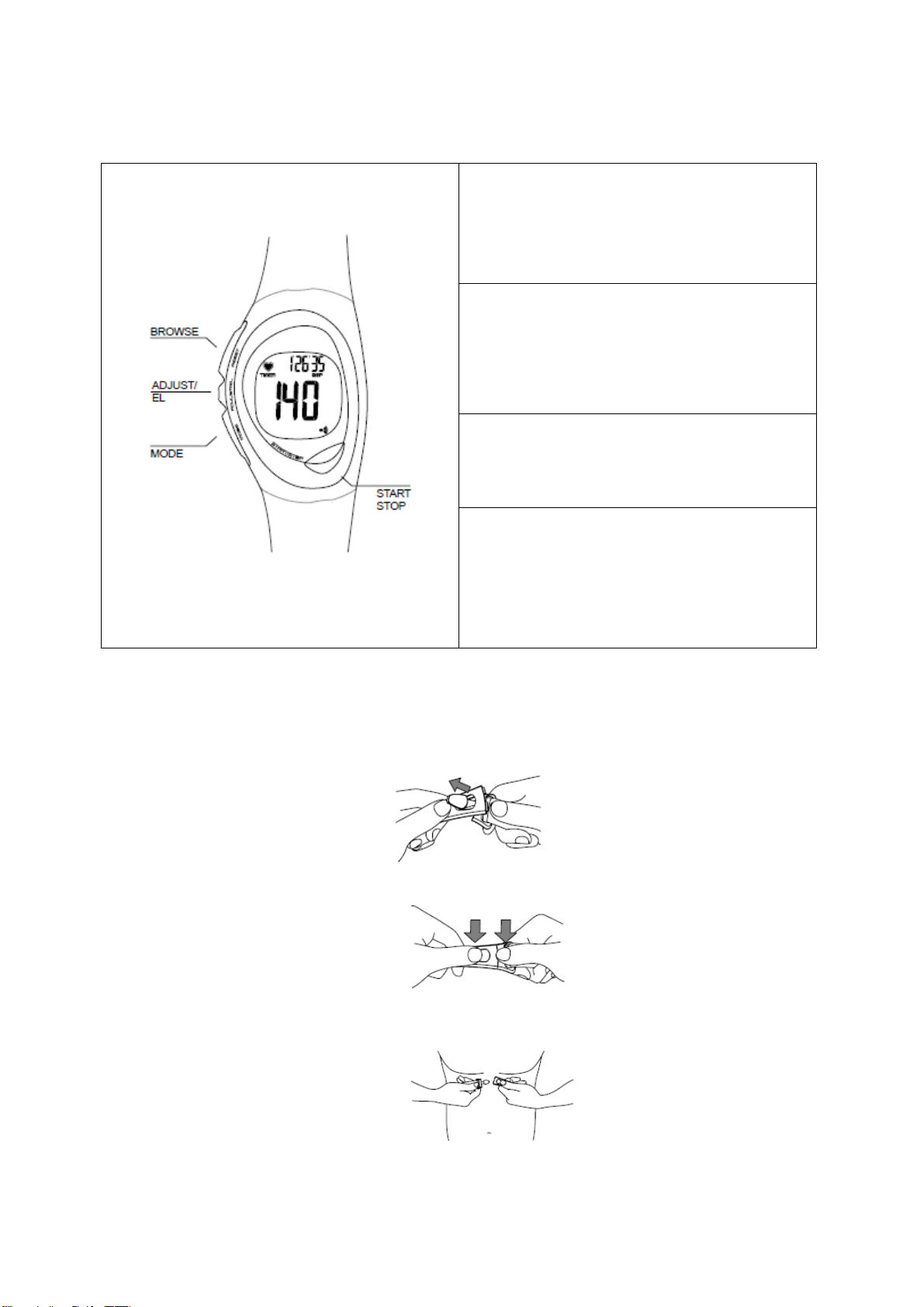
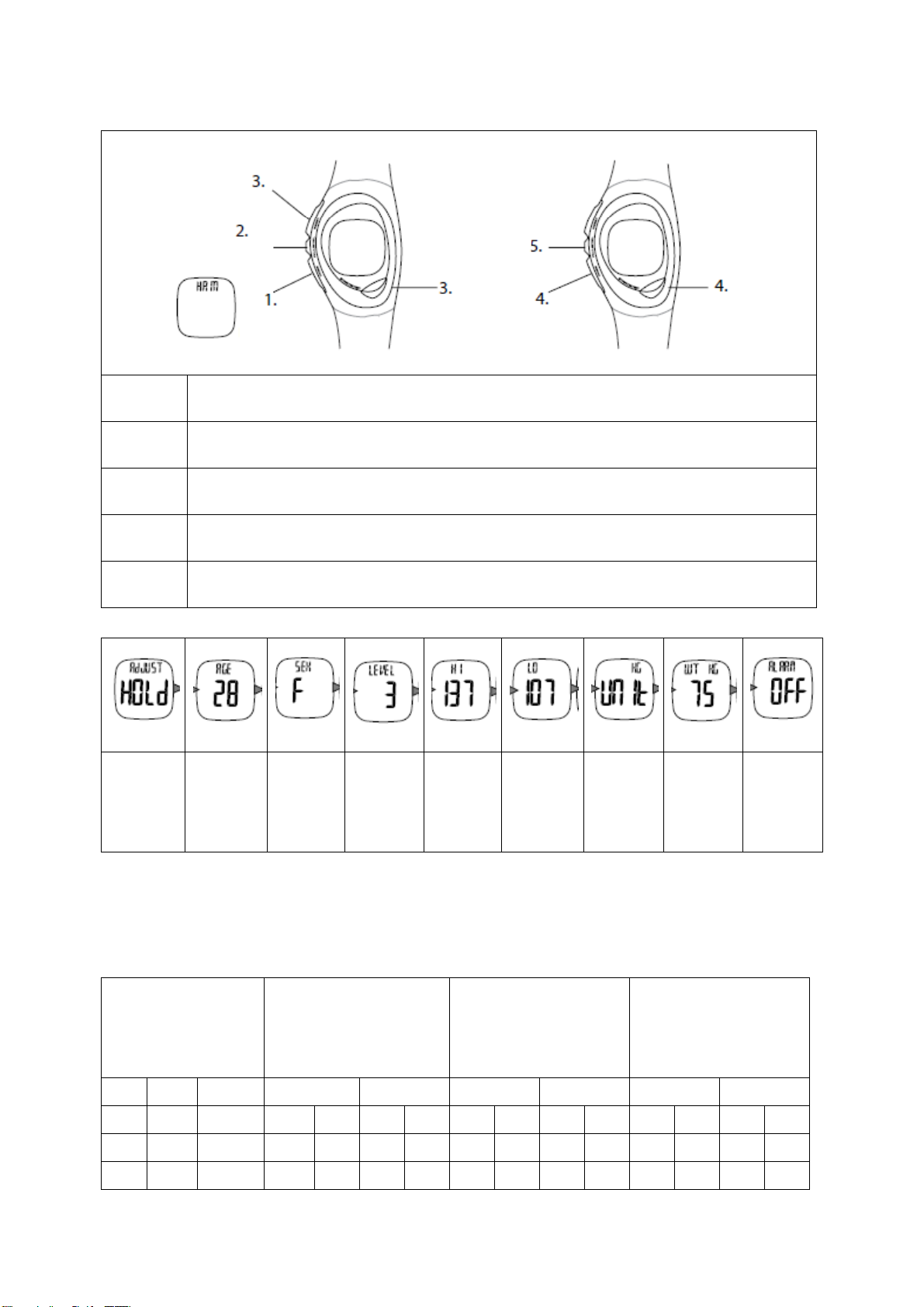
KEYS AND FUNCTIONS
MODE
•Scrolls through various modes of the
watch
•Advances to next variable in setting
sequence
ADJUST/LIGHT
•Activates light
•Enters the setting sequence for each
setting mode
•Clears session data
START/STOP
•Increases variable in setting sequence
•Pauses time in HRM mode
BROWSE
•Decreases variable in setting sequence
•Toggles through sub modes
•Toggles between lb/kg
•End session
WEARING THE CHEST BELT
Follow these steps to wear it before using.
1. Push the tab through a slot on one side of the chest belt.
2. Press down until the tabs are secure under surface and flush so they don’t wiggle.
3. Attach the other side around your chest. Position on rib cage under the chest. Make sure the
chest belt is positioned correctly and against your skin.
4. Lift the belt slightly from the skin and wet both grooved areas on the back to ensure strong
connection between your pulse and the belt.

6
QUICK START
5. Enter HRM mode
6. Choose zone
7. Start run
LEVEL 1: 55-70% - Sustain healthy heart and lose weight
LEVEL 2: 70-80% - Develop endurance and increase stamina.
LEVEL 3: 80-100% - Sustain excellent fitness condition and increase muscle strength.
NO SIGNAL: Three dash lines will appear if the watch is not receiving transmission from the chest
belt.
TIME
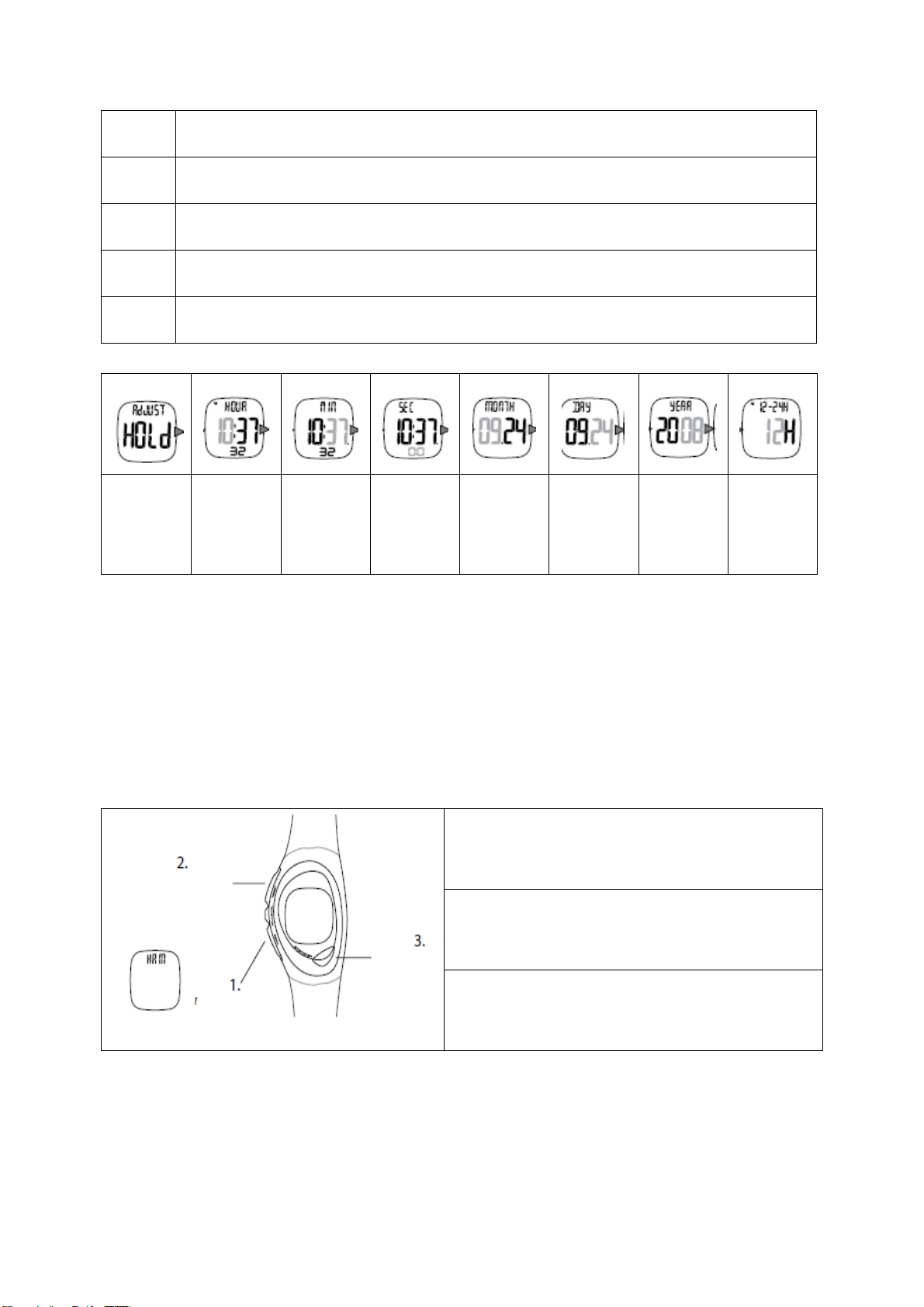
In the TIME mode, you can set the Time, Date, Hour Format. Follow steps from 1 to 5 to set in the
time and date.
7
1
Scroll to the TIME mode
2
Hold for 2 sec.
3
Digit/Digit toggle key Tone ON/OFF
4
Select next variable
5
Exit
Set Hour
Set
Minute
Set
Seconds
Set Month
Set Day
Set Year
Choose
12/24
Hour
Clock
HEART RATE MONITOR
HEART RATE ZONE
It is important to know your maximum heart rate, training zone, upper heart rate limit and lower heart
rate limit before starting for the best training benefits. Before setting in your training data, consult it
with your physician. Or you can set in your upper and lower limit following this guide:
Calculation of maximum heart rate: MALE=220-Age, FEMALE=226-Age
STARTING
Follow steps 1-3 to get ready and to start your running.
1) Enter HRM mode
2) Scroll through and choose accordingly
3) Start when READY is displayed

8
The three dash lines will blink while receiving
transmission from the chest belt.
The exercise time is displayed under the heart rate by default. Press the START/STOP key to view
other information.
IN-ZONE
Your heart rate is within your target zone.
OUT-ZONE
If your heart rate is out of the zone, the high or low arrows will
display and the digits will flash.
Your heart rate is measured in betas per min. (bpm) and setting a heart rate zone allows you to work
with an upper and lower heart rate limit. Follow steps 1-5 to adjust the user settings.
9
1
Scroll to the HRM mode.
2
Hold for 2 sec.
3
Digit (+Digit/Toggle)
4
Select next variable (Press to scroll data).
5
Exit
Set age
Set sex
Set HR
zone
level
Set
upper
HR zone
limit
Set lower
HR zone
limit
Set unit
Set
weight
Set HR
zone
alarm
ON/OFF
HEART RATE INTENSITY CHART
This is an alternative to check your heart rate zones based on sex, age and weight. Starting with your
max. heart rate (MHR), use the chart to calculate your zones depending on the intensity of your
workout. Please note that this chart may not be suitable for everyone.
Max. heart rate
Male=220-Age
Female=226-Age
Level 1 (55-70%)
Sustain and healthy
heart and lose weight.
Level 2 (70-80%)
Develop endurance
and increase stamina.
Level 3 (80-100%)
Sustain excellent
fitness condition and
increase muscle
tension.
AGE
MALE
FEMALE
MALE
FEMALE
MALE
FEMALE
MALE
FEMALE
20
200
206
110
140
113
144
140
160
144
164
160
200
164
206
25
195
201
107
136
110
140
136
156
140
160
156
195
160
201
30
190
196
104
133
107
137
133
152
137
156
152
190
156
196

10
35
185
191
101
129
105
133
139
148
133
152
148
185
152
191
40
180
186
99
126
102
130
126
144
130
148
144
180
148
186
45
175
181
96
122
99
126
122
140
126
144
140
175
144
181
50
170
176
93
119
96
123
119
136
123
140
136
170
140
176
55
165
171
90
115
94
119
115
132
119
136
132
165
136
171
60
160
166
88
112
91
116
112
128
116
132
128
160
132
166
65
155
161
85
108
88
112
108
124
112
128
124
155
128
161
70
150
156
82
105
85
109
105
120
109
124
120
150
124
156
75
145
151
79
101
83
105
101
116
105
120
116
145
120
151
DATA
In the DATA mode, you can view of your stored data from last session.
Follow steps 1-3 to manage your data. Only one session data can be stored.
CLEAR SESSION
You can start a new session when the current data is cleared. Hold for 2 sec. to clear the data. Data
must be cleared to start a new session.
This manual suits for next models
1
Table of contents


