InnoMedia InfoTalk 7 User manual

Operating manual
Operating manual
InfoTalk®
7


InfoTalk®
7
Congratulations on your purchase of InnoMedia’s InfoTalk device.
InfoTalk 7 is an intelligent Internet Phone that incorporates our
unique all-in-one solution which enables you to call any phone in the
world via an InnoSphere Call or a Talk-to-Talk Call. By using your
Internet account, you can enjoy significant and long term savings
on your overseas calls through the Internet. Full understanding of
what this product has to offer begins with reading this operating
manual. The first chapter contains a User Quick Start Guide for
easy set-up of your InfoTalk device. Subsequent chapters also
include details of the product information and specifications,
device settings, calling sequences and troubleshooting tips.
Copyright 2002 InnoMedia Inc. All rights reserved.
* Specifications subject to change without notice.

© Copyright 2002 InnoMedia Inc.
Published by InnoMedia, who reserves the right to make improvements in
the products described in this operating manual as well as to revise this
publication at any time and without notice to any person of such revision
or change.
All rights reserved. No part of this publication may be reproduced,
transcribed, stored in any electronic retrieval system, translated into any
language or computer language, or be transmitted in any form whatsoever
without the prior written consent of the published.
For additional information contact:
InnoMedia Ptd Ltd.
10 Science Park Road, #03-04
The Alpha, Singapore Science Park II, SINGAPORE 117684
Tel: (65) 6-872- 0828 Fax: (65) 6-872-0900
InnoMedia, Inc.
186 Topaz Street
Milpitas, CA 95035-5429 USA
Tel: (408) 432-5400 Fax: (408) 432-5404
InnoMedia Technology Inc.
3F, No 3, Industrial East Road IX,
Hsinchu Science-Based Industrial Park, Hsinchu, TAIWAN 300
Tel: (886) 3-564-1299 Fax: (886) 3-564-1589
InnoMedia, Inc.
No. 22 Chao Wai Street, Prime Tower, Suite 1405
Chaoyang District, Beijing 100020, P.R. CHINA
Tel: (86) 10 6588 5141 Fax: (86) 10 6588 5140
InnoMedia Website: www.innomedia.com
InnoSphere Website: www.innosphere.net
TRADEMARKS
All brand and product names are trademarks or registered
trademarks of their respective holders.
NOTICE
All titles, versions, trademarks, claims of compatibility, etc., of hardware
and software products mentioned herein are the sole property and
responsibility of the respective vendors. InnoMedia makes no endorsement
of any particular product for any purpose, nor claims responsibility for its
operation and accuracy.
UPDATES
Updates to the products and the manual are obtainable at
participating InnoMedia dealers and distributors or through
the Innomedia website.
Version 1.0

Chapter 1 User Quick Start Guide 1
Chapter 2 Product Information
& Installation 9
Chapter 3 Setting up InfoTalk 7 15
Chapter 4 Making calls with InfoTalk 7 25
Chapter 5 Tips & Troubleshooting 33
Chapter 6 Glossary 41
Chapter 7 Product Approval Information 47


C h a p t e r · 1
r
USER QUICK START
This chapter contains the essential
information for installing and setting up the
InfoTalk unit, so that users can start using
the InfoTalk to place calls and enjoy great
savings immediately.
r
2
User Quick Start Guide
The aim of this Quick Start Guide is to provide you with sufficient knowledge to
set up and start using your InfoTalk 7 after stepping through the instructions.
I. INSTALLATION
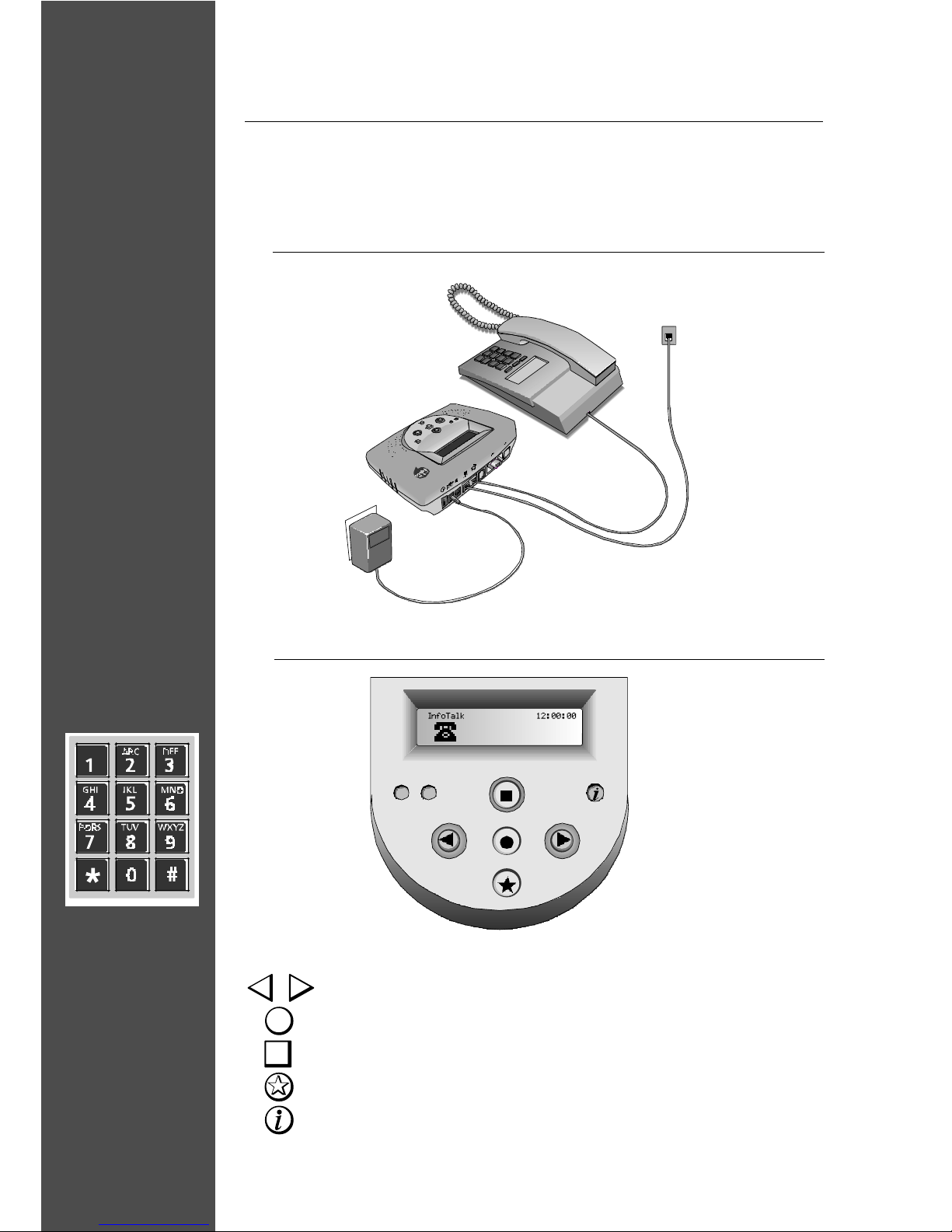
BUTTON FUNCTION
To scroll Backward or Forward
To Confirm selection or to Proceed to the next level
To Exit from selection or Return to previous screen
To remain online when making follow-on Internet calls
For quick access to InnoSphere Call dialing mode
Diagram of overall connection
II. BUTTON FUNCTIONS
Welcome screen
Diagram of
phone keypad

[Important]
III. INFOTALK 7 CONFIGURATION SHEET
Before you proceed to configure your InfoTalk, we suggest that you fill in the information in
column first to serve as your reference.
Sub-Menu
Phone Book
Dial Up
Settings
InnoSphere
Calls
Option
User Phone
Number
Name
ISP Phone No.
Login Name
Login Password
User ID
Password
Explanation
The phone number of the
phone line which is
connected to your InfoTalk.
Please enter the country
code, area code and the
phone number into your
InfoTalk.
Provide a name to your ISP
profile.
Your ISP dial-up phone
number.
Your ISP account User ID
Your ISP account Password
Refer to the given envelope
for the assign User ID
Refer to the given envelope
for the assign password
Example
Phone Number:
8872500
Area Code:
408
Country Code:
1
David - AT&T
4379000
David
apple123
1234567890
1234
Actual

4
[NOTES]
-Login Name and Password are both case sensitive; hence please enter the
exact character whereby lower case “c” is not the same as upper case “C”. If
the wrong information is entered, you will receive “Invalid UserID and
Password” message on your CONNECTIVITY TEST.
-Please note that your ISP Internet account has specific Login Name/UserID
and Password; they are not the same as the Login Name/UserID for your other
email address like your Hotmail or Yahoo Mail. Please enter only the correct
information.
-If you have multiple Dial Up Settings profiles and InnoSphere Calls profiles
stored into your InfoTalk, please go to the SELECT DEFAULT option in each of
the respective sub-menu and choose the profiles you want to use. Without
making your choice, InfoTalk will use the first profile as your default profile.
Table of contents
Other InnoMedia Cordless Telephone manuals